
vue2.0 + vux (二)Footer组件
1.Footer组件
Footer.vue
<!-- 底部 footer -->

<template>

  <div>

    <tabbar>

      <!-- 综合 -->

      <tabbar-item :link="{path:'/'}" selected>

        <img slot="icon" src="../assets/img/ic_nav_news_normal.png">

        <img slot="icon-active" src="../assets/img/ic_nav_news_actived.png">

        <span slot="label">综合</span>

      </tabbar-item>

      <!-- 动弹 -->

      <tabbar-item :link="{path:'/'}">

        <img slot="icon" src="../assets/img/ic_nav_tweet_normal.png">

        <img slot="icon-active" src="../assets/img/ic_nav_tweet_actived.png">

        <span slot="label">动弹</span>

      </tabbar-item>

      <!-- 中间图标 -->

      <tabbar-item :link="{path:'/'}">

        <img slot="icon" src="../assets/img/ic_nav_add_normal.png" height="40" width="40">

      </tabbar-item>

      <!-- 发现 -->

      <tabbar-item :link="{path:'/'}">

        <img slot="icon" src="../assets/img/ic_nav_discover_normal.png">

        <img slot="icon-active" src="../assets/img/ic_nav_discover_actived.png">

        <span slot="label">发现</span>

      </tabbar-item>

      <!-- 我的 -->

      <tabbar-item :link="{path:'/mySettings'}">

        <img slot="icon" src="../assets/img/ic_nav_my_normal.png">

        <img slot="icon-active" src="../assets/img/ic_nav_my_pressed.png">

        <span slot="label">我的</span>

      </tabbar-item>

    </tabbar>

  </div>

</template>

<script>

  import { Tabbar, TabbarItem } from 'vux'

  export default {

    name: 'AppFooter',

    components: {

      Tabbar,

      TabbarItem

    },

    data(){

      return {

        index: 0

      }

    }

  }

</script>
2.页面调用
App.vue
<template>

  <div id="app">

    <!-- 视图层 -->

    <router-view></router-view>

    <!-- 底部选项卡 -->

    <app-footer></app-footer>

  </div>

</template>

<script>

  import AppFooter from './components/Footer'

  export default {

    components: {

      AppFooter

    }

  }

</script>

<style lang="less">

  @import '~vux/src/styles/reset.less';

  body {

    background-color: #fbf9fe;

    line-height: 1.2;

  }

</style>
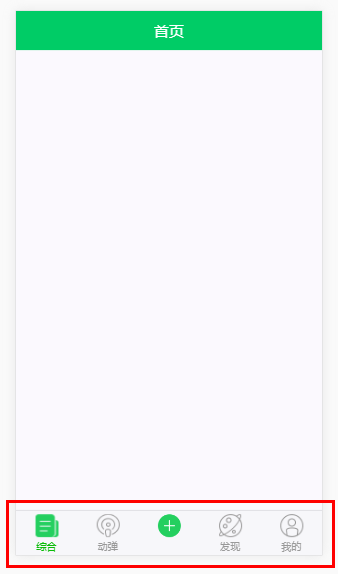
3.效果图
vue2.0 + vux (二)Footer组件的更多相关文章
- Vue2.0表单校验组件vee-validate的使用
vee-validate使用教程 *本文适合有一定Vue2.0基础的同学参考,根据项目的实际情况来使用,关于Vue的使用不做多余解释.本人也是一边学习一边使用,如果错误之处敬请批评指出* 一.安装 n ...
- Vue2.0的变化 ,组件模板,生命周期,循环,自定义键盘指令,过滤器
组件模板: 之前: <template> <h3>我是组件</h3><strong>我是加粗标签</strong> </templat ...
- Webpack+vue2.0如何注册全局组件 (01)
Part 1, 问题: webpack + vue2.0框架中,如何在入口js中注册组件? 就是在一个月以前,匆匆闯入vuejs这个社群,基本了解了vuejs的一些基础特性和语法.笔者兴致勃勃地开始想 ...
- Vue2.0中的transition组件
组件的过度 Vue1.0中transition做为标签的行内属性被vue支持.但在Vue2.0中.Vue放弃了旧属性的支持并提供了transition组件,transition做为标签被使用. 使用t ...
- Vue2.0如何实现父组件与子组件之间的事件发射与接收
关于vue2.0的事件发射和接收,大家都知道$dispatch和$broadcast在vue2.0已经被弃用了,取而代之的是更加方便快捷的方式,使用事件中心,组件通过它来互相通信,不管组件在哪一个层都 ...
- 在vue2.0中引用element-ui组件库
element-ui是由饿了么团队开发的一套基于 Vue 2.0 的桌面端组件库. 官网:http://element.eleme.io/ 安装 npm i element-ui -S 引用完整的el ...
- vue2.0 + vux (一)Header 组件
1.main.js import Vue from 'vue' import FastClick from 'fastclick' import VueRouter from 'vue-router' ...
- vue2.0 + vux (六)NewsList 资讯页 及 NewsDetail 资讯详情页
设置代理,避免出现跨域问题 /*设置代理,避免出现跨域问题*/ proxyTable: { '/api':{ target: 'https://www.oschina.net/action/apiv2 ...
- vue2.0的瀑布流组件-使用说明
做一个小项目,需要瀑布流,就选他了,先看看效果 使用瀑布流布局组件:vue-waterfall-easy 下载引入: 方式一:直接从git上复制组件的完整代码,引入vue组件文件即可 import v ...
随机推荐
- python - 目录处理
# -*- coding:utf-8 -*- '''@project: jiaxy@author: Jimmy@file: study_文件目录操作.py@ide: PyCharm Community ...
- cURL介绍
1.cURL介绍 cURL 是一个利用URL语法规定来传输文件和数据的工具,支持很多协议,如HTTP.FTP.TELNET等.最爽的是,PHP也支持 cURL 库.本文将介绍 cURL 的一些高级特性 ...
- Phpstrom 书签应用
F11增加书签 书签 Ctrl + F11切换书签助记符 Ctrl +#[0-9]转到编号书签 Shift + F11显示书签
- 【Luogu】P2515软件安装(树形DP)
题目链接 这么水的题我一遍没A,而且前两次提交都只有十分.气死我了.本来我的博客拒收水题来着. Tarjan缩点之后跑树形DP即可. #include<cstdio> #include&l ...
- d3 画简单的柱形图
<!DOCTYPE html> <html> <head> <meta charset="utf-8"> <title> ...
- 【Eclpise】Eclipse中Tomcat启动失败或者是重启失败
经常在Eclipse中遇到这样的问题,tomcat重启之后失败,而且也停止不了.最好的解决办法就是用DOS命令杀死进程. 比如下面这种情况: 1.查看进程ID 用windows的netstat查看信 ...
- C++ 回调函数的简单例子(转)
原文转自 http://blog.csdn.net/wnlwcg/article/details/6930990# 1.调用端 // 下面的这个_stdcall很重要的 void _stdcall T ...
- 转 Python爬虫入门三之Urllib库的基本使用
静觅 » Python爬虫入门三之Urllib库的基本使用 1.分分钟扒一个网页下来 怎样扒网页呢?其实就是根据URL来获取它的网页信息,虽然我们在浏览器中看到的是一幅幅优美的画面,但是其实是由浏览器 ...
- RGB和YUV之比较【转】
转自:http://blog.csdn.net/qfnu08zzr/article/details/6763159 版权声明:本文为博主原创文章,未经博主允许不得转载. RGB 原理 RGB 是从颜色 ...
- PHP错误捕获处理
PHP错误捕获处理 一般捕获错误使用的方法是: try{ ...}catch(Exception $e){ echo $e->getMessage();} 或者 set_exception_ha ...