
vue2.0 + vux (六)NewsList 资讯页 及 NewsDetail 资讯详情页
设置代理,避免出现跨域问题
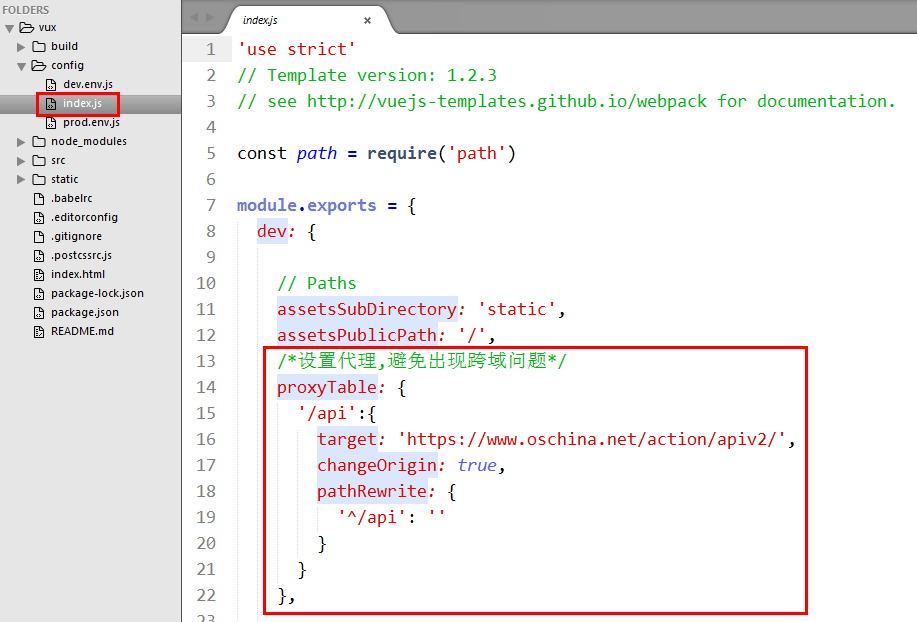
/*设置代理,避免出现跨域问题*/

proxyTable: {

  '/api':{

    target: 'https://www.oschina.net/action/apiv2/',

    changeOrigin: true,

    pathRewrite: {

      '^/api': ''

    }

  }

},
api/index.js 接口配置
/**

 * 引入 异步请求API

 */

import "whatwg-fetch"

const host_addr='http://192.168.1.110:8081/'

/**

 * 获取资讯列表

 * 解决跨域问题: 用 '/api' 代替 host_addr

 */

export let getList = async (page, tag) => {

  let response = await fetch('/api' + `news_list?pageIndex=${page}&pageSize=20&catalog=${tag}`, {

    method: 'GET',

    mode: 'cors'

  }).catch((error) => {

    console.log(error)

  })

  return await response.json().catch((error) => {

    console.log(error)

  })

}

/**

 * 获取资讯详情

 */

export let getNewsDetail = async (id) => {

  let response = await fetch('/api' + `news_detail?id=${id}`, {

    method: 'GET',

    mode: 'cors'

  }).catch((error) => {

    console.log(error)

  })

  return await response.json().catch((error) => {

    console.log(error)

  })

}

/**

 * 获取博客列表

 */

export let getBlogList = async (page, tag) => {

  let response = await fetch(host_addr + `blog_list?pageIndex=${page}&pageSize=20&catalog=${tag}`, {

    method: 'GET',

    mode: 'cors'

  }).catch((error) => {

    console.log(error)

  })

  return await response.json().catch((error) => {

    console.log(error)

  })

}

/**

 * 获取问答列表

 */

export let getQuestionList = async (page, tag) => {

  let response = await fetch(host_addr + `question_list?pageIndex=${page}&pageSize=20&catalog=${tag}`, {

    method: 'GET',

    mode: 'cors'

  }).catch((error) => {

    console.log(error)

  })

  return await response.json().catch((error) => {

    console.log(error)

  })

}

/**

 * 获取活动列表

 */

export let getEventList = async (page, tag) => {

  let response = await fetch(host_addr + `event_list?pageIndex=${page}&pageSize=20&catalog=${tag}`, {

    method: 'GET',

    mode: 'cors'

  }).catch((error) => {

    console.log(error)

  })

  return await response.json().catch((error) => {

    console.log(error)

  })

}
1.资讯页
NewsList.vue
<!-- 资讯 -->

<template>

  <div>

    <!-- 轮播图 -->

    <swiper :list="imgs" auto style="width:100%;height:120px;margin:0 auto;" dots-class="custom-bottom" dots-position="center"></swiper>

    <!-- 滚动列表 -->

    <div>

      <scroller lock-x scrollbar-y :height="height" :bounce=false :scrollbarY="false" ref="scroller">

        <div class="news-wrap-list">

          <cell v-for="x in Objlist" :title="x.title" :link="{path:'/newsDetail',query:{id:x.id,tag:'资讯'}}" :inline-desc="x.body" :key="x.id">

            <img class="ic_img" slot="icon" src="../../assets/img/ic_label_today.png">

            <div>

              <span class="pubdate">{{x.pub_date}}</span>

            </div>

          </cell>

        </div>

      </scroller>

    </div>

  </div>

</template>

<script>

  // 引入 vux 内部组件

  import { Swiper, Scroller, Cell } from 'vux'

  // 引入 api接口文档

  import { getList } from '../../api/index.js'

  // 轮播图列表

  const imgList = [

    'http://file06.16sucai.com/2016/0222/17714c3b51079911760e5ef7fdb553f6.jpg',

    'http://pic.58pic.com/58pic/15/67/98/93C58PICjeM_1024.jpg',

    'http://file06.16sucai.com/2016/0315/1df566087c24a94cd9534bc9bc1871ff.jpg'

  ];

  // 轮播图图片地址列表

  const urlList = imgList.map((one, index) => ({

    url: 'javascript:',  //这里填写图片点击的链接

    img: one

  }));

  export default {

    name: 'NewsList',

    components:{

      Swiper,

      Scroller,

      Cell

    },

    data(){

      return {

        imgs:urlList,

        Objlist:[],

        ishow:false,

        pageIndex:1,

        catalog:0,

        height: ''

      }

    },

    created(){

      // 获取屏幕高度

      this.height = document.documentElement.clientHeight - 46 - 44 - 120 - 53 + 'px';

      console.log(this.height);

      // 请求列表数据

      this.getList();

    },

    methods:{

      // 异步请求

      async getList(){

        // 获取列表数据

        let data = await getList(this.pageIndex, this.catalog);

        console.log(data);

        // 获取资讯列表数据

        var news_list = data.obj_list;

        // 判断是否还有数据

        if(news_list.length > 0){

          this.ishow = true;

          for(var i=0;i<news_list.length;i++){

            var time = news_list[i].pub_date;

            // 修改日期显示格式

            var bngDate = new Date(time.replace(/-/g,"/"));

            var endDate = new Date();

            var minutes = (endDate.getTime() - bngDate.getTime())/60/1000;

            // 时间段 判断pub_date显示内容

            if(minutes >= 60){

              minutes = minutes/60;

              var dateTime = parseInt(minutes);

              if(dateTime >= 48){

                news_list[i].pub_date = "2天前";

              }else if(dateTime >= 24){

                news_list[i].pub_date = "昨天";

              }else{

                news_list[i].pub_date = dateTime + "小时以前";

              }

            }else{

              var minute = parseInt(minutes);

              news_list[i].pub_date = minute + "分钟以前";

            }

            news_list[i].title = "  " + news_list[i].title;

            this.Objlist.push(news_list[i]);

          }

        }

        this.locked = false;

        this.loading = false;

      },

      load(uuid){

        setTimeout(() => {

          this.$broadcast('pulldown:reset', uuid);

        }, 1000);

      }

    }

  }

</script>

<style lang="less" scoped>

  .ic_img{

    position:absolute; top:10px; left: 5px;

    width:15px;

    height:15px;

  }

  .weui_cell_bd>p{

    font-size:15px;

  }

  .vux-label-desc{

    padding-right:15px;

  }

  .weui_cell_bd.weui_cell_primary{

    padding-left:5px;

  }

  .news-wrap-list {

    height: 2800px;

    overflow: hidden;

  }

  .pubdate{

    font-size:5px;

  }

</style>
2.资讯详情页
NewsDetail.vue
<!-- 资讯详情页 -->

<template>

  <div>

    <tabbar class="tabbar">

      <div class="title">{{title}}</div>

      <tabbar-item class="search"></tabbar-item>

    </tabbar>

    <h3 class="htitle">{{result.title}}</h3>

    <scroller  lock-x scrollbar-y :height="height" :bounce=false :scrollbarY="false" ref="scroller">

      <div id="content" class="contentDiv"></div>

    </scroller>

  </div>

</template>

<script>

  import { Tabbar,TabbarItem,Scroller} from 'vux'

  import { getNewsDetail } from '../../api/index.js'

  // 引入 jquery

  import "jquery"

  var $ = require('jquery');

  window.$ = $;

  export default{

    name:'NewsDetail',

    data () {

      return {

        title: '',

        result:'',

        body: '',

        height: ''

      }

    },

    components:{

      Tabbar,

      TabbarItem,

      Scroller

    },

    created () {

      // 获取屏幕高度

      this.height = document.documentElement.clientHeight - 50 - 100 - 53 + 'px';

      console.log(this.$route.query);

      this.title = this.$route.query.tag;

      this.getDetail();

    },

    methods:{

      // 获取消息id,根据id到服务端请求详情

      async getDetail() {

        let data = await getNewsDetail(this.$route.query.id);

        console.log(data);

        if(data.code >= 0){

          this.result = data.obj_data;

          this.body = data.obj_data.body;

          $(".contentDiv").html(this.body);

          //获取div高度,根据该高度设定滑动区域,避免footer位置变化

          var contentHeight=$(".contentDiv").height() + 50;

          document.getElementById("content").style.height = contentHeight + "px";

          this.$nextTick(() => {

            this.$refs.scroller.reset();

          });

        }

      }

    }

  }

</script>

<style lang="less" scoped>

  .tabbar{

    background-color:#00CC66;

    height:50px;

    position:relative;

  }

  .search{

    position:absolute;right:5px;top:5px;z-index:999;

  }

  .title{

    text-align:center;

    margin:auto;

    color:white;

    line-height:50px;

    font-size:18px;

  }

  .htitle{

    text-align:center;

    margin:auto;

    color:black;

    line-height:50px;

    height: 100px;

  }

</style>
3.效果图

vue2.0 + vux (六)NewsList 资讯页 及 NewsDetail 资讯详情页的更多相关文章
- vue2.0 + vux (四)Home页
1.综合页(首页) Home.vue <!-- 首页 --> <template> <div> <!-- 顶部 标题栏 --> <app-head ...
- vue2.0 + vux (三)MySettings 页
1.MySettings.vue <!-- 我的设置 --> <template> <div> <img class="img_1" sr ...
- vue2.0 + vux (五)api接口封装 及 首页 轮播图制作
1.安装 jquery 和 whatwg-fetch (优雅的异步请求API) npm install jquery --save npm install whatwg-fetch --save 2. ...
- vue2.0 + vux (二)Footer组件
1.Footer组件 Footer.vue <!-- 底部 footer --> <template> <div> <tabbar> <!-- 综 ...
- vue2.0 + vux (一)Header 组件
1.main.js import Vue from 'vue' import FastClick from 'fastclick' import VueRouter from 'vue-router' ...
- vue2.0 + vux 项目搭建
1.快速搭建项目模板 因为项目使用vux,所以推荐使用vux官网的airyland/vux2 模板,vue-cli工具是vue项目的搭建脚手架 默认为 webpack2 模板,如果你需要使用webpa ...
- 【数据售卖平台】—— Vue2.0入门学习项目爬坑
前言:这个项目是我从零学习Vue2.0时用于练习基础知识的入门项目,包含了Vue2.0几乎所有项目都会用到的基础功能,是新手用来练手的好项目,这里温故知新对功能点做一个总结.github地址:http ...
- Vue2.0史上最全入坑教程(下)—— 实战案例
书接上文 前言:经过前两节的学习,我们已经可以创建一个vue工程了.下面我们将一起来学习制作一个简单的实战案例. 说明:默认我们已经用vue-cli(vue脚手架或称前端自动化构建工具)创建好项目了 ...
- 从壹开始前后端分离 [ Vue2.0+.NET Core2.1] 二十四║ Vuex + JWT 实现授权验证登录
壹周回顾 哈喽,又是元气满满的一个周一,又与大家见面了,周末就是团圆节了,正好咱们的前后端也要团圆了,为什么这么说呢,因为以后的开发可能就需要前后端一起了,两边也终于会师了,还有几天Vue系列就基本告 ...
随机推荐
- python学习--学习时间属性的应用(time / datetime )
#!/usr/bin/python # -*- coding:utf-8 -*- # import time # myd={1:'a',2:'b'}# for key,value in dict.it ...
- POJ 1690 (Your)((Term)((Project)))
(Your)((Term)((Project))) Time Limit: 1000MS Memory Limit: 10000K Total Submissions: 2912 Accept ...
- manacher-模板-hd-3068
/* 题意:给一个字符串,求该串的最长回文串的长度: 算法:Manacher O(n)复杂度,求以每一个字符为中心的最长汇文串的长度: 这个算法把奇数和偶数的情况和在一起来考虑了: */ #inclu ...
- [LOJ#530]「LibreOJ β Round #5」最小倍数
[LOJ#530]「LibreOJ β Round #5」最小倍数 试题描述 第二天,LCR 终于启动了备份存储器,准备上传数据时,却没有找到熟悉的文件资源,取而代之的是而屏幕上显示的一段话: 您的文 ...
- [cogs729]圆桌问题(最大流)
传送门 模型 二分图多重匹配问题,可以用最大流解决. 实现 建立二分图,每个单位为X集合中的顶点,每个餐桌为Y集合中的顶点,增设附加源S和汇T. 1.从S向每个Xi顶点连接一条容量为该单位人数的有向边 ...
- [CODEVS1911] 孤岛营救问题(分层图最短路)
传送门 吐槽:神tm网络流... 用持有的钥匙分层,状态压缩,用 2 进制表示持有的钥匙集合. dis[i][j][k] 表示持有的钥匙集合为 k,到达点 (i, j) 的最短路径. 分层图的最短路听 ...
- BZOJ4259 残缺的字符串 【fft】
题目 很久很久以前,在你刚刚学习字符串匹配的时候,有两个仅包含小写字母的字符串A和B,其中A串长度为m,B串长度为n.可当你现在再次碰到这两个串时,这两个串已经老化了,每个串都有不同程度的残缺. 你想 ...
- Java2WSDL 和 WSDL2Java(Axis)
原文地址:https://www.ibm.com/developerworks/cn/webservices/ws-axisfaq/ 生成或取得WSDL文件 生成客户端或服务端代码 执行WSDL2Ja ...
- Flask获取post提交数据
完成示例 # flask 代码 from flask import Flask,request ... @app.route('/get_tasks',methods=["POST" ...
- jquery中object对象循环遍历的方法
一个朋友问对象如何转为数组,当我问他为啥要转得时候,他告诉我,数组可以用js循环遍历,而对象则不可以.其实呢,对象同样可以循环遍历的啊.不用转换也可以循环!说明你对js或者jquery的某些操作不是很 ...