
Python-S9-Day123——爬虫两示例
01 今日内容回顾
02 内容回顾和补充:面向对象约束
03 爬虫之抽屉新热榜
04 爬虫之抽屉自动登录(一)
05 爬虫之抽屉自动登录(二)
06 爬虫之登录github(一)
07 爬虫之登录github(二)
08 爬虫之登录拉钩
09 上述内容总结
10 requests模块详解(一)
11 requests模块详解(二)
12 requests模块详解(三)
13 bs4模块简述
14 9期最丑的男人:轮询
15 9期最丑的男人:长轮询
16 今日总结
01 今日内容回顾
1.1 requests;
1.2 bs4(一定是bs4版本);
1.3 轮询/长轮询(消息队列相关知识);
02 内容回顾和补充:面向对象约束
2.1 Flask上下文管理机制;
2.2 为什么要使用上下文管理机制呢?
2.3 为什么要用Local呢?
2.4 LocalStack维护成栈
2.5 视图函数中使用:request/session/g/current_app
2.6 请求上下文和应用上下文要先放到local中才能使用;
2.7 离线脚本;
2.8 面向对象的认知;
2.8.1编程范式——面向对象和面向过程;
2.9 约束;
2.9.1 Java和C#中的接口:约定子类中必须包含某个方法;
2.9.2 抽象方法/抽象类:约束子类中必须包含某个方法;
2.9.3 Python没有接口,但是有抽象方法、抽象类(ABC实现);
2.9.4 Python中类的约束是以类的继承+raise NotImplementedError来伪造抽象类;
2.9.5 告知他人如何使用,自己开发时候,如何使用呢?约束别人写代码的时候,遵循规范标准;
03 爬虫之抽屉新热榜
3.1 博文参考;
https://www.cnblogs.com/wupeiqi/articles/6283017.html
3.2 requests模拟浏览器请求,bs4解析字符串;
3.3 爬取抽屉新热榜;
import requests

from bs4 import BeautifulSoup

###########################示例1:爬出数据(携带请求头)################################

r1 = requests.get(

    url="https://dig.chouti.com/",

    headers={

        'user-agent': 'Mozilla/5.0 (Macintosh; Intel Mac OS X 10_13_6) AppleWebKit/537.36 (KHTML, like Gecko) Chrome/69.0.3497.81 Safari/537.36'

    }

)

soup = BeautifulSoup(r1.text, 'html.parser')

# 标签对象;

content_list = soup.find(name='div', id='content-list')

# [标签对象,标签对象]

item_list = content_list.find_all(name='div', attrs={'class': 'item'})

for item in item_list:

    a = item.find(name='a', attrs={'class': 'show-content color-chag'})

    print(a.text.strip())
/Users/cuixiaozhao/PycharmProjects/s9/s9day123/venv/bin/python /Users/cuixiaozhao/PycharmProjects/s9/s9day123/爬取抽屉新热榜.py
【段子】 感人
《只狼 影逝二度》公布主视觉图(图5),明年3月22日,是朋友就来跟我死两次!
马云明年交棒张勇,阿里巴巴低开2.3%
两部门:加强网约车和顺风车平台驾驶员背景核查;整改完成前,滴滴等平台无限期停止顺风车服务
是个狠人!
@金融圈女神经:在房产群里看到一个拷问灵魂的问题:假设你在上海中环内有套90平米的老破小,夫妻二人35-40岁,税后合计三四万(月薪),家有幼儿,父母在外地,你会选择:1.吃好喝好穿好,小孩上私立,偶尔出趟国?还是2.节衣缩食,置换一套大房子或者买二套?不讨论2016年,也不讨论2020年,只讨论此时此刻。
【目击者还原网红殴打孕妇:她说这种孕妇生下来的小孩也不是什么好种】9月7日,浙江杭州,杨女士称,自己怀孕32周被网红@Saya一(陈某伊)打骂致先兆早产,打人者在微博上拥有300多万粉丝。杨女士称,当晚她看到一只没牵绳的法斗犬朝自己扑来,丈夫用脚推了狗一下,陈某伊便与自己和丈夫发生争执,期间还辱骂自己并动手。
肉肉女孩,ins:juasicko
那些游戏报错画面中隐藏的“游戏”
房企销售宣传的惯用套路,目瞪口呆!
【高盛解读:如何看待中国消费放缓】高盛认为,非官方统计的中国消费数据相对官方口径更加悲观,是因为前者并未考虑到消费者的消费习惯正由线下转向线上。在高盛看来,中国商品消费疲软的“罪魁祸首”是消费信贷增长放缓和债务负担进一步走高。
腾讯投资并购部回应“投资子弹短信”:未提及投资事宜,只曾在微信上有简短沟通
2018维密名单公布:何穗、陈瑜复试通过,奚梦瑶免试保送
【全球首个海洋垃圾系统下海,背后的 Ocean Cleanup 创始人仅24岁】Boyan Slat 是荷兰人,16岁在希腊潜水的时候,发现海洋里的塑料比鱼多,回国后就开始研究海洋垃圾。17岁在TEDx演讲,讲述自己创新的洋流垃圾收集系统。19岁便成立公司,专注实现自己清理海洋垃圾的梦想。
【段子】 看了一个神剧的剧本,看到一半就看不下去了,女主要过检查站传递绝密信息,既要带信息过去又不能被鬼子看出来,特工队领导教她密码技术,在竹篮那编不同色块的竹篾,劳资一看妈的这不就是二维码技术吗,这已经不是神剧的问题了,这是瞎几把乱编的问题,万一鬼子同时摸出条码枪怎么办,很气愤,乱写(@神嘛事儿)
北京高校化粪池爆炸污染水源致学生腹泻?校方否认
2018年的俄罗斯产共党
【网秦创始人林宇发文称遭董事长史文勇绑架 受到非人折磨】今日,网秦发布公告,任命网秦创始人林宇接任网秦CEO,并担任联席董事长。林宇还在朋友圈晒出《立案告知书》照片,并发文称自己遭原网秦董事长史文勇绑架,期间受到非人折磨,九死一生。
韩春雨被曝早年自称代笔博士论文收费七千,还欲让学生买论文
生日快乐鸭!两只鸭鸭迎来了它们的2岁生日,铲屎官劈了半个大西瓜,用青瓜当蜡烛,用苹果做了个“2”给它们庆生
【91岁教师守候留守儿童:只要我有口气,不会让他们念不起书】91岁的叶老师教英语已经40年了,退休后他自费办“留守儿童之家”,为留守儿童无偿补课18年,至今仍坚持上课、批改作业。他说:”我愿意我的最后一口气,是在讲台上呼出去的。”
没学历的男朋友送外卖我该不该和他分手?
当我试图帮助别人……
【百度回应“搜索品牌官网、公立医院问题”】当网民使用百度搜索时,如遭遇搜索推广结果中因假冒、钓鱼欺诈等网站受到损失,只要提供相关证据,百度将不设上限进行“全额”先行保障。
【侍魂归来、名越稔洋带来新作,Playstation直播活动信息汇总】索尼Playstation LineUp Tour已经结束,活动上出现了很多令人激动的新游戏。《侍魂》新作、名越稔洋的《Judge Eyes 死神遗言》、《铳墓》新作、《噬神者3》等等。 Process finished with exit code
04 爬虫之抽屉自动登录(一)
2.1 登录爬取;
import requests

from bs4 import BeautifulSoup

###########################示例1:爬出数据(携带请求头)################################

r1 = requests.get(

    url="https://dig.chouti.com/",

    headers={

        'user-agent': 'Mozilla/5.0 (Macintosh; Intel Mac OS X 10_13_6) AppleWebKit/537.36 (KHTML, like Gecko) Chrome/69.0.3497.81 Safari/537.36'

    }

)

soup = BeautifulSoup(r1.text, 'html.parser')

# 标签对象;

content_list = soup.find(name='div', id='content-list')

# [标签对象,标签对象]

item_list = content_list.find_all(name='div', attrs={'class': 'item'})

for item in item_list:

    a = item.find(name='a', attrs={'class': 'show-content color-chag'})

    print(a.text.strip())
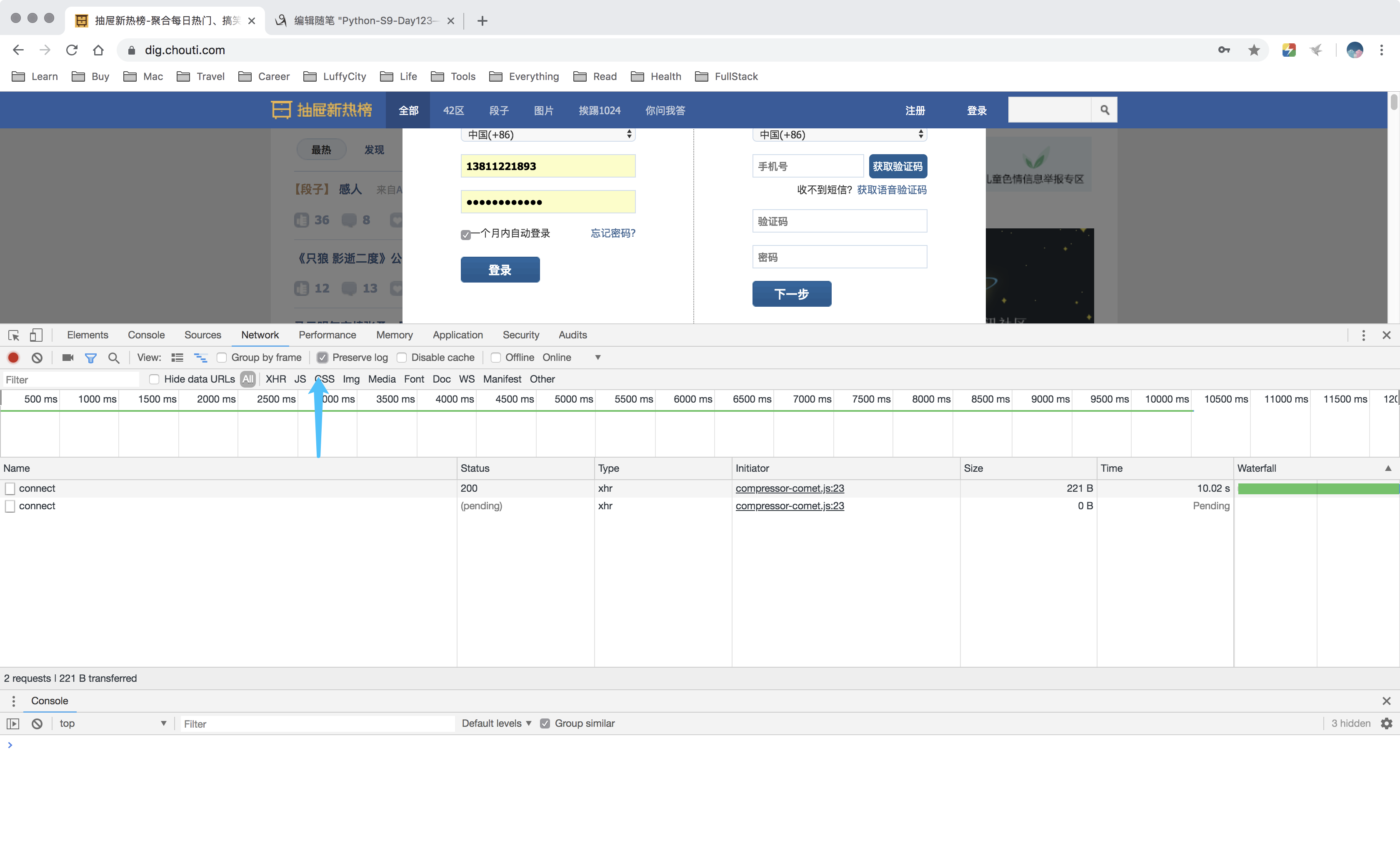
2.2 点赞(反爬虫验证);
###########################示例2:点赞(携带请求头)################################

# 1. 查看首页;

import requests

r1 = requests.get(

    url='https://dig.chouti.com/',

    headers={

        'user-agent': 'Mozilla/5.0 (Macintosh; Intel Mac OS X 10_13_6) AppleWebKit/537.36 (KHTML, like Gecko) Chrome/69.0.3497.81 Safari/537.36'

    }

)

print(r1.cookies)

# 2. 提交用户名和密码, 发送post请求;

r2 = requests.post(

    url='https://dig.chouti.com/login',

    headers={

        'user-agent': 'Mozilla/5.0 (Macintosh; Intel Mac OS X 10_13_6) AppleWebKit/537.36 (KHTML, like Gecko) Chrome/69.0.3497.81 Safari/537.36'

    },

    data={

        'phone': '8613811221893 ',

        'password': '19930911cxs.',

        'oneMonth': 1

    },

    cookies=r1.cookies.get_dict()

)

print(r2.text)  # {"result":{"code":"9999", "message":"", "data":{"complateReg":"0","destJid":"ctu_52518370025"}}}

print("拿到抽屉网站返回的cookies",

      r2.cookies.get_dict())  # 拿到抽屉网站返回的cookies {'gpsd': '4f535c2cce5ff030aeb4a2d2e94816b1', 'puid': 'a5308883c2de1e61b40dc7ddb850d385', 'JSESSIONID': 'aaajHz9vNpOEMdfzWjYww'}

# 3. 进行点赞;

r3 = requests.post(

    url='https://dig.chouti.com/link/vote?linksId=22010751',

    headers={

        'user-agent': 'Mozilla/5.0 (Macintosh; Intel Mac OS X 10_13_6) AppleWebKit/537.36 (KHTML, like Gecko) Chrome/69.0.3497.81 Safari/537.36'

    },

    cookies=r1.cookies.get_dict()

)

print(r3.text)  # {"result":{"code":"30010", "message":"你已经推荐过了", "data":""}}
05 爬虫之抽屉自动登录(二)
06 爬虫之登录github(一)
#######################示例三:自动登录github#########################################

# 1、GET:登录访问页面;

""

'''

- 去HTML中找到隐藏的input标签,获取类似于csrf_token;

- 获取cookie;

'''

# 2、发送post请求,用户名和密码;

'''

- 发送数据;

    -csrf;

    -用户名;

    -密码;

- 携带cookie

'''

# 3、GET,访问https://github.com/settings/emails

'''

- 携带cookie

'''
07 爬虫之登录github(二)
08 爬虫之登录拉钩
8.1 Referer头,是上一次请求的地址,可用于做图片防盗链;
import requests

import re

r1 = requests.get(

    url='https://passport.lagou.com/login/login.html',

    headers={

        'User-Agent': 'Mozilla/5.0 (Macintosh; Intel Mac OS X 10_13_6) AppleWebKit/537.36 (KHTML, like Gecko) Chrome/69.0.3497.81 Safari/537.36',

    },

)

X_Anti_Forge_Token = re.findall("X_Anti_Forge_Token = '(.*?)'", r1.text, re.S)[0]

X_Anti_Forge_Code = re.findall("X_Anti_Forge_Code = '(.*?)'", r1.text, re.S)[0]

#print(X_Anti_Forge_Token, X_Anti_Forge_Code)

# print(r1.text)

r2 = requests.post(

    url='https://passport.lagou.com/login/login.json',

    headers={

        'User-Agent': 'Mozilla/5.0 (Macintosh; Intel Mac OS X 10_13_6) AppleWebKit/537.36 (KHTML, like Gecko) Chrome/69.0.3497.81 Safari/537.36',

        'X-Anit-Forge-Code': X_Anti_Forge_Code,

        'X-Anit-Forge-Token': X_Anti_Forge_Token,

        'X-Request-With': 'XMLHttpRequest',

        'Referer': 'https://passport.lagou.com/login/login.html',

    },

    data={

        'isValidate': True,

        'username': '',

        'password': '69de96af1d1ed394c2b9dafc5f441a60',

        'request_form_verifyCode': ' ',

        'submit': '',

    },

    cookies = r1.cookies.get_dict()

)

print(r2.text)

'''

{"content":{"rows":[]},"message":"操作成功","state":1,"submitCode":87998714,"submitToken":"6dc215ff-4476-42b2-b3aa-e84e5a14cae5"}

'''
09 上述内容总结
s9day123

内容回顾:

    第一部分:Flask

        1. flask上下文管理机制

            切记:不要说详细

        2. Local的作用?

        3. LocalStack维护成栈

        4. 视图函数中使用:request/session/g/current_app

            注意:请求上下文和应用上下文需要先放入Local中,才能获取到。

                # by luffycity.com

                from flask import Flask,current_app,request,session,g

                app = Flask(__name__)

                # 错误

                # print(current_app.config)

                @app.route('/index')

                def index():

                    # 正确

                    print(current_app.config)

                    return "Index"

                if __name__ == '__main__':

                    app.run()

        5. 离线脚本

            from chun import db,create_app

            from flask import current_app

            # 错误

            # print(current_app.config)

            # app = create_app()

            # app_ctx = app.app_context()

            # with app_ctx:

            #     # 正确

            #     print(current_app.config)

    第二部分:面向对象

        1. 谈谈你对面向对象的认识。

        2. 约束

            Java:

                - 接口,约子类中必须包含某个方法(约束)。

                    Interface IMessage:

                        def func1(self):

                            pass

                        def func2(self):

                            pass

                    class Msg(IMessage):

                        def func1(self):

                            print('func1')

                        def func2(self):

                            print('func1')

                - 抽象方法/抽象类,约子类中必须包含某个方法。(约束+继承)

                    class abstract IMessage:

                        def abstract func1(self):

                            pass

                        def abstract func2(self):

                            pass

                        def func3(self):

                            print('asdfasdf')

                    class Msg(IMessage):

                        def func1(self):

                            print('func1')

                        def func2(self):

                            print('func1')

            Python:

                - 接口(无)

                - 抽象方法/抽象类(有,ABC)

                - 类继承+异常

                    class IMessage(object):

                        def func1(self):

                            raise NotImplementedError('子类没有实现func1方法')

                    class Msg(IMessage):

                        def func1(self):

                            print('')

                    obj = Msg()

                    obj.func1()

            有什么用?用于告知其他人以后继承时,需要实现那个方法,如:

                class BaseAuthentication(object):

                    """

                    All authentication classes should extend BaseAuthentication.

                    """

                    def authenticate(self, request):

                        """

                        Authenticate the request and return a two-tuple of (user, token).

                        """

                        raise NotImplementedError(".authenticate() must be overridden.")

                    def authenticate_header(self, request):

                        """

                        Return a string to be used as the value of the `WWW-Authenticate`

                        header in a `401 Unauthenticated` response, or `None` if the

                        authentication scheme should return `403 Permission Denied` responses.

                        """

                        pass

            以后自己开发时,如何使用?

                需求:

                    class BaseMessage(object):

                        def send(self):

                            raise NotImplementedError('必须实现send方法')

                    class Msg(BaseMessage):

                        def send(self):

                            print('发送短信')

                    class Wechat(BaseMessage):

                        def send(self):

                            print('发送微信')

                    class Email(BaseMessage):

                        def send(self):

                            print('发送邮件')

                    class DingDing(BaseMessage):

                        def send(self):

                            print('发送钉钉提醒')

        3. __dict__

        4. metaclass

    整理面试题(今天交给我)

今日内容:

    - 爬虫

        - requests

        - bs4

    - 长轮询/轮询

内容详细:

    参考博客:https://www.cnblogs.com/wupeiqi/articles/6283017.html

    需求:

        1. 爬取汽车之家新闻咨询

            - 什么都不带

        2. 爬抽屉新热榜

            - 带请求头

            - 带cookie

            - 登录:

                - 获取cookie

                - 登录:携带cookie做授权

                - 带cookie去访问

        3. 爬取GitHub

            - 带请求头

            - 带cookie

            - 请求体中:

                commit:Sign in

                utf8:✓

                authenticity_token:hmGj4oS9ryOrcwoxK83raFqKR4sFG1yC09NxnDJg3B/ycUvCNZFPs4AxTsd8yPbm1F3i38WlPHPcRGQtyR0mmw==

                login:asdfasdfasdf

                password:woshiniba8

        4. 登录拉勾网

            - 密码加密

                - 找js,通过python实现加密方式

                - 找密文,密码<=>密文

            - Referer头, 上一次请求地址,可以用于做防盗链。

    总结:

        请求头:

            user-agent

            referer

            host

            cookie

            特殊请起头,查看上一次请求获取内容。

                'X-Anit-Forge-Code':...

                'X-Anit-Forge-Token':...

        请求体:

            - 原始数据

            - 原始数据 + token

            - 密文

                - 找算法

                - 使用密文

        套路:

            - post登录获取cookie,以后携带cookie

            - get获取未授权cookie,post登录携带cookie去授权,以后携带cookie

    1. requests模块

        - 方法

            requests.get

            requests.post

            requests.put

            requests.delete

            ...

            requests.request(method='POST')

        - 参数

        - session

            session = requests.Session()

            session.get()

            session.post()

            ...

    2. BeautifulSoup

    3. 轮询/长轮询(跟爬虫没有关系)

        在线投票:最丑的男人

        - 轮询:每2秒钟发送请求。

        - 长轮询:最多hang住30s(兼容性好)

            - 实时

            - 在线

        - websocket实现(兼容性不太好)
10 requests模块详解(一)
10.1 方法:
- requests.get
- requests.post
- requests.put
- requests.delete
10.2 参数;
requests.get =
- url = 'https://www.cuixiaozhao.com'
- headers = {}
- cookies = {}
- params = {'k1':'v1','k2':'v2'} #https://www.cuixiaozhao.com?k1=v1&k2=v2
requests.post =
- url = 'https://www.cuixiaozhao.com'
- headers = {}
- cookies = {}
- params = {'k1':'v1','k2':'v2'} #https://www.cuixiaozhao.com?k1=v1&k2=v2
- data = {}
10.3 参数;
10.3.1 url;
10.3.2 headers;
10.3.3 cookies;
10.3.4 params;
10.3.5 data;
10.3.6 data传请求体;
10.3.7 json传请求体;
10.3.8 代理,代理池;
10.3.9 文件上传;
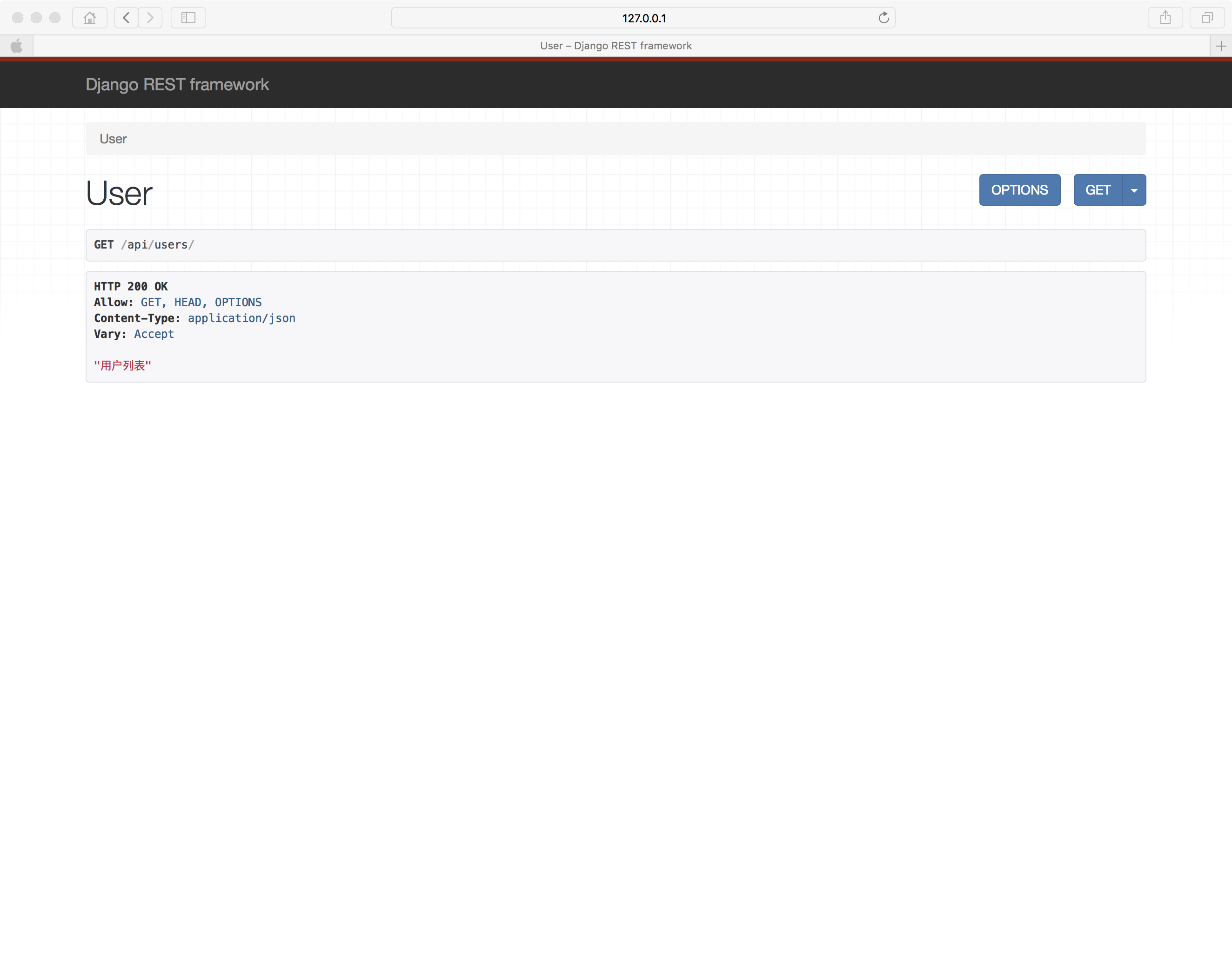
10.3.10 用户认证auth;
- 内部用户名和密码,用户名和密码加密后,放在请求头中传给后台;
- "用户名:密码"
- base64("用户名:密码")
- "Basic base64(“用户名:密码”)"
- 请求头:Authorzation:“basic base64(“用户名:密码”)”
from requests.auth import HTTPBasicAuth, HTTPDigestAuth

ret = requests.get(

    'https://api.github.com/user', auth=HTTPBasicAuth('admin', 'admin')

)

print(ret.text)
11 requests模块详解(二)
12 requests模块详解(三)
12.1 超时(timeout);
12.2 允许重定向allow_redirects;
12.3 大文件下载stream,一点一点去下载,防止占满内存空间;
12.4 证书cert——百度、腾讯不用携带证书(系统帮我们做了);
12.5 确认verify;类似于yum install 中的-y参数;
13 bs4模块简述
13.1 方法;
13.2 参数;
13.3 session,但是推荐自己带上session;
13.4 长轮询;
14 9期最丑的男人:轮询
14.1 轮询/长轮询(跟爬虫没有关系)
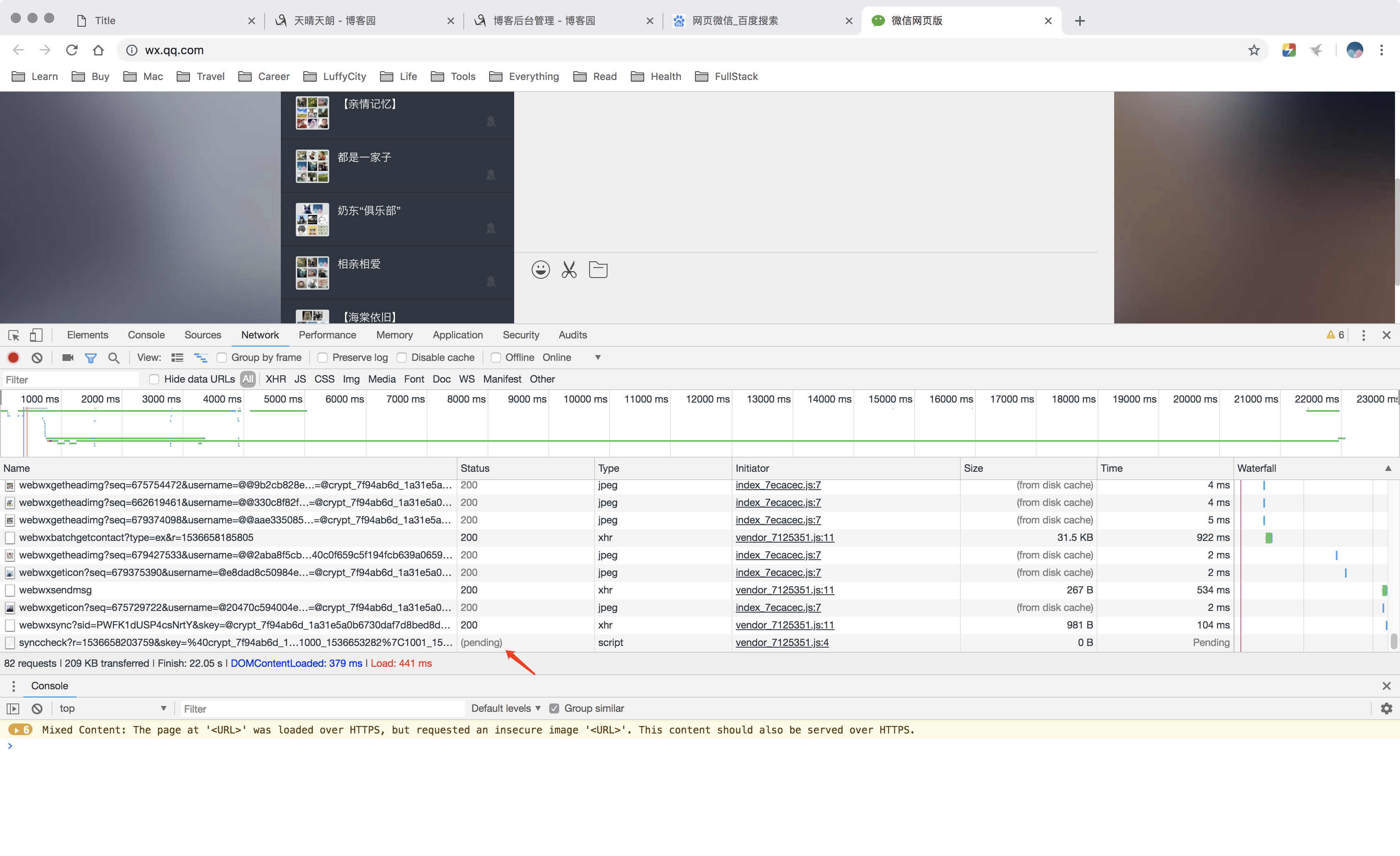
- 轮询:每隔固定时间发送一次请求,比如每隔2秒钟;
- 长轮询:夯住一段时间,间隔较长时间进行发送请求,比如1分钟;省去了socket连接的时间;在线实时,一般就是长轮询好!
app.py
from flask import Flask, render_template, request, jsonify

app = Flask(__name__)

USERS = {

    '': {'name': '贝贝', 'count': 1},

    '': {'name': '小东北', 'count': 0},

    '': {'name': '何伟明', 'count': 0},

}

@app.route('/user/list')

def user_list():

    import time

    # time.sleep(120)

    return render_template('user_list.html', users=USERS)

@app.route('/vote', methods=['POST'])

def vote():

    uid = request.form.get('uid')

    USERS[uid]['count'] += 1

    return '投票成功!'

@app.route('/get/vote')

def get_vote():

    return jsonify(USERS)

if __name__ == '__main__':

    app.run(host="192.168.1.49", threaded=True)
app1.py
from flask import Flask, render_template, request, jsonify

app = Flask(__name__)

import queue

q = queue.Queue()

@app.route('/get/vote')

def get_vote():

    try:

        val = q.get(timeout=5)

    except queue.Empty:

        val = "已超时"

    return val

@app.route('/vote')

def vote():

    q.put('')

    return "投票成功!"

if __name__ == '__main__':

    app.run(threaded=True)
user_list.html
<!DOCTYPE html>

<html lang="en">

<head>

    <meta charset="UTF-8">

    <title>Title</title>

    <meta name="viewport" content="width=device-width, initial-scale=1">

    <script src="https://cdn.bootcss.com/jquery/3.3.0/jquery.min.js"></script>

    <style>

        li {

            cursor: pointer;

        }

    </style>

</head>

<body>

<ul id="userlist">

    {% for key,val in users.items() %}

    <li uid="{{key}}">{{val.name}} ({{val.count}})</li>

    {% endfor %}

</ul>

<script>

    $(function () {

        $('#userlist').on('dblclick', 'li', function () {

            var uid = $(this).attr('uid');

            $.ajax({

                url: '/vote',

                type: 'POST',

                data: {uid: uid},

                success: function (arg) {

                    console.log(arg);

                }

            });

        });

    });

    /*

    获取投票信息;

    */

    function get_vote() {

        $.ajax({

            url: '/get/vote',

            type: 'GET',

            dataType: 'JSON',

            success: function (arg) {

                console.log(arg);

                $('#userlist').empty();

                $.each(arg, function (k, v) {

                    console.log(k, v);

                    var li = document.createElement('li');

                    li.setAttribute('uid', k);

                    li.innerText = v.name + "(" + v.count + ")";

                    $('#userlist').append(li);

                })

            }

        })

    }

    //设置定时器,2000ms = 2s;

    setInterval(get_vote, 2000)

</script>

</body>

</html>
15 9期最丑的男人:长轮询
app.py;
from flask import Flask, render_template, request, jsonify, session

import uuid

import queue

app = Flask(__name__)

app.secret_key = 'asdfasdfasd'

USERS = {

    '': {'name': '贝贝', 'count': 1},

    '': {'name': '小东北', 'count': 0},

    '': {'name': '何伟明', 'count': 0},

}

QUEQUE_DICT = {

    # 'asdfasdfasdfasdf':Queue()

}

@app.route('/user/list')

def user_list():

    user_uuid = str(uuid.uuid4())

    QUEQUE_DICT[user_uuid] = queue.Queue()

    session['current_user_uuid'] = user_uuid

    return render_template('user_list.html', users=USERS)

@app.route('/vote', methods=['POST'])

def vote():

    uid = request.form.get('uid')

    USERS[uid]['count'] += 1

    for q in QUEQUE_DICT.values():

        q.put(USERS)

    return "投票成功"

@app.route('/get/vote', methods=['GET'])

def get_vote():

    user_uuid = session['current_user_uuid']

    q = QUEQUE_DICT[user_uuid]

    ret = {'status': True, 'data': None}

    try:

        users = q.get(timeout=5)

        ret['data'] = users

    except queue.Empty:

        ret['status'] = False

    return jsonify(ret)

if __name__ == '__main__':

    app.run(threaded=True)

    # app.run(threaded=True)
user_list.html
<!DOCTYPE html>

<html lang="zh-CN">

<head>

    <meta charset="UTF-8">

    <title>Title</title>

    <meta name="viewport" content="width=device-width, initial-scale=1">

    <style>

        li {

            cursor: pointer;

        }

    </style>

</head>

<body>

<ul id="userList">

    {% for key,val in users.items() %}

    <li uid="{{key}}">{{val.name}} ({{val.count}})</li>

    {% endfor %}

</ul>

<script src="https://cdn.bootcss.com/jquery/3.3.0/jquery.min.js"></script>

<script>

    $(function () {

        $('#userList').on('click', 'li', function () {

            var uid = $(this).attr('uid');

            $.ajax({

                url: '/vote',

                type: 'POST',

                data: {uid: uid},

                success: function (arg) {

                    console.log(arg);

                }

            })

        });

        get_vote();

    });

    /*

    获取投票信息

     */

    function get_vote() {

        $.ajax({

            url: '/get/vote',

            type: "GET",

            dataType: 'JSON',

            success: function (arg) {

                if (arg.status) {

                    $('#userList').empty();

                    $.each(arg.data, function (k, v) {

                        var li = document.createElement('li');

                        li.setAttribute('uid', k);

                        li.innerText = v.name + "(" + v.count + ')';

                        $('#userList').append(li);

                    })

                }

                get_vote();

            }

        })

    }

</script>

</body>

</html>
16 今日总结
16.1 轮询通过定时器实现;
16.2 长轮询会将请求夯住,如果有信息过来,会立即返回,节省连接次数;
16.3 适用场景:实时在线;
16.4 websocket实现长轮询,但是兼容性不太好;
Python-S9-Day123——爬虫两示例的更多相关文章
- 用Python写网络爬虫 第二版
书籍介绍 书名:用 Python 写网络爬虫(第2版) 内容简介:本书包括网络爬虫的定义以及如何爬取网站,如何使用几种库从网页中抽取数据,如何通过缓存结果避免重复下载的问题,如何通过并行下载来加速数据 ...
- Python基础及爬虫入门
**写在前面**我们在学习任何一门技术的时候,往往都会看很多技术博客,很多程序员也会写自己的技术博客.但是我想写的这些不是纯技术博客,我暂时也没有这个能力写出 Python 或者爬虫相关的技术博客来. ...
- Python 开发轻量级爬虫08
Python 开发轻量级爬虫 (imooc总结08--爬虫实例--分析目标) 怎么开发一个爬虫?开发一个爬虫包含哪些步骤呢? 1.确定要抓取得目标,即抓取哪些网站的哪些网页的哪部分数据. 本实例确定抓 ...
- Python 开发轻量级爬虫07
Python 开发轻量级爬虫 (imooc总结07--网页解析器BeautifulSoup) BeautifulSoup下载和安装 使用pip install 安装:在命令行cmd之后输入,pip i ...
- Python 开发轻量级爬虫05
Python 开发轻量级爬虫 (imooc总结05--网页下载器) 介绍网页下载器 网页下载器是将互联网上url对应的网页下载到本地的工具.因为将网页下载到本地才能进行后续的分析处理,可以说网页下载器 ...
- Python 开发轻量级爬虫04
Python 开发轻量级爬虫 (imooc总结04--url管理器) 介绍抓取URL管理器 url管理器用来管理待抓取url集合和已抓取url集合. 这里有一个问题,遇到一个url,我们就抓取它的内容 ...
- Python 开发轻量级爬虫03
Python 开发轻量级爬虫 (imooc总结03--简单的爬虫架构) 现在来看一下一个简单的爬虫架构. 要实现一个简单的爬虫,有哪些方面需要考虑呢? 首先需要一个爬虫调度端,来启动爬虫.停止爬虫.监 ...
- Python 开发轻量级爬虫01
Python 开发轻量级爬虫 (imooc总结01--课程目标) 课程目标:掌握开发轻量级爬虫 为什么说是轻量级的呢?因为一个复杂的爬虫需要考虑的问题场景非常多,比如有些网页需要用户登录了以后才能够访 ...
- dota玩家与英雄契合度的计算器,python语言scrapy爬虫的使用
首发:个人博客,更新&纠错&回复 演示地址在这里,代码在这里. 一个dota玩家与英雄契合度的计算器(查看效果),包括两部分代码: 1.python的scrapy爬虫,总体思路是pag ...
随机推荐
- Java中的字符串问题
本文章分为三个部分: 1.创建字符串对象的两种方式以及它们的存储方式 2.String a = new String("a")创建了几个对象的问题 3.字符串小例子 ------- ...
- 弹出页面第一次加载可以生成table和方法的绑定,第二次点击进来不能生成table和方法的帮定
问题原因: 弹出页面的写法是每次点击都会在原有页面基础之上新添加一个将其覆盖,原有页面不关闭.我用的生成table和点击事件的绑定是id选择器.页面中只绑定第一次的页面,第二次的页面作用不上. 解决: ...
- [转载]正则表达式参考文档 - Regular Expression Syntax Reference.
正则表达式参考文档 - Regular Expression Syntax Reference. [原创文章,转载请保留或注明出处:http://www.regexlab.com/zh/regref. ...
- IOS截取部分图片
截取部分图片这么简单: - (void)loadView { [[UIApplication sharedApplication] setStatusBarHidden:YES withAni ...
- 2018.2.2 java中的Date如何获取 年月日时分秒
package com.util; import java.text.DateFormat; import java.util.Calendar; import java.util.Date; pub ...
- Spring Boot 2.x零基础入门到高级实战教程
一.零基础快速入门SpringBoot2.0 1.SpringBoot2.x课程全套介绍和高手系列知识点 简介:介绍SpringBoot2.x课程大纲章节 java基础,jdk环境,maven基础 2 ...
- java连接MySQL数据库操作步骤
package com.swift; //这里导入的包是java.sql.Connection而不是com.mysql.jdbc.Connection import java.sql.Connecti ...
- vue-cli npm run build 打包问题 webpack@3.6
1, vue-router 路由 有两个模式 (mode) hash (默认模式) 使用URL来模拟一个完整的URL 但是没个URL都会带上 "#/'' 支持所有浏览器 这个模式使用 red ...
- 洛谷P1048采药
这道题一看就知道是01背包,我门用f[i]来表示时间剩余i时的最大的价值 一共只有两种选择取或者不取,可以得到方程式f[i]=max(f[i],f[i-a[i]]+v[i])(a[i]是表示时间,v[ ...
- HTML5/CSS3 第一章基础
HTML5/CSS3基础 1. HTML 1.1 什么是HTML HTML是用来制作网页的标记语言 HTML是Hypertext Markup Language的英文缩写,即超文本标记语言 HTML语 ...