
Java进阶知识05 Hibernate联合主键之Annotation(注解)和XML实现方式
1、Hibernate联合主键(Annotation实现)
1.1、单列主键
1.1.1、为什么要有主键? //唯一确定一条记录
1.1.2、一个表能否有多个主键? //不能
1.1.3、为什么把id设为主键? //如果有其他的方式可以作为主键,id可以不要
1.1.4、主键生成策略:
identity:自增长,对DB2,MySQL, MS SQL Server, Sybase和HypersonicSQL的内置标识字段提供支持。 返回的标识符是long, short 或者int类型的。
sequence:自增长,在DB2,PostgreSQL, Oracle, SAP DB, McKoi中使用序列(sequence), 而在Interbase中使用生成器(generator)。返回的标识符是long, short或者 int类型的。
native:自增长,根据底层数据库的能力选择identity, sequence 或者hilo中的一个。如果是mysql,自动选择identity,如果是oracle,自动选择sequence 。
increment:自增长,只有在没有其他进程往同一张表中插入数据时才能使用。 在集群下不要使用。
assigned:指定主键生成策略
uuid:随机生成唯一值(String类型)
1.2、联合主键类必须要序列化,并重写equals和hashCode方法
主键类为什么要序列化?如果多个该类对象同时放入内存中,在一个集群系统中,其中一台服务器如果down机了,需要将内存中对象写到其它服务器。同时,如果该服务器内存已满,需要用虚拟内存,这就需要序列化后才能写到硬盘上。
1.3、注解
@Entity
@Table(name=”XXXX”) //类名和表名一样,可省略不写
@Column(.....)
A.实现方式一:将联合主键类注解为@Embeddable、将对象中联合主键注解为@Id
B.实现方式二:在对象中把联合主键引用注解为@EmbeddedId
C.实现方式三:在对象中包含联合主键的字段、并将其都注解为@Id,并在该对象类上注解@IdClass(联合主键类.class)
1.4、实例
1.4.1、创建一个实体类Student和StudentPK:联合主键类序列化,重写equals和hashCode方法
StudentPK 实体类:
 package com.shore.entity;

 import java.io.Serializable;

 import javax.persistence.Entity;

 /**

  * @author DSHORE/2019-9-16

  *

  */

 @Entity

 public class StudentPK implements Serializable {

     private static final long serialVersionUID = -2060041603022800114L; //序列化

     // name+address作为联合主键

     private String name;

     private String address;

     public StudentPK() {

         super();

     }

     public StudentPK(String name, String address) {

         super();

         this.name = name;

         this.address = address;

     }

     public String getName() {

         return name;

     }

     public void setName(String name) {

         this.name = name;

     }

     public String getAddress() {

         return address;

     }

     public void setAddress(String address) {

         this.address = address;

     }

     //联合主键类序列化,重写equals和hashCode方法

     @Override

     public boolean equals(Object object) {

         // instanceof——判断左边对象是否为右边对象的实例

         if (object instanceof StudentPK) {

             StudentPK pk = (StudentPK) object;

             if (this.name.equals(pk.getName())

                     && this.address.equals(pk.getAddress())) {

                 return true;

             }

         }

         return false;

     }

     @Override

     public int hashCode() {

         return this.name.hashCode();

     }

 }
Student 实体类:
 package com.shore.entity;

 import java.io.Serializable;

 import javax.persistence.EmbeddedId;

 import javax.persistence.Entity;

 import org.hibernate.annotations.Type;

 /**

  * @author DSHORE/2019-9-16

  *

  */

 @Entity

 public class Student implements Serializable {

     //对应的Student对象类建议也要序列化,但是可以不重写equals和hashCode方法

     private static final long serialVersionUID = -2924879320015689901L;

     private StudentPK keys;//联合主键 别名

     private Boolean sex;

     private String hobby;

     public Student() {

         super();

     }

     public Student(StudentPK keys, Boolean sex, String hobby) {

         super();

         this.keys = keys;

         this.sex = sex;

         this.hobby = hobby;

     }

     @EmbeddedId  //指定keys为联合主键

     public StudentPK getKeys() {

         return keys;

     }

     public void setKeys(StudentPK keys) {

         this.keys = keys;

     }

     @Type(type = "yes_no")  //数据库中,会以Y/N的形式插入到sex字段中

     public Boolean getSex() {

         return sex;

     }

     public void setSex(Boolean sex) {

         this.sex = sex;

     }

     public String getHobby() {

         return hobby;

     }

     public void setHobby(String hobby) {

         this.hobby = hobby;

     }

 }
1.4.2、创建hibernate.cfg.xml配置文件
 <?xml version='1.0' encoding='utf-8'?>

 <!DOCTYPE hibernate-configuration PUBLIC

         "-//Hibernate/Hibernate Configuration DTD 3.0//EN"

         "http://www.hibernate.org/dtd/hibernate-configuration-3.0.dtd">

 <hibernate-configuration>

     <session-factory>

         <!-- Database connection settings -->

         <property name="connection.driver_class">com.mysql.jdbc.Driver</property>

         <property name="connection.url">jdbc:mysql://localhost:3306/school</property>

         <property name="connection.username">root</property>

         <property name="connection.password">123456</property>

         <property name="dialect">org.hibernate.dialect.MySQLDialect</property>

         <property name="cache.provider_class">org.hibernate.cache.NoCacheProvider</property>

         <property name="show_sql">true</property>

         <property name="hbm2ddl.auto">create</property>

         <!-- <mapping resource="com/shore/entity/Student.hbm.xml"/> -->

         <mapping class="com.shore.entity.Student" />

     </session-factory>

 </hibernate-configuration>
联合主键,MySQL数据库的写法:(本文不需要手动创建数据表,是自动创建的,下面的MySQL建表脚本,仅提供参考)
 CREATE TABLE student(

   name VARCHAR(20),

   address VARCHAR(100),

   sex BOOLEAN,

   hobby VARCHAR(60),

   PRIMARY KEY(name,address)  -- 联合主键

 )
1.4.3、创建测试类CompositeKeyTest ,开始测试:
 package com.shore.test;

 import org.hibernate.Session;

 import org.hibernate.SessionFactory;

 import org.hibernate.Transaction;

 import org.hibernate.cfg.AnnotationConfiguration;

 import org.junit.AfterClass;

 import org.junit.BeforeClass;

 import org.junit.Test;

 import com.shore.entity.Student;

 import com.shore.entity.StudentPK;

 /**

  * @author DSHORE/2019-9-16

  *

  */

 public class CompositeKeyTest {

     public static SessionFactory sessionFactory = null;

     public static Session session = null;

     @BeforeClass

     public static void buildSessionFactory() {

                         //联合主键之Annotation实现,用的是AnnotationConfiguration方法

         sessionFactory = new AnnotationConfiguration().configure().buildSessionFactory();

     }

     @AfterClass

     public static void close() {

         session.close();

         sessionFactory.close();

     }

     @Test

     public void test() {

         session = sessionFactory.openSession();//打开一个session

         Transaction transaction = session.beginTransaction();//开启事务

         Student student = new Student(new StudentPK("zhansan", "xxxxxx"), true, "yundong");

         session.save(student);

         transaction.commit();//提交事务

     }

 }
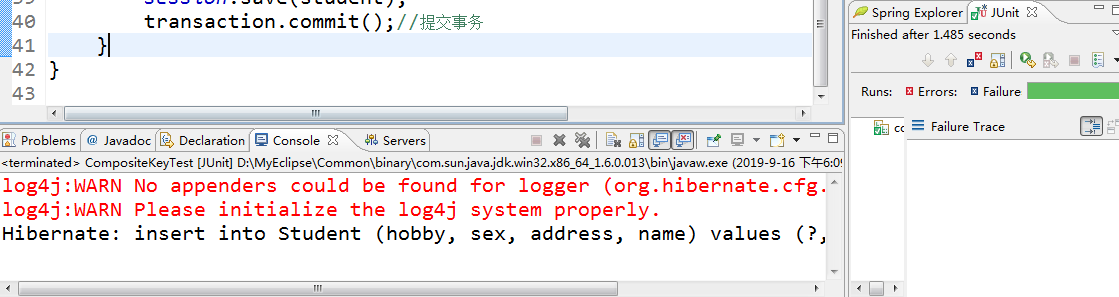
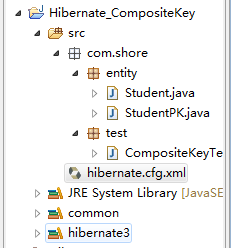
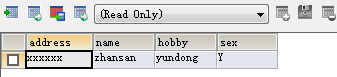
1.4.4、测试结果图:
2、Hibernate联合主键(XML实现)
代码和上面的全部一样,不一样的地方如下所示:
2.1、首先,注解得全部去掉。
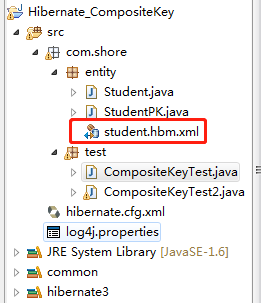
2.2、多了一个配置文件:student.hbm.xml
 <?xml version="1.0"?>

 <!DOCTYPE hibernate-mapping PUBLIC

         "-//Hibernate/Hibernate Mapping DTD 3.0//EN"

         "http://www.hibernate.org/dtd/hibernate-mapping-3.0.dtd">

 <hibernate-mapping package="com.shore.entity">

     <class name="Student">

         <composite-id name="keys">

             <key-property name="name"/>

             <key-property name="address"/>

         </composite-id>

         <property name="sex" type="java.lang.Boolean"/>

         <property name="hobby" type="java.lang.String"/>

     </class>

 </hibernate-mapping>
2.3、最后在hibernate.cfg.xml配置文件中引入“student.hbm.xml”文件即可
 <?xml version='1.0' encoding='utf-8'?>

 2 <!DOCTYPE hibernate-configuration PUBLIC

          "-//Hibernate/Hibernate Configuration DTD 3.0//EN"

          "http://www.hibernate.org/dtd/hibernate-configuration-3.0.dtd">

 6 <hibernate-configuration>

 7     <session-factory>         <!-- Database connection settings -->

 9         <property name="connection.driver_class">com.mysql.jdbc.Driver</property>

10         <property name="connection.url">jdbc:mysql://localhost:3306/school</property>

11         <property name="connection.username">root</property>         <property name="connection.password">123456</property>

14         <property name="dialect">org.hibernate.dialect.MySQLDialect</property>

15         <property name="cache.provider_class">org.hibernate.cache.NoCacheProvider</property>

16         <property name="show_sql">true</property>

17         <property name="hbm2ddl.auto">create</property>

19         <mapping resource="com/shore/entity/Student.hbm.xml"/>

20         <!-- <mapping class="com.shore.entity.Student" /> -->

21     </session-factory>

22 </hibernate-configuration>
2.4、还有sessionFactory创建方式不一样:
 package com.shore.test;

 import org.hibernate.Session;

 import org.hibernate.SessionFactory;

 import org.hibernate.Transaction;

 import org.hibernate.cfg.AnnotationConfiguration;

 import org.junit.AfterClass;

 import org.junit.BeforeClass;

 import org.junit.Test;

 import com.shore.entity.Student;

 import com.shore.entity.StudentPK;

 /**

  * @author DSHORE/2019-9-16

  *

  */

 public class CompositeKeyTest2 {

     public static SessionFactory sessionFactory = null;

     public static Session session = null;

     @BeforeClass

     public static void buildSessionFactory() {

                         //联合主键之xml实现,用的是Configuration()方法

         sessionFactory = new Configuration().configure().buildSessionFactory(); //之前用的是:AnnotationConfiguration()

     }

     @AfterClass

     public static void close() {

         session.close();

         sessionFactory.close();

     }

     @Test

     public void test() {

         session = sessionFactory.openSession();//打开一个session

         Transaction transaction = session.beginTransaction();//开启事务

         Student student = new Student(new StudentPK("zhansan", "xxxxxx"), true, "yundong");

         session.save(student);

         transaction.commit();//提交事务

     }

 }
|
原创作者:DSHORE 作者主页:http://www.cnblogs.com/dshore123/ 原文出自:https://www.cnblogs.com/dshore123/p/11528059.html 欢迎转载,转载务必说明出处。(如果本文对您有帮助,可以点击一下右下角的 推荐,或评论,谢谢!) |
Java进阶知识05 Hibernate联合主键之Annotation(注解)和XML实现方式的更多相关文章
- hibernate 联合主键生成机制(组合主键XML配置方式)
hibernate 联合主键生成机制(组合主键XML配置方式) 如果数据库中用多个字段而不仅仅是一个字段作为主键,也就是联合主键,这个时候就可以使用hibernate提供的联合主键生成策略. 具体 ...
- 这是一个hibernate 联合主键的例子
package com.bird.entity; import java.io.Serializable; import javax.persistence.Entity; import javax. ...
- hibernate 联合主键 composite-id
如果表使用联合主键(一个表有两个以上的主键),你可以映射类的多个属性为标识符属性.如:<composite-id>元素接受<key-property> 属性映射(单表映射)和& ...
- hibernate 联合主键
xml方式处理联合主键: 以有两个主键:id和name的student表为例. 先创建个主键类: package com.bjsxt.hibernate; //黑色为必写项 public ...
- Hibernate联合主键映射
1.联合主键的映射规则 1) 类中的每个主键属性都对应到数据表中的每个主键列. Hibernate要求具有联合主键的实体类实现Serializable接口,并且重写hashCode与equals方法, ...
- Java进阶知识07 Hibernate一对一双向外键关联(Annotation+XML实现)
1.Annotation 注解版 1.1.创建Husband类和Wife类 package com.shore.model; import javax.persistence.Entity; impo ...
- Java进阶知识06 Hibernate一对一单向外键关联(Annotation+XML实现)
1.Annotation 注解版 1.1.创建Husband类和Wife类 package com.shore.model; import javax.persistence.Entity; impo ...
- hibernate ——联合主键
接上一篇博客:http://www.cnblogs.com/tengpan-cn/p/5551323.html 主键类不需要写任何注解,表对象类使用@IdClass注解 在表对象类前面加@IdClas ...
- Java进阶知识03 Hibernate的基础配置详解
1.Hibernate的原理/流程步骤 1.通过Configuration().configure(); 读取并解析hibernate.cfg.xml配置文件,并创建一个configuration对象 ...
随机推荐
- python 安装PostgreSQL 模块:psycopg2
官方资料:http://www.psycopg.org/psycopg/docs/ 安装: yum -y install python-psycopg2 (安装的版本可能是2.0) pip insta ...
- 并不对劲的bzoj4538:loj2049:p3250:[HNOI2016]网络
题意 有一棵\(n\)(\(n\leq 10^5\))个点的树,\(m\)(\(m\leq 2\times 10^5\))个操作.操作有三种:1.给出\(u,v,k\),表示加入一条从\(u\)到\( ...
- json在线格式化校验
推荐个在线工具箱,json在线格式化转换编码,挺好用的 https://www.codejson.com/
- css 字体库和动画
@font-face { font-family:'WebSymbols'; src: url('../font/WebSymbols-Regular.otf'); } .icon{ font-fam ...
- JS downLoad
$.fileDownload(url, { httpMethod: 'GET', data: null, prepareCallback: function (url) { layer.msg(&qu ...
- Ubuntu14.04更新硬件实现堆栈(HWE)
Ubuntu14.04更新硬件实现堆栈(HWE) 来源: https://github.com/gatieme/AderXCoding/tree/master/system/tools/ubuntu_ ...
- node 基本搭建 server.js
const express = require('express'); const expressStatic = require('express-static'); const bodyparse ...
- ASE第二次结对编程——Code Search
复现极限模型 codenn 原理 其原理大致是将代码特征映射到一个向量,再将描述文字也映射到一个向量,将其cos距离作为loss训练. 对于代码特征,原论文提取了函数名.调用API序列和token集: ...
- STM32/MINI
- sql like 拼接字符串模糊查询
这种分割的值大家常用,如果要用like 来查询包含2,这个值的数据有哪些,这个怎么查? like '%2%' ????,这是不行的如果是 44,125,687 同样可以查出来,那么就想到通配符, l ...