
thinkphp5 二维码生成 composer
进入extend文件夹
composer require endroid/qrcode
2.将二维码生成封装为服务

QrcodeServer.php代码如下:
<?php

/**

 * Created by PhpStorm.

 * User: cdjyj21

 * Date: 2018/9/4

 * Time: 11:57

 */

namespace app\services;

//引入刚刚添加的composer安装的类  里面的自动加载类
use think\facade\App;
require_once App::getRootPath().'/extend/vendor/autoload.php';
use Endroid\QrCode\ErrorCorrectionLevel;

use Endroid\QrCode\LabelAlignment;

use Endroid\QrCode\QrCode;

class QrcodeServer

{

    protected $_qr;

    protected $_encoding        = 'UTF-8';              // 编码类型

    protected $_size            = ;                  // 二维码大小

    protected $_logo            = false;                // 是否需要带logo的二维码

    protected $_logo_url        = '';                   // logo图片路径

    protected $_logo_size       = ;                   // logo大小

    protected $_title           = false;                // 是否需要二维码title

    protected $_title_content   = '';                   // title内容

    protected $_generate        = 'display';            // display-直接显示  writefile-写入文件

    protected $_file_name       = './static/qrcode';    // 写入文件路径

    const MARGIN           = ;                        // 二维码内容相对于整张图片的外边距

    const WRITE_NAME       = 'png';                     // 写入文件的后缀名

    const FOREGROUND_COLOR = ['r' => , 'g' => , 'b' => , 'a' => ];          // 前景色

    const BACKGROUND_COLOR = ['r' => , 'g' => , 'b' => , 'a' => ];    // 背景色

    public function __construct($config) {

        isset($config['generate'])      &&  $this->_generate        = $config['generate'];

        isset($config['encoding'])      &&  $this->_encoding        = $config['encoding'];

        isset($config['size'])          &&  $this->_size            = $config['size'];

        isset($config['logo'])          &&  $this->_logo            = $config['logo'];

        isset($config['logo_url'])      &&  $this->_logo_url        = $config['logo_url'];

        isset($config['logo_size'])     &&  $this->_logo_size       = $config['logo_size'];

        isset($config['title'])         &&  $this->_title           = $config['title'];

        isset($config['title_content']) &&  $this->_title_content   = $config['title_content'];

        isset($config['file_name'])     &&  $this->_file_name       = $config['file_name'];

    }

    /**

     * 生成二维码

     * @param $content //需要写入的内容

     * @return array | page input

     */

    public function createServer($content) {

        $this->_qr = new QrCode($content);

        $this->_qr->setSize($this->_size);

        $this->_qr->setWriterByName(self::WRITE_NAME);

        $this->_qr->setMargin(self::MARGIN);

        $this->_qr->setEncoding($this->_encoding);

        $this->_qr->setErrorCorrectionLevel(ErrorCorrectionLevel::HIGH);   // 容错率

        $this->_qr->setForegroundColor(self::FOREGROUND_COLOR);

        $this->_qr->setBackgroundColor(self::BACKGROUND_COLOR);

        // 是否需要title

        if ($this->_title) {

            $this->_qr->setLabel($this->_title_content, , null, LabelAlignment::CENTER);

        }

        // 是否需要logo

        if ($this->_logo) {

            $this->_qr->setLogoPath($this->_logo_url);

            $this->_qr->setLogoWidth($this->_logo_size);

        }

        $this->_qr->setValidateResult(false);

        if ($this->_generate == 'display') {

            // 展示二维码

            // 前端调用 例:<img src="http://localhost/qr.php?url=base64_url_string">

            header('Content-Type: ' . $this->_qr->getContentType());

            return $this->_qr->writeString();

        } else if ($this->_generate == 'writefile') {

            // 写入文件

            $file_name = $this->_file_name;

            return $this->generateImg($file_name);

        } else {

            return ['success' => false, 'message' => 'the generate type not found', 'data' => ''];

        }

    }

    /**

     * 生成文件

     * @param $file_name //目录文件 例: /tmp

     * @return array

     */

    public function generateImg($file_name) {

        $file_path = $file_name . DIRECTORY_SEPARATOR . uniqid() . '.' . self::WRITE_NAME;

        if (!file_exists($file_name)) {

            mkdir($file_name, , true);

        }

        try {

            $this->_qr->writeFile($file_path);

            $data = [

                'url' => $file_path,

                'ext' => self::WRITE_NAME,

            ];

            return ['success' => true, 'message' => 'write qrimg success', 'data' => $data];

        } catch (\Exception $e) {

            return ['success' => false, 'message' => $e->getMessage(), 'data' => ''];

        }

    }

}
3.调用
例:
<?php

/**

 * Created by PhpStorm.

 * User: cdjyj21

 * Date: 2018/9/4

 * Time: 11:57

 */

namespace app\test\controller;

use app\services\QrcodeServer;

class Qrcode

{

    /**

     * 直接输出二维码 + 生成二维码图片文件

     */

    public function create(){

        // 自定义二维码配置

        $config = [

            'title'         => true,

            'title_content' => 'test',

            'logo'          => true,

            'logo_url'      => './logo.png',

            'logo_size'     => ,

        ];

        // 直接输出

        $qr_url = 'http://www.baidu.com?id=' . rand(, );

        $qr_code = new QrcodeServer($config);

        $qr_img = $qr_code->createServer($qr_url);

        echo $qr_img;

        // 写入文件

        $qr_url = '这是个测试二维码';

        $file_name = './static/qrcode';  // 定义保存目录

        $config['file_name'] = $file_name;

        $config['generate']  = 'writefile';

        $qr_code = new QrcodeServer($config);

        $rs = $qr_code->createServer($qr_url);

        print_r($rs);

        exit;

    }

}
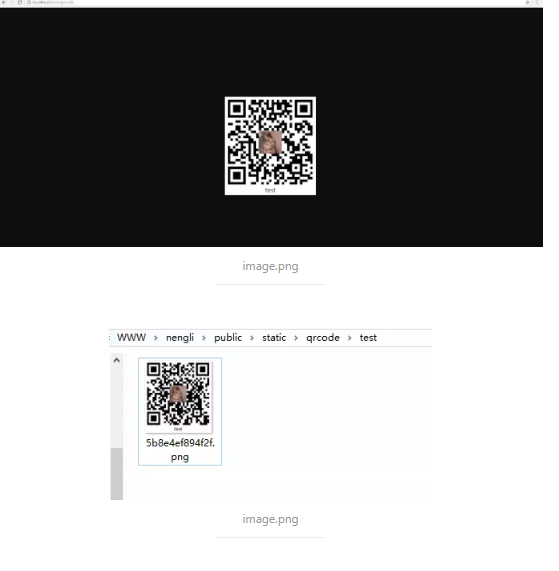
在浏览器中直接访问create()方法,会直接输出二维码,同时会在自定义保存目录下生成一张二维码图片。效果如下:
那这种直接输出的二维码怎么应用于项目中呢,一般都是直接写在html 中的 <img> 标签中,例如:
<img src="http://localhost:8080/projecttest/qrtest?id=1234" alt="这是一个二维码" />
这里罗列下我看懂的几个参数,也算给自己做个笔记吧。
| 参数名 | 描述 | 示例 |
|---|---|---|
| setText | 设置文本 | https://www.baidu.com |
| setSize | 设置二维码的大小,这里二维码应该是正方形的,所以相当于长宽 | 400 |
| setMargin | 设置二维码边距 | 10 |
| setForegroundColor | 设置前景色,RGB颜色 | array('r' => 0, 'g' => 0, 'b' => 0, 'a' => 0) |
| setBackgroundColor | 设置背景色,RGB颜色 | array('r' => 0, 'g' => 0, 'b' => 0, 'a' => 0) |
| setEncoding | 设置编码 | utf8 |
| setErrorCorrectionLevel | 设置错误级别(low / medium / quartile / high) | high |
| setLogoPath | 设置logo路径 | logo.png |
| setLogoWidth | 设置logo大小 | 50 |
| setLabel | 设置标签 | test |
| setLabelFontSize | 设置标签字体大小 | 16 |
| setLabelFontPath | 设置标签字体路径 | null |
| setLabelAlignment | 设置标签对齐方式(left / center / right) | center |
| setLabelMargin | 设置标签边距 | array('t' => 10,'r' => 20,'b' => 10,'l' => 30) |
| setWriterRegistry | ||
| setWriter | ||
| setWriterByName | 写入文件的后缀名 | png |
| setWriterByPath | ||
| setWriterByExtension | ||
| setValidateResult | ||
| writeString | ||
| writeDataUri | ||
| writeFile | 写入文件 | test.png |
thinkphp5 二维码生成 composer的更多相关文章
- thinkphp5 二维码生成
1.下载二维码插件Phpqrcode,地址 https://sourceforge.net/projects/phpqrcode/files/,把下载的文件夹放到\thinkphp\vendor下 2 ...
- 【thinkphp5.1】 endroid/qrcode 二维码生成
composer 链接: https://packagist.org/packages/endroid/qrcode 注意:PHP版本 要求 7.1+ 1. 使用 composer 安装 endroi ...
- PHP 自定义二维码生成
环境:PHP 7.*.* ,Composer 包管理工具.QrCode 效果如下: 使用 Composer 安装 QrCode QrCode 类库基于 php 的 GD 库,用于生成任意尺寸的二维码, ...
- [开源]C#二维码生成解析工具,可添加自定义Logo
二维码又称 QR Code,QR 全称 Quick Response,是一个近几年来移动设备上超流行的一种编码方式,它比传统的 Bar Code 条形码能存更多的信息,也能表示更多的数据类型:比如:字 ...
- 聊聊 Web 项目二维码生成的最佳姿势
在设计和实现的过程之后,你永远不知道部署上去的程序会已什么样的姿势运行. 本篇借一次生成二维码逻辑的不同实现,阐述 Web 项目中二维码生成的正确姿势. 文中如有批量,欢迎各位看客老爷拍砖.试运行前5 ...
- .NET 二维码生成(ThoughtWorks.QRCode)
引用ThoughtWorks.QRCode.dll (源代码里有) 1.简单二维码生成及解码代码: //生成二维码方法一 private void CreateCode_Simple(string n ...
- iOS开发 二维码生成
基于libqrencode的二维码生成 + (void)drawQRCode:(QRcode *)code context:(CGContextRef)ctx size:(CGFloat)size { ...
- PHP二维码生成的方法(google APi,PHP类库,libqrencode等)
原文地址: http://blog.csdn.net/liuxinmingcode/article/details/7910975 ================================== ...
- Android 二维码 生成和识别(附Demo源码)
今天讲一下目前移动领域很常用的技术——二维码.现在大街小巷.各大网站都有二维码的踪迹,不管是IOS. Android.WP都有相关支持的软件.之前我就想了解二维码是如何工作,最近因为工作需要使用相关技 ...
随机推荐
- COALESCE关键字的使用
COALESCE是sql标准里面的一个关键字,我们可以和聚合函数sum,count,max等一起使用完成一些特殊的功能. 以下sql语句基于mysql 1.查询某一个列总和,如果没有数据或者NULL返 ...
- Linux CentOS汉化系统
u root切换为root用户 写入环境变量 echo "export LANG="zh_CN.UTF8"">>/etc/profile sourc ...
- Pytorch-tensor的维度变化
引言 本篇介绍tensor的维度变化. 维度变化改变的是数据的理解方式! view/reshape:大小不变的条件下,转变shape squeeze/unsqueeze:减少/增加维度 transpo ...
- jQuery代码书写规范
1. 对于同一个对象不超过三个操作的,可以直接写成一行 $("li").show().unbind("click"); 2. 对于同一个对象的较多操作,建议每行 ...
- C#_初识之HelloWorld
C#————是一个我很不愿意去碰的语言,但是还是得低头,巨硬还是巨硬....... ———————————————————————————————————————————————— 前几天在Githu ...
- kubeadm快速安装k8s
1.安装net-tools [root@localhost ~]# yum install -y net-tools 2.关闭firewalld [root@localhost ~]# systemc ...
- [转帖]postgres 创建新用户并授权-- 非常好的
postgres 创建新用户并授权 https://blog.csdn.net/XuHang666/article/details/81506297 原作者总结的挺好的 可以用来学习一下. grant ...
- 【Java学习】类、对象、实例—类是对象的抽象,对象是类的实例
类.对象.实例的关系是什么,如果不能很好的理解什么是类什么是对象就无法讲清楚, 类:某种事物与另一种事物具有相似性,比如哈士奇和泰迪,我们发现他们有一些相似的特性和行为,在生物学上,他们都属于“狗”, ...
- php 正则替换特殊字符 和检测是否是中文
如果是只想输入中文的话,就这么写,要注意是分gb2312和utf-8的哦: gb2312:if(!preg_match("/^[".chr(0xa1)."-". ...
- python虚拟环境的的使用
基于创建虚拟环境 virtualenv 安装 pip3 install virtualenv 通过virtulaenv创建虚拟环境 virtualenv luffycity --python=C:\P ...