
Python - Django - 编辑作者
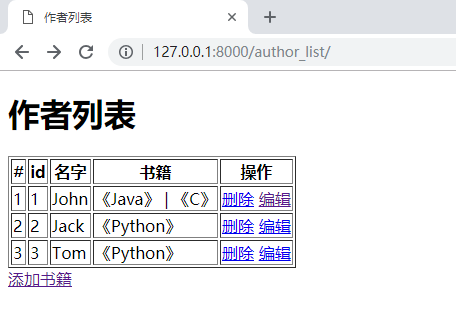
在作者列表页面的操作栏中加上编辑按钮
<!DOCTYPE html>

<html lang="en">

<head>

    <meta charset="UTF-8">

    <title>作者列表</title>

</head>

<body>

<h1>作者列表</h1>

<table border="1">

    <thead>

    <tr>

        <th>#</th>

        <th>id</th>

        <th>名字</th>

        <th>书籍</th>

        <th>操作</th>

    </tr>

    </thead>

    <tbody>

    {% for author in author_list %}

        <tr>

            <td>{{ forloop.counter }}</td>

            <td>{{ author.id }}</td>

            <td>{{ author.name }}</td>

            <td>

                {% for book in author.book.all %}

                    {% if forloop.last %}

                        {{ book.title }}

                    {% else %}

                        {{ book.title }} |

                    {% endif %}

                {% endfor %}

            </td>

            <td>

                <a href="/del_author/?id={{ author.id }}">删除</a>

                <a href="/edit_author/?id={{ author.id }}">编辑</a>

            </td>

        </tr>

    {% endfor %}

    </tbody>

</table>

<a href="/add_author/">添加书籍</a>

</body>

</html>
运行结果:
添加 edit_author.html
<!DOCTYPE html>

<html lang="en">

<head>

    <meta charset="UTF-8">

    <title>编辑作者</title>

</head>

<body>

<h1>编辑作者</h1>

<form action="/edit_author/" method="post">

    <input type="text" name="author_id" value="{{ author.id }}" style="display: none">

    <p>

        作者姓名:<input type="text" name="author_name" value="{{ author.name }}">

    </p>

    <p>

        书籍:

        <select multiple name="books">

            {% for book in book_list %}

                {% if book in author.book.all %}

                    <option selected value="{{ book.id }}">{{ book.title }}</option>

                {% else %}

                    <option value="{{ book.id }}">{{ book.title }}</option>

                {% endif %}

            {% endfor %}

        </select>

    </p>

    <p>

        <input type="submit" value="提交">

    </p>

</form>

</body>

</html>
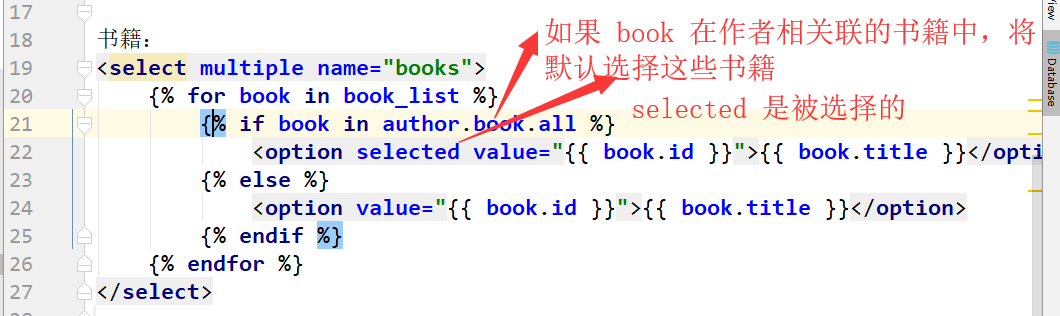
解析:
在 urls.py 中添加 edit_author 的对应关系
from django.conf.urls import url

from django.contrib import admin

from app01 import views

urlpatterns = [

    # 出版社

    url(r'^publisher_list/', views.publisher_list),

    url(r'^add_publisher/', views.add_publisher),

    url(r'^del_publisher/', views.del_publisher),

    url(r'^edit_publisher/', views.edit_publisher),

    # 书籍

    url(r'^book_list/', views.book_list),

    url(r'^add_book/', views.add_book),

    url(r'^del_book/', views.del_book),

    url(r'^edit_book/', views.edit_book),

    # 作者

    url(r'^author_list/', views.author_list),

    url(r'^add_author/', views.add_author),

    url(r'^del_author/', views.del_author),

    url(r'^edit_author/', views.edit_author),

]
在 views.py 中添加 edit_author 函数
from django.shortcuts import render, redirect, HttpResponse

from app01 import models

# 展示出版社列表

def publisher_list(request):

    pass

# 添加新的出版社

def add_publisher(request):

    pass

# 删除出版社

def del_publisher(request):

    pass

# 编辑出版社

def edit_publisher(request):

    pass

# 展示书籍列表

def book_list(request):

    pass

# 添加书籍

def add_book(request):

    pass

# 删除书籍

def del_book(request):

    pass

# 编辑书籍

def edit_book(request):

    pass

# 作者列表

def author_list(request):

    # 查询所有作者

    all_author = models.Author.objects.all()

    return render(request, "author_list.html", {"author_list": all_author})

# 添加作者

def add_author(request):

    if request.method == "POST":

        # 取得提交的数据

        new_author_name = request.POST.get("author_name")

        # 如果提交的数据是多个值的话用 getlist

        books = request.POST.getlist("books")

        # 创建作者

        new_author_obj = models.Author.objects.create(name=new_author_name)

        # 把新作者和书籍建立对应关系,自动提交

        new_author_obj.book.set(books)

        # 跳转到作者列表页面,查看是否添加成功

        return redirect("/author_list/")

    # 查询所有的书籍

    all_books = models.Book.objects.all()

    return render(request, "add_author.html", {"book_list": all_books})

# 删除作者

def del_author(request):

    # 从 url 里提取要删除的作者 id

    del_id = request.GET.get("id")

    # 根据 id 删除 author 表和其相关联表的数据

    models.Author.objects.get(id=del_id).delete()

    # 返回作者列表

    return redirect("author_list.html")

# 编辑作者

def edit_author(request):

    # 从 post 提交过来的书籍

    if request.method == "POST":

        # 获取提交过来的作者 id 和姓名

        edit_author_id = request.POST.get("author_id")

        new_author_name = request.POST.get("author_name")

        # 获取提交过来和作者相关联的书籍

        new_book = request.POST.getlist("books")

        # 根据 id 去数据库中查询当前编辑的作者对象

        edit_author_obj = models.Author.objects.get(id=edit_author_id)

        # 更新数据库中作者的名字

        edit_author_obj.name = new_author_name

        # 更新数据库中与作者关联的书籍的对应关系

        edit_author_obj.book.set(new_book)

        # 将修改保存到数据库中

        edit_author_obj.save()

        # 返回作者列表页面,查看编辑是否成功

        return redirect("/author_list/")

    # 从 url 里获取要编辑作者的 id

    edit_id = request.GET.get("id")

    # 获取要编辑的作者对象

    edit_author_obj = models.Author.objects.get(id=edit_id)

    # 获取对象书籍对象

    all_book_list = models.Book.objects.all()

    return render(request, "edit_author.html", {"book_list": all_book_list, "author": edit_author_obj})
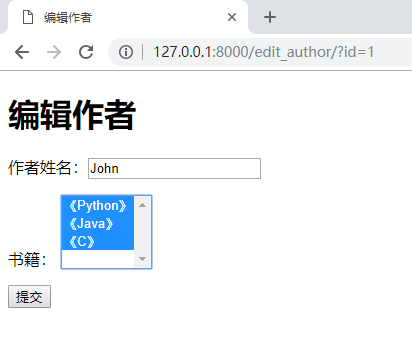
运行效果:

编辑 John

《Java》和《C》默认是被选择的,将 《Python》也选上
提交后
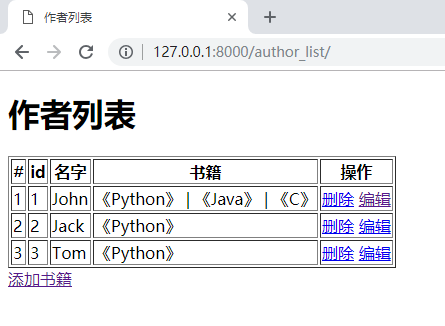
来数据库中看一下
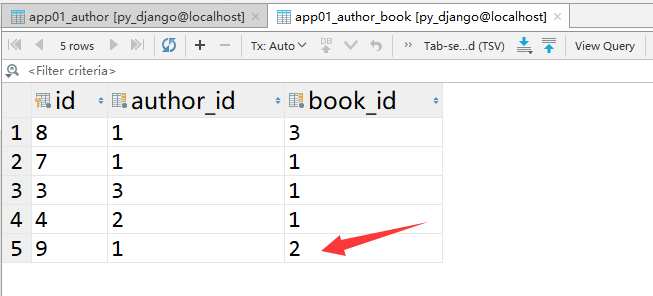
作者 id 为 1 的关联书籍多了一个 2
Python - Django - 编辑作者的更多相关文章
- Python - Django - 删除作者
修改 author_list.html,添加删除按钮 <!DOCTYPE html> <html lang="en"> <head> <m ...
- Python - Django - 添加作者
在 book_list.html 的页面下方加上 “添加作者” 的链接 <!DOCTYPE html> <html lang="en"> <head& ...
- Python - Django - 显示作者列表
在 views.py 中添加展示作者列表的函数 from django.shortcuts import render, redirect, HttpResponse from app01 impor ...
- python Django教程 之 模型(数据库)、自定义Field、数据表更改、QuerySet API
python Django教程 之 模型(数据库).自定义Field.数据表更改.QuerySet API 一.Django 模型(数据库) Django 模型是与数据库相关的,与数据库相关的代码 ...
- Python+Django+Eclipse 在Windows下快速开发自己的网站
一.配置开发环境 我的开发环境是:Python3.3.2 + Django1.5.2 + Eclipse 1.安装Python 下载地址:http://www.python.org/getit/ 安装 ...
- python Django 学习笔记(一)—— Django安装
注:本人python版本2.7.5 ,win7系统 安装Django https://www.djangoproject.com/download/ 官方下载Django-1.5.5.tar.gz 1 ...
- 教你如何将 Sublime 3 打造成 Python/Django IDE开发利器
Sublime Text 是一款非常强大的文本编辑器, 下面我们介绍如何将 Sublime Text 3 打造成一款 Python/Django 开发利器: 1. 安装 Sublime Text 3 ...
- 将 Sublime 3 打造成 Python/Django IDE
Sublime Text 是一款非常强大的文本编辑器, 下面我们介绍如何将 Sublime Text 3 打造成一款 Python/Django 开发利器: 1. 安装 Sublime Text 3 ...
- Python+Django+SAE系列教程17-----authauth (认证与授权)系统1
通过session,我们能够在多次浏览器请求中保持数据,接下来的部分就是用session来处理用户登录了. 当然,不能仅凭用户的一面之词,我们就相信,所以我们须要认证. 当然了,Django 也提供了 ...
随机推荐
- hive 常用操作
参考:https://www.cnblogs.com/jonban/p/10779938.html Hive 启动:hive 退出:hive>quit; show databases; use ...
- rest_framework/api.html
解决办法 在setting.py文件中添加 'rest_framework' 注册这个应用 INSTALLED_APPS = [ 'django.contrib.admin', 'django.con ...
- BZOJ4802 欧拉函数 (Pollard-Rho Miller-Robin)
题目 求大数的欧拉函数φ\varphiφ 题解 Pollard-Rho 板子 CODE #pragma GCC optimize (3) #include <bits/stdc++.h> ...
- 关于https的五大误区
如今,https协议正在被广泛重视和使用.随着今年2月初,谷歌旗下Chrome浏览器宣布将所有http标示为不安全网站,许多网站都争相从http升级到了https.当你打开很多网站时,会发现浏览器左上 ...
- 剖析生产系统的I/O模式
剖析生产系统的I/O模式 2019/02/13 vmunix 了解I/O的特点对于优化系统性能非常重要,I/O是顺序的还是随机的,是读操作还是写操作,读写的比例是多少,I/O数据块的大小,这些都是影响 ...
- mysql5.7版本以上下载安装
1.mysql官网下载地址:https://downloads.mysql.com/archives/community/ 2.下载完成后解压,解压后如图: 3.放置位置,把解压好的文件夹放在自己喜欢 ...
- GitLab获取人员参与项目-贡献项目列表
目录 前言 获取token 登录 获取用户参与项目 完整代码 前言 最近在做的统计报表项目包含人员代码提交量. 要获取人员代码提交量首先要知道人员参与的项目.GitLab个人页面中有Contribut ...
- java Spring定时器 每个季度执行一次
@Scheduled(cron = " 0 00 00 1 4,7,10,1 ?")//每个季度的第一天零点进行统计此注解是每个季度结束后的下一天执行(因为Spring不识别字母( ...
- Ubuntu14.04系统显示器不自动休眠修改
-----设置Ubuntu14.04不自动锁屏,常亮 右上角的菜单打开system setting ----- brightness&lock按钮 1. 2. 参考: https://blog ...
- ajax请求数据动态填充之文档与字符串区别手法
success: function(data){ if(data.status==200){ var realName=data.doc.realName; $("#yishiul" ...