
Python - Django - 添加作者
在 book_list.html 的页面下方加上 “添加作者” 的链接
<!DOCTYPE html>

<html lang="en">

<head>

    <meta charset="UTF-8">

    <title>作者列表</title>

</head>

<body>

<h1>作者列表</h1>

<table border="1">

    <thead>

    <tr>

        <th>#</th>

        <th>id</th>

        <th>名字</th>

        <th>书籍</th>

    </tr>

    </thead>

    <tbody>

        {% for author in author_list %}

            <tr>

            <td>{{ forloop.counter }}</td>

            <td>{{ author.id }}</td>

            <td>{{ author.name }}</td>

            <td>

                {% for book in author.book.all %}

                    {% if forloop.last %}

                        {{ book.title }}

                    {% else %}

                        {{ book.title }} |

                    {% endif %}

                {% endfor %}

            </td>

            </tr>

        {% endfor %}

    </tbody>

</table>

<a href="/add_author/">添加书籍</a>

</body>

</html>
运行效果:

在 urls.py 处添加 “添加作者” 的 url 对应关系
from django.conf.urls import url

from django.contrib import admin

from app01 import views

urlpatterns = [

    # 出版社

    url(r'^publisher_list/', views.publisher_list),

    url(r'^add_publisher/', views.add_publisher),

    url(r'^del_publisher/', views.del_publisher),

    url(r'^edit_publisher/', views.edit_publisher),

    # 书籍

    url(r'^book_list/', views.book_list),

    url(r'^add_book/', views.add_book),

    url(r'^del_book/', views.del_book),

    url(r'^edit_book/', views.edit_book),

    # 作者

    url(r'^author_list/', views.author_list),

    url(r'^add_author/', views.add_author),

]
创建 add_author.html 添加作者页面
<!DOCTYPE html>

<html lang="en">

<head>

    <meta charset="UTF-8">

    <title>添加作者</title>

</head>

<body>

<h1>添加作者</h1>

<form action="/add_author/" method="post">

    <p>

        作者姓名:<input type="text" name="author_name">

    </p>

    <p>

        书籍:

        <select multiple name="books">

            {% for book in book_list %}

                <option value="{{ book.id }}">{{ book.title }}</option>

            {% endfor %}

        </select>

    </p>

    <p>

        <input type="submit" value="提交">

    </p>

</form>

</body>

</html>
最后在 views.py 加上添加作者的函数
from django.shortcuts import render, redirect, HttpResponse

from app01 import models

# 展示出版社列表

def publisher_list(request):

    pass

# 添加新的出版社

def add_publisher(request):

    pass

# 删除出版社

def del_publisher(request):

    pass

# 编辑出版社

def edit_publisher(request):

    pass

# 展示书籍列表

def book_list(request):

    pass

# 添加书籍

def add_book(request):

    pass

# 删除书籍

def del_book(request):

    pass

# 编辑书籍

def edit_book(request):

    pass

# 作者列表

def author_list(request):

    # 查询所有作者

    all_author = models.Author.objects.all()

    return render(request, "author_list.html", {"author_list": all_author})

# 添加作者

def add_author(request):

    if request.method == "post":

        # 取得提交的数据

        new_author_name = request.POST.get("author_name")

        # 如果提交的数据是多个值的话用 getlist

        books = request.POST.getlist("books")

        # 创建作者

        new_author_obj = models.Author.objects.create(name=new_author_name)

        # 把新作者和书籍建立对应关系,自动提交

        new_author_obj.book.set(books)

        # 跳转到作者列表页面,查看是否添加成功

        return redirect("/author_list/")

    # 查询所有的书籍

    all_books = models.Book.objects.all()

    return render(request, "add_author.html", {"book_list": all_books})
运行结果:
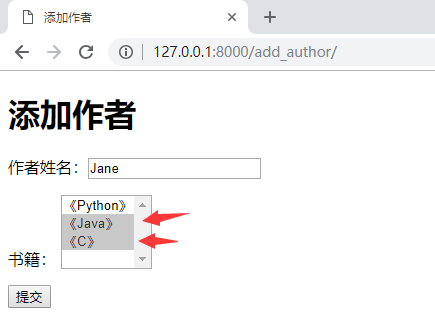
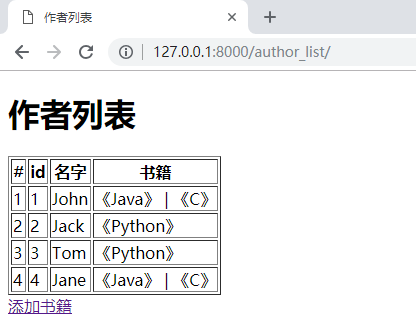
提交后
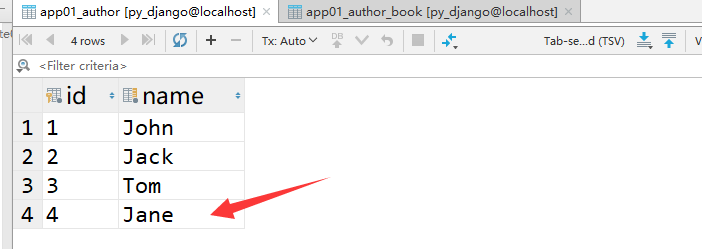
再看一下数据库

Python - Django - 添加作者的更多相关文章
- Python - Django - 编辑作者
在作者列表页面的操作栏中加上编辑按钮 <!DOCTYPE html> <html lang="en"> <head> <meta char ...
- Python - Django - 删除作者
修改 author_list.html,添加删除按钮 <!DOCTYPE html> <html lang="en"> <head> <m ...
- Python - Django - 显示作者列表
在 views.py 中添加展示作者列表的函数 from django.shortcuts import render, redirect, HttpResponse from app01 impor ...
- Python - Django - 添加首页尾页上一页下一页
添加首页和尾页: views.py: from django.shortcuts import render from app01 import models def book_list(reques ...
- python Django教程 之 模型(数据库)、自定义Field、数据表更改、QuerySet API
python Django教程 之 模型(数据库).自定义Field.数据表更改.QuerySet API 一.Django 模型(数据库) Django 模型是与数据库相关的,与数据库相关的代码 ...
- python——django使用mysql数据库(一)
之前已经写过如何创建一个django项目,现在我们已经有了一个小骷髅,要想这个web工程变成一个有血有肉的人,我们还需要做很多操作.现在就先来介绍如何在django中使用mysql数据库. 前提:已经 ...
- python Django教程 之模板渲染、循环、条件判断、常用的标签、过滤器
python3.5 manage.py runserver python Django教程 之模板渲染.循环.条件判断.常用的标签.过滤器 一.Django模板渲染模板 1. 创建一个 zqxt_tm ...
- python Django教程 之 安装、基本命令、视图与网站
python Django教程 之 安装.基本命令.视图与网站 一.简介 Django 中提供了开发网站经常用到的模块,常见的代码都为你写好了,通过减少重复的代码,Django 使你能够专注于 w ...
- python django 多级业务树形结构规划及页面渲染
概述: 在项目中,父级到子级结构并不少见,如果仅仅的两层树形结构,我们可以使用数据库的外键设计轻松做到,子级业务表设计一字段外键到父级业务表,这样子到父.父到子的查询都非常简单. 但是往往父子结构会有 ...
随机推荐
- python打造批量关键词排名查询工具
自己做站点的时候,都看看收录和关键词排名什么的,所以打造的这个批量关键词查询工具. #encoding:utf-8 import urllib,re,random,time,sys,StringIO, ...
- vue computed、filters 用法笔记
computed 在使用时的效果是属性,不是函数. 其次,computed 的值是“智能”响应的,依赖必须都是这个实例自己的东西,如果某个计算需要依赖传入的值,则推荐使用 methods. filte ...
- 线程(C++11)
不同平台.框架.语言所使用的线程函数不同.对于初学者选择一种适合自己的,用熟用透即可. Windows中,CreateThread() Linux中,pthread_create() MFC框架中,A ...
- AcWing P379 捉迷藏 题解
Analysis 这道题因为我们要给能到达的两个点都连上,又由于n<=200,所以我们可以用n³的传递闭包来建边,再用匈牙利算法来求二分图最大点独立集. #include<iostream ...
- 四十三.MongoDB副本集 MongoDB文档管理
一.部署MongoDB副本集 1.1 启用副本集配置并指定集群名称 rs1 1.2 定义集群成员列表 部署好机器51,52,53:51上配置 bind_ip=192.168.4.51(要改) port ...
- CF938D Buy a Ticket dijkstra
考试T1,建一个反图跑一个最短路就好了~ code: #include <bits/stdc++.h> #define ll long long #define N 200002 #def ...
- 块状链表 bzoj 3343教主的魔法
//块状链表//分块排序,然后每次查找时在暴力查找头和尾两个块.//中间那些块,因为有序所以只需2分查找即可.我用的是lower_pound();//插入是,也是头和尾暴力插入,中间那些加到一个累计里 ...
- JDK8中好用的日期处理-LocalDate类-LocalTime-LocalDateTIme,mysql解决时区相差13小时的问题,日期格式器DateTimeFormatter
set global time_zone='+08:00'; set time_zone = '+08:00'; show variables like '%time_zone:'
- [线性代数] 矩阵代数進階:矩阵分解 Matrix factorization
Matrix factorization 导语:承载上集的矩阵代数入门,今天来聊聊进阶版,矩阵分解.其他集数可在[线性代数]标籤文章找到.有空再弄目录什麽的. Matrix factorization ...
- hive --metastore三种模式
在官网上对于这几种模式的介绍如下: 按Metastore数据库位置分: 1.本地/嵌入式Metastore数据库(Derby) 2.远程Metastore数据库(其他的关系型数据库,像mysql.or ...