
NPOI CellStyle 设置
    public class ExcelNPOIUnit

    {

        public static void SetCell(IWorkbook workbook, ISheet sheet,

             IRow row, int createCellIndex, object cellContent, CellType cellType, HorizontalAlignment alignment)

        {

            IDataFormat celldataformat = workbook.CreateDataFormat();

            IFont font = workbook.CreateFont();

            font.FontName = "Calibri";

            ICell cell = row.FirstOrDefault(n => n.ColumnIndex == createCellIndex);

            if (cell == null)

                cell = row.CreateCell(createCellIndex);

            cell.CellStyle.SetFont(font);

            cell.CellStyle.BorderLeft = BorderStyle.Thin;

            cell.CellStyle.BorderRight = BorderStyle.Thin;

            cell.CellStyle.BorderTop = BorderStyle.Thin;

            cell.CellStyle.BorderBottom = BorderStyle.Thin;

            //在这里设置会影响全部单元格

            //cell.CellStyle.Alignment = alignment;

            double tmp = -;

            if (cellType == CellType.Numeric && double.TryParse(cellContent.ToString(), out tmp))

            {

                //必须在这里这样设置,才能对当前单元格有效

                ICellStyle cellstyle = workbook.CreateCellStyle();

                cellstyle.CloneStyleFrom(cell.CellStyle);

                cellstyle.DataFormat = HSSFDataFormat.GetBuiltinFormat("#,##0");

                cellstyle.Alignment = alignment;

                cell.CellStyle = cellstyle;

                cell.SetCellValue(tmp);

            }

            else

            {

                //必须在这里这样设置,才能对当前单元格有效

                ICellStyle cellstyle = workbook.CreateCellStyle();

                cellstyle.CloneStyleFrom(cell.CellStyle);

                cellstyle.Alignment = alignment;

                cell.CellStyle = cellstyle;

                cell.SetCellValue(cellContent.ToString());

            }

        }

        public static void SaveSheet(string fullname, ISheet sheet)

        {

            using (FileStream writefile = new FileStream(fullname, FileMode.Create, FileAccess.Write))

            {

                sheet.Workbook.Write(writefile);

            }

        }

        public static IWorkbook GetWorkbook(string fullname)

        {

            IWorkbook workbook = null;

            if (fullname.ToLower().EndsWith(".xls"))

            {

                using (FileStream fs = new FileStream(fullname, FileMode.Open, FileAccess.Read))

                {

                    workbook = new HSSFWorkbook(fs);

                }

            }

            else

            {

                using (FileStream fs = new FileStream(fullname, FileMode.Open, FileAccess.Read))

                {

                    workbook = new XSSFWorkbook(fs);

                }

            }

            return workbook;

        }

    }
var wk = ExcelNPOIUnit.GetWorkbook(logname);
var sheet = wk.GetSheet("Sheet1");
int rowindex = 2;
int cellindex = 0;
foreach (var item in list)
{
IRow row = sheet.CreateRow(rowindex);
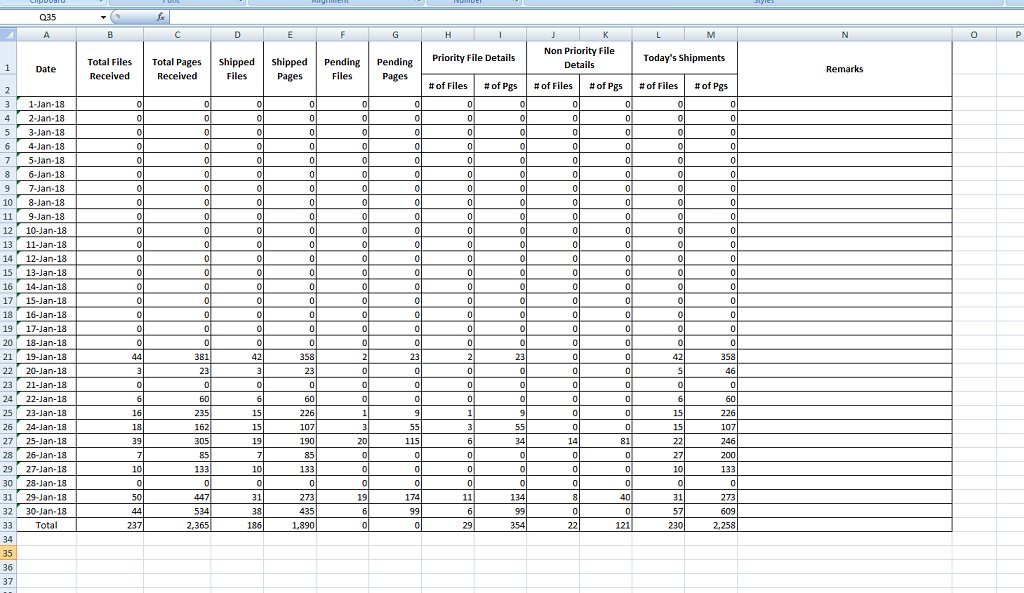
ExcelNPOIUnit.SetCell(wk, sheet, row, cellindex++, item.CreateDate, CellType.String, HorizontalAlignment.Center);
ExcelNPOIUnit.SetCell(wk, sheet, row, cellindex++, item.TotalFilesReceived, CellType.Numeric, HorizontalAlignment.Right);
ExcelNPOIUnit.SetCell(wk, sheet, row, cellindex++, item.TotalPagesReceived, CellType.Numeric, HorizontalAlignment.Right);
ExcelNPOIUnit.SetCell(wk, sheet, row, cellindex++, item.ShippedFiles, CellType.Numeric, HorizontalAlignment.Right);
ExcelNPOIUnit.SetCell(wk, sheet, row, cellindex++, item.ShippedPages, CellType.Numeric, HorizontalAlignment.Right);
ExcelNPOIUnit.SetCell(wk, sheet, row, cellindex++, item.PendingFiles, CellType.Numeric, HorizontalAlignment.Right);
ExcelNPOIUnit.SetCell(wk, sheet, row, cellindex++, item.PendingPages, CellType.Numeric, HorizontalAlignment.Right);
ExcelNPOIUnit.SetCell(wk, sheet, row, cellindex++, item.NofFiles_Priority, CellType.Numeric, HorizontalAlignment.Right);
ExcelNPOIUnit.SetCell(wk, sheet, row, cellindex++, item.NoofPgs_Priority, CellType.Numeric, HorizontalAlignment.Right);
ExcelNPOIUnit.SetCell(wk, sheet, row, cellindex++, item.NoofFiles_NoPriority, CellType.Numeric, HorizontalAlignment.Right);
ExcelNPOIUnit.SetCell(wk, sheet, row, cellindex++, item.NoofPgs_NoPriority, CellType.Numeric, HorizontalAlignment.Right);
ExcelNPOIUnit.SetCell(wk, sheet, row, cellindex++, item.NoofFiles_Today, CellType.Numeric, HorizontalAlignment.Right);
ExcelNPOIUnit.SetCell(wk, sheet, row, cellindex++, item.NoofPgs_Today, CellType.Numeric, HorizontalAlignment.Right);
ExcelNPOIUnit.SetCell(wk, sheet, row, cellindex++, item.Remarks, CellType.Numeric, HorizontalAlignment.Left);
rowindex++;
cellindex = 0;
}
ExcelNPOIUnit.SaveSheet(logname, sheet);
NPOI CellStyle 设置的更多相关文章
- NPOI 格式设置2—时间,千分位,繁体,小数位
在Excel中我们经常要设置格式,比如说日期格式(yyyymmdd).小数点格式(1.20).货币格式($2000).百分比格式(99.99%)等等,这些东西在过去我们恐怕只能在服务器端生成好,不但增 ...
- NPOI格式设置1
using NPOI.SS.UserModel; using NPOI.HSSF.UserModel; //创建Execl IWorkbook hssfworkbook =new HSSFWorkbo ...
- NPOI格式设置
using NPOI.SS.UserModel; using NPOI.HSSF.UserModel; //创建Execl IWorkbook hssfworkbook =new HSSFWorkbo ...
- NPOI打印设置
打印设置主要包括方向设置.缩放.纸张设置.页边距等.NPOI 1.2支持大部分打印属性,能够让你轻松满足客户的打印需要. 方向设置首先是方向设置,Excel支持两种页面方向,即纵向和横向. 在NPOI ...
- NPOI Excel设置样式
在表格导出时,会碰到样式修改的问题,作如下简单归纳: //创建行样式ICellStyle style = workbook.CreateCellStyle();//前景色 ...
- NPOI 自定义单元格背景颜色-Excel
NPOI针对office2003使用HSSFWorkbook,对于offce2007及以上使用XSSFWorkbook:今天我以HSSFWorkbook自定义颜色为例说明,Office2007的未研究 ...
- NPOI 教程 - 2.1单元格合并
来源:http://liyingchun343333.blog.163.com/blog/static/3579731620091018212990/ 合并单元格在制作表格时很有用,比如说表格的标题就 ...
- NPOI使用手册[转]
NPOI使用手册 目录 1.认识NPOI 2. 使用NPOI生成xls文件 2.1 创建基本内容 2.1.1创建Workbook和Sheet 2.1.2创建DocumentSummaryInforma ...
- [转]NPOI 单元格级别应用
原文地址:http://hi.baidu.com/linrao/item/fadf96dce8770753d63aaef2 HSSFWorkbook hssfworkbook = new HSSFWo ...
随机推荐
- Halcon标定
摄像头拍摄时候,图像均有畸变,但是图像的扭曲变形均是有规律的成线性的,所以可以通过算法矫正.halcon标定过程需要在镜头内放置标定板:标定板一般选用30*30mm的:可以通过halcon程序来制作: ...
- 退出telnet 命令
很多时候 telnet 完就无法退出了,ctrl+c 有时也无法退出 后来找到了正确的命令 ctrl+] 然后在telnet 命令行输入 quit 就可以退出了
- Elasticsearch-PHP 命名空间
命名空间 客户端有很多命名空间,通常能够暴漏出他管理的功能.命名空间对应Elasticsearch各种管理的端点.如下是完成的命名空间的列表: 命名空间 功能 indices() 以指数为中心的统计数 ...
- Mysql合并两列数据
实例: UPDATE x_yiyuanpinggu_nengli SET ch_yuzhongfangxiang = CONCAT(ch_yuanyuzhong,ch_mubiaoyuzhong) M ...
- 如何在ArcMap中监听键盘鼠标事件
昨天有个朋友想要实现一个功能,就是在ArcMap中编辑数据的时候,能够通过快捷键自动设置预定义的属性,比如,选中若干要素,按A键,就自动填充属性,按B键,则又自动填充另外的属性字段. 单就这个功能而言 ...
- Django框架开发web网站的网页优化—页面静态化
网站优化-页面静态化 1)概念 提前将页面所用到的数据从数据库查询出来,然后生成一个静态页面,之后用户来访问的时候,直接返回静态页面. 举例:首页静态化:获取首页用到的数据表中的数据,生成静态首页in ...
- 从0开始用spring boot编写分布式配置中心-peppa
欢迎大家一起来编写peppa github地址: github 交流群: 目前市面上比较流行的分布式配置中心有disconf.apollo,用起来还是比较方便的,然而由于在权限管理这块做得不够好,导致 ...
- Excel VBA 入门(零)
本教程所用系统环境: Windows 10 Excel 2013 1. 添加开发工具 打开Excel,依然找到"文件"->"选项"->"自 ...
- css的优先级和权重问题 以及!important优先级
一,前言: 刚加的css怎么没有渲染出来?浏览器中查看,发现是被其他的css给覆盖了,相信我们都曾遇到过这样的问题.那么浏览器是如何选择css标签的渲染顺序的呢?换句话说,css选择器的优先级是怎么规 ...
- cocos2d-js反射
如何在android平台上使用js直接调用Java方法 在cocos2d-js 3.0beta中加入了一个新特性,在android平台上我们可以通过反射直接在js中调用java的静态方法.它的使用方法 ...