
【Python】简单实现爬取小说《天龙八部》,并在页面本地访问
背景
很多人说学习爬虫是提升自己的一个非常好的方法,所以有了第一次使用爬虫,水平有限,依葫芦画瓢,主要作为学习的记录。
思路
- 使用python的requests模块获取页面信息
- 通过re模块(正则表达式)取出需要的内容(小说标题,正文)
- 通过MysqlDB模块入库
- 使用webpy模块生成访问页面
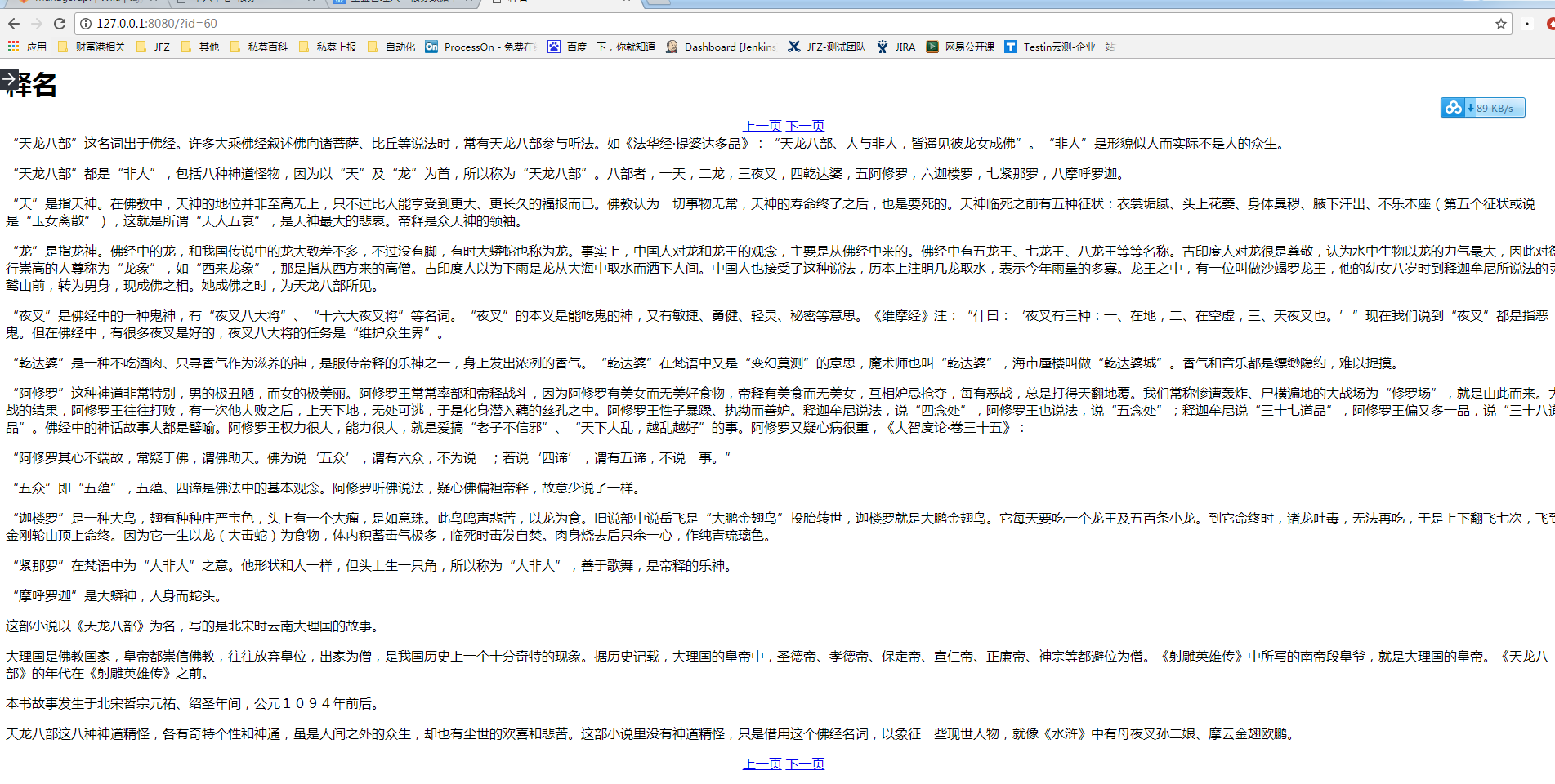
最终的效果图
下面是效果图,简单实现了点击上一页、下一页翻页的功能:
目录结构
目录结构如下:
D:\PROJECT\SPIDER
│ fiction_spider.py
│ webapp.py
│
└─template
index.html
爬取信息及入库示例代码
#coding:utf-8#fiction_spider.py
import requests
import re
import MySQLdb

def get_title():
    html = requests.get('http://www.jinyongwang.com/tian/').content
    rem = r'<li><a href="(.*?)">(.*?)</a>'
    return  re.findall(rem,html)

def get_content(url):
    html = requests.get('http://www.jinyongwang.com/'+url).content
    #print html
    matchs_p = r'<p>(.*?)</p><script.*?'
    data = re.findall(matchs_p, html)
    return data[0]

if __name__ == '__main__':
    a = MySQLdb.connect(host='10.1.*.*', port=3306, user='user', passwd='passwd', db='testdb', charset='utf8')
    for i in get_title():
        cur = a.cursor()
        print i[1]
        print i[0]
        sqli = 'INSERT INTO `fiction` (`title`, `content`) VALUES ("%s","%s" )'%(i[1],get_content(i[0]))
        cur.execute(sqli)
        cur.close()
        a.commit()
    a.close()
生成访问页面示例代码
#coding:utf-8#webapp.py
import web
import re

urls = ('/(.*)','Index')

db = web.database(dbn = 'mysql',host='10.1.*.*', port=3306, user='user', passwd='passwd', db='testdb', charset='utf8')

render = web.template.render('template')

class Index:
    def GET(self,html):
        id = re.findall('(.*?).html',html)[0]
        print id
        data = db.query("select * from fiction where id=%s"%id)
        return render.index(data[0],id)

if __name__ == '__main__':

    web.application(urls,globals()).run()
页面访问的index.html内容如下:
$def with(data,s)
<meta charset="utf-8"/>
<title>$:data.title</title>
<h1>$:data.title</h1>
<div style="margin:0px auto;text-align:center;">
<a href="$:(int(s)-1).html">上一页</a>
<a href="$:(int(s)+1).html">下一页</a>
</div>
$:data.content
<br>
<div style="margin:0px auto;text-align:center;">
<a href="$:(int(s)-1).html">上一页</a>
<a href="$:(int(s)+1).html">下一页</a>
</div>
保存到txt:
if __name__ == '__main__':
    a  = open(u'射雕**传.txt','w')
    m = 0
    for i in get_title():
        #print i[1], get_content(i[0])
        time.sleep(2)
        data = i[1] + '\n' + '\n' + get_content(i[0]).replace('</p><p>','\n\n') + '\n\n' #在标题和内容之间插入换行符,将html中的<p>参数变成换行符
        a.writelines(data)
        m += 1
        print u'正在爬取第%s段内容' % m
        # if m >2:
        #     print u'正在爬取第%s段内容' % m
        #     break
    a.close()
【Python】简单实现爬取小说《天龙八部》,并在页面本地访问的更多相关文章
- 初次尝试python爬虫,爬取小说网站的小说。
本次是小阿鹏,第一次通过python爬虫去爬一个小说网站的小说. 下面直接上菜. 1.首先我需要导入相应的包,这里我采用了第三方模块的架包,requests.requests是python实现的简单易 ...
- Python简单程序爬取天气信息,定时发邮件给朋友【高薪必学】
前段时间看到了这个博客.https://blog.csdn.net/weixin_45081575/article/details/102886718.他用了request模块,这不巧了么,正好我刚用 ...
- python简单爬虫爬取百度百科python词条网页
目标分析:目标:百度百科python词条相关词条网页 - 标题和简介 入口页:https://baike.baidu.com/item/Python/407313 URL格式: - 词条页面URL:/ ...
- 04 Python网络爬虫 <<爬取get/post请求的页面数据>>之requests模块
一. urllib库 urllib是Python自带的一个用于爬虫的库,其主要作用就是可以通过代码模拟浏览器发送请求.其常被用到的子模块在Python3中的为urllib.request和urllib ...
- python爬虫——爬取小说 | 探索白子画和花千骨的爱恨情仇(转载)
转载出处:药少敏 ,感谢原作者清晰的讲解思路! 下述代码是我通过自己互联网搜索和拜读完此篇文章之后写出的具有同样效果的爬虫代码: from bs4 import BeautifulSoup imp ...
- Scrapy爬取小说简单逻辑
Scrapy爬取小说简单逻辑 一 准备工作 1)安装Python 2)安装PIP 3)安装scrapy 4)安装pywin32 5)安装VCForPython27.exe ........... 具体 ...
- Python实战项目网络爬虫 之 爬取小说吧小说正文
本次实战项目适合,有一定Python语法知识的小白学员.本人也是根据一些网上的资料,自己摸索编写的内容.有不明白的童鞋,欢迎提问. 目的:爬取百度小说吧中的原创小说<猎奇师>部分小说内容 ...
- Golang 简单爬虫实现,爬取小说
为什么要使用Go写爬虫呢? 对于我而言,这仅仅是练习Golang的一种方式. 所以,我没有使用爬虫框架,虽然其很高效. 为什么我要写这篇文章? 将我在写爬虫时找到资料做一个总结,希望对于想使用Gola ...
- python之爬取小说
继上一篇爬取小说一念之间的第一章,这里将进一步展示如何爬取整篇小说 # -*- coding: utf- -*- import urllib.request import bs4 import re ...
随机推荐
- Android集成百度地图SDK
本Demo中所含功能 1:定位,显示当前位置 2:地图多覆盖物(地图描点.弹出该点的具体信息) 3:坐标地址互相换算 4:POI兴趣点检索 5:线路查询(步行,驾车,公交) 6:绘制线路(OpenGL ...
- XTU1198:Candy(背包)
版权声明:本文为博主原创文章.未经博主同意不得转载. https://blog.csdn.net/libin56842/article/details/26182519 题目描写叙述 Henry和Le ...
- python学习笔记(八)python操作Excel
一.python操作excel,python操作excel使用xlrd.xlwt和xlutils模块,xlrd模块是读取excel的,xlwt模块是写excel的,xlutils是用来修改excel的 ...
- SSH查看Linux系统是32位还是64位?
Linux下如何明确地查看操作系统的位数 如何知晓操作系统是32位还是64位?这里介绍一种简单的方式: [root@localhost mysql-5.1.57]# getconf LONG_BI ...
- iClap的名字是怎么来的,clap是有什么特殊的意义么?
iClap的名字来源于:Clap中文是鼓掌的意思,鼓掌代表合拍,一个团队的价值观以及工作方式合拍,是最重要的,当项目启动时,大家对产品认可,鼓掌开始实施:当项目成功上线,团队也会以鼓掌的形式庆祝:当我 ...
- android解决setOnItemClickListener没有响应
今天遇到一种情况,抽屉式导航栏里的listView的点击事件没有响应点击事件. 查看了下,原来是因为抽屉式导航栏的fragment声明,放在了内容fragment之前,导致点击动作被内容fragmen ...
- $python用装饰器实现一个计时器
直接上代码: import time from functools import wraps # 定义装饰器 def fn_timer(function): @wraps(function) def ...
- 使用selenium前学习HTML(3)— 属性
<!-- HTML标签可以拥有属性,属性提供元素的更多的信息: 属性总是以名称/值对的形式出现,比如:name="value". 属性总是在 HTML 元素的开始标签中规定. ...
- Ubuntu16.04中查看硬盘的型号和读取速度
最近在测试FTP服务器,上传和下载的速度与很多因数有关,其中,硬盘的读取速度就是其中不同的区别点,我同时用了三台不用的服务器架设FTP服务,一台是出来ftp服务外还含平台其他管理软件,一台是全新的系统 ...
- 搭建Firekylin博客
搭建步骤 1).安装 Node.js curl --silent --location https://rpm.nodesource.com/setup_8.x | sudo bash - yum - ...