
1-22-shell脚本基本应用-实验手册
脚本应用思路
1. 确定命令操作(设计并执行任务)
2. 编写Shell脚本(组织任务过程)
3. 设置计划任务(控制时间,调用任务脚本)
---------------------------------------------
实战-1、实现管理员在登录系统时显示如下信息
1)当前运行的进程数量
2)当前系统的登录用户的数量
3)当前使用的磁盘根分区的使用情况
操作过程如下图:
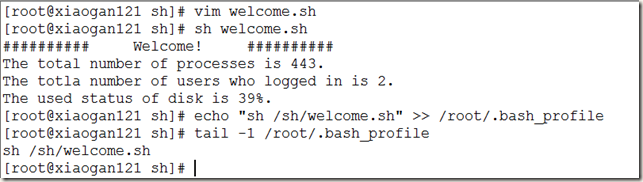
注意:也可修改/etc/profile配置文件,实现开机运行
脚本源码如下:
#!/bin/bash
# welcome information for login
#
# Print below information:
# 1. The total number of processes.
# 2. The totla number of users who logged in.
# 3. The used status of disk.
echo "########## Welcome! ##########"
# 1. The total number of processes.
echo "The total number of processes is $(ps -aux | wc -l)."
# 2. The totla number of users who logged in.
echo "The totla number of users who logged in is $(who | wc -l)."
# 3. The used status of disk.
echo "The used status of disk is $(df -hT | grep root | awk '{print $6}')."
---------------------------------------------
实战-2、编写脚本实现系统服务启动 停止 当前状态的脚本
#!/bin/bash
#service manager script
# status start stop restart
if [ $1 = 'start' ] #start server of $2
then systemctl start $2 2>>server.logs
elif [ $1 = 'stop' ] #stop server of $2
then systemctl stop $2 2>>server.logs
elif [ $1 = 'status' ] #status server of $2
then systemctl status $2 2>>server.logs
elif [ $1 = 'restart' ] #restart server of $2
then systemctl restart $2 2>>server.logs
fi
---------------------------------------------
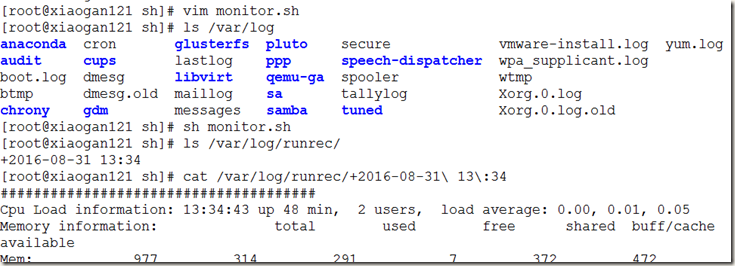
实战-3、写运行状况监控脚本
/sh/monitor.sh,用于记录CPU负载、内存和交换空间、磁盘空间、最近的用户登录情况等信息,以及当时的时间信息。
#!/bin/bash
#back monitor CPU Mem Swap Disk LastLogin information to file
# set recored Dir
Dir=/var/log/runrec/
# prepare the environment
mkdir -p $Dir
# get current time
RecTime=$(date +"%Y-%m-%d %H:%M")
# set record filename
RecFile=$Dir$RecTime.log
# get CPU
RecLoad=$(uptime)
# get Mem and Swap
RecMem=$(free -m)
# get Disk
RecDisk=$(df -hT)
# get Last
RecLastLogin=$(last -n 20)
# echo information and saved to RecFile
echo "######################################
Cpu Load information:$RecLoad
Memory information:$RecMem
Disk Usage information:$RecDisk
Last Login 20 users record:$RecLastLogin" >> $RecFile
设置定时备份:

---------------------------------------------
实战-4、过滤出本机echo网卡的MAC地址,并赋值给hwaddr
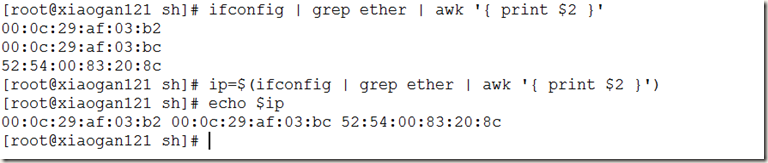
[root@xiaogan121 sh]# ifconfig | grep ether | awk '{ print $2 }'
00:0c:29:af:03:b2
00:0c:29:af:03:bc
52:54:00:83:20:8c
[root@xiaogan121 sh]# ip=$(ifconfig | grep ether | awk '{ print $2 }')
[root@xiaogan121 sh]# echo $ip
00:0c:29:af:03:b2 00:0c:29:af:03:bc 52:54:00:83:20:8c
[root@xiaogan121 sh]#
---------------------------------------------
实战-5、编写脚本计算当前的内存使用百分比
MemTotal=$(free -m | grep Mem | awk '{ print $2 }')
MemUse=$(free -m | grep Mem | awk '{ print $3 }')
usage=$( expr $( expr $MemUse \* 100 ) / $MemTotal )

[root@xiaogan121 sh]# usage=$( expr $( expr $(free -m | grep Mem | awk '{ print $3 }') \* 100 ) / $(free -m | grep Mem | awk '{ print $2 }') )
[root@xiaogan121 sh]# echo $usage
31
[root@xiaogan121 sh]# free -m | grep Mem | awk '{ print $3 }'
311
[root@xiaogan121 sh]# free -m | grep Mem | awk '{ print $2 }'
977
[root@xiaogan121 sh]# free -m
total used free shared buff/cache available
Mem: 977 312 292 7 373 474
Swap: 2047 0 2047
[root@xiaogan121 sh]#
---------------------------------------------
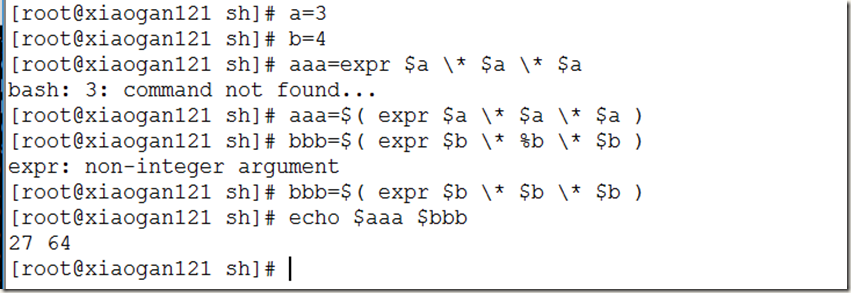
实战-6、计算3 4 的平方和
1-22-shell脚本基本应用-实验手册的更多相关文章
- Miniconda 安装 & Pip module 安装 & Shell 脚本调用 Miniconda 虚拟环境手册(实战项目应用)
(实战项目应用) 1. 下载Miniconda 两个安装方式: 方式1:wget https://mirrors.tuna.tsinghua.edu.cn/anaconda/miniconda/Min ...
- Shell脚本编程总结及速查手册
Shell是一种编程语言, 它像其它编程语言如: C, Java, Python等一样也有变量/函数/运算符/if语句/循环控制/… 但在开始之前, 我想先理清Shell语言与Shell之间的关系. ...
- 让你提前知道软件开发(22):shell脚本文件操作
文章1部分 再了解C语言 shell脚本中的文件操作 [文章摘要] 编写shell脚本时,经常会涉及到对文件的操作,比方从文件里读取一行数据.向文件追加一行数据等. 完毕文件读写操作的方法有非常多,了 ...
- Linux编程 22 shell编程(输出和输入重定向,管道,数学运算命令,退出脚本状态码)
1. 输出重定向 最基本的重定向是将命令的输出发送到一个文件中.在bash shell中用大于号(>) ,格式如下:command > inputfile.例如:将date命令的输出内容, ...
- 《Linux命令行与shell脚本编程大全 第3版》Linux命令行---22
以下为阅读<Linux命令行与shell脚本编程大全 第3版>的读书笔记,为了方便记录,特地与书的内容保持同步,特意做成一节一次随笔,特记录如下:
- 2019.11.13课堂实验之用Linux下的shell脚本完成两文本交替输出
有两个文本如下,实际中并不知道两文本各有多少行: 文本1.txt aaaaaaaaaaaaaaaaaaaaaaaaaaaaaaaaaaaaaaa ccccccccccccccccccccccccccc ...
- 实验五:shell脚本编程
项目 内容 这个作业属于哪个课程 班级课程的主页链接 这个作业的要求在哪里 作业要求链接地址 学号-姓名 17043133-木腾飞 作业学习目标 1.了解shell 脚本的概念及应用2.掌握shell ...
- 实验五 shell脚本编程
项目 内容 这个作业属于哪个课程 课程链接 这个作业的要求在哪里 作业要求 学号-姓名 17041428-朱槐健 作业学习目标 1. 了解shell脚本的概念及使用 2.掌握shell脚本语言的基本语 ...
- 实验五shell脚本编程
项目 内容 这个作业属于哪个课程 <班级课程的主页链接> 这个作业的要求在哪里 作业要求链接地址 学号-姓名 17043220-万文文 作业学习目标 1)了解shell脚本的概念及使用.2 ...
随机推荐
- IOS 此时无法安装XXX
背景介绍 替一家公司做了企业APP,由于经常需要更新,考虑到上传到APP Store的审核过程,所以当初选定了是用企业证书发布,然后通过网页自动跳转下载APP. 事情原委 昨天下午突然接到客户反馈,I ...
- PHPCMS新闻内容调用方法介绍
{template "content","header"} ---------- 调用根目录下phpcms\template\content\header文件 ...
- XDU 1164 男神的树(树+lazy数组)
#include<cstdio> #include<cmath> #include<cstring> #include<vector> #define ...
- Tornado 自定义Form,session实现方法
一. 自定义Tornado 验证模块 我们知道,平时在登陆某个网站或软件时,网站对于你输入的内容是有要求的,并且会对你输入的错误内容有提示,对于Django这种大而全的web框架,是提供了form表单 ...
- python3_pickle模块详解
python3 pickle持久化的储存数据. python程序运行中得到了一些字符串,列表,字典等数据,想要长久的保存下来,方便以后使用,而不是简单的放入内存中关机断电就丢失数据.python模块大 ...
- 在linux环境下安装python3.6
wget https://www.python.org/ftp/python/3.6.1/Python-3.6.1.tgz --no-check-certificat gunzip Python-3. ...
- swift设计模式学习 - 装饰模式
移动端访问不佳,请访问我的个人博客 设计模式学习的demo地址,欢迎大家学习交流 装饰模式 在不必改变原类文件和使用继承的情况下,动态地扩展一个对象的功能.它是通过创建一个包装对象,也就是装饰来包裹真 ...
- mybatis动态sql中的sql标签——抽取可重用的sql片段
1.用<sql>标签抽取可重用的sql片段 <!-- 抽取可重用的SQL片段,方便后面引用 1.sql抽取,经常将要查询的列名,或者插入用的列名,之后方便引用 ...
- DataStage系列教程 (Slowly Changing Dimension)缓慢变化维
BI中维表的增量更新一般有2种: Type 1:覆盖更改.记录的列值发生变化,直接update成最新记录. Type 2:历史跟踪更改.记录值发生变化,将该记录置为失效,再insert一条新的记录. ...
- 解题报告: hdu 3949 - 线性基
#include <iostream> #include <cstdio> #define LL long long using namespace std; const in ...