
我的Android学习路线(二)
这两天的主要工作:
- 优化了一下布局界面,原本使用的是相对布局,直观省力,但是考虑了一下还是使用更加主流的线性布局。
- 完善了一下计算器的功能,比如加入小数运算。
使用线性布局的思路可以用下面的伪代码表示
<最外层 纵向排列>

    <数字显示>

        <TextView>

    </数字显示>

    <第一排按钮 横向排列>

        <Button>...

    </第一排按钮>

    <第二排...>

    ...

</最外层>
接着,使用权重划分就可以使每个元素“撑满”屏幕。
经过调整后,现在的布局如下:
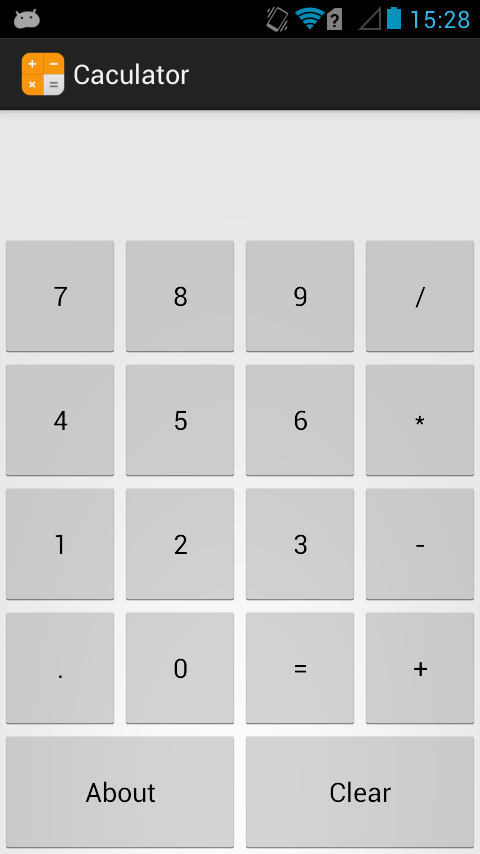
布局代码:
<LinearLayout xmlns:android="http://schemas.android.com/apk/res/android"

    xmlns:tools="http://schemas.android.com/tools"

    android:layout_width="match_parent"

    android:layout_height="match_parent"

    android:orientation="vertical" >

    <!-- 文字显示 -->

    <LinearLayout

        android:layout_width="fill_parent"

        android:layout_height="wrap_content"

        android:layout_weight="1"

        android:orientation="horizontal" >

        <TextView

        android:id="@+id/TextView_1"

        android:layout_width="fill_parent"

        android:layout_height="fill_parent"

        android:textSize="36sp" />

    </LinearLayout>

    <!-- 按钮区域 -->

    <LinearLayout

        android:layout_width="fill_parent"

        android:layout_height="wrap_content"

        android:layout_gravity="bottom"

        android:layout_weight="5"

        android:orientation="vertical" >

        <!-- 第一排按钮 -->

        <LinearLayout

            android:layout_width="fill_parent"

            android:layout_height="wrap_content"

            android:layout_weight="1"

            android:orientation="horizontal" >

            <Button

                android:id="@+id/btn_7"

                android:layout_width="wrap_content"

                android:layout_height="fill_parent"

                android:layout_weight="1"

                android:text="7" />

            <Button

                android:id="@+id/btn_8"

                android:layout_width="wrap_content"

                android:layout_height="fill_parent"

                android:layout_weight="1"

                android:text="8"/>

            <Button

                android:id="@+id/btn_9"

                android:layout_width="wrap_content"

                android:layout_height="fill_parent"

                android:layout_weight="1"

                android:text="9" />

            <Button

                android:id="@+id/btn_div"

                android:layout_width="wrap_content"

                android:layout_height="fill_parent"

                android:layout_weight="1"

                android:text="/" />

        </LinearLayout>

        <!-- 第二排按钮 -->

        <LinearLayout

            android:layout_width="fill_parent"

            android:layout_height="wrap_content"

            android:layout_weight="1"

            android:orientation="horizontal" >

            <Button

                android:id="@+id/btn_4"

                android:layout_width="wrap_content"

                android:layout_height="fill_parent"

                android:layout_weight="1"

                android:text="4" />

            <Button

                android:id="@+id/btn_5"

                android:layout_width="wrap_content"

                android:layout_height="fill_parent"

                android:layout_weight="1"

                android:text="5" />

            <Button

                android:id="@+id/btn_6"

                android:layout_width="wrap_content"

                android:layout_height="fill_parent"

                android:layout_weight="1"

                android:text="6" />

            <Button

                android:id="@+id/btn_mul"

                android:layout_width="wrap_content"

                android:layout_height="fill_parent"

                android:layout_weight="1"

                android:text="*" />

        </LinearLayout>

        <!-- 第三排按钮 -->

        <LinearLayout

            android:layout_width="fill_parent"

            android:layout_height="wrap_content"

            android:layout_weight="1"

            android:orientation="horizontal" >

            <Button

                android:id="@+id/btn_1"

                android:layout_width="wrap_content"

                android:layout_height="fill_parent"

                android:layout_weight="1"

                android:text="1" />

            <Button

                android:id="@+id/btn_2"

                android:layout_width="wrap_content"

                android:layout_height="fill_parent"

                android:layout_weight="1"

                android:text="2" />

            <Button

                android:id="@+id/btn_3"

                android:layout_width="wrap_content"

                android:layout_height="fill_parent"

                android:layout_weight="1"

                android:text="3" />

            <Button

                android:id="@+id/btn_sub"

                android:layout_width="wrap_content"

                android:layout_height="fill_parent"

                android:layout_weight="1"

                android:text="-" />

        </LinearLayout>

        <!-- 第四排按钮 -->

        <LinearLayout

            android:layout_width="fill_parent"

            android:layout_height="wrap_content"

            android:layout_weight="1"

            android:orientation="horizontal" >

            <Button

                android:id="@+id/btn_point"

                android:layout_width="wrap_content"

                android:layout_height="fill_parent"

                android:layout_weight="1"

                android:text="." />

            <Button

                android:id="@+id/btn_0"

                android:layout_width="wrap_content"

                android:layout_height="fill_parent"

                android:layout_weight="1"

                android:text="0" />

            <Button

                android:id="@+id/btn_equ"

                android:layout_width="wrap_content"

                android:layout_height="fill_parent"

                android:layout_weight="1"

                android:text="=" />

            <Button

                android:id="@+id/btn_add"

                android:layout_width="wrap_content"

                android:layout_height="fill_parent"

                android:layout_weight="1"

                android:text="+" />

        </LinearLayout>

        <!-- 第五排按钮 -->

        <LinearLayout

            android:layout_width="fill_parent"

            android:layout_height="wrap_content"

            android:layout_weight="1"

            android:orientation="horizontal">

            <Button

                android:id="@+id/btn_about"

                android:layout_width="0dp"

                android:layout_height="fill_parent"

                android:layout_weight="1"

                android:text="About" />

            <Button

                android:id="@+id/btn_clear"

                android:layout_width="0dp"

                android:layout_height="fill_parent"

                android:layout_weight="1"

                android:text="Clear" />

        </LinearLayout>

    </LinearLayout>

</LinearLayout>
这份布局代码还是存在很多的 warning,主要原因是使用 LinearLayout 之后,并排的按钮会被系统默认为按钮组,因此 eclipse 会提示去掉 Button 的 Border,不过在这里这样做影响不大。
而且这份代码存在的一个问题是,在宽度和高度使用了权重之后,其实大可直接将 width 和 height 指定为0。
以下是 Main 代码
package cn.zhouxuchen.caculator; import android.os.Bundle;
import android.app.Activity;
import android.app.AlertDialog;
import android.app.Dialog;
import android.content.DialogInterface;
import android.content.DialogInterface.OnClickListener;
import android.view.Menu;
import android.view.View;
import android.widget.Button;
import android.widget.TextView; public class MainActivity extends Activity { double num_A = 0;
double num_B = 0;
double result = 0;
int decimal_A = 1; //数字A小数点后的位数
int decimal_B = 1; //数字B小数点后的位数 boolean is_A = true; //判断是否操作A数,是则操作A数,否则操作B数
boolean is_A_float = false; //判断在操作数字A时是否输入小数点
boolean is_B_float = false; //判断在操作数字B时是否输入小数点
boolean is_Add = false; //判断是否进行加法运算
boolean is_Sub = false; //判断是否进行减法运算
boolean is_Mul = false; //判断是否进行乘法运算
boolean is_Div = false; //判断是否进行除法运算
boolean result_exist = false; //判断是否已经计算出一个结果
boolean operator_exist = false; //判断是否已经按下运算符按钮 String textScreen = ""; @Override
protected void onCreate(Bundle savedInstanceState) {
super.onCreate(savedInstanceState);
setContentView(R.layout.activity_main); //--- 文字显示 ---
final TextView textView = (TextView) findViewById(R.id.TextView_1);
//--- 数字按钮 ---
Button btn_0 = (Button) findViewById(R.id.btn_0);
Button btn_1 = (Button) findViewById(R.id.btn_1);
Button btn_2 = (Button) findViewById(R.id.btn_2);
Button btn_3 = (Button) findViewById(R.id.btn_3);
Button btn_4 = (Button) findViewById(R.id.btn_4);
Button btn_5 = (Button) findViewById(R.id.btn_5);
Button btn_6 = (Button) findViewById(R.id.btn_6);
Button btn_7 = (Button) findViewById(R.id.btn_7);
Button btn_8 = (Button) findViewById(R.id.btn_8);
Button btn_9 = (Button) findViewById(R.id.btn_9);
//--- 运算符 ---
Button btn_add = (Button) findViewById(R.id.btn_add);
Button btn_sub = (Button) findViewById(R.id.btn_sub);
Button btn_mul = (Button) findViewById(R.id.btn_mul);
Button btn_div = (Button) findViewById(R.id.btn_div);
Button btn_equ = (Button) findViewById(R.id.btn_equ);
Button btn_point = (Button) findViewById(R.id.btn_point);
//--- 其他按钮 ---
Button btn_about = (Button) findViewById(R.id.btn_about);
Button btn_clear = (Button) findViewById(R.id.btn_clear); //--- 为关于按钮添加方法 ---
btn_about.setOnClickListener(new View.OnClickListener() {
@Override
public void onClick(View arg0) {
String Title = "这是一个计算器\n";
String Info =
"这不重要\n" +
"请点击下面那玩意关闭\n" +
"By 周教授";
AlertDialog.Builder about = new AlertDialog.Builder(MainActivity.this);
about.setTitle(Title);
about.setMessage(Info);
about.setIcon(R.drawable.ic_launcher);
about.setNegativeButton("点我点我", new OnClickListener() {
@Override
public void onClick(DialogInterface dialog, int arg1) {
dialog.dismiss();
}
}); about.create().show();
}
}); //--- 为清除按钮添加方法 ---
btn_clear.setOnClickListener(new View.OnClickListener() {
@Override
public void onClick(View arg0) {
num_A = 0;
num_B = 0;
result = 0;
decimal_A = 1;
decimal_B = 1;
is_A = true;
is_A_float = false;
is_B_float = false;
is_Add = false;
is_Sub = false;
is_Mul = false;
is_Div = false;
result_exist = false;
operator_exist = false;
textScreen = "";
textView.setText(textScreen);
}
}); //--- 为小数点按钮添加方法 ---
btn_point.setOnClickListener(new View.OnClickListener() {
@Override
public void onClick(View arg0) {
if(is_A) {
is_A_float = true;
} else {
is_B_float = true;
}
}
}); //--- 为数字按钮添加监听器以及相应的方法 ---
btn_0.setOnClickListener(new View.OnClickListener() {
@Override
public void onClick(View arg0) {
result_exist = false;
operator_exist = false; if(is_A) {
if(is_A_float) {
decimal_A++;
} else {
num_A *= 10;
} textScreen = num_A + "";
textView.setText(textScreen);
} else {
if(is_B_float) {
decimal_B++;
} else {
num_B *= 10;
} textView.setText(textScreen + num_B);
}
}
}); btn_1.setOnClickListener(new View.OnClickListener() {
@Override
public void onClick(View arg0) {
result_exist = false;
operator_exist = false; if(is_A) {
if(is_A_float) {
num_A += 1 / Math.pow(10, decimal_A);
decimal_A++;
} else {
num_A = num_A*10 + 1;
} textScreen = num_A + "";
textView.setText(textScreen);
} else {
if(is_B_float) {
num_B += 1 / Math.pow(10, decimal_B);
decimal_B++;
} else {
num_B = num_B*10 + 1;
} textView.setText(textScreen + num_B);
}
}
}); btn_2.setOnClickListener(new View.OnClickListener() {
@Override
public void onClick(View arg0) {
result_exist = false;
operator_exist = false; if(is_A) {
if(is_A_float) {
num_A += 2 / Math.pow(10, decimal_A);
decimal_A++;
} else {
num_A = num_A*10 + 2;
} textScreen = num_A + "";
textView.setText(textScreen);
} else {
if(is_B_float) {
num_B += 2 / Math.pow(10, decimal_B);
decimal_B++;
} else {
num_B = num_B*10 + 2;
} textView.setText(textScreen + num_B);
}
}
}); btn_3.setOnClickListener(new View.OnClickListener() {
@Override
public void onClick(View arg0) {
result_exist = false;
operator_exist = false; if(is_A) {
if(is_A_float) {
num_A += 3 / Math.pow(10, decimal_A);
decimal_A++;
} else {
num_A = num_A*10 + 3;
} textScreen = num_A + "";
textView.setText(textScreen);
} else {
if(is_B_float) {
num_B += 3 / Math.pow(10, decimal_B);
decimal_B++;
} else {
num_B = num_B*10 + 3;
} textView.setText(textScreen + num_B);
}
}
}); btn_4.setOnClickListener(new View.OnClickListener() {
@Override
public void onClick(View arg0) {
result_exist = false;
operator_exist = false; if(is_A) {
if(is_A_float) {
num_A += 4 / Math.pow(10, decimal_A);
decimal_A++;
} else {
num_A = num_A*10 + 4;
} textScreen = num_A + "";
textView.setText(textScreen);
} else {
if(is_B_float) {
num_B += 4 / Math.pow(10, decimal_B);
decimal_B++;
} else {
num_B = num_B*10 + 4;
} textView.setText(textScreen + num_B);
}
}
}); btn_5.setOnClickListener(new View.OnClickListener() {
@Override
public void onClick(View arg0) {
result_exist = false;
operator_exist = false; if(is_A) {
if(is_A_float) {
num_A += 5 / Math.pow(10, decimal_A);
decimal_A++;
} else {
num_A = num_A*10 + 5;
} textScreen = num_A + "";
textView.setText(textScreen);
} else {
if(is_B_float) {
num_B += 5 / Math.pow(10, decimal_B);
decimal_B++;
} else {
num_B = num_B*10 + 5;
} textView.setText(textScreen + num_B);
}
}
}); btn_6.setOnClickListener(new View.OnClickListener() {
@Override
public void onClick(View arg0) {
result_exist = false;
operator_exist = false; if(is_A) {
if(is_A_float) {
num_A += 6 / Math.pow(10, decimal_A);
decimal_A++;
} else {
num_A = num_A*10 + 6;
} textScreen = num_A + "";
textView.setText(textScreen);
} else {
if(is_B_float) {
num_B += 6 / Math.pow(10, decimal_B);
decimal_B++;
} else {
num_B = num_B*10 + 6;
} textView.setText(textScreen + num_B);
}
}
}); btn_7.setOnClickListener(new View.OnClickListener() {
@Override
public void onClick(View arg0) {
result_exist = false;
operator_exist = false; if(is_A) {
if(is_A_float) {
num_A += 7 / Math.pow(10, decimal_A);
decimal_A++;
} else {
num_A = num_A*10 + 7;
} textScreen = num_A + "";
textView.setText(textScreen);
} else {
if(is_B_float) {
num_B += 7 / Math.pow(10, decimal_B);
decimal_B++;
} else {
num_B = num_B*10 + 7;
} textView.setText(textScreen + num_B);
}
}
}); btn_8.setOnClickListener(new View.OnClickListener() {
@Override
public void onClick(View arg0) {
result_exist = false;
operator_exist = false; if(is_A) {
if(is_A_float) {
num_A += 8 / Math.pow(10, decimal_A);
decimal_A++;
} else {
num_A = num_A*10 + 8;
} textScreen = num_A + "";
textView.setText(textScreen);
} else {
if(is_B_float) {
num_B += 8 / Math.pow(10, decimal_B);
decimal_B++;
} else {
num_B = num_B*10 + 8;
} textView.setText(textScreen + num_B);
}
}
}); btn_9.setOnClickListener(new View.OnClickListener() {
@Override
public void onClick(View arg0) {
result_exist = false;
operator_exist = false; if(is_A) {
if(is_A_float) {
num_A += 9 / Math.pow(10, decimal_A);
decimal_A++;
} else {
num_A = num_A*10 + 9;
} textScreen = num_A + "";
textView.setText(textScreen);
} else {
if(is_B_float) {
num_B += 9 / Math.pow(10, decimal_B);
decimal_B++;
} else {
num_B = num_B*10 + 9;
} textView.setText(textScreen + num_B);
}
}
}); //--- 为运算符按钮添加监听器及相应的方法 ---
btn_add.setOnClickListener(new View.OnClickListener() {
@Override
public void onClick(View arg0) {
//--- 判断之前是否按下过运算符按钮 ---
if(operator_exist) {
is_Add = true;
is_Sub = false;
is_Mul = false;
is_Div = false; textScreen = num_A + " + ";
textView.setText(textScreen);
operator_exist = true;
return;
} //--- 判断之前有没有运算出结果 ---
if(result_exist) {
num_A = result;
result_exist = false; is_Add = true;
is_A = false;
textScreen = num_A + " + ";
textView.setText(textScreen);
return;
} //--- 判断是否需要计算出结果并进行下一次运算 ---
if(!is_A) {
if(is_Add) {
result = num_A + num_B;
//is_Add 的值不变
} else if(is_Sub) {
result = num_A - num_B;
is_Sub = false;
} else if(is_Mul) {
result = num_A * num_B;
is_Mul = false;
} else if(is_Div){
result = num_A / num_B;
is_Div = false;
} is_B_float = false;
decimal_B = 1; is_Add = true;
num_A = result;
num_B = 0;
textScreen = num_A + " + ";
textView.setText(textScreen);
return;
} is_Add = true;
is_A = false;
operator_exist = true; textScreen = num_A + " + ";
textView.setText(textScreen);
}
}); btn_sub.setOnClickListener(new View.OnClickListener() {
@Override
public void onClick(View arg0) {
//--- 判断之前是否按下过运算符按钮 ---
if(operator_exist) {
is_Add = false;
is_Sub = true;
is_Mul = false;
is_Div = false; textScreen = num_A + " - ";
textView.setText(textScreen);
operator_exist = true;
return;
} //--- 判断之前有没有运算出结果 ---
if(result_exist) {
num_A = result;
result_exist = false; is_Sub = true;
is_A = false;
textScreen = num_A + " - ";
textView.setText(textScreen);
return;
} //--- 判断是否需要计算出结果并进行下一次运算 ---
if(!is_A) {
if(is_Add) {
result = num_A + num_B;
is_Add = false;
} else if(is_Sub) {
result = num_A - num_B;
// is_Sub = false;
} else if(is_Mul) {
result = num_A * num_B;
is_Mul = false;
} else if(is_Div){
result = num_A / num_B;
is_Div = false;
} is_B_float = false;
decimal_B = 1; is_Sub = true;
num_A = result;
num_B = 0;
textScreen = num_A + " - ";
textView.setText(textScreen);
return;
} is_Sub = true;
is_A = false;
operator_exist = true; textScreen = num_A + " - ";
textView.setText(textScreen);
}
}); btn_mul.setOnClickListener(new View.OnClickListener() {
@Override
public void onClick(View arg0) {
//--- 判断之前是否按下过运算符按钮 ---
if(operator_exist) {
is_Add = false;
is_Sub = false;
is_Mul = true;
is_Div = false; textScreen = num_A + " * ";
textView.setText(textScreen);
operator_exist = true;
return;
} //--- 判断之前有没有运算出结果 ---
if(result_exist) {
num_A = result;
result_exist = false; is_Mul = true;
is_A = false;
textScreen = num_A + " * ";
textView.setText(textScreen);
return;
} //--- 判断是否需要计算出结果并进行下一次运算 ---
if(!is_A) {
if(is_Add) {
result = num_A + num_B;
is_Add = false;
} else if(is_Sub) {
result = num_A - num_B;
is_Sub = false;
} else if(is_Mul) {
result = num_A * num_B;
// is_Mul = false;
} else if(is_Div){
result = num_A / num_B;
is_Div = false;
} is_B_float = false;
decimal_B = 1; is_Mul = true;
num_A = result;
num_B = 0;
textScreen = num_A + " * ";
textView.setText(textScreen);
return;
} is_Mul = true;
is_A = false;
operator_exist = true; textScreen = num_A + " * ";
textView.setText(textScreen);
}
}); btn_div.setOnClickListener(new View.OnClickListener() {
@Override
public void onClick(View arg0) {
//--- 判断之前是否按下过运算符按钮 ---
if(operator_exist) {
is_Add = false;
is_Sub = false;
is_Mul = false;
is_Div = true; textScreen = num_A + " / ";
textView.setText(textScreen);
operator_exist = true;
return;
} //--- 判断之前有没有运算出结果 ---
if(result_exist) {
num_A = result;
result_exist = false; is_Div = true;
is_A = false;
textScreen = num_A + " / ";
textView.setText(textScreen);
return;
} //--- 判断是否需要计算出结果并进行下一次运算 ---
if(!is_A) {
if(is_Add) {
result = num_A + num_B;
is_Add = false;
} else if(is_Sub) {
result = num_A - num_B;
is_Sub = false;
} else if(is_Mul) {
result = num_A * num_B;
is_Mul = false;
} else if(is_Div){
result = num_A / num_B;
// is_Div = false;
} is_B_float = false;
decimal_B = 1; is_Div = true;
num_A = result;
num_B = 0;
textScreen = num_A + " / ";
textView.setText(textScreen);
return;
} is_Div = true;
is_A = false;
operator_exist = true; textScreen = num_A + " / ";
textView.setText(textScreen);
}
}); btn_equ.setOnClickListener(new View.OnClickListener() {
@Override
public void onClick(View arg0) {
if(is_A) {
result = num_A;
textScreen = result + "";
result_exist = true;
textView.setText(textScreen);
return;
} if(is_Add) {
result = num_A + num_B;
is_Add = false;
} else if(is_Sub) {
result = num_A - num_B;
is_Sub = false;
} else if(is_Mul) {
result = num_A * num_B;
is_Mul = false;
} else if(is_Div) {
result = num_A / num_B;
is_Div = false;
} textScreen = result + "";
is_A_float = false;
is_B_float = false;
decimal_A = 1;
decimal_B = 1;
num_A = 0;
num_B = 0;
is_A = true;
result_exist = true;
textView.setText(textScreen);
}
});
} }
至此,基本的布局就告一段落,下面就可以捣鼓四大组件了。
我的Android学习路线(二)的更多相关文章
- Android学习路线(二十四)ActionBar Fragment运用最佳实践
转载请注明出处:http://blog.csdn.net/sweetvvck/article/details/38645297 通过前面的几篇博客.大家看到了Google是怎样解释action bar ...
- Android学习路线(二十一)运用Fragment构建动态UI——创建一个Fragment
你能够把fragment看成是activity的模块化部分.它拥有自己的生命周期,接受它自己的输入事件,你能够在activity执行时加入或者删除它(有点像是一个"子activity&quo ...
- Android学习路线总结,绝对干货
title: Android学习路线总结,绝对干货 tags: Android学习路线,Android学习资料,怎么学习android grammar_cjkRuby: true --- 一.前言 不 ...
- (转)Android学习路线总结,绝对干货
一.前言 不知不觉自己已经做了几年开发了,由记得刚出来工作的时候感觉自己能牛逼,现在回想起来感觉好无知.懂的越多的时候你才会发现懂的越少. 如果你的知识是一个圆,当你的圆越大时,圆外面的世界也就越大. ...
- Android学习路线总结,绝对干货(转)
转自:https://www.cnblogs.com/yishaochu/p/5436094.html 一.前言 不知不觉自己已经做了几年开发了,由记得刚出来工作的时候感觉自己能牛逼,现在回想起来感觉 ...
- Android学习路线总结,绝对干货(转)
title: Android学习路线总结,绝对干货tags: Android学习路线,Android学习资料,怎么学习androidgrammar_cjkRuby: true--- 一.前言 不知不觉 ...
- 工作不久的安卓开发者,他们是这样规划自己的Android学习路线
Android开发工作者工作不久的时候,会有一段迷茫期,觉得自己应该再学一点,却不知道从何学起,该怎样规划自己的学习路线呢?今天,我给大家梳理一下Android基础,就像建造房屋一样,要建造一座宏伟的 ...
- Android学习路线指南
看到这位大牛的博文,不禁得感概,我最近也遇到了很多问题,内心彷徨不堪,转载大牛这篇博文,是为了更好的勉励自己.原文地址在最后面. 前言 看到一篇文章中提到"最近几年国内的初级Android程 ...
- 我的Android学习路线(一)
最近实在是闲的无聊,本着不能让自己的时间白白流失的目的,我就决定完成一下之前的诺言:把 Android 开发学了.正好手头有一本<Android 4编程入门经典>,于是便用两天时间把视图部 ...
- 【Android】完善Android学习(二:API 2.3.4)
备注:之前Android入门学习的书籍使用的是杨丰盛的<Android应用开发揭秘>,这本书是基于Android 2.2API的,目前Android已经到4.4了,更新了很多的API,也增 ...
随机推荐
- docker-compose部署zk集群、kafka集群以及kafka-manager,及其遇到的问题和解决
zk集群docker-compose.yml 1.新建网络 docker network create --driver bridge --subnet --gateway 172.23.0.1 zo ...
- SQL Server扩展事件-- 使用system_health默认跟踪会话监控死锁
SQL Server扩展事件(Extended Events)-- 使用system_health默认跟踪会话监控死锁 转自:http://blog.51cto.com/ultrasql/160037 ...
- Django orm 中 python manage.py makemigrations 和 python manage.py migrate 这两条命令用途
生成一个临时文件 python manage.py makemigrations 这时其实是在该app下建立 migrations目录,并记录下你所有的关于modes.py的改动,比如0001_ini ...
- cl查看类的内存布局
查看单个类的内存布局 Microsoft Visual Studio编译器cl的编译选项可以查看源文件中某个C++类的内存布局,对于想了解某个对象的内存布局的人来说十分直观和方便. • 命令格式 ...
- [转载] 活跃在github上的国内前端大牛
出处:http://blog.csdn.net/yaoxtao/article/details/38518933 20位活跃在Github上的国内技术大牛 本文列举了20位在Github上非常活跃的国 ...
- Check back what the kd 6 for more info
Representing a shout-to his fans in China, the What the KD 6 may be the product of NIKEiD's Player E ...
- Kattis - bank 【简单DP】
Kattis - bank [简单DP] Description Oliver is a manager of a bank near KTH and wants to close soon. The ...
- spark 作业提交
kafka-topics.sh --describe --zookeeper xxxxx:2181 --topic testkafka-run-class.sh kafka.tools.GetOffs ...
- (译)Windows Azure的7月更新:SQL数据库,流量管理,自动缩放,虚拟机
Windows Azure的7月更新:SQL数据库,流量管理,自动缩放,虚拟机 今早我们释出一些很棒的Windows Azure更新.这些新的提升包括:SQL数据库:支持SQL自动导出和一个新的高级层 ...
- laravel 环境配置
一.composer 安装 1.确定为最新版本的PHP 2.进入Composer官网下载页面,在页面最下方Manual Download区域选择需要的版本下载. 3.将下载的composer.phar ...