
SSH开发环境整合搭建
1.建立动态web工程,加入必要的jar包。
antlr-2.7.7.jar

asm-3.3.jar

asm-commons-3.3.jar

asm-tree-3.3.jar

c3p0-0.9.1.2.jar

com.springsource.net.sf.cglib-2.2.0.jar

com.springsource.org.aopalliance-1.0.0.jar

com.springsource.org.aspectj.weaver-1.6.8.RELEASE.jar

commons-fileupload-1.2.2.jar

commons-io-2.0.1.jar

commons-lang3-3.1.jar

commons-logging-1.1.1.jar

dom4j-1.6.1.jar

freemarker-2.3.19.jar

hibernate-commons-annotations-4.0.2.Final.jar

hibernate-core-4.2.4.Final.jar

hibernate-jpa-2.0-api-1.0.1.Final.jar

javassist-3.11.0.GA.jar

javassist-3.15.0-GA.jar

jboss-logging-3.1.0.GA.jar

jboss-transaction-api_1.1_spec-1.0.1.Final.jar

mchange-commons-java-0.2.10.jar

mysql-connector-java-5.1.26-bin.jar

ognl-3.0.5.jar

spring-aop-4.0.0.RELEASE.jar

spring-aspects-4.0.0.RELEASE.jar

spring-beans-4.0.0.RELEASE.jar

spring-context-4.0.0.RELEASE.jar

spring-core-4.0.0.RELEASE.jar

spring-expression-4.0.0.RELEASE.jar

spring-jdbc-4.0.0.RELEASE.jar

spring-orm-4.0.0.RELEASE.jar

spring-tx-4.0.0.RELEASE.jar

spring-web-4.0.0.RELEASE.jar //此包为spring整合到web的关键jar包

struts2-core-2.3.4.jar

struts2-spring-plugin-2.3.4.jar

xwork-core-2.3.4.jar
2. web.xml的配置
<!-- 配置spring监听器,在动态web加载时就将其配置文件一同加载 -->
    <context-param>

        <param-name>contextConfigLocation</param-name>

        <!-- 将spring配置文件放入一个IOC容器 -->

        <param-value>classpath:applicationcontext.xml</param-value>

    </context-param>

    <listener>

        <listener-class>org.springframework.web.context.ContextLoaderListener</listener-class>

    </listener>


<!-- struts2的配置文件,拦截所有请求,判断是否是struts2请求,若是则拦截,若不是则放行 -->

    <filter>

        <filter-name>struts2</filter-name>

        <filter-class>org.apache.struts2.dispatcher.ng.filter.StrutsPrepareAndExecuteFilter</filter-class>

    </filter>

    <filter-mapping>

        <filter-name>struts2</filter-name>

        <url-pattern>/*</url-pattern>

    </filter-mapping>
3. spring整合hibernate及struts2的配置文件
图解如下:
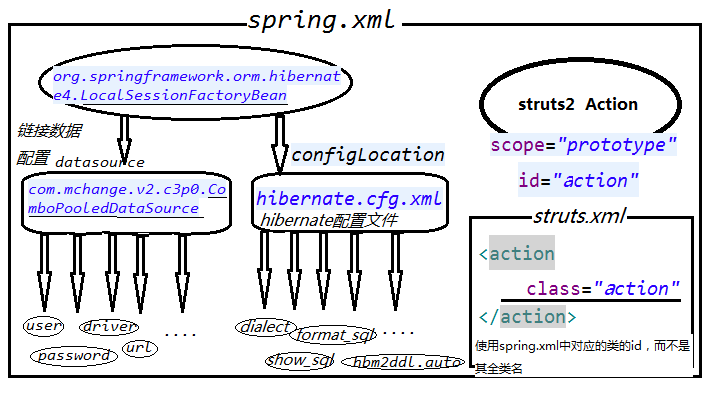
applicationcontext.xml
<?xml version="1.0" encoding="UTF-8"?>

<beans xmlns="http://www.springframework.org/schema/beans"

    xmlns:xsi="http://www.w3.org/2001/XMLSchema-instance"

    xmlns:context="http://www.springframework.org/schema/context"

    xmlns:tx="http://www.springframework.org/schema/tx"

    xmlns:aop="http://www.springframework.org/schema/aop"

    xsi:schemaLocation="http://www.springframework.org/schema/beans http://www.springframework.org/schema/beans/spring-beans.xsd

        http://www.springframework.org/schema/context http://www.springframework.org/schema/context/spring-context-4.0.xsd

        http://www.springframework.org/schema/aop http://www.springframework.org/schema/aop/spring-aop-4.0.xsd

        http://www.springframework.org/schema/tx http://www.springframework.org/schema/tx/spring-tx-4.0.xsd">

    <!-- 加载db.properties文件 -->

    <context:property-placeholder location="classpath:db.properties"/>

    <bean id="dataSource" class="com.mchange.v2.c3p0.ComboPooledDataSource">

        <property name="user" value="${user}"></property>

        <property name="password" value="${password}"></property>

        <property name="driverClass" value="${driver}"></property>

        <property name="jdbcUrl" value="${url}"></property>

        <property name="initialPoolSize" value="${initialPoolSize}"></property>

        <property name="maxPoolSize" value="${maxPoolSize}"></property>

    </bean>

    <bean id="sessionFactory" class="org.springframework.orm.hibernate4.LocalSessionFactoryBean">

        <property name="dataSource" ref="dataSource"></property>

        <property name="configLocation" value="classpath:hibernate.cfg.xml"></property>

        <property name="mappingLocations" value="classpath:com/ssh/entity/*.hbm.xml"></property>

    </bean>
   <bean id="employeeAction" class="com.ssh.action.EmployeeAction" scope="prototype">
     <property name="employeeService" ref="employeeService"></property>
     <property name="departmentService" ref="departmentService"></property>
    </bean>
</beans>
db.properties 数据库连接的信息
user=root

password=123

driver=com.mysql.jdbc.Driver

url=jdbc:mysql:///ssh

initialPoolSize=5

maxPoolSize=10
hibernate.cfg.xml
<?xml version="1.0" encoding="UTF-8"?>

<!DOCTYPE hibernate-configuration PUBLIC

        "-//Hibernate/Hibernate Configuration DTD 3.0//EN"

        "http://hibernate.sourceforge.net/hibernate-configuration-3.0.dtd">

<hibernate-configuration>

    <session-factory>

        <property name="dialect">org.hibernate.dialect.MySQL5InnoDBDialect</property>

        <property name="show_sql">true</property>

        <property name="hibernate.format_sql">true</property>

        <property name="hibernate.hbm2ddl.auto">update</property>

    </session-factory>

</hibernate-configuration>
struts.xml
<?xml version="1.0" encoding="UTF-8" ?>

<!DOCTYPE struts PUBLIC

    "-//Apache Software Foundation//DTD Struts Configuration 2.3//EN"

    "http://struts.apache.org/dtds/struts-2.3.dtd">

<struts>

    <constant name="struts.action.extension" value="action,do,"/>

    <package name="hello" namespace="/" extends="struts-default">

        <action name="emp-*" class="employeeAction" method="{1}"> <!-- class中用的并不是全类名,是在spring中管理该类的id -->

            <result name="save" type="redirectAction">/emp-list</result>

        </action>

    </package>

</struts>
这样基本的开发环境就搭建好了
SSH开发环境整合搭建的更多相关文章
- SSH开发环境整合
第一步:Spring开发环境搭建 1.1: 添加配置文件和相应spring-3.2-core.Jar 核心包 配置文件 <?xml version="1.0" encodin ...
- SSH开发环境搭建
断断续续学习hibernate也有一段时间了,在这里研究一下SSH开发环境的搭建过程,自己简单的搭建一个SSH的开发环境.采用maven搭建. 0.项目结构: 1.导包:(maven项目) pom.x ...
- Apache+MySQL+PHP开发环境的搭建(二)
通过自主选择相应的apache,mysql,php等软件,根据自己的应用开发需求进行安装.此方法搭建的环境自主性较强,搭建过程较为复杂,繁琐. 1.所需软件: Apache: http-2.2.22- ...
- 搭建phonegap开发环境,搭建安卓开发环境
<!DOCTYPE html> <html> <head> <meta charset="utf-8"> <meta http ...
- windows下vue开发环境的搭建
一 介绍: vue.js是什么? Vue.js(读音 /vjuː/, 类似于 view) 是一套构建用户界面的渐进式框架.与其他重量级框架不同的是,Vue 采用自底向上增量开发的设计.Vue 的核心库 ...
- Windows Phone 7 开发环境的搭建
本节开始进行Windows Phone 开发环境的搭建,包括所需要的操作系统及硬件的介绍,开发工具的下载与安装,以及开发工具的介绍等.由于Jake Lin老师的视频中讲解的是早期的Windows Ph ...
- Java开发环境的搭建02——IntelliJ IDEA篇(Windows)
1.IntelliJ IDEA的下载与安装 IntelliJ IDEA简称IDEA,由JetBrains公司开发,是java语言开发的集成环境,也是目前业界被公认的最好的java开发工具之一.尤其在智 ...
- 总结:Mac前端开发环境的搭建(配置)
新年新气象,在2016年的第一天,我入手了人生中第一台自己的电脑(大一时好友赠送的电脑在一次无意中烧坏了主板,此后便不断借用别人的或者网站的).macbook air,身上已无分文...接下来半年的房 ...
- Idea开发环境中搭建Maven并且使用Maven打包部署程序
1.配置Maven的环境变量 a.首先我们去maven官网下载Maven程序,解压到安装目录,如图所示: b.配置M2_HOME的环境变量,然后将该变量添加到Path中 备注:必须要有JAVA_HOM ...
随机推荐
- element-ui 源码学习
https://athena0304.github.io/element-analysis/ 1.模板字符串实现字符串拼接 typeClass() { return `el-alert--${ thi ...
- chrome 禁止自动更新
禁止chrome自动更新 CreateTime--2017年7月4日09:07:01Author:Marydon 版本号:59.0.3071.115 x64 第一步:禁止Google更新服务 参考 ...
- 〖Qt编程〗Qt编程中的各种数据类型的相互转换
char * 与 const char *的转换 char *ch1=”hello11″; const char *ch2=”hello22″; ch2 = ch1;//不报错,但有警告 ch1 = ...
- 【C++】全排列
给定正整数n,求1,2,3,...,n的全排列 解法一:递归,结果并不为字母序排列. void Helper(vector<int> v, int low, int high) { if( ...
- Linux命令-文件处理命令:ln
ln -s /etc/issue /tmp/issue.soft 为这个/etc/issue文件创建一个软连接,名称为/tmp/issue.soft(相当于windows里面给/etc/issue文件 ...
- IntelliJ IDEA类头注释和方法注释
The template is editable. Along with static text, code and comments, you can also use predefined var ...
- Eclipse保存验证JS缓慢
EclipseSave保存js文件的时候验证JS的时间很长( 使用extjs).Eclipse – Validation – JavaScript Validator 的 Manual和Build都没 ...
- H5 input 聚焦 置顶
myFocus (e) { this.active = true function getElementTop(element){ try { var actualTop = element.offs ...
- 【Android】13.3 使用SQLite.NET-PCL访问SQLite数据库
分类:C#.Android.VS2015: 创建日期:2016-02-26 一.简介 本章开头已经说过了,SQLite.NET-PCL用起来很爽,这一节咱们看看怎样使用吧. 二.示例3运行截图 下面左 ...
- js中如何判断一个字符串包含另外一个字符串?
js中判断一个字符串包含另外一个字符串的方式比较多? 比如indexOf()方法,注意O是大写. var test="this is a test"; if(test.indexO ...