
VC++:ActiveX Test Container
VC++6.0安装后包含了ActiveX Test Container工具,位置为:
"C:\Program Files (x86)\Microsoft Visual Studio\Common\Tools\TSTCON32.EXE"
但是在VS2008以及VS2010中就不能明显地找到这个工具了~ 怎么获取呢?
The ActiveX Text Container tool is still available as a sample in Visual Studio 2008 and Visual Studio 2010. It is included in the Visual C++ samples ZIP file included with Visual Studio:
- ·For VS2008, it’s in [Program Files]\Microsoft Visual Studio 9.0\Samples\1033\AllVCLanguageSamples.zip
- ·For VS2010, it’s in [Program Files]\Microsoft Visual Studio 10.0\Samples\1033\VC2010Samples.zip
The sample is named TSTCON and is in the C++\MFC\OLE\TstCon folder in the ZIP file. You can build this sample and run it to test the functionality of your ActiveX controls.
Note that there is a problem with the sample in Visual Studio 2008. After building the application, running it will give an error message because “the application configuration is incorrect”. To fix this, change the “Enable User Account Control” property on the Linker / Manifest File property page for the TCProps project to No (as in the screen shot below) and rebuild the solution. You will need to do this for all configurations and platforms that you want to run. Once you do so, the tool will run (in both Win32 and x64 configurations) without issue.
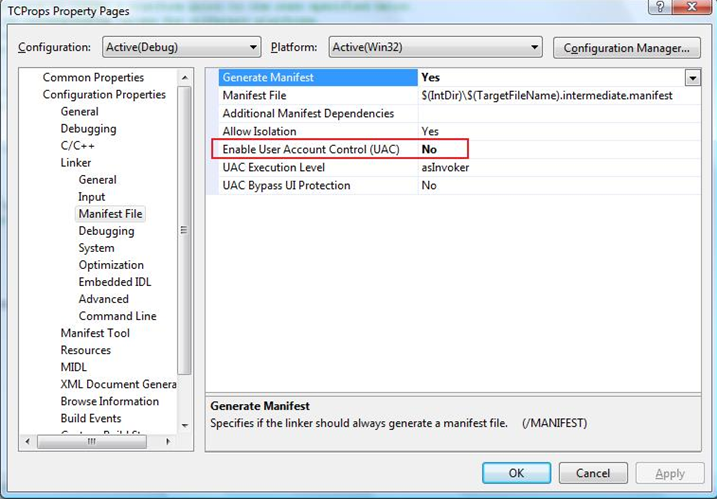
For Visual Studio 2010, the sample was converted to the new Visual C++ build system (based on MSBuild) and the problematic setting was removed during the conversion. So for Visual Studio 2010, the sample builds and runs (in both Win32 and x64 configurations) without issue.
VC++:ActiveX Test Container的更多相关文章
- Maven使用tomcat7-maven-plugin插件run时出现错误: A child container failed during start java.util.concurrent.ExecutionException: org.apache.catalina.LifecycleException: Failed to start component
错误如下: A child container failed during startjava.util.concurrent.ExecutionException: org.apache.catal ...
- 1.端口被占用问题:Embedded servlet container failed to start. Port 8097 was already in use.
1.端口被占用问题:Embedded servlet container failed to start. Port 8097 was already in use.netstat -anonetst ...
- VC ++ MFC activex 控件获取连接的VPN 信息
vc++ MFC 进行activex 控件的开发步骤就不用多写了,只是简单的说明一下方法,以及具体的代码: 使用的类库是 windows 系统的 rasapi32.dll 记住需要添加的头文件如下 ...
- VC++编写ActiveX控件
ActiveX这门技术是通过生成“*.ocx”文件来实现的.先来了解下OCX文件,在百度百科上面对OCX是这样解释的:“.ocx是ocx控件的扩展名,OCX 是对象类别扩充组件.如果你用过Visual ...
- Java tomcat启动失败(Servlet3.0 Web Project):A child container failed during start
Tomcat启动失败,失败全部信息: 五月 , :: 下午 org.apache.tomcat.util.digester.SetPropertiesRule begin 警告: [SetProper ...
- VBA中练习ADO:ActiveX Data Object
前期绑定,要先添加引用---"Microsoft ActiveX Data Objects 6.1" ADO学习的权威参考可点击:w3school ADO简单理解:是几个Activ ...
- 一个不错的扩展:Ext.ux.container.ButtonSegment
地址:http://www.sencha.com/forum/showthread.php?132048-Ext.ux.container.ButtonSegment
- 解决Eclipse 项目报错:Unbound classpath container: ‘JRE System Library [JavaSE-1.7]
MyEclipse出现下面两条报错: The project cannot be built until build path errors are resolved HelloWord Unknow ...
- VC++:制作一个控件注册的小工具
在平时的工作中,时常需要注册与反注册ActiveX控件,有时需要判断控件是否已经注册. 所以通过查找资料编写了一个控件注册的小工具,欢迎学习交流,不当之处请多多交流. 先直接上图: 主要代码: ...
随机推荐
- Jsp+Servlet+JavaBean经典MVC模式理解
MVC模式目的(实现Web系统的职能分工). 在Java EE中,Jsp+Servlet+JavaBean算是里面经典的模式,是初学者必备的知识技能.M, Model(模型)实现系统的业务逻辑 1.通 ...
- Linode之使用UE实现SSH连接
在Linode上建立了节点后,选择对应的操作系统(我选用的是Ubuntu 12.04 LTS),然后启动就可以.详细能够參见该文(https://library.linode.com/getting- ...
- Zookeeper研究和应用
http://www.searchtb.com/2011/01/zookeeper-research.html zookeeper简介 zookeeper是一个开源分布式的服务,它提供了分布式协作,分 ...
- socket 的粘包问题解决方案
粘包: 由于接受recv有最大限制,管道中有大于最大限制字节时, 第二次recv的会是之前残留的信息,这种现象叫做粘包. TCP协议是面向连接的,面向流的,当在发送数据时接受方不知道要收多少字节的数据 ...
- 修改host简化远程访问
问题描述: 使用本机登陆服务器时,需要经常输入IP地址,在局域网下和非局域网下输入的IP又不一样,十分麻烦,如果可以给IP命名一个简单的名字,岂不是很方便? 解决方法: 修改host文件: vim / ...
- json-lib 的maven dependency 异常解决方案
项目中要用到json-lib,mvnrepository.com查找它的dependency时结果如下: xml 代码 <dependency> <groupId>net. ...
- Atitit.ALT+TAB没反应车and 点击任务栏程序闪烁但是不能切换
Atitit.ALT+TAB没反应车and 点击任务栏程序闪烁但是不能切换 1. 可能你的Alt+Tab键被别人禁用了,试下下面的方法: 1 2. 为什么要禁用Alt+Tab 1 3. ALT+TAB ...
- linux 终端 查看上一页
问题描述: 我在终端中使用”dpkg -l”命令显示主机中安装的软件时,发现内容很多,而当命令执行完毕后,只显示终端最后一屏的内容.前面的都无法查看,这个是很让人憋屈的.下面就这一个问题说一下我的解决 ...
- locatin
//location对象 //初始url:http://www.wrox.com/WileyCDA: //将URL修改为:http://www.wrox.com/WileyCDA/#section1 ...
- android 获取屏幕高度和宽度 的方法
我们需要获取Android手机或Pad的屏幕的物理尺寸,以便于界面的设计或是其他功能的实现.下面就介绍讲一讲如何获取屏幕的物理尺寸 下面的代码即可获取屏幕的尺寸. 在一个Activity的onC ...