
游戏1:HTML5制作网页游戏围住神经猫--createjs
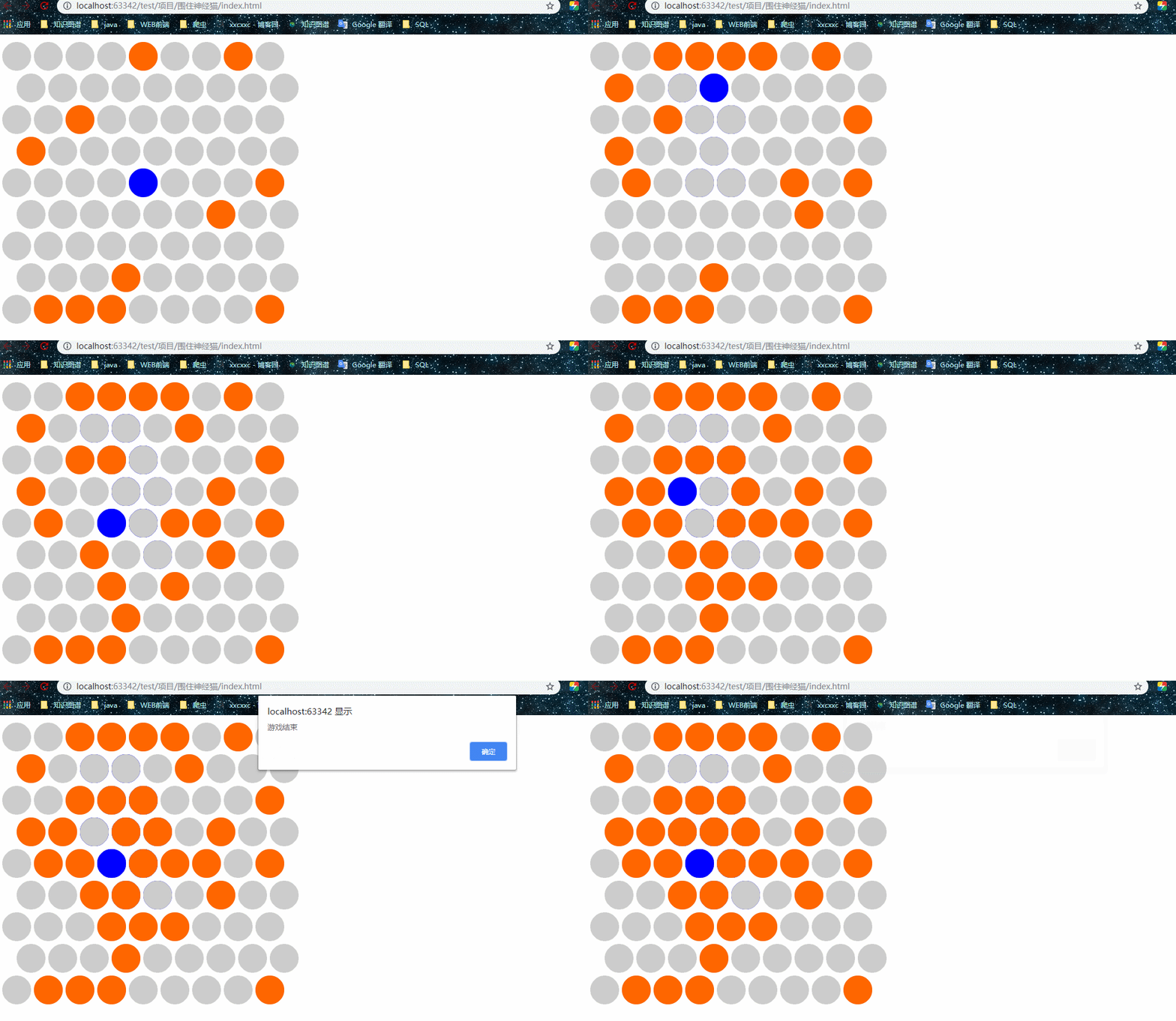
游戏简介:点击小圆圈,是蓝色的小圆圈不跑出圆圈外,跑出则结束游戏
准备工作:
下载easejs :下载地址:http://www.createjs.cc/easeljs 中文网站
效果:
index.html
<!DOCTYPE html>

<html lang="en">

<head>

    <meta charset="UTF-8">

    <title>围住神经猫游戏</title>

    <script src="js/easeljs.min.js"></script>

    <script src="js/Circle.js"></script>

</head>

<body>

<canvas width="800px" height="800px" id="gameView"></canvas>

<script src="js/app.js"></script>

</body>

</html>
app.js
/**

 * Created by xxc on 2018/11/24.

 */

var stage = new createjs.Stage("gameView");

createjs.Ticker.setFPS(30);

createjs.Ticker.addEventListener("tick",stage);

var gameView = new createjs.Container;

gameView.x = 30;

gameView.y = 30;

stage.addChild(gameView);

var circleArr = [[],[],[],[],[],[],[],[],[]];

var currentCat;

var MOVE_NONE=-1,MOVE_LEFT= 0,MOVE_UP_LEFT= 1,MOVE_UP_RIGHT= 2,MOVE_RIGHT= 3,MOVE_DOWN_RIGHT= 4,MOVE_DOWN_LEFT=5;

function getMoveDir(cat){

    var distanceMap=[];

    //left

    var can = true;

    for(var x = cat.indexX;x>=0;x--){

        if(circleArr[x][cat.indexY].getCircleType()==Circle.TYPE_SELECTED){

            can = false;

            distanceMap[MOVE_LEFT] = cat.indexX-x;

            break;

        }

    }

    if(can){

        return MOVE_LEFT;

    }

    //LEFT UP

    can = true;

    var x = cat.indexX,y = cat.indexY;

    while(true){

        if(circleArr[x][y].getCircleType()==Circle.TYPE_SELECTED){

            can = false;

            distanceMap[MOVE_UP_LEFT] = cat.indexY-y;

            break;

        }

        if(y%2==0){

            x--;

        }

        y--;

        if(y<0||x<0){

            break;

        }

    }

    if(can){

        return MOVE_UP_LEFT;

    }

    //right up

    can = true;

    x = cat.indexX,y = cat.indexY;

    while(true){

        if(circleArr[x][y].getCircleType()==Circle.TYPE_SELECTED){

            can = false;

            distanceMap[MOVE_UP_RIGHT] = cat.indexY-y;

            break;

        }

        if(y%2==1){

            x++;

        }

        y--;

        if(y<0||x>8){

            break;

        }

    }

    if(can){

        return MOVE_UP_RIGHT;

    }

    //right

    can = true;

    for(var x = cat.indexX;x<9;x++){

        if(circleArr[x][cat.indexY].getCircleType()==Circle.TYPE_SELECTED){

            can = false;

            distanceMap[MOVE_RIGHT] = x-cat.indexX;

            break;

        }

    }

    if(can){

        return MOVE_RIGHT;

    }

    //right down

    can = true;

    x = cat.indexX,y = cat.indexY;

    while(true){

        if(circleArr[x][y].getCircleType()==Circle.TYPE_SELECTED){

            can = false;

            distanceMap[MOVE_DOWN_RIGHT] = y-cat.indexY;

            break;

        }

        if(y%2 == 1){

            x++;

        }

        y++;

        if(y>8||x>8){

            break;

        }

    }

    if(can){

        return MOVE_DOWN_RIGHT;

    }

    //left down

    can = true;

    x = cat.indexX,y = cat.indexY;

    while(true){

        if(circleArr[x][y].getCircleType()==Circle.TYPE_SELECTED){

            can = false;

            distanceMap[MOVE_DOWN_LEFT] = y-cat.indexY;

            break;

        }

        if(y%2 == 0){

            x--;

        }

        y++;

        if(y>8||x<0){

            break;

        }

    }

    if(can){

        return MOVE_DOWN_LEFT;

    }

    var maxDir = -1,maxValue = -1;

    for(var dir = 0;dir<distanceMap.length;dir++){

        if(distanceMap[dir]>maxValue){

            maxValue = distanceMap[dir];

            maxDir = dir;

        }

    }

    if(maxValue>1){

        return maxDir;

    }else{

        return MOVE_NONE;

    }

}

function circleClicked(event) {

    if(event.target.getCircleType()!=Circle.TYPE_CAT){

        event.target.setCircleType(Circle.TYPE_SELECTED);

    }else{

        return ;

    }

    if(currentCat.indexX == 0 || currentCat.indexX == 8 || currentCat.indexY == 0 || currentCat.indexY == 8){

        alert("游戏结束");

        return;

    }

    var dir = getMoveDir(currentCat);

    switch (dir){

        case MOVE_LEFT:

            currentCat.setCircleType(Circle.TYPE_UNSELECTED);

            currentCat=circleArr[currentCat.indexX-1][currentCat.indexY];

            currentCat.setCircleType(Circle.TYPE_CAT);

            break;

        case MOVE_UP_LEFT:

            currentCat.setCircleType(Circle.TYPE_UNSELECTED);

            currentCat=circleArr[currentCat.indexY%2?currentCat.indexX:currentCat.indexX-1][currentCat.indexY-1];

            currentCat.setCircleType(Circle.TYPE_CAT);

            break;

        case MOVE_UP_RIGHT:

            currentCat.setCircleType(Circle.TYPE_UNSELECTED);

            currentCat=circleArr[currentCat.indexY%2?currentCat.indexX+1:currentCat.indexX][currentCat.indexY-1];

            currentCat.setCircleType(Circle.TYPE_CAT);

            break;

        case MOVE_RIGHT:

            currentCat.setCircleType(Circle.TYPE_UNSELECTED);

            currentCat=circleArr[currentCat.indexX+1][currentCat.indexY];

            currentCat.setCircleType(Circle.TYPE_CAT);

            break;

        case MOVE_DOWN_RIGHT:

            currentCat.setCircleType(Circle.TYPE_UNSELECTED);

            currentCat=circleArr[currentCat.indexY%2?currentCat.indexX+1:currentCat.indexX][currentCat.indexY+1];

            currentCat.setCircleType(Circle.TYPE_CAT);

            break;

        case MOVE_DOWN_LEFT:

            currentCat.setCircleType(Circle.TYPE_UNSELECTED);

            currentCat=circleArr[currentCat.indexY%2?currentCat.indexX:currentCat.indexX-1][currentCat.indexY+1];

            currentCat.setCircleType(Circle.TYPE_CAT);

            break;

        default :

            alert("游戏结束");

    }

}

function addCircles(){

    for(var indexY = 0;indexY<9;indexY++){

        for(var indexX = 0;indexX<9;indexX++){

            var c = new Circle();

            gameView.addChild(c);

            circleArr[indexX][indexY] = c;

            c.indexX = indexX;

            c.indexY = indexY;

            c.x = indexY%2?indexX*55 + 25 : indexX*55;

            c.y = indexY * 55;

            if(indexX == 4 && indexY==4){

                c.setCircleType(Circle.TYPE_CAT);

                currentCat = c;

            }else if(Math.random()<0.1){

                c.setCircleType(Circle.TYPE_SELECTED);

            }

            c.addEventListener("click",circleClicked);

        }

    }

}

addCircles();
Circle.js
/**

 * Created by xxc on 2018/11/24.

 */

//画圆

function Circle(){

    createjs.Shape.call(this);

    this.setCircleType = function (type) {

        this._circleType = type;

        switch (type){

            case Circle.TYPE_UNSELECTED:

                this.setColor("#cccccc");

                break;

            case Circle.TYPE_SELECTED:

                this.setColor("#ff6600");

                break;

            case Circle.TYPE_CAT:

                this.setColor("#0000ff");

                break;

        }

    }

    this.setColor = function (colorString) {

        this.graphics.beginFill(colorString);

        this.graphics.drawCircle(0,0,25);

        this.graphics.endFill();

    }

    this.getCircleType = function () {

        return this._circleType;

    }

    this.setCircleType(1);

}

Circle.prototype = new createjs.Shape();

Circle.TYPE_UNSELECTED = 1;

Circle.TYPE_SELECTED = 2;

Circle.TYPE_CAT = 3;
游戏1:HTML5制作网页游戏围住神经猫--createjs的更多相关文章
- 游戏2:HTML5制作网页游戏看看你有多色--createjs
效果: index.html <!DOCTYPE html> <html lang="en"> <head> <meta charset= ...
- [Mugeda HTML5技术教程之14]案例分析:制作网页游戏
本文档要分析的案例是一个爱消除的网页小游戏,从中可以体会一些Mugeda API的用法和使用Mugeda动画制作网页游戏的方法. (一)游戏规则: 1.开始游戏时,手机出现在最上面一行的任意一格: 2 ...
- HTML5制作网页(2)
<!DOCTYPE html><html> <head> <meta charset="UTF-8"> <title> ...
- 推荐21款最佳 HTML5 网页游戏
尽管 HTML5 的完全实现还有很长的路要走,但 HTML5 正在改变 Web,未来 HTML5 将把 Web 带入一个更加成熟和开放的应用平台.现在,越来越多的人尝试用 HTML5 来制作网页游戏等 ...
- 40个容易上瘾的HTML5网页游戏,总有一款适合你
我记得姐姐家的孩子在刚刚才学会走路,说话还不能完整的时候就已经能自己用小手点出小游戏的网站来一个人自娱自乐.我一直在想这一代跟着计算机一起茁壮成长的孩子会不会也和美国那一代人一样,出现9岁的黑客和计算 ...
- 基于HTML5坦克大战游戏简化版
之前我们有分享过不少经典的HTML5游戏,有些还是很有意思的,比如HTML5版切水果游戏和HTML5中国象棋游戏.今天要分享的是一款简化版的HTML5坦克大战游戏,方向键控制坦克的行进方向,空格键发射 ...
- 基于html5实现的愤怒的小鸟网页游戏
之前给大家分享一款基于html5 canvas和js实现的水果忍者网页版,今天给大家分享一款基于html5实现的愤怒的小鸟网页游戏.这款游戏适用浏览器:360.FireFox.Chrome.Safar ...
- 网页游戏开发秘笈 PDF扫描版
精选10种常见的游戏类型,透过典型实例,深入剖析游戏引擎及工具的选用技巧,详细讲解每款游戏的制作过程,为快速掌握网页游戏开发提供系统而实用的指南. 网页游戏开发秘笈 目录: 译者序 前 言 导 言 ...
- 经典 HTML5 & Javascript 俄罗斯方块游戏
Blockrain.js 是一个使用 HTML5 & JavaScript 开发的经典俄罗斯方块游戏.只需要复制和粘贴一段代码就可以玩起来了.最重要的是,它是响应式的,无论你的显示屏多么宽都能 ...
随机推荐
- eclipse在线安装mybatis generator插件
转自:http://blog.csdn.net/u012283609/article/details/67640433 安装步骤: 打开eclipse菜单栏help–>Eclipse Marke ...
- [C++] c pointer
the nature of pointer const keyword const int* p int const *p int* const p int const a const int a ...
- C# WebService中任务处理线程创建子线程后
protected void WriteLog(string message) { lock (lockObject) { var file = System.IO.File.AppendText(& ...
- Lua中“.”调用方法与“:”调用方法的区别
Lua中“.”调用方法与“:”调用方法的区别: ...
- 【Linux】GDB查看栈信息(转)
在调试程序的过程中,查看程序的函数调用堆栈是一项最基本的任务,几乎所有的图形调试器都支持这项特性. GDB调试器当然也支持这一特性,但是功能更加灵活和丰富. GDB将当前函数的栈帧编号为0,为外层函数 ...
- Java泛型(泛型接口、泛型类、泛型方法)
转载 转载出处:https://www.cnblogs.com/JokerShi/p/8117556.html 泛型接口: 定义一个泛型接口: 通过类去实现这个泛型接口的时候指定泛型T的具体类型. 指 ...
- Win8共享wifi热点设置
Win8共享wifi热点如何设置?大家都知道win7系统可以实现wifi热点共享,那么win8应该也能实现wifi热点共享,那么如何设置win8不需要任何软件只需要对电脑进行设置就可以共享无线上网. ...
- JAVA篇之环境安装(Windows)
一.JAVA 安装两个重要概念 1.JRE::英文Java Development Kit ,记住英文,深入理解就去看相关文章. 2.JDK:英文 Java Runtime Environment,记 ...
- js 日期加一天或者减一天,最简单方法
通过计算一天的时间戳是多少进行换算:(new Date(new Date().getTime()-86400000)).Format("yyyy-MM-dd hh:mm:ss")
- MFC学习(一)
参考: VS项目属性的一些配置项的总结(important) 1. 项目配置 项目属性定制 常规(General) -> 平台工具集(Platform Toolset):vs2012中默认为&q ...