
lucene 学习之编码篇
本文环境:lucene5.2 JDK1.7 IKAnalyzer
引入lucene相关包
<!-- lucene核心包 -->

    <dependency>

        <groupId>org.apache.lucene</groupId>

        <artifactId>lucene-core</artifactId>

        <version>5.2.0</version>

    </dependency>

      <!-- 查询解析器 -->

    <dependency>

        <groupId>org.apache.lucene</groupId>

        <artifactId>lucene-queryparser</artifactId>

        <version>5.2.0</version>

    </dependency>

      <!-- 分词器 -->

    <dependency>

        <groupId>org.apache.lucene</groupId>

        <artifactId>lucene-analyzers-common</artifactId>

        <version>5.2.0</version>

    </dependency>
开发中依赖的包
<!-- https://mvnrepository.com/artifact/commons-io/commons-io -->

    <dependency>

        <groupId>commons-io</groupId>

        <artifactId>commons-io</artifactId>

        <version>2.4</version>

    </dependency>

    <!-- https://mvnrepository.com/artifact/junit/junit -->

    <dependency>

        <groupId>junit</groupId>

        <artifactId>junit</artifactId>

        <version>4.10</version>

    </dependency>
一、创建索引
1、确定索引库的位置
a、将索引库存入本地磁盘
FSDirectory dir=FSDirectory.open(path);
b、将索引存入内存
Directory directory = new RAMDirectory();
2、创建分词器
//创建分词器

        Analyzer al=new StandardAnalyzer();
lucene内置有四个分析器:WhitespaceAnalyzer、SimpleAnalyzer、StopAnalyser、StandardAnalyzer
- WhitespaceAnalyzer:分析器是通过空格来分割文本信息
- SimpleAnalyzer:分析器会首先通过非字母字符来拆分文本信息,并统一转为小写格式,会去掉数字类型的字符
- StopAnalyser:和SimpleAnalyzer分析器类似,但StopAnalyser会去掉一些常用单词(the、a、an..)
- StandardAnalyzer:是lucene最复杂的核心分析器,可以识别某些种类的语汇单元,如公司名称、Email、主机名称等,它会将语汇单元转为小写格式,并去除掉停用词和标点符号
3、创建IndexWriter,进行索引文件的写入。
//创建索引的写入配置对象

        IndexWriterConfig iwc= new IndexWriterConfig(al);

        //创建索引的Writer

        IndexWriter iw=new IndexWriter(dir, iwc);
4、创建文档 创建域将内容提取并进行索引的存储
//创建文档

            Document doc=new Document();

            //创建域 (域是键值对的数据结构)Store.YES:将该值存储到索引库

            Field fieldName=new TextField("fieldName","xs.txt",Store.YES);

            Field fieldContent=new TextField("fieldContent","san guo yan yi",Store.YES);

            Field fieldsize=new LongField("fieldSize",10324,Store.YES);

            Field fieldPath=new TextField("fieldPath","F:/xs/sg/xs.txt",Store.YES);

            //将域加入文档中

            doc.add(fieldName);

            doc.add(fieldContent);

            doc.add(fieldsize);

            doc.add(fieldPath);

            //把文档写入索引库

            iw.addDocument(doc);
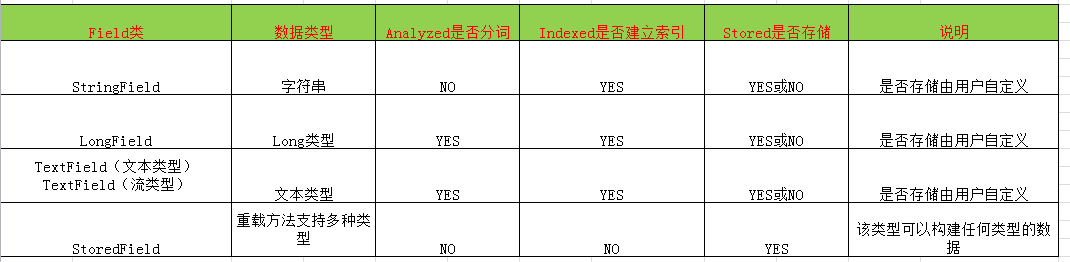
Field域的3各重要属性:
a、是否分析
将field值按照指定的分词器进行分析出相应的语汇单元,将词进行索引。例如:博文标题、博文作者、博文描述、博文内容 ,这些都应该建立索引
b、是否索引
对field分析后的词或整个field值进行索引,只有建立索引的field才能被搜索
c、是否存储(Store.YES:表示存储 Store.NO:表示不存储)
将field值存储在文档中,只有存储在文档中的field才可以从Document中取出。(一般对于内容较大的field不建立存储)
常用Field域的类型:
5、提交,并关闭资源
//提交

        iw.commit();

        iw.close();
完整代码:
 @Test

     public void ImportIndex() throws IOException {

         //获得索引库路径

         Path path=Paths.get("E:\\test\\luceneWI");

         //打开索引库

         FSDirectory dir=FSDirectory.open(path);

         //创建分词器

         Analyzer al=new StandardAnalyzer();

         //创建索引的写入配置对象

         IndexWriterConfig iwc= new IndexWriterConfig(al);

         //创建索引的Writer

         IndexWriter iw=new IndexWriter(dir, iwc);

         //采集原始文档

         File sourceFile=new File("E:\\test\\lucene");

         //获取该文件下所有的文件

         File [] files=sourceFile.listFiles();

         //遍历每一个文件

         for(File file:files){

             //获取文件属性

             String fileName=file.getName();

             String content=FileUtils.readFileToString(file);

             long size=FileUtils.sizeOf(file);

             String sourcePath=file.getPath();

             //创建文档

             Document doc=new Document();

             //创建域 (域是键值对的数据结构)Store.YES:将该值存储到索引库

             Field fieldName=new TextField("fieldName",fileName,Store.YES);

             Field fieldContent=new TextField("fieldContent",content,Store.YES);

             Field fieldsize=new LongField("fieldSize",size,Store.YES);

             Field fieldPath=new TextField("fieldPath",sourcePath,Store.NO);

             //将域加入文档中

             doc.add(fieldName);

             doc.add(fieldContent);

             doc.add(fieldsize);

             doc.add(fieldPath);

             //把文档写入索引库

             iw.addDocument(doc);

         }

         //提交

         iw.commit();

         iw.close();

     }
执行结果查看索引库
我们使用 luke可以查看索引库的具体信息luke-5.3.0-luke-release
二、添加索引
添加前我们的索引库中有7各文档

现在我们要新加一条文档
@Test

    public void addIndex() throws IOException {

        //获得索引库路径

        Path path=Paths.get("E:\\test\\luceneWI");

        //打开索引库

        FSDirectory dir=FSDirectory.open(path);

        //创建分词器

        Analyzer al=new IKAnalyzer();

        //创建索引的写入配置对象

        IndexWriterConfig iwc= new IndexWriterConfig(al);

        //创建索引的Writer

        IndexWriter iw=new IndexWriter(dir, iwc);

        //新建一个文件 china.txt

        File file=new File("E:\\test\\lucene\\china.txt");

        String fileName=file.getName();

        String content=FileUtils.readFileToString(file);

        long size=FileUtils.sizeOf(file);

        String sourcePath=file.getPath();

        //创建域 (域时键值对的数据结构)Store.YES:在索引库中是否以存储的形式存在

        Field fieldName=new TextField("fieldName",fileName,Store.YES);

        Field fieldContent=new TextField("fieldContent",content,Store.YES);

        Field fieldsize=new LongField("fieldSize",size,Store.YES);

        Field fieldPath=new TextField("fieldPath",sourcePath,Store.YES);

        //创建文档

        Document doc=new Document();

        //将域加入文档中

        doc.add(fieldName);

        doc.add(fieldContent);

        doc.add(fieldPath);

        doc.add(fieldsize);

        //把文档写入索引库

        iw.addDocument(doc);

        iw.commit();

        iw.close();

    }
执行后

三、删除索引
1、删除所有
@Test

    public void deleteIndexAll() throws IOException {

        //获得索引库路径

        Path path=Paths.get("E:\\test\\luceneWI");

        //打开索引库

        FSDirectory dir=FSDirectory.open(path);

        //创建分词器

        Analyzer al=new IKAnalyzer();

        //创建索引的写入配置对象

        IndexWriterConfig iwc= new IndexWriterConfig(al);

        //创建索引的Writer

        IndexWriter iw=new IndexWriter(dir, iwc);

        iw.deleteAll();//删除所有

        iw.commit();//提交

        iw.close();//关闭资源

    }
2、按照条件删除
@Test

    public void deleteIndexAllQuery() throws IOException {

        //获得索引库路径

        Path path=Paths.get("E:\\test\\luceneWI");

        //打开索引库

        FSDirectory dir=FSDirectory.open(path);

        //创建分词器

        Analyzer al=new IKAnalyzer();

        //创建索引的写入配置对象

        IndexWriterConfig iwc= new IndexWriterConfig(al);

        //创建索引的Writer

        IndexWriter iw=new IndexWriter(dir, iwc);

        //创建语汇单元

        Term term=new Term("fieldName","china");// 要删除的document中包含的语汇单元

        //创建根据语汇单元的查询对象

        Query query=new TermQuery(term);

        iw.deleteDocuments(query);

        iw.commit();//提交

        iw.close();//关闭资源

    }
四、查询
1、分词语汇单元查询
@Test

    public void QueryIndexAll() throws IOException {

        //获得索引库路径

        Path path=Paths.get("E:\\test\\luceneWI");

        //打开索引库

        FSDirectory dir=FSDirectory.open(path);

        //创建索引库的读取对象

        DirectoryReader reader=DirectoryReader.open(dir);

        //创建索引库的搜索对象

        IndexSearcher is=new IndexSearcher(reader);

        //创建语汇单元

        Term term=new Term("fieldName","license");// 要删除的document中包含的语汇单元

        //创建根据语汇单元的查询对象

        TermQuery tq=new TermQuery(term);

        TopDocs result=is.search(tq, 10);//查询前10条

        int totalHits=result.totalHits;//获取总记录数

        System.out.println("totalHits:"+totalHits);

        //获取文档列表

        ScoreDoc[] sd=result.scoreDocs;

        for(ScoreDoc sc:sd){

            int id=sc.doc;//获取文档ID

            Document doc=is.doc(id);//获取文档

            String fieldName=doc.get("fieldName");

            String fieldContent=doc.get("fieldContent");

            String fieldSize=doc.get("fieldSize");

            String fieldPath=doc.get("fieldPath");

            System.out.println("fieldName:"+fieldName);

            System.out.println("fieldContent:"+fieldContent);

            System.out.println("fieldSize:"+fieldSize);

            System.out.println("fieldPath:"+fieldPath);

        }

    }
2、数值范围查询
@Test

    public void queryIndexNumberAll() throws IOException {

        //获得索引库路径

        Path path=Paths.get("E:\\test\\luceneWI");

        //打开索引库

        FSDirectory dir=FSDirectory.open(path);

        //创建索引库的读取对象

        DirectoryReader reader=DirectoryReader.open(dir);

        //创建索引库的搜索对象

        IndexSearcher is=new IndexSearcher(reader);

        //创建数值查询对象

        Query tq=NumericRangeQuery.newLongRange("fieldSize", 0L, 100L, true, true);

        System.out.println("打印查询对象:"+tq);//打印查询对象:fieldSize:[0 TO 100]

        TopDocs result=is.search(tq, 10);//查询前10条

        int totalHits=result.totalHits;//获取总记录数

        System.out.println("totalHits:"+totalHits);

        //获取文档列表

        ScoreDoc[] sd=result.scoreDocs;

        for(ScoreDoc sc:sd){

            int id=sc.doc;//获取文档ID

            Document doc=is.doc(id);//获取文档

            String fieldName=doc.get("fieldName");

            String fieldContent=doc.get("fieldContent");

            String fieldSize=doc.get("fieldSize");

            String fieldPath=doc.get("fieldPath");

            System.out.println("fieldName:"+fieldName);

            System.out.println("fieldContent:"+fieldContent);

            System.out.println("fieldSize:"+fieldSize);

            System.out.println("fieldPath:"+fieldPath);

        }

    }
3、多查询对象联合查询
    @Test

    public void bqqueryIndexNumberAll() throws IOException {

        //获得索引库路径

        Path path=Paths.get("E:\\test\\luceneWI");

        //打开索引库

        FSDirectory dir=FSDirectory.open(path);

        //创建索引库的读取对象

        DirectoryReader reader=DirectoryReader.open(dir);

        //创建索引库的搜索对象

        IndexSearcher is=new IndexSearcher(reader);

        //创建多条件查询对象,通过控制& 或者| 或者 ! 来组合查询条件

        BooleanQuery tq=new BooleanQuery();

        //创建分词语汇查询对象

        Query query1=new TermQuery(new Term("fieldName","china"));

        Query query2=new TermQuery(new Term("fieldContent","china"));

        Query query3=NumericRangeQuery.newLongRange("fieldSize", 0L, 100L, true, true);

        //通过BooleanQuery 控制 两个查询条件的关系

        tq.add(query1,Occur.MUST);

        tq.add(query2,Occur.MUST); //Occur.MUST 同时满足  Occur.SHOULD: 可以满足可以不满足 Occur.MUST_NOT:不能满足

        tq.add(query3,Occur.MUST);

         System.out.println("bq:"+tq);//bq:+fieldName:china +fieldContent:china ( 表示 必须同时满足两个条件)

        TopDocs result=is.search(tq, 10);//查询前10条

        int totalHits=result.totalHits;//获取总记录数

        System.out.println("totalHits:"+totalHits);

        //获取文档列表

        ScoreDoc[] sd=result.scoreDocs;

        for(ScoreDoc sc:sd){

            int id=sc.doc;//获取文档ID

            Document doc=is.doc(id);//获取文档

            String fieldName=doc.get("fieldName");

            String fieldContent=doc.get("fieldContent");

            String fieldSize=doc.get("fieldSize");

            String fieldPath=doc.get("fieldPath");

            System.out.println("fieldName:"+fieldName);

            System.out.println("fieldContent:"+fieldContent);

            System.out.println("fieldSize:"+fieldSize);

            System.out.println("fieldPath:"+fieldPath);

        }

    }
4、解析查询
QueryParser 对查询条件进行分词查询
    @Test

    public void queryParserIndexAll() throws  Exception {

        //获得索引库路径

        Path path=Paths.get("E:\\test\\luceneWI");

        //打开索引库

        FSDirectory dir=FSDirectory.open(path);

        //创建索引库的读取对象

        DirectoryReader reader=DirectoryReader.open(dir);

        //创建索引库的搜索对象

        IndexSearcher is=new IndexSearcher(reader);

        //创建查询解析对象

        QueryParser qp=new QueryParser("fieldName", new IKAnalyzer());//分词器要与创建索引的一样

        //通过QueryParser解析查询对象

        Query tq=qp.parse("爱我china");//单个查询条件

    //    Query tq=qp.parse("fieldName:爱我   OR fieldContent:china");//多个查询条件  OR /AND

         System.out.println("tq:"+tq);//tq:fieldName:爱我 fieldName:我 fieldName:china (进行分词了)

        TopDocs result=is.search(tq, 10);//查询前10条

        int totalHits=result.totalHits;//获取总记录数

        System.out.println("totalHits:"+totalHits);

        //获取文档列表

        ScoreDoc[] sd=result.scoreDocs;

        for(ScoreDoc sc:sd){

            int id=sc.doc;//获取文档ID

            Document doc=is.doc(id);//获取文档

            String fieldName=doc.get("fieldName");

            String fieldContent=doc.get("fieldContent");

            String fieldSize=doc.get("fieldSize");

            String fieldPath=doc.get("fieldPath");

            System.out.println("fieldName:"+fieldName);

            System.out.println("fieldContent:"+fieldContent);

            System.out.println("fieldSize:"+fieldSize);

            System.out.println("fieldPath:"+fieldPath);

        }

    }
5、多域解析查询
@Test

    public void queryManyParserIndexAll() throws  Exception {

        //获得索引库路径

        Path path=Paths.get("E:\\test\\luceneWI");

        //打开索引库

        FSDirectory dir=FSDirectory.open(path);

        //创建索引库的读取对象

        DirectoryReader reader=DirectoryReader.open(dir);

        //创建索引库的搜索对象

        IndexSearcher is=new IndexSearcher(reader);

        //定义多个域

        String [] fields={"fieldName","fieldContent"};

        //创建查询解析对象  查询的语汇单词之间的关系是或,只要满足其中一个语汇单元,就可以查询出来

        MultiFieldQueryParser mp=new MultiFieldQueryParser(fields, new IKAnalyzer());

        Query tq=mp.parse("爱我china");

         System.out.println("tq:"+tq);//tq:(fieldName:爱我 fieldName:我 fieldName:china) (fieldContent:爱我 fieldContent:我 fieldContent:china)

        TopDocs result=is.search(tq, 10);//查询前10条

        int totalHits=result.totalHits;//获取总记录数

        System.out.println("totalHits:"+totalHits);

        //获取文档列表

        ScoreDoc[] sd=result.scoreDocs;

        for(ScoreDoc sc:sd){

            int id=sc.doc;//获取文档ID

            Document doc=is.doc(id);//获取文档

            String fieldName=doc.get("fieldName");

            String fieldContent=doc.get("fieldContent");

            String fieldSize=doc.get("fieldSize");

            String fieldPath=doc.get("fieldPath");

            System.out.println("fieldName:"+fieldName);

            System.out.println("fieldContent:"+fieldContent);

            System.out.println("fieldSize:"+fieldSize);

            System.out.println("fieldPath:"+fieldPath);

        }

    }
lucene 学习之编码篇的更多相关文章
- lucene 学习之基础篇
一.什么是全文索引 全文检索首先将要查询的目标文档中的词提取出来,组册索引(类似书的目录),通过查询索引达到搜索目标文档的目的,这种先建立索引,再对索引进行搜索的过程就叫全文索引. 从图可以看出做全文 ...
- 一步步学习javascript基础篇(3):Object、Function等引用类型
我们在<一步步学习javascript基础篇(1):基本概念>中简单的介绍了五种基本数据类型Undefined.Null.Boolean.Number和String.今天我们主要介绍下复杂 ...
- RabbitMQ学习总结 第二篇:快速入门HelloWorld
目录 RabbitMQ学习总结 第一篇:理论篇 RabbitMQ学习总结 第二篇:快速入门HelloWorld RabbitMQ学习总结 第三篇:工作队列Work Queue RabbitMQ学习总结 ...
- PHP学习笔记 - 进阶篇(11)
PHP学习笔记 - 进阶篇(11) 数据库操作 PHP支持哪些数据库 PHP通过安装相应的扩展来实现数据库操作,现代应用程序的设计离不开数据库的应用,当前主流的数据库有MsSQL,MySQL,Syba ...
- PHP学习笔记 - 进阶篇(4)
PHP学习笔记 - 进阶篇(4) 字符串操作 字符串介绍 PHP开发中,我们遇到最多的可能就是字符串. 字符串变量用于包含字符串的值. 一个字符串 通过下面的3种方法来定义: 1.单引号 2.双引号 ...
- Lucene学习总结之七:Lucene搜索过程解析
一.Lucene搜索过程总论 搜索的过程总的来说就是将词典及倒排表信息从索引中读出来,根据用户输入的查询语句合并倒排表,得到结果文档集并对文档进行打分的过程. 其可用如下图示: 总共包括以下几个过程: ...
- Lucene学习总结之六:Lucene打分公式的数学推导
在进行Lucene的搜索过程解析之前,有必要单独的一张把Lucene score公式的推导,各部分的意义阐述一下.因为Lucene的搜索过程,很重要的一个步骤就是逐步的计算各部分的分数. Lucene ...
- Java工程师学习指南 完结篇
Java工程师学习指南 完结篇 先声明一点,文章里面不会详细到每一步怎么操作,只会提供大致的思路和方向,给大家以启发,如果真的要一步一步指导操作的话,那至少需要一本书的厚度啦. 因为笔者还只是一名在校 ...
- Lucene学习总结之七:Lucene搜索过程解析 2014-06-25 14:23 863人阅读 评论(1) 收藏
一.Lucene搜索过程总论 搜索的过程总的来说就是将词典及倒排表信息从索引中读出来,根据用户输入的查询语句合并倒排表,得到结果文档集并对文档进行打分的过程. 其可用如下图示: 总共包括以下几个过程: ...
随机推荐
- NUCLEO-L053R8 RCC时钟树 MCO输出
RCC时钟配置实验 最近玩了一下Nucleo-L053R8板子,即STM32L053R8T6.浏览了RCC章节后,顺便做了个小实验,现在给大伙分享一下. 实验非常简单,配置一下系统时钟,可以通过肉眼观 ...
- Scala学习笔记(五)—— 元组和集合
1. 映射 映射Java中的Map,即Key/Value的数据形式 映射的创建,有以下两种方法 scala> val map =Map("Lisa" -> 90 , & ...
- 初识Trie_对Trie的一些认识
Trie,之前觉得一个听起来很diao的数据结构,学了发现其实是一个挺简单的数据结构. 在计算机科学中,trie,又称前缀树或字典树,是一种有序树,用于保存关联数组,其中的键通常是字符串.与二叉查找树 ...
- VINS(五)非线性优化与在线标定调整
首先根据最大后验估计(Maximum a posteriori estimation,MAP)构建非线性优化的目标函数. 初始化过程通过线性求解直接会给出一个状态的初值,而非线性优化的过程关键在于求解 ...
- 函数返回const,以便控制访问
#include <stdio.h> class const_out_parameter{ private: ]; public: int* const_out_parameter_tes ...
- Java开发工程师(Web方向) - 01.Java Web开发入门 - 第3章.Tomcat
第3章--Tomcat Tomcat安装与运行 Tomcat:目前最常用的基于java的web应用服务器 本课程中所有的Java代码最终都需要部署到Tomcat中运行 Tomcat的配置文件是XML的 ...
- Pyhton网络爬虫实例_豆瓣电影排行榜_BeautifulSoup4方法爬取
-----------------------------------------------------------学无止境------------------------------------- ...
- 82. Single Number [easy]
Description Given 2*n + 1 numbers, every numbers occurs twice except one, find it. Example Given [1, ...
- MD5接口解密操作_接口签名校验
很多HTTP接口在传参时,需要先对接口的参数进行数据签名加密如以下POST接口 http://localhost:8080/pinter/com/userInfo 参数为{"phoneNum ...
- 文件上传:CommonsMultipartResolver
一. 简介 CommonsMultipartResolver是基于Apache的Commons FileUpload来实现文件上传功能的,主要作用是配置文件上传的一些属性. 二. 配置 1)依赖Apa ...