
实现移动端touch事件的横向滑动列表效果
要实现手机端横向滑动效果并不难,了解实现的原理及业务逻辑就很容易实现。原理:touchstart(手指按下瞬间获取相对于页面的位置)——》touchmove(手指移动多少,元素相应移动多少)。
接下来讲讲实现逻辑:
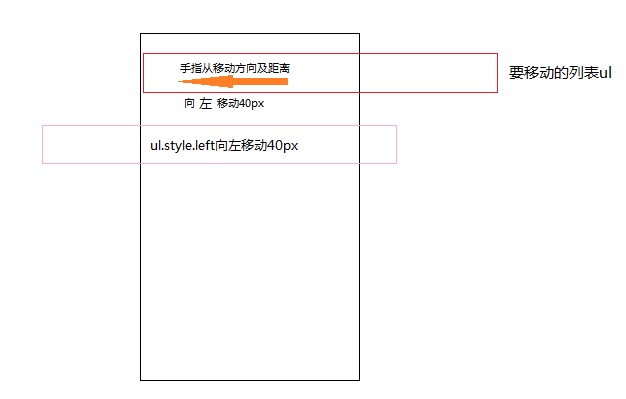
其实就是手指拖动列表向哪个方向移动多少像素,并设置左右拖动的边界值。
附上代码及注释:
	<div id="common_wrap" class="common-wrap">

		<h4 class="common-kit__h4">在区域内向左右滑动</h4>

			<ul class="common-kit__list" id="mask" style="left:0px">

				<li><a href="javascript:;">感冒药箱</a></li>

				<li><a href="javascript:;">健胃消食药箱</a></li>

				<li><a href="javascript:;">高血压药箱</a></li>

				<li><a href="javascript:;">慢病控制药箱</a></li>

				<li><a href="javascript:;">孕妇育儿药箱</a></li>

				<li><a href="javascript:;">糖尿病药箱</a></li>

			</ul>

	</div>
设置样式:
	*{

		padding: 0;

		margin: 0;

	}

	html,body{

		width: 100%;

		overflow: hidden;

	}

	.common-wrap{

		width: 100%;

		height: 105px;

		border-bottom: 8px solid #eee;

	}

	.common-kit__h4{

		font-size: 14px;

		margin-top: 17px;

		margin-left: 8px;

		letter-spacing: 0.2px;

	}

	.common-kit{

		width: 100%;

		position: relative;

	}

	.common-kit__list{

		width: 558px;

		position: absolute;

		margin-top: 10px;

		height: 80px;

	}

	.common-kit__list li{

		position: relative;

		list-style: none;

		width: 80px;

		height: 80px;

		background-color: #eee;

		float: left;

		margin-left: 13px;

	}

	.common-kit__list li a{

		text-decoration: none;

		font-size: 12px;

		position: absolute;

		top:50%;

		transform:translateY(-50%);

		text-align: center;

		padding: 0px 12px;

	}

	.common-kit__list li:first-child{

		margin-left: 8px;

	}
js代码:
function slidecommonkit(){

	var mask = document.getElementById('mask');

	var common_kit__list=document.querySelector('.common-kit__list');

        var startPosition, endPosition, deltaX, deltaY, moveLength;

        var commonkitLeft;

    /*手指按下瞬间触发touchstart事件*/

    mask.addEventListener('touchstart', function (e) {

        commonkitLeft=parseInt(common_kit__list.style.left);

        var touch = e.targetTouches[0];  //targetTouches位于当前DOM元素上的手指动作的列表

        startPosition = {   //取屏幕上第一个手指相对于页面的坐标

            x: touch.pageX,

            y: touch.pageY

        }

    });

    /*手指移动触发touchmove事件*/

    mask.addEventListener('touchmove', function (e) {

        var touch = e.targetTouches[0];

        endPosition = {

            x: touch.pageX,

            y: touch.pageY

        }

        deltaX = endPosition.x - startPosition.x;   //移动到最后的坐标x - 开始时的坐标x

        moveLength = Math.abs(deltaX);   //获得移动的x方向的距离

        /*向左移动的函数*/

        var swipeLeft=function(){

            if( deltaX<(-30) ){   //这里以30作为判断是否触发、如果deltaX小于-30,说明向左移动

                if(Math.abs(commonkitLeft)+moveLength > ( common_kit__list.offsetWidth-window.innerWidth ) ){   //判断临界值

                    common_kit__list.style.left=window.innerWidth-common_kit__list.offsetWidth+'px';

                }else{

                    common_kit__list.style.left=commonkitLeft-moveLength+'px';  //上一次的left值-移动的距离(由于距离是正数,而向左移动left值是负数,所以用-)

                }

            }

        }

        swipeLeft();   //执行该函数

        /*向右移动的函数*/

        var swipeRight=function(){

            if( deltaX>30 ){

                /*主要是逻辑*/

                if(commonkitLeft+moveLength > 0  ){

                    common_kit__list.style.left=0+'px';

                }else{

                    common_kit__list.style.left=commonkitLeft+moveLength+'px';

                }

            }

        }

        swipeRight();

    });

};

slidecommonkit();
效果图如下:

这样就实现横向滑动列表效果了。
注意:使用touch事件必须要下载touch.min.js <script src="touch.min.js"></script> 才能使用,原生js是没有这个事件的。
实现移动端touch事件的横向滑动列表效果的更多相关文章
- React Native学习(七)—— FlatList实现横向滑动列表效果
本文基于React Native 0.52 Demo上传到Git了,有需要可以看看,写了新内容会上传的.Git地址 https://github.com/gingerJY/React-Native-D ...
- H5案例分享:移动端touch事件判断滑屏手势的方向
移动端touch事件判断滑屏手势的方向 方法一 当开始一个touchstart事件的时候,获取此刻手指的横坐标startX和纵坐标startY: 当触发touchmove事件时,在获取此时手指的横坐标 ...
- 移动端touch事件实现页面弹动--小插件
动手之前的打盹 说实话真的是好久没有更新博客了,最近一直赶项目,身心疲惫:最关键的是晚上还要回去上一波王者,实在是忙啊! 这周下来,清闲了些许,或许是因为要到国庆的缘故吧,大家都显得无精打采.俗话说的 ...
- 移动端touch事件影响click事件以及在touchmove添加preventDefault导致页面无法滚动的解决方法
这两天自己在写一个手机网页,用到了触屏滑动的特效,就是往右滑动的时候左侧隐藏的菜单从左边划出来. 做完之后在手机原生浏览器中运行正常,但在QQ和微信中打开,发现touchmove只会触发一次,而且to ...
- 移动端 Touch 事件
在移动端页面开发时,常常会用到touch事件,比如左滑右滑的轮播等.常用的触摸事件有touchstart,touchmove,touchend. 每个事件包含下面三个用于跟踪虎摸的属性: touche ...
- 纯css实现移动端横向滑动列表&&overflow:atuo;隐藏滚动条
<!DOCTYPE html> <html> <head> <title>横向滑动</title> <style type=" ...
- 原生js移动端touch事件实现上拉加载更多
大家都知道jQuery里没有touch事件,所以在移动端使用原生js实现上拉加载效果还是很不错的,闲话不多说,代码如下: //获取要操作的元素 var objSection = document.ge ...
- 移动端 touch 事件的originalEvent
对于移动端的触摸事件,我们通过touchstart.touchmove.touchend实现,PC端一般使用mousedown.mousemove.mouseup实现. 我们获取事件坐标,原生js获取 ...
- 移动端Touch事件基础
1.三个常用的移动端事件 ontouchstart 手指按下时触发 ontouchmove 手指移动时触发 ontouchend 手动抬起时触发 注意:这些事件当作事件属性使用时,不兼容谷歌浏览器. ...
随机推荐
- 北航软院2014级C#期末考试部分考题解答
博主注:本渣渣水平有限,文中若有不对的地方敬请指出,谢谢. 本文中大部分图片来自老师的PPT,感谢邵老师,想要的可以点击右边QQ联系我:) 一.选择 6.Which of the following ...
- 文献综述十八:基于SSH框架的进销存管理系统设计与实现
一.基本信息 标题:基于SSH框架的进销存管理系统设计与实现 时间:2017 出版源:内蒙古科技与经济 文件分类:对框架的研究 二.研究背景 进销存管理系统在各企业中广泛应用,使用SSH框架,很大程度 ...
- python调用另一个.py文件中的类和函数
同一文件夹下的调用 1.调用函数 A.py文件如下:def add(x,y): print('和为:%d'%(x+y)) 在B.py文件中调用A.py的add函数如下: import AA.ad ...
- Java_方法的基本语法格式
[修饰符] 返回值类型 方法名称([参数列表]){ 方法体 } [ ]中的内容是可有可无的 暂时将方法的修饰符编写为 public static 返回值类型有两种情况 : 第一种:无返回值类型,也就是 ...
- Testlink 机器重启后Access denied for user 'admin '@'localhost' (using password: YES)解决
问题表现: 装完Testlink,重启系统后,在testlink权限未分配会出现如下提示: 1045 - Access denied for user 'Testlink '@'localhost' ...
- Javascript面向对象编程(转)
http://blog.csdn.net/lmj623565791/article/details/29210679 其实,从这个面向对象编程的例子来看,思路还是很清晰的. 第一步: 构造函数,用于初 ...
- unity Socket TCP连接案例(一)
非常清晰的demo 服务端 using System; using System.Collections; using System.Collections.Generic; using System ...
- 在create-react-app创建的React项目应用中配置JQ、Sass
使用 create-react-app 配置 react 开发环境,像下面这样,就可以构建一个新的 react 单页面应用,非常方便. npm install -g create-react-app ...
- Scrapy框架学习(三)Spider、Downloader Middleware、Spider Middleware、Item Pipeline的用法
Spider有以下属性: Spider属性 name 爬虫名称,定义Spider名字的字符串,必须是唯一的.常见的命名方法是以爬取网站的域名来命名,比如爬取baidu.com,那就将Spider的名字 ...
- Java ConcurrentModificationException异常原因和解决方法(转)
摘自:http://www.cnblogs.com/dolphin0520/p/3933551.html#undefined 在前面一篇文章中提到,对Vector.ArrayList在迭代的时候如果同 ...