
Android-SQLiteOpenHelper里增删改查
为什么要写一篇,Android-SQLiteOpenHelper里增删改查,的文章呢;
因为之前的方式是:MySQLiteOpenHelper(只负责 生成打开据库/生成打开表/升级表),在其他端:完成此数据库表的增删改查逻辑处理,这样代码有些分散
现在 MySQLiteOpenHelper(负责 生成打开据库 / 生成打开表 / 升级表 / 完成此数据库表的增删改查逻辑处理 / 还有其他表处理功能增加等等),这一个类全包了
MySQLiteOpenHelperStudent
注意事项:继承SQLiteOpenHelper抽象类 重写的创表方法,此SQLiteDatabase db 不能关闭
 package liudeli.datastorage.db;

 import android.content.ContentValues;

 import android.content.Context;

 import android.database.Cursor;

 import android.database.sqlite.SQLiteDatabase;

 import android.database.sqlite.SQLiteOpenHelper;

 import android.util.Log;

 import java.util.List;

 import liudeli.datastorage.entity.Student;

 /**

  *  数据库表管理

  *  MySQLiteOpenHelperStudent

  *  (负责 生成打开据库 / 生成打开表 / 升级表 /

  *        完成此数据库表的增删改查逻辑处理

  *       / 还有其他表处理功能增加等等)

  */

 public class MySQLiteOpenHelperStudent extends SQLiteOpenHelper {

     private final static String TAG = MySQLiteOpenHelperStudent.class.getSimpleName();

     /**

      * 数据库名称

      */

     private final static String DB_NAME = "student_info_manager.db";

     /**

      * 表名

      */

     private static final String TABLE_NAME = "studentTable";

     /**

      * 定义单例模式,可以被多次地方多次调用

      */

     private static MySQLiteOpenHelperStudent mySQLiteOpenHelperStudent;

     public static MySQLiteOpenHelperStudent getInstance(Context context) {

         if (null == mySQLiteOpenHelperStudent) {

             synchronized (MySQLiteOpenHelperStudent.class) {

                 if (null == mySQLiteOpenHelperStudent) {

                     mySQLiteOpenHelperStudent = new MySQLiteOpenHelperStudent(context, DB_NAME, null, 1);

                 }

             }

         }

         return mySQLiteOpenHelperStudent;

     }

     private MySQLiteOpenHelperStudent(Context context, String name, SQLiteDatabase.CursorFactory factory, int version) {

         super(context, name, factory, version);

     }

     /**

      * 创表方法,注意:⚠️ 传递进来的 SQLiteDatabase database 不能关闭

      * @param database

      */

     private void createTable(SQLiteDatabase database) {

         String createTableSQL =  "CREATE TABLE IF NOT EXISTS " + TABLE_NAME + " (ID INTEGER PRIMARY KEY, "

                 + "name VARCHAR, "

                 + "age INTEGER, "

                 + "hobby  VARCHAR);";

         try {

             database.execSQL(createTableSQL);

         } catch (Exception e) {

             e.printStackTrace();

             Log.e(TAG, TAG + "创表异常:" + e.toString());

         }

         /**

          * 注意:⚠️

          * 这里不能关闭database

          * 一旦关闭就会 Caused by: java.lang.IllegalStateException:

          *             attempt to re-open an already-closed object: SQLiteDatabase:

          * 为什么不能在这里关闭呢?

          * 答:因为这个database,是在 public void onCreate ->传递过来的

          */

         /*finally {

             if (null != database) {

                 database.close();

             }

         }*/

     }

     /**

      * 删除表,会把表给删除,慎用

      * drop 表

      */

     public void dropTable() {

         SQLiteDatabase database = getWritableDatabase();

         String dropSQL = "drop table if exists " + TABLE_NAME;

         try {

             database.execSQL(dropSQL);

         } catch (Exception e) {

             e.printStackTrace();

             Log.d(TAG, "drop异常:" + e.toString());

         } finally {

             if (null != database) {

                 database.close();

             }

         }

     }

     /**

      * 清除表的数据

      */

     public void cleanUpData() {

         // delete from TableName;  //清空数据

         SQLiteDatabase database = getWritableDatabase();

         String cleanUpDataSQL = "delete from " + TABLE_NAME;

         try {

             database.execSQL(cleanUpDataSQL);

         } catch (Exception e) {

             e.printStackTrace();

             Log.d(TAG, "清除表的数据异常:" + e.toString());

         } finally {

             if (null != database) {

                 database.close();

             }

         }

     }

     /**

      * 插入多条数据

      * @param students 传递Student集合

      */

     public void insertData(List<Student> students) {

         SQLiteDatabase database = getWritableDatabase();

         try {

             for (Student student : students) {

                 ContentValues contentValues = new ContentValues();

                 contentValues.clear();

                 contentValues.put("name", student.getName());

                 contentValues.put("age", student.getName());

                 contentValues.put("hobby", student.getHobby());

                 database.insert(TABLE_NAME, "_id", contentValues);

             }

         } catch (Exception e) {

             e.printStackTrace();

             Log.e(TAG, "insert多条异常:" + e.toString());

         } finally {

             if (null != database) {

                 database.close();

             }

         }

     }

     /**

      * 插入单条

      * @param contentValues 传递ContentValues

      */

     public void insertData(ContentValues contentValues) {

         SQLiteDatabase database = getWritableDatabase();

         try {

             database.insert(TABLE_NAME, "_id", contentValues);

         } catch (Exception e) {

             e.printStackTrace();

             Log.e(TAG, "insert单条异常:" + e.toString());

         } finally {

             if (null != database) {

                 database.close();

             }

         }

     }

     /**

      * 查询需要的列名

      */

     private String[] columns = new String[]{"name", "age", "hobby"};

     /**

      * 查询第一条数据

      * @return 返回Student实体

      */

     public Student selectData() {

         SQLiteDatabase database = getReadableDatabase();

         Cursor cursor = null;

         Student student = null;

         try {

             cursor = database.query(TABLE_NAME, columns, null, null, null, null, null);

             if (cursor.moveToFirst()) {

                 String name = cursor.getString(cursor.getColumnIndex("name"));

                 int age = cursor.getInt(cursor.getColumnIndex("age"));

                 String hobby = cursor.getString(cursor.getColumnIndex("hobby"));

                 student = new Student(name, age, hobby);

             }

         } catch (Exception e) {

             e.printStackTrace();

             Log.e(TAG, "select异常:" + e.toString());

         } finally {

             if (null != database) {

                 database.close();

             }

             if (null != cursor) cursor.close();

         }

         return student;

     }

     /**

      * 判断第一条数据是否存在

      * @return 存在返回true,否则返回false

      */

     public boolean isMoveToFirst() {

         boolean result;

         SQLiteDatabase database = getReadableDatabase();

         Cursor cursor = database.query(TABLE_NAME,

                 columns,

                 null,

                 null,

                 null,

                 null,

                 null);

         result = cursor.moveToFirst();

         database.close();

         cursor.close();

         return result;

     }

     /**

      *    .........  还可以增加很多操作表相关的行为

      */

     /**

      * 继承SQLiteOpenHelper抽象类 重写的创表方法,此SQLiteDatabase db 不能关闭

      * @param db

      */

     @Override

     public void onCreate(SQLiteDatabase db) {

         createTable(db);

     }

     /**

      * 继承SQLiteOpenHelper抽象类 重写的升级方法

      * @param db

      * @param oldVersion

      * @param newVersion

      */

     @Override

     public void onUpgrade(SQLiteDatabase db, int oldVersion, int newVersion) {

     }

 }
继承SQLiteOpenHelper抽象类 重写的创表方法,此SQLiteDatabase db 不能关闭
/**

     * 创表方法,注意:⚠️ 传递进来的 SQLiteDatabase database 不能关闭

     * @param database

     */

    private void createTable(SQLiteDatabase database) {

        String createTableSQL =  "CREATE TABLE IF NOT EXISTS " + TABLE_NAME + " (ID INTEGER PRIMARY KEY, "

                + "name VARCHAR, "

                + "age INTEGER, "

                + "hobby  VARCHAR);";

        try {

            database.execSQL(createTableSQL);

        } catch (Exception e) {

            e.printStackTrace();

            Log.e(TAG, TAG + "创表异常:" + e.toString());

        }

        /**

         * 注意:⚠️

         * 这里不能关闭database

         * 一旦关闭就会 Caused by: java.lang.IllegalStateException:

         *             attempt to re-open an already-closed object: SQLiteDatabase:

         * 为什么不能在这里关闭呢?

         * 答:因为这个database,是在 public void onCreate ->传递过来的

         */

        /*finally {

            if (null != database) {

                database.close();

            }

        }*/

    }
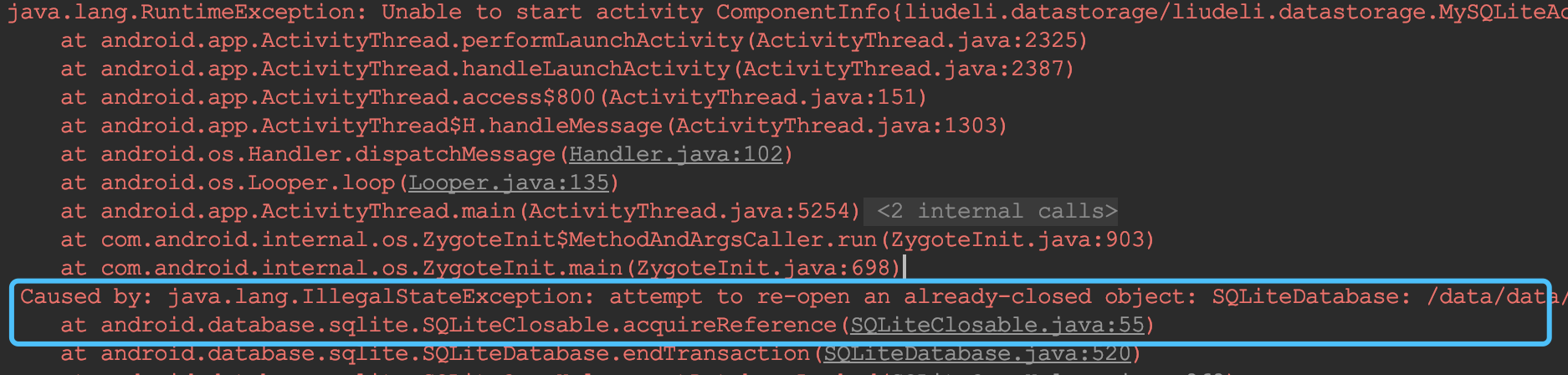
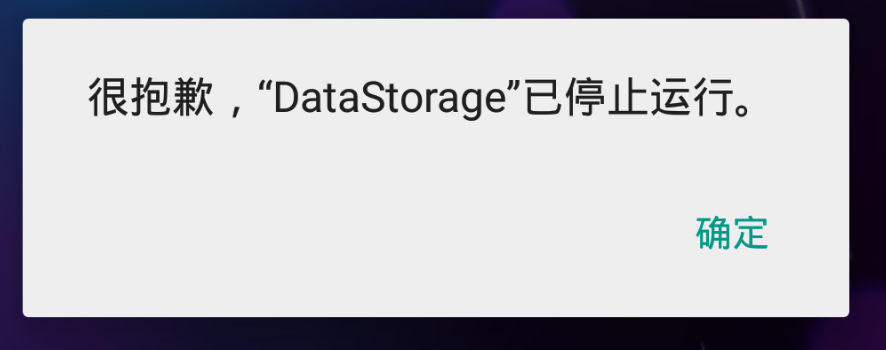
一旦关闭,就会报以下错误:
Caused by: java.lang.IllegalStateException: attempt to re-open an already-closed object: SQLiteDatabase:
Student实体:
package liudeli.datastorage.entity;

public class Student {

    private String name;

    private int age;

    private String hobby;

    public Student() {

    }

    public Student(String name, int age, String hobby) {

        this.name = name;

        this.age = age;

        this.hobby = hobby;

    }

    public String getName() {

        return name;

    }

    public void setName(String name) {

        this.name = name;

    }

    public int getAge() {

        return age;

    }

    public void setAge(int age) {

        this.age = age;

    }

    public String getHobby() {

        return hobby;

    }

    public void setHobby(String hobby) {

        this.hobby = hobby;

    }

    @Override

    public String toString() {

        return "Student{" +

                "name='" + name + '\'' +

                ", age=" + age +

                ", hobby='" + hobby + '\'' +

                '}';

    }

}
测试代码:
package liudeli.datastorage;

import android.app.Activity;

import android.content.ContentValues;

import android.os.Bundle;

import android.util.Log;

import android.view.View;

import android.widget.Toast;

import java.util.ArrayList;

import java.util.List;

import liudeli.datastorage.db.MySQLiteOpenHelperStudent;

import liudeli.datastorage.entity.Student;

public class MySQLiteActivity extends Activity {

    private MySQLiteOpenHelperStudent mySQLiteOpenHelperStudent;

    @Override

    protected void onCreate(Bundle savedInstanceState) {

        super.onCreate(savedInstanceState);

        setContentView(R.layout.activity_my_sqlite);

        mySQLiteOpenHelperStudent = MySQLiteOpenHelperStudent.getInstance(this);

        /**

         * 初始化数据

         */

        ContentValues contentValues = new ContentValues();

        contentValues.put("name", "刘刘" + System.currentTimeMillis());

        contentValues.put("age", 26);

        contentValues.put("hobby", "爱写博客" + System.currentTimeMillis());

        mySQLiteOpenHelperStudent.insertData(contentValues);

    }

    /**

     * 查询

     * @param view

     */

    public void query(View view) {

        Student student = mySQLiteOpenHelperStudent.selectData();

        if (student != null) {

            Log.d("sql", "student.toString:" + student.toString());

        }

    }

    /**

     * 是否有第一条数据

     * @param view

     */

    public void query1(View view) {

        Toast.makeText(this, mySQLiteOpenHelperStudent.isMoveToFirst() + "", Toast.LENGTH_LONG).show();

    }

    /**

     * drop表 删除表

     * @param view

     */

    public void  dropTable(View view) {

        mySQLiteOpenHelperStudent.dropTable();

    }

    /**

     * 插入很多数据

     * @param view

     */

    public void installMany(View view) {

        List<Student> students = new ArrayList<>();

        students.add(new Student("李李", 11, "AAAAAAA"));

        students.add(new Student("李李22", 222, "BBBB"));

        students.add(new Student("李李33", 333, "CCC"));

        students.add(new Student("李李44", 444, "DDD"));

        mySQLiteOpenHelperStudent.insertData(students);

    }

    /**

     * 清除表数据

     * @param view

     */

    public void cleanUpData(View view) {

        mySQLiteOpenHelperStudent.cleanUpData();

    }

}
测试代码的布局:
<?xml version="1.0" encoding="utf-8"?>

<LinearLayout xmlns:android="http://schemas.android.com/apk/res/android"

    android:layout_width="match_parent"

    android:layout_height="match_parent"

    android:orientation="vertical">

    <Button

        android:layout_width="wrap_content"

        android:layout_height="wrap_content"

        android:onClick="query"

        android:text="查询"

        android:layout_weight="0"

        />

    <Button

        android:layout_width="wrap_content"

        android:layout_height="wrap_content"

        android:text="是否有第一条数据"

        android:onClick="query1"

        android:layout_weight="0"

        />

    <Button

        android:layout_width="wrap_content"

        android:layout_height="wrap_content"

        android:text="drop表 删除表"

        android:onClick="dropTable"

        android:layout_weight="0"

        />

    <Button

        android:layout_width="wrap_content"

        android:layout_height="wrap_content"

        android:text="插入很多数据"

        android:onClick="installMany"

        android:layout_weight="0"

        />

    <Button

        android:layout_width="wrap_content"

        android:layout_height="wrap_content"

        android:onClick="cleanUpData"

        android:text="清除表数据"

        />

</LinearLayout>
Android-SQLiteOpenHelper里增删改查的更多相关文章
- Android SQLite 数据库 增删改查操作
Android SQLite 数据库 增删改查操作 转载▼ 一.使用嵌入式关系型SQLite数据库存储数据 在Android平台上,集成了一个嵌入式关系型数据库--SQLite,SQLite3支持NU ...
- 利用SQLite在android上实现增删改查
利用SQLite在android上实现增删改查 方法: 一.直接利用database.execSQL()方法输入完整sql语句进行操作 这种方法适用于复杂的sql语句,比如多表查询等等 这里适合于增删 ...
- android 数据库的增删改查的另一种方式
老师笔记 # 3 Android下另外一种增删改查方式 1.创建一个帮助类的对象,调用getReadableDatabase方法,返回一个SqliteDatebase对象 2.使用Sq ...
- android 数据库的增删改查
主java package com.itheima.crud; import android.app.Activity; import android.content.Context; import ...
- Yii里增删改查的操作方法
一.AR $model=New user();//user是数据库中的一张表,有id,name,pwd字段 1.增加: <1. $model->name='张三': $model-> ...
- Android SQLite数据库增删改查操作
一.使用嵌入式关系型SQLite数据库存储数据 在Android平台上,集成了一个嵌入式关系型数据库——SQLite,SQLite3支持NULL.INTEGER.REAL(浮点数字). TEXT(字符 ...
- Android学习--------实现增删改查数据库操作以及实现相似微信好友对话管理操作
版权声明:本文为博主原创文章,转载请注明原文地址.谢谢~ https://blog.csdn.net/u011250851/article/details/26169409 近期的一个实验用到东西挺多 ...
- 快速入门GreenDao框架并实现增删改查案例
大家的项目中不可避免的使用到SQLite,为此我们要花费心思编写一个增删改查框架.而一个好的ORM框架则能够给我们带来极大的方便,今天给大家讲解一个非常火热的ORM-GreenDao. 基本概念 Gr ...
- Android(java)学习笔记193:利用谷歌API对数据库增删改查(推荐使用)
接下来我们通过项目案例来介绍:这个利用谷歌API对数据库增删改查 1.首先项目图: 2.这里的布局文件activity_main.xml: <LinearLayout xmlns:android ...
随机推荐
- lodop打印控件需要开启的几个计算机服务
首先要开启: 其次:
- DllMain 用法
1.1 DllMain简介 跟exe有个main或者WinMain入口函数一样,DLL也有一个入口函数,就是DllMain.以“DllMain”为关键字,来看看MSDN帮助文档怎么介绍这个函数的. ...
- 中信信用卡淘气金卡,V金卡,大众点评金卡,易卡白金卡
中信 | 谈谈经典多倍积分卡:易卡&悦卡(超详细+图解+思考)! http://www.flyertea.com/thread-1972766-1-1.html 易卡积分测试,购物/机票/外卖 ...
- 关于centos7.5部署oelinker_php版本的问题点汇总
1.下载开源版本https://github.com/eolinker/eoLinker-AMS-Lite-For-PHP到本地,将release文件夹内容copy到apache的/var/www/h ...
- 2017CCSP总结——失败(铜)
这次比赛,算是铩羽而归.尽管是第一次出去打比赛,在经验方面略显不足,但是,归根到底,我这次比赛打的很失败.包括我们学校去的,打的也不好,可以说是全体翻车.真的很对不起带我们去的老师.>_< ...
- SqlServer快速获得表总记录数(大数据量)
--第1种 执行全表扫描才能获得行数 SELECT count(*) FROM BUS_tb_UserGradePrice --第2种 执行扫描全表id不为空的,获得行数 select count(u ...
- 原生态JDBC问题的总结
package com.js.ai.modules.aiyq.testf; import java.sql.Connection; import java.sql.DriverManager; imp ...
- Python实现进度条总结
先说一下文本系统的控制符:\r: 将光标移动到当前行的首位而不换行:\n: 将光标移动到下一行,并不移动到首位:\r\n: 将光标移动到下一行首位. 环境:root@ubuntu16: ...
- 3_bootsrap布局容器
3.布局容器 BootStrap必须需要至少一个布局容器,才能为页面内容进行封装和方便的样式控制. 相当于一个画板. 帮助手册位置:全局CSS样式------->概览------->布局容 ...
- leetcode110
/** * Definition for a binary tree node. * public class TreeNode { * public int val; * public TreeNo ...