
Android学习--------实现增删改查数据库操作以及实现相似微信好友对话管理操作
版权声明:本文为博主原创文章,转载请注明原文地址。谢谢~ https://blog.csdn.net/u011250851/article/details/26169409
近期的一个实验用到东西挺多。特地总结一下。
要求功能:
1、第一个页面加入歌曲名和歌手,跳到第二个页面列表显示全部记录。使用sqlite数据库
2、对于第二个页面显示的信息能够进行删除和改动操作,并自己主动刷新
最后我做的效果:
watermark/2/text/aHR0cDovL2Jsb2cuY3Nkbi5uZXQvZnJpZ2h0aW5nZm9yYW1iaXRpb24=/font/5a6L5L2T/fontsize/400/fill/I0JBQkFCMA==/dissolve/70/gravity/Center" width="266" height="283" />
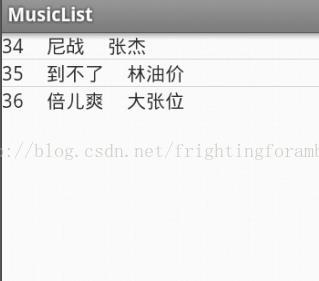
长按列表项弹出单个管理的菜单。像微信好友对话管理一样。
删除时能够直接删除这一条并在列表中直接显示,更新时弹出对话框更新内容提交后在列表中又一次显示。
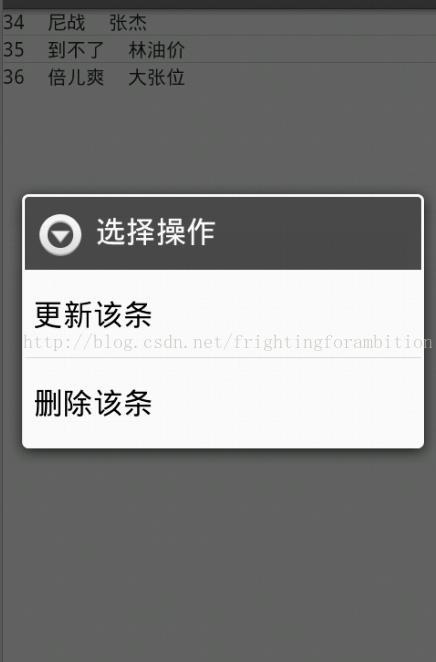
watermark/2/text/aHR0cDovL2Jsb2cuY3Nkbi5uZXQvZnJpZ2h0aW5nZm9yYW1iaXRpb24=/font/5a6L5L2T/fontsize/400/fill/I0JBQkFCMA==/dissolve/70/gravity/Center" width="334" height="464" alt="" />
做此例遇到的困难:
1、菜单获取上下文
2、获取对话框中的内容
3、对话框button加入监听事件-----注意包不要导错:import android.content.DialogInterface.OnClickListener;
主要代码例如以下:
第一个页面:
package com.example.musiclist;

import android.app.Activity;

import android.content.Intent;

import android.database.Cursor;

import android.database.sqlite.SQLiteDatabase;

import android.database.sqlite.SQLiteException;

import android.os.Bundle;

import android.view.Menu;

import android.view.View;

import android.view.View.OnClickListener;

import android.widget.Button;

import android.widget.EditText;

public class MainActivity extends Activity {

	SQLiteDatabase db;

	String music;

	String singer;

	Button add;

 	@Override

 	protected void onCreate(Bundle savedInstanceState) {

		super.onCreate(savedInstanceState);

		setContentView(R.layout.activity_main);

		db = SQLiteDatabase.openOrCreateDatabase(this.getFilesDir().toString()+"/music.db3", null);

		add = (Button)findViewById(R.id.add);

		add.setOnClickListener(new OnClickListener(){

			Cursor cursor = null;

			public void onClick(View sourse){

				music = ((EditText)findViewById(R.id.music)).getText().toString();

				singer = ((EditText)findViewById(R.id.singer)).getText().toString();

				try{

					insertData(db,music,singer);

				}catch(SQLiteException se){

					//primary key autoincrement

					db.execSQL("create table musiclist(_id integer primary key autoincrement,"

							+"music varchar(30) ,"

							+"singer varchar(30))");

					insertData(db,music,singer);

				}finally{

					//cursor.close();

					Intent intentSec = new Intent(MainActivity.this,SecondActivity.class);

					startActivity(intentSec);

				}

			}

		});

	}

	private void insertData(SQLiteDatabase db,String name,String weibo){

		//运行插入语句

		db.execSQL("insert into musiclist values(null,?,?)",new String[]{music,singer});

	}

	public void onDestroy(){

		super.onDestroy();

		if(db!=null&&db.isOpen()){

			db.close();

		}

	}

	@Override

	public boolean onCreateOptionsMenu(Menu menu) {

		// Inflate the menu; this adds items to the action bar if it is present.

		getMenuInflater().inflate(R.menu.main, menu);

		return true;

	}

}
<LinearLayout xmlns:android="http://schemas.android.com/apk/res/android"

    xmlns:tools="http://schemas.android.com/tools"

    android:layout_width="match_parent"

    android:layout_height="match_parent"

    android:orientation="vertical" >

    <ListView

        android:id="@+id/show"

        android:layout_width="fill_parent"

        android:layout_height="wrap_content" >

    </ListView>

</LinearLayout>
第二个页面:
package com.example.musiclist;

import android.app.Activity;

import android.app.AlertDialog;

import android.content.DialogInterface;

import android.content.DialogInterface.OnClickListener;

import android.database.Cursor;

import android.database.sqlite.SQLiteDatabase;

import android.database.sqlite.SQLiteException;

import android.os.Bundle;

import android.support.v4.widget.SimpleCursorAdapter;

import android.view.ContextMenu;

import android.view.ContextMenu.ContextMenuInfo;

import android.view.Menu;

import android.view.MenuItem;

import android.view.View;

import android.view.View.OnCreateContextMenuListener;

import android.widget.AdapterView.AdapterContextMenuInfo;

import android.widget.CursorAdapter;

import android.widget.EditText;

import android.widget.ListView;

import android.widget.TableLayout;

public class SecondActivity extends Activity {

	SQLiteDatabase db;

	ListView show;

	@Override

	protected void onCreate(Bundle savedInstanceState) {

		super.onCreate(savedInstanceState);

		setContentView(R.layout.activity_second);

		show = (ListView)findViewById(R.id.show);

		db = SQLiteDatabase.openOrCreateDatabase(this.getFilesDir().toString()+"/music.db3", null);

		//显示列表

		showlist();

		// 加入长按点击弹出选择菜单

		show.setOnCreateContextMenuListener(new OnCreateContextMenuListener() {

			public void onCreateContextMenu(ContextMenu menu, View v,

					ContextMenuInfo menuInfo) {

				menu.setHeaderTitle("选择操作");

				menu.add(0, 0, 0, "更新该条");

				menu.add(0, 1, 0, "删除该条");

			}

		});

	}

	//给菜单项加入事件

	@Override

	public boolean onContextItemSelected(MenuItem item) {

		AdapterContextMenuInfo info = (AdapterContextMenuInfo) item.getMenuInfo();

		//info.id得到listview中选择的条目绑定的id

		String id = String.valueOf(info.id);

		switch (item.getItemId()) {

		case 0:

			updateDialog(id);

			return true;

		case 1:

			//System.out.println("删除"+info.id);

			deleteData(db,id);

			showlist();

			return true;

		default:

			return super.onContextItemSelected(item);

		}

	}

	//更新对话框

	private void updateDialog(final String id){

		final TableLayout updatemsg = (TableLayout)getLayoutInflater().inflate(R.layout.updatemsg, null);

		new AlertDialog.Builder(this)

		.setTitle("更新该条信息")

		.setView(updatemsg)

		.setPositiveButton("更新",new OnClickListener(){

			@Override

			public void onClick(DialogInterface dialog, int which) {

				// TODO Auto-generated method stub

				String musicN = ((EditText)updatemsg.findViewById(R.id.musicN)).getText().toString();

				String singerN = ((EditText)updatemsg.findViewById(R.id.singerN)).getText().toString();

				updateData(db,id,musicN,singerN);

				showlist();

			}

		})

		.setNegativeButton("取消", new OnClickListener(){

			public void onClick(DialogInterface dialog,int which){

			}

		})

		.create()

		.show();

	}

	private void updateData(SQLiteDatabase db,String id,String musicN,String singerN){

		db.execSQL("update musiclist set music='"+musicN+"',singer='"+singerN+"' where _id=?",new String[]{id});

	}

	//删除列表项

	private void deleteData(SQLiteDatabase db,String id){

		db.execSQL("delete from musiclist where _id=?",new String[]{id});

	}

	//显示列表项

	private void showlist(){

		Cursor cursor = null;

		try{

			cursor = db.rawQuery("select * from musiclist", null);

			inflateList(cursor);

		}catch(SQLiteException se){

			db.execSQL("create table musiclist(_id integer primary key autoincrement,"

					+"music varchar(30) ,"

					+"singer varchar(30))");

			//查询

			cursor = db.rawQuery("select * from musiclist", null);

			inflateList(cursor);

		}finally{

			//cursor.close();

		}

	}

	private void inflateList(Cursor cursor){

		//填充SimpleCursorAdapter

		SimpleCursorAdapter adapter = new SimpleCursorAdapter(SecondActivity.this,R.layout.line,cursor,

				new String[]{"_id","music","singer"},

				new int[]{R.id.idS,R.id.musicS,R.id.singerS},

				CursorAdapter.FLAG_REGISTER_CONTENT_OBSERVER);

		show.setAdapter(adapter);

	}

	public void onDestroy(){

		super.onDestroy();

		if(db!=null&&db.isOpen()){

			db.close();

		}

	}

	@Override

	public boolean onCreateOptionsMenu(Menu menu) {

		// Inflate the menu; this adds items to the action bar if it is present.

		getMenuInflater().inflate(R.menu.main, menu);

		return true;

	}

}
<LinearLayout xmlns:android="http://schemas.android.com/apk/res/android"

    xmlns:tools="http://schemas.android.com/tools"

    android:layout_width="match_parent"

    android:layout_height="match_parent"

    android:orientation="vertical" >

    <ListView

        android:id="@+id/show"

        android:layout_width="fill_parent"

        android:layout_height="wrap_content" >

    </ListView>

</LinearLayout>
列表 line.xml:
<?

xml version="1.0" encoding="utf-8"?>

<LinearLayout xmlns:android="http://schemas.android.com/apk/res/android"

    android:layout_width="match_parent"

    android:layout_height="match_parent"

    android:orientation="horizontal">

    <TextView

        android:id="@+id/idS"

        android:layout_width="wrap_content"

        android:layout_height="wrap_content"

         />

     <TextView

        android:layout_width="wrap_content"

        android:layout_height="wrap_content"

        android:text="     "

         />

    <TextView

        android:id="@+id/musicS"

        android:layout_width="wrap_content"

        android:layout_height="wrap_content"

         />

    <TextView

        android:layout_width="wrap_content"

        android:layout_height="wrap_content"

        android:text="     "

         />

    <TextView

        android:id="@+id/singerS"

        android:layout_width="wrap_content"

        android:layout_height="wrap_content"

         />

    <TextView

        android:layout_width="wrap_content"

        android:layout_height="wrap_content"

        android:text="     "

         />

</LinearLayout>
对话框:updatemsg.xml
<?

xml version="1.0" encoding="utf-8"?

>

<TableLayout xmlns:android="http://schemas.android.com/apk/res/android"

    android:layout_width="match_parent"

    android:layout_height="match_parent" >

    <TableRow>

        <TextView

            android:layout_width="100dip"

            android:layout_height="wrap_content"

            android:text="音乐名"

            android:textSize="30px"

            android:textColor="#ffffff" />

        <EditText

            android:id="@+id/musicN"

            android:layout_width="100dip"

            android:layout_height="wrap_content" />

    </TableRow>

    <TableRow>

        <TextView

            android:layout_width="100dip"

            android:layout_height="wrap_content"

            android:text="歌手"

            android:textSize="30px"

            android:textColor="#ffffff" />

        <EditText

            android:id="@+id/singerN"

            android:layout_width="100dip"

            android:layout_height="wrap_content" />

    </TableRow>

</TableLayout>
Android学习--------实现增删改查数据库操作以及实现相似微信好友对话管理操作的更多相关文章
- 利用SQLite在android上实现增删改查
利用SQLite在android上实现增删改查 方法: 一.直接利用database.execSQL()方法输入完整sql语句进行操作 这种方法适用于复杂的sql语句,比如多表查询等等 这里适合于增删 ...
- django之创建第8-1个项目-数据库之增删改查/数据库数据显示在html页面
1.为test.DB数据库预先创建下面数据 1 张三 16 2015-01-02 12 李四 17 2015-01-04 13 王五 14 ...
- android139 360 黑名单 增删改查-数据库操作
BlackNumberOpenHelper.java package com.itheima52.mobilesafe.db.dao; import android.content.Context; ...
- JDBC学习笔记——增删改查
1.数据库准备 要用JDBC操作数据库,第一步当然是建立数据表: ? 1 2 3 4 5 6 CREATE TABLE `user` ( `id` int(11) NOT NULL AUTO_I ...
- jdbc编程学习之增删改查(2)
一,enum类型的使用 在SQL中没有布尔类型的数据,我们都使用过布尔类型,当属性的值只用两种情况时.例如性别等.那在数据库对这些属性的值个数比较少时我们应该使用什么数据类型呢?SQL给我们提供了枚举 ...
- laravel 增删改查 数据库设置 路由设置
laravel 框架的路由设置: url: http://www.shanzezhao.com/laraverl/my_laravel/public/index.php/indexs laravel ...
- MyBatis入门2_增删改查+数据库字段和实体字段不一致情况
本文为博主辛苦总结,希望自己以后返回来看的时候理解更深刻,也希望可以起到帮助初学者的作用. 转载请注明 出自 : luogg的博客园 谢谢配合! 当数据库字段和实体bean中属性不一致时 之前数据库P ...
- vba增删改查数据库2
sub test()Set cnn = CreateObject("ADODB.Connection") Set rs = CreateObject("Adodb.Rec ...
- MongoDB学习之--增删改查(1)
本文是对mongodb学习的一点笔记,主要介绍最简单的增删改操作,初学,看着API,有什么错误,希望大家指正:(使用官方驱动) 1.增 增加操作是最简单的,构造bsonDcument插入即可: 方式1 ...
随机推荐
- php随手记
引用(&)是变量的别名,而不是指针,可用unset(变量名)把此变量的别名注销掉,等于没有声明此变量. @为错误抑制符,可以用在任何表达式前面. ``为命令操作符,可以执行系统命令. inst ...
- Linux学习 : 移植qt 5.6.3 及 tslib 1.4
(一) 移植 qt5.6.3 一.qt简介: Qt是一个1991年由Qt Company开发的跨平台C++图形用户界面应用程序开发框架.它既可以开发GUI程序,也可用于开发非GUI程序,比如控制台工具 ...
- Android : 基于alsa库的音乐播放
继上篇:Android : alsa-lib 移植 ,这篇随笔实现一个demo基于移植好的alsa库在Android平台上播放wav文件: 一.利用ffmeg将一个mp3文件转换成wav文件: (1) ...
- Docker小白从零入门到实战系列【二】
1.安装好Centos 7 2.关闭SELINUX sed -i 's#SELINUX=enforcing#SELINUX=disabled#g' /etc/selinux/configsetenfo ...
- js 循环遍历数组
var a =[1,3,4]; a.each(functiom{ .... }) or for (var x in a ){ .... }
- dos命令:目录操作
目录操作 一.cd语句 1.介绍 显示当前目录名或改变当前目录. 2.语法 CHDIR [/D] [drive:][path] CHDIR [..] CD [/D] [drive:][path] ...
- shell脚本-实战防dos攻击
根据web日志或者或者网络连接数,监控当某个IP并发连接数或者短时内PV达到100,即调用防火墙命令封掉对应的IP,监控频率每隔3分钟.防火墙命令为:iptables -I INPUT -s 10.0 ...
- Github笔记(1)
学习目的: 借助GitHub托管项目代码 GitHub官方介绍: 中文:http://www.cnblogs.com/twtp/articles/5264073.html 英文:https://gui ...
- ecmall 基础类分析
class ECBaseApp,继承自class BaseApp,是includes/ecapp.base.php文件. 该类是一个非常重要的类,他是各个APP的应用的基础继承类.处理相关的基础应用. ...
- Ubuntu16.04安装OpenCV3.2以及PCL1.8
最近在学习slam14讲,需要配置一些环境<视觉slam十四讲> 这本书中已经给出如何配置相关环境的比较详细的说明,但是有些环境并无卵用,比如OpenCV以及PCL 这里给出自己屡试不爽的 ...