
[Xamarin] 開啟另外一個Activity 並且帶資料 (转帖)
每隻App是透過許多畫面所組成的,當然可能主畫面之外,都會有許多其他的頁面
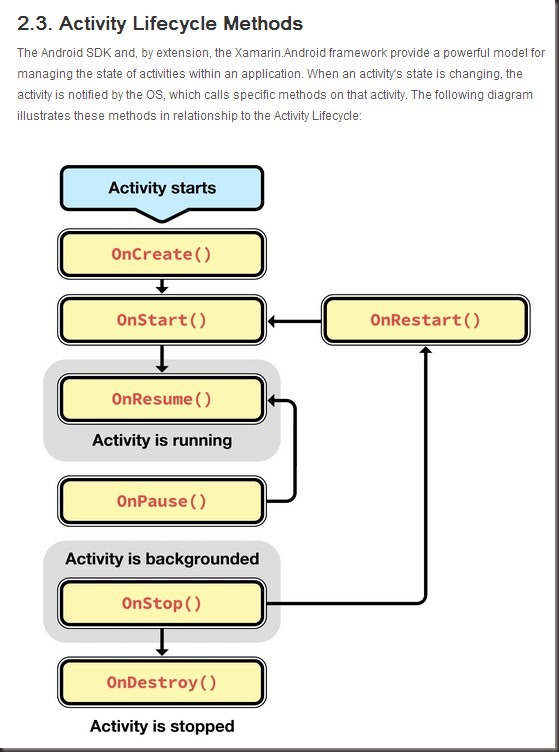
再Android 設計中畫面會有配合的Activity 當然在這之前,最好事先了解一下,Android 關於生命週期的規劃
關於Activity 的生命週期可以參考這篇
http://docs.xamarin.com/guides/android/application_fundamentals/activity_lifecycle
我們看看今天的範例..
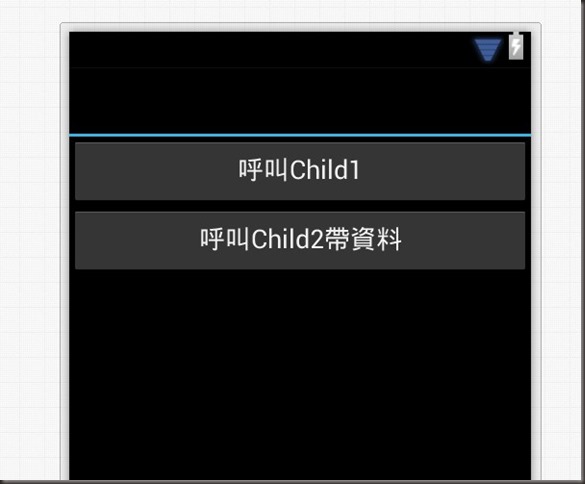
兩個按鈕,第一個按鈕(btn1) 按下後,會呼叫起Child1Activity
這邊不難,直接看程式
var btn1 = FindViewById<Button>(Resource.Id.btn1);
btn1.Click += delegate
{
StartActivity(typeof(Child1Activity));
};
很簡單,如果不需要帶資料給另外一個Activity 直接透過StartActivity 就可以呼叫起來
再來第二個按鈕(btn2) 我們要把Child2Activity給叫起來之外我們必須要把一些資料帶過去
這時候要透過intent (意圖),為什麼會這樣設計呢?!這關係到因為很多時候,在Android 中會有許多Activity會被不只是自己開發的App給叫起
有可能會是系統發給你的,所以都得透過Intent去做處理,其中案例我帶一個key 為 username 值為 donma的資料過去
var btn2 = FindViewById<Button>(Resource.Id.btn2);
btn2.Click += delegate
{
var intentAct2 = new Intent(this, typeof(Child2Activity));
//將intent 放入username的值為donma 帶過去
intentAct2.PutExtra("username", "donma");
StartActivity(intentAct2);
};
在Activity 這邊,原本android 是要透過getIntent 取得,但是在Xamarin 直接就可以在 this.Intent 中拿到
Child2Activity.cs:
using Android.App;
using Android.OS;
using Android.Widget;
namespace NewActivity
{
[Activity(Label = "My Activity")]
public class Child2Activity : Activity
{
protected override void OnCreate(Bundle bundle)
{
base.OnCreate(bundle);
SetContentView(Resource.Layout.Child2);
var username = Intent.GetStringExtra("username") ?? "無資料";
var tvChild2View = FindViewById<TextView>(Resource.Id.tvChild2View);
tvChild2View.Text = "傳來的資料:" + username;
}
}
}
結果:

成功拉是不是沒很難 :)
[Xamarin] 開啟另外一個Activity 並且帶資料 (转帖)的更多相关文章
- [Xamarin] 透過WebClient跟網路取得資料 (转帖)
之前寫過一篇文章,關於在Android上面取得資料 透過GET方式傳資料給Server(含解決中文編碼問題) 我們來回顧一下 Android 端的Code: 有沒有超多,如果是在Xaramin下面,真 ...
- Delphi APP 開發入門(八)SQLite資料庫
Delphi APP 開發入門(八)SQLite資料庫 分享: Share on facebookShare on twitterShare on google_plusone_share 閲讀次 ...
- 開啟活動監視器 (SQL Server Management Studio)
本主題描述如何開啟 [活動監視器] 來取得有關 SQL Server 處理序以及這些處理序如何影響目前 SQL Server 執行個體的資訊. 此外,本主題也描述如何設定 [活動監視器] 的重新整理間 ...
- [ Eclipse ] [ Problem ] Eclipse 無法開啟問題
因為 Eclipse 在設定環境的過程掛掉太多次,擷取一些網路上優秀的文章當作備份 http://www.ewdna.com/2013/12/Eclipse-Loading-Workbench.htm ...
- office outlook 無法開啟 outlook 視窗
例如[無法啟動Microsoft Office Outlook.無法開啟Outlook 視窗.] 1.啟動 Outlook 安全模式outlook.exe /safe2.清除並重新產生目前設定檔的功能 ...
- 開啟windows 7 ,10 的熱點功能(無線熱點)
開啟windows 7 ,10 的熱點功能: 1.首先要確定你的電腦無線芯片有無熱點功能 # netsh wlan show drivers Hosted network supported ...
- [Xamarin] 關於Internal Storage ,存取App內部使用資料 (转帖)
最近在開發App,會使用到必須要處理一些App所使用的資料,上網路查一下Android 得作法,包含我自己也實作了一下,可能是因為對Java || Android 不是很孰悉,常常錯在 java.la ...
- [Xamarin.Android] 儲存資料於Windows Azure (转帖)
在準備討論Xamarin.Android 如何整合GCM與Windows Azure來實作Push Notification之前, 先來了解如何將Xamarin.Android 與Windows Az ...
- .net批量上傳Csv檔資料應用程序開發總結
應用環境:visual studio 2010開發工具,Database為Sql2008以上版本 最近在生產環境中需要開發一款應用程式,上傳電子檔(.csv)資料至Database 最初方案: 以tx ...
随机推荐
- excel定位函数
在Excel中MATCH函数可以返回指定内容所在的位置,而INDEX又可以根据指定位置查询到位置所对应的数据,各取其优点,我们可以返回指定位置相关联的数据. MATCH函数(返回指定内容所 ...
- Ubuntu下的apache2的配置过程
参考apache2的中文文档:http://httpd.apache.org/docs/2.4/ 安装apache2: apt-get install apache2 安装apache2doc文档:a ...
- 注册一个GitHub用户的过程
今天,我注册了一个GitHub用户.一开始,不知道GitHub是什么,还以为叫什么"getup",心里还想着什么网站名字这么奇怪,后来在舍友的帮助之下知道了原来是叫GitHub.下 ...
- asp.net mvc5 下载文件方法
控制器自带的 FileContentResult 可以让我们很方便的返回文件到服务端,减少了很多步骤.用于下载文件的时候,像视频.文本.图片这种浏览器支持的文件,默认就会被浏览器打开.这时候想让它变成 ...
- C# 调用人脸识别 虹软ArcFace2.0实例
虹软SDK推出了2.0版本,这个版本的所有API都集合在一个动态库里面,再通过引擎库调用,比1.2版本相对轻便了很多. 了解详情戳这里 小西瓜也迫不及待弄了一个新版本的C#实例,基于VS2013开发的 ...
- LightOJ 1220 Mysterious Bacteria(唯一分解定理 + 素数筛选)
http://lightoj.com/volume_showproblem.php?problem=1220 Mysterious Bacteria Time Limit:500MS Memo ...
- OpenStack虚机网卡的创建过程
OpenStack虚机网卡的创建过程 OpenStack最基本和常用的操作就是启动虚机.虚机启动的过程中涉及很多内容,其中非常重要的一个环节就是创建并绑定虚机的虚拟网卡.虚机的创建和管理是Nova的任 ...
- MessagingTimeout: Timed out waiting for a reply to message ID
l3中出现大量消息超时错误,对网络的操作各种异常. 报错如下: 2016-02-25 05:54:59.886 15110 ERROR neutron.agent.l3.agent [req-db92 ...
- python--面向对象(02)
1.类的成员 在类中你能写的所有内容都是类的成员 class 类名: # 方法 def __init__(self, 参数1, 参数2....): # 属性变量量 self.属性1 = 参数1 sel ...
- c++11新特性总结(转。加上重点)
1.类型与变量相关 1.1.nullptr: 取代了NULL,专用于空指针 1.2.constexpr: 近似const, 可以修饰变量,也可以修饰函数, 修饰变量如: const int globa ...