
TF42064: The build number already exists for build definition error in TFS2010
In TFS2008, deleting a build removes it from the database itself. If you delete a build called Build_20110423.1 or 1.0.0.1 from Build Explorer and trigger the build again then you will see that new builds starts with same number (Build_20110423.1 or 1.0.0.1) but not with an incremental number (Build_20110423.2 or 1.0.0.2). But, it doesn’t work the same way in TFS2010.
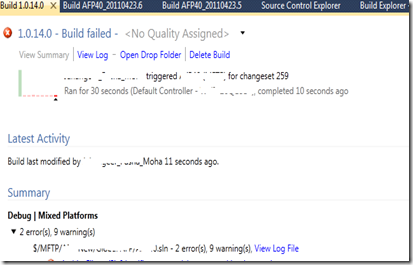
I queued a build in TFS2010 which got failed with Build Number 1.0.14.0 due to compilation errors.
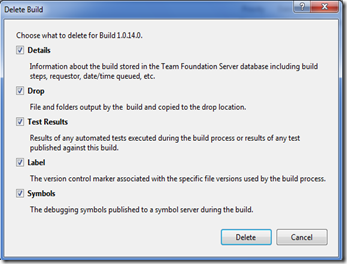
I wanted to reuse the same build number. So, I have deleted the Build from Build Explorer by checking all the available options.
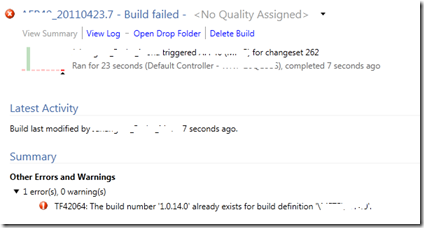
Triggered the Build again but it got failed with error TF42064: The build number ‘1.0.14.0’ already exists for build definition .
.
This is because in TFS2010 when you delete the builds, it only gets marked as deleted in the database so that it doesn’t show up in the UI anymore. To get rid of this build completely you actually have to Destroy it using tfsbuild destroy command which is added in TFS2010.
Open the Visual Studio Command Prompt and you can run the tfsbuild destroy command in below mentioned syntax.
C:\WINDOWS\system32>tfsbuild destroy /collection:http://TFSServer:8080/tfs/defaultcollection /builddefinition:"TeamProject\BuildDefinitionName" BuildNumber 1.0.14.0
No builds found for build specification 'BuildNumber'.
Destroy build record for 1.0.14.0 permanently? (Yes/No/All) yes
Destroying 1.0.14.0... Done
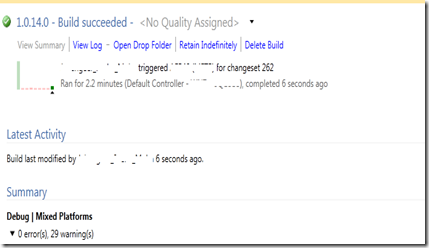
I queued the build again and now the build succeeded with 1.0.14.0 Build Number.
TF42064: The build number already exists for build definition error in TFS2010的更多相关文章
- Eclipse项目导入Android Stuio 配置出现 Timeout waiting to lock buildscript class cache for build file 'H:\studioproject\Generic_SN\build.gradle'
Eclipse项目导入Android Stuio 配置出现 Error:Timeout waiting to lock buildscript class cache for build file ...
- Build step 'Execute shell' marked build as failure解决
今天jenkins构建时运行脚本报错如下: Build step 'Execute shell' marked build as failure 脚本没问题后来看了下原因是磁盘空间不足导致报错,清除下 ...
- Jenkins Build step 'Execute shell' marked build as failure
问题出现: Jenkins一直都构建成功,今天突然报错:Jenkins Build step 'Execute shell' marked build as failure 问题原因: By defa ...
- ..\OBJ\CAN.axf: Error: L6411E: No compatible library exists with a definition of startup symbol __main.
..\OBJ\CAN.axf: Error: L6411E: No compatible library exists with a definition of startup symbol __ma ...
- Jenkins设置BUILD NUMBER初始值
由于服务器迁移,需要将之前的Jenkins构建项目一并迁移,为了区分构建编号,需要将所有项目的BUILDE NUMBER 初始值定义. 网上有一些资料是更新单个项目的,我们这项目几百个,所以只好自己研 ...
- Vue项目本地run与build后样式不同,build后样式不生效
今天老大,让我改一个按钮的样式,就是鼠标放在按钮上,改变字体的颜色.觉得小意思啦,不就是:hover吗? 啊...什么鬼?本地run可以,但是build之后并没有生效!!! 我们项目引入的第三方UI库 ...
- Compile、Make和Build的区别(as make, build, clean, run)
Compile.Make和Build的区别 - 熔 岩 - 51CTO技术博客 http://lavasoft.blog.51cto.com/62575/436216/ 针对Java的开发工具,一般都 ...
- nuxt build 项目文件分析、nuxt build 发布后的资源如何部署cdn
建议在项目发布的时候,还是将.nuxt 进行发布到生产环境,是比较稳妥的做法 出处:https://nickfu.com/p/150 nuxt build 后的前端资源都会存放在.nuxt/dist/ ...
- uva 1151 - Buy or Build poj 2784 Buy or Build(最小生成树)
最小生成树算法简单 只是增加了一些新的东西,对于需要最小生成树算法 和中 并检查使用的一系列 还有一些更深入的了解. 方法的一些复杂问题 #include<cstdio> #include ...
随机推荐
- linux权限详解
一个用户.一个组 我们来看一看 Linux 权限和所有权模型.我们已经看到每个文件属于一个用户和一个组.这正是 Linux 中权限模型的核心.您可以在 ls -l 清单中查看用户和组: $ ls -l ...
- springcloud Ribbon自定义负载均衡插件
现在我们通过插件的方式添加新的一种策略. package com.zhuyang.config; import org.springframework.beans.factory.annotation ...
- Avoid strong reference cycles
转自:http://masteringios.com/blog/2014/03/06/avoid-strong-reference-cycles/ With the introduction of A ...
- C++ 智能指针 shared_ptr
今天晚上去旁听了C++高级编程的课,其中提到智能指针.第一反映还以为是auto_ptr呢,一听才知道是share_ptr这个.哦,原来是C++11特性.大致的原因是auto_ptr有一点缺陷,而sha ...
- CLR Debug extention
https://github.com/Microsoft/clrmd https://www.nuget.org/packages/Microsoft.Diagnostics.Runtime http ...
- 08、通过自定义依赖属性,用 StateTrigger 修改全局主题样式
在 Win 10 的 UWP 中,需要在 xaml 中,通过使用 StateTrigger 修改全局的文本大小.Background.画刷等依赖属性等主题样式.下面只针对字体大小进行描述,其它依赖属性 ...
- 用C#写一个多进程监控自动关机工具
因为据说某server开着就很贵,所以我们跑完测试的job后就要赶紧关机才行,但是测试的job要跑很久,过程中又不需要干什么,所以就得有个守家的,有时候会走很晚.如果有一个自动化关机的工具就好了,当指 ...
- 一款基于jquery的侧边栏导航
之前为大家介绍了好多导航菜单,今天给大家分享一款基于jquery的侧边栏导航.这款导航侧边滑出,适合放在手机网页或webapp.一看下实现的效果图: 在线预览 源码下载 实现的代码. html代码 ...
- mysql的OFFSET实现分页
使用limit 可以实现分页比如 limit 0,5 是从1到5条, limit 5,5 是从,6到10条, 使用limit offset 时 limit 5 offset 0 从 1 到5 条 ...
- 爬取千万淘宝商品的python脚本
import time import leveldb from urllib.parse import quote_plus import re import json import itertool ...