
Axis2 Web Service Development & Deployment Guide(Axis2使用)
主要内容:
记录关于Axis2的使用,通过WSDL文件生成Web service的客户端和服务器端的过程.
目录:
- Requirement(必备工具)
- Development - Client Generation(生成客户端)
- Development - Server Generation(生成服务器端)
Requirement(必备工具)
- Apache Axis 2 1.5.6 (and above) 下载地址:http://archive.apache.org/dist/axis/axis2/java/core/1.6.1/axis2-1.6.1-bin.zip
- Apache Tomcat 6 (and above)
- Apache Ant 1.8.3 (and above)
- Java JDK 1.5 (and above)
- WSDL
Development - Client Generation(生成客户端)
- in folder:Create a folder as clientSide under C:\
- in cmd:Now open a cmd
- in cmd:Change your path to C:\axis2-1.5.6\bin
- in cmd:Set your JAVA_HOME to your java SDK home (eg : set JAVA_HOME=c:\Program Files\Java\jdk1.6.0_33)

- in cmd:Enter: wsdl2java.bat -uri CBS-CustAcctListProfile-I-Concrete_HTTP.wsdl -u -o c:\clientSide
- in folder:The commend above will generate the client side java files under C:\clientSide
- in folder:Go to C:\clientSide in windows explorer and open the build.xml file
- in build.xml file:Change memoryMaximumSize="256m" memoryInitialSize="256m" to memoryMaximumSize="512m" memoryInitialSize="512m"

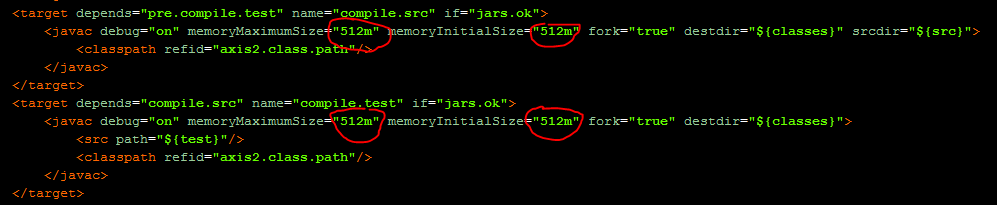
- in build.xml file:Change axis2.home

- in build.xml file:Change <jar destfile="${lib}/${name}-test-client.jar"> to <jar destfile="${lib}/appropriatename-client.jar">
- Appropriate
name depends on the service, example for CBS-CustAcctDetails-I
appropriate name for the jar would be cbs-CustAcctDetails-client.jar - in cmd:Open back the existing (or new cmd and set the java), point to the bin folder (eg : C:\apache\apache-ant-1.8.3\bin),enter : ant -f c:\clientSide\build.xml
- in folder:The client jar will be created at C:\clientSide\build\lib\
Development - Server Generation(生成服务器端)
- in folder:Create a folder serverSide under C:\
- in cmd:Now open cmd
- in cmd:Change your path to C:\axis2-1.5.6\bin
- in cmd:Set your JAVA_HOME to your java SDK home (eg : set JAVA_HOME=c:\Program Files\Java\jdk1.6.0_33)
- in folder:put your WSDL file into:C:\serverSide\build\classes\META-INF
- in cmd:Then enter: wsdl2java.bat -uri <filename.wsdl> -ss -sd -o c:\serverSide (note:filename need to change to your WSDL file name)
- in folder:This command will generate server side (service provider) java files under C:\serverSide.
- in folder:Go to C:\serverSide in windows explorer and open the build.xml file.
- in build.xml file:Change memoryMaximumSize="256m" memoryInitialSize="256m" to memoryMaximumSize="512m" memoryInitialSize="512m"

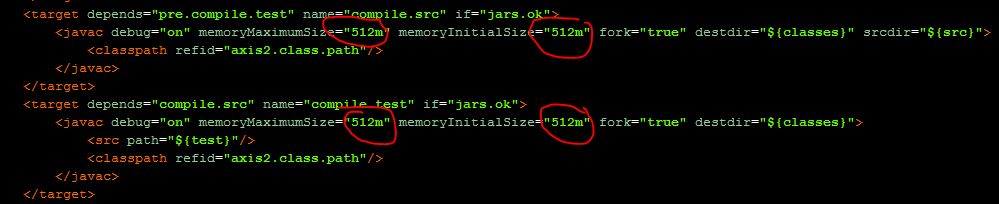
- in build.xml file:Change axis2.home
- in cmd:Open back the existing (or new cmd and set the java), enter : ant -f c:\serverSide\build.xml (OR:in cmd:Change your path to C:\axis2-1.5.6\bin,enter: ant )
- in folder:This will build the java files in C:\serverSide\build\lib\
如有侵权,请联系作者删除
Axis2 Web Service Development & Deployment Guide(Axis2使用)的更多相关文章
- Web Service学习之一:Web Service原理
一.定义 Web Service 不是框架也不是技术 而是解决远程调用.跨平台调用.跨语言调用问题的一种规范. 二.应用1.同一个公司新.旧系统的整合:比如CRM系统与OA.客服系统相互调用2.不同公 ...
- Web Service相关工具的配置
近期在学习Web Service Testing,使用到了soapUI这个工具,但是在学习之前,需要搭建Web Service环境,其中有关数据库的连接问题花费了我好多时间,主要还是自己对于很多配置不 ...
- Error in WCF client consuming Axis 2 web service with WS-Security UsernameToken PasswordDigest authentication scheme
13down votefavorite 6 I have a WCF client connecting to a Java based Axis2 web service (outside my c ...
- Eclipse利用Axis2插件构建Web Service并测试
在学习Web Service的时候,从网上找到前辈的博客http://www.cnblogs.com/hexinlin/p/3358558.html,并依此文的方法按部就班:编写欲发布的java类He ...
- 新手Axis2 发布Web Service之路
由于公司的需求,需要写几个银行接口写模拟器(Mock Server),此次接口需要发布成一个WEB Service. 一开始,我以为只要负责写接口的业务层就行了,具体的框架或是环境搭建可以不用管.在与 ...
- 2.3 Apache Axis2 快速学习手册之 ADB 构建Web Service
使用ADB生成服务(根据ADB 命令将wsdl 文件还原成Java代码) 要使用Axis2数据绑定框架(ADB)生成和部署服务,请执行以下步骤. 通过在Axis2_HOME / samples / q ...
- 2.1 Apache Axis2 快速学习手册之 POJO 构建Web Service
1. 准备:创建一个Maven Web App 项目 这里让我们使用Maven 模板创建一个Web App 项目 1. New------> Maven Project 2. 使用默认配置,点击 ...
- Java主流Web Service框架介绍:CXF和Axis2
CXF和Axis2是目前java平台上最主流的两个框架,虽然两个项目都隶属ASF,但却是基于不同思想和风格实现的,因此也各有所长. CXF:http://cxf.apache.org/ 是由过去的 ...
- Eclipse+tomcat+axis2进行web service部署
用Eclipse+axis2+tomcat进行web service部署 2016-12-07 目录 1 安装JDK 1.1 下载JDK 1.2 安装和配置JDK 1.3 验证2 安装Ecli ...
随机推荐
- Determining Whether Multitasking Is Available
[Determining Whether Multitasking Is Available] Apps must be prepared to handle situations where mul ...
- 借用服务器百度BAE
3一.简介 对于普通的开发者,不必要买服务器和买域名,这时要将自己的项目传到服务器上,就用到了百度BAE这样的,可以直接传项目的服务器. 二.申请 登录百度开放平台上 三.登录网址,选择要使用的项目 ...
- 20169205实验三 敏捷开发与XP实践
20169205实验三 敏捷开发与XP实践 实验内容及步骤 (一)敏捷开发与XP基本知识 敏捷开发(Agile Development)是一种以人为核心.迭代.循序渐进的开发方法. 一项实践在XP环境 ...
- oracle树形语句
oracle树查询的最重要的就是select…start with…connect by…prior语法了.依托于该语法,我们可以将一个表形结构的以树的顺序列出来.在下面列述了oracle中树型查询的 ...
- openfire搭建spackweb在线即时聊天
1.首先去openFire官网下载openFire以及spackweb,以下地址可以2样东西一次打包下载.http://download.csdn.net/detail/a315157973/8048 ...
- vue实现首页导航切换不同路由的方式(二)【使用vuex实现的】
<nav> <!-- 导航栏 --> <div class="indexNavOut"> <div class="indexNa ...
- 前端与HTTP
本文整理在,我的github 上.欢迎Star. 各版本的http 发展 在HTTP建立之初,主要是为了传输超文本标记语言(HTML)文档.随着时代的发展,也进行了若干次演进.下图是各个版本发布的时间 ...
- mysql快速插入大数据
说的是插入数据,这个倒像是载入数据. 上一篇,是按照插入数据来写的,就是insert into,当时插入一万条实在是太慢了,大概是286734毫秒. insert into table values, ...
- [react001] 使用webpack自动构建react 项目
1.react 简介 React 是一个Facebook出品的前端UI开发框架.react官方的tutorials 为了让人容易上手,并没有给在平常工作使用react的详细配置,随意学习的深入,你为了 ...
- eCharts IE8兼容性问题
使用Echart的图表柱状图,里面用了Float32Array,IE8下面会提示无法找到Float32Array,黄色叹号. 网上查找后使用如下方法解决:不明觉厉 在<head></ ...