
基于SSH框架下登录验证码模块的实现
1、前端页面代码:
主要以jQuery的ajax异步请求实现。
...
<script type="text/javascript" src="${pageContext.request.contextPath }/js/jquery-1.11.3.min.js"></script>
<script type="text/javascript">
$(function () {
//验证码图片刷新
$("#vcode").click(function () {
$(this).prop("src","${pageContext.request.contextPath }/user_createVerificationCode?"+new Date()); });
//验证码校验
$("#txtcode").blur(function () {
var url = "${pageContext.request.contextPath }/user_checkVerificationCode"
var code = $(this).val();
$.get(url,{"code":code},function (result) {
if(result != ""){
$("#tip").html(result);
//验证码错误,登录按钮失效
$("#btn").prop("disabled","disabled");
}else{
$("#tip").html("");
$("#btn").removeAttr("disabled");
}
});
});
})
</script>
...
<tr>
<td style="HEIGHT: 28px">验证码:</td>
<td style="HEIGHT: 28px"><input id=txtcode style="WIDTH: 130px" name=txtcode required></td>
<td style="HEIGHT: 18px"><img id="vcode" src="${pageContext.request.contextPath }/user_createVerificationCode" /></td>
<td style="HEIGHT: 28px"> <span id="tip" style="color: red"></span></td>
<tr>
<td></td>
<td>
<input id="btn" value="登录">
</td>
</tr>
...
2、struts.xml
<package name="user" extends="struts-default" namespace="/">

    <action name="user_*" class="userAction" method="{1}"></action>

</package>
3、applicationContext.xml
<bean id="userAction" class="com.pri.web.action.UserAction" scope="prototype">

        <property name="validateCode" ref="validateCode"/>

</bean>

<!-- 生成验证图片需要为多例,默认情况为单例 -->

<bean id="validateCode" class="cn.dsna.util.images.ValidateCode" scope="prototype">

     <constructor-arg index="0">

         <value>80</value>

     </constructor-arg>

     <constructor-arg index="1">

         <value>20</value>

     </constructor-arg>

     <constructor-arg index="2">

         <value>4</value>

     </constructor-arg>

     <constructor-arg index="3">

         <value>10</value>

     </constructor-arg>

</bean>
4、Action.java
public class UserAction extends ActionSupport implements ModelDriven<User>{private String code;

    public String getCode() { return code;}

    public void setCode(String code) {this.code = code;}

    private ValidateCode validateCode;

    public void setValidateCode(ValidateCode validateCode) {

        this.validateCode = validateCode;

    }
   public String createVerificationCode(){

        String vcode = validateCode.getCode ();

        HttpSession session = ServletActionContext.getRequest().getSession();

        session.setAttribute("vcode",vcode);

        try {

            validateCode.write (ServletActionContext.getResponse().getOutputStream ());//将服务器生成的验证码,以流的形式写给客户端(变成图片)

        } catch (IOException e) {

            e.printStackTrace();

        }

        return NONE;

    }

    public String checkVerificationCode() throws IOException {

        HttpSession session = ServletActionContext.getRequest().getSession();

        String vcode = (String) session.getAttribute("vcode");

        if (!code.equalsIgnoreCase(vcode)){

            HttpServletResponse response = ServletActionContext.getResponse();

            response.setContentType("text/html;charset=utf-8");

            response.getWriter().println("验证码输入有误!");

        }else{
       HttpServletResponse response = ServletActionContext.getResponse();
      response.setContentType("text/html;charset=utf-8");
      response.getWriter().print("");
     }
    return NONE;
  }
}
5、ValidateCode.java
package cn.dsna.util.images;

import java.awt.Color;

import java.awt.Font;

import java.awt.Graphics2D;

import java.awt.image.BufferedImage;

import java.io.FileOutputStream;

import java.io.IOException;

import java.io.OutputStream;

import java.util.Random;

import javax.imageio.ImageIO;

public class ValidateCode {

    private int width = 160;

    private int height = 40;

    private int codeCount = 5;

    private int lineCount = 150;

    private String code = null;

    private BufferedImage buffImg = null;

    private char[] codeSequence = new char[]{'A', 'B', 'C', 'D', 'E', 'F', 'G', 'H', 'I', 'J', 'K', 'L', 'M', 'N', 'P', 'Q', 'R', 'S', 'T', 'U', 'V', 'W', 'X', 'Y', 'Z', '1', '2', '3', '4', '5', '6', '7', '8', '9'};

    public ValidateCode() {

        this.createCode();

    }

    public ValidateCode(int width, int height) {

        this.width = width;

        this.height = height;

        this.createCode();

    }

    public ValidateCode(int width, int height, int codeCount, int lineCount) {

        this.width = width;

        this.height = height;

        this.codeCount = codeCount;

        this.lineCount = lineCount;

        this.createCode();

    }

    public void createCode() {

        int x = false;

        int fontHeight = false;

        int codeY = false;

        int red = false;

        int green = false;

        int blue = false;

        int x = this.width / (this.codeCount + 2);

        int fontHeight = this.height - 2;

        int codeY = this.height - 4;

        this.buffImg = new BufferedImage(this.width, this.height, 1);

        Graphics2D g = this.buffImg.createGraphics();

        Random random = new Random();

        g.setColor(Color.WHITE);

        g.fillRect(0, 0, this.width, this.height);

        ImgFontByte imgFont = new ImgFontByte();

        Font font = imgFont.getFont(fontHeight);

        g.setFont(font);

        int i;

        int red;

        int green;

        int blue;

        for(int i = 0; i < this.lineCount; ++i) {

            i = random.nextInt(this.width);

            int ys = random.nextInt(this.height);

            int xe = i + random.nextInt(this.width / 8);

            int ye = ys + random.nextInt(this.height / 8);

            red = random.nextInt(255);

            green = random.nextInt(255);

            blue = random.nextInt(255);

            g.setColor(new Color(red, green, blue));

            g.drawLine(i, ys, xe, ye);

        }

        StringBuffer randomCode = new StringBuffer();

        for(i = 0; i < this.codeCount; ++i) {

            String strRand = String.valueOf(this.codeSequence[random.nextInt(this.codeSequence.length)]);

            red = random.nextInt(255);

            green = random.nextInt(255);

            blue = random.nextInt(255);

            g.setColor(new Color(red, green, blue));

            g.drawString(strRand, (i + 1) * x, codeY);

            randomCode.append(strRand);

        }

        this.code = randomCode.toString();

    }

    public void write(String path) throws IOException {

        OutputStream sos = new FileOutputStream(path);

        this.write((OutputStream)sos);

    }

    public void write(OutputStream sos) throws IOException {

        ImageIO.write(this.buffImg, "png", sos);

        sos.close();

    }

    public BufferedImage getBuffImg() {

        return this.buffImg;

    }

    public String getCode() {

        return this.code;

    }

}
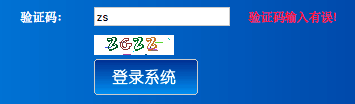
效果显示:
基于SSH框架下登录验证码模块的实现的更多相关文章
- 基于SSH框架的学生公寓管理系统的质量属性
系统名称:学生公寓管理系统 首先介绍一下学生公寓管理系统,在学生公寓管理方面,针对学生有关住宿信息问题进行管理,学生公寓管理系统主要包含了1)学生信息记录:包括学号.姓名.性别.院系.班级:2)住宿信 ...
- 基于SSH框架开发的《高校大学生选课系统》的质量属性的实现
基于SSH框架开发的<高校大学生选课系统>的质量属性的实现 对于可用性采取的是错误预防战术,即阻止错误演变为故障:在本系统主要体现在以下两个方面:(1)对于学生登录模块,由于初次登陆,学生 ...
- 基于ssh框架的在线考试系统开发的质量属性
我做的系统是基于ssh框架的在线考试系统.在线考试系统有以下几点特性:(1)系统响应时间需要非常快,可以迅速的出题,答题.(2)系统的负载量也需要非常大,可以支持多人在线考试(3)还有系统的安全性也需 ...
- java自定义注解知识实例及SSH框架下,拦截器中无法获得java注解属性值的问题
一.java自定义注解相关知识 注解这东西是java语言本身就带有的功能特点,于struts,hibernate,spring这三个框架无关.使用得当特别方便.基于注解的xml文件配置方式也受到人们的 ...
- 基于SSH框架的在线考勤系统开发的质量属性
我要开发的是一个基于SSH框架的在线考勤系统. 质量属性是指影响质量的相关因素,下面我将分别从6个系统质量属性(可用性,易用性,可修改性,性能,安全性,可测试性)来分析我的系统,以及如何实现这些质量属 ...
- 如何实现基于ssh框架的投票系统的的质量属性
如何实现基于ssh框架的投票系统的的质量属性: 项目 :网上考试系统 我做的是网上考试系统,因为标准化的考试越来越重要,而通过计算机进行标准化判卷,系统会自动判卷出成绩,组织考试的人不用组织人员打印试 ...
- 基于SSH框架的学生选课质量属性分析
系统:学生选课系统 框架:SSH(Struts2+Spring+Hibernate) 我做的是基于SSH框架的学生选课系统.学生选课系统的特性:①系统响应时间短,能够快速调出课程数据供学生选课提交.② ...
- 基于SSH框架的人力资源管理系统设计与实现
- - ->关注博主公众号[C you again],获取更多IT资源(IT技术文章,毕业设计.课程设计系统源码,经典游戏源码,HTML网页模板,PPT.简历模板,!!还可以投稿赚钱!!,点击查 ...
- 基于Struts2框架实现登录案例 之 程序国际化
国际化牵涉的知识非常多,这里只能简单的介绍,程序国际化的一般做法是:在jsp页面时, 不是直接输出信息,而是输出一个key值,该key值在不同语言环境下找到对应资源文件下的 对应信息,因此首先要创建满 ...
随机推荐
- 表格Table宽度设置无效的解决方法
表格Table宽度设置无效的解决方法 bootstrap中使用table时发现不管用width赋值方式都无法改变table>td的宽度 解决方法: 设置table:table-layout:fi ...
- Centos搭建Groovy开发环境
背景 临时接到需求,要帮兄弟团队跑一点线上的数据,据说很急.于是拿出了许久不用的Spring-Boot.可是,可是,死活启动有问题,心累了.其实一般写脚本就是在Boot用Groovy写好,然后放到线上 ...
- [转] 红帽7搭建Zabbix监控
zabbix是一个基于WEB界面的提供分布式系统监视以及网络监视功能的企业级的开源解决方案. zabbix能监视各种网络参数,保证服务器系统的安全运营:并提供灵活的通知机制以让系统管理员快速定位/解决 ...
- BiliBili, ACFun… And More!【递归算法】
题源:http://acm.uestc.edu.cn/#/problem/show/3 题解: 题意:播放一段视频文件,有播放速度和缓冲速度两种,因为作者的癖好,播放前要缓冲几秒钟(这段时间不计算在总 ...
- JAVA编程思想第一章——对象导论
- FJWC2019 全连
题目描述 有n个音符,第i个音符会在第i个时刻来临 令第 i 个音符的准备时间为 ti 个单位时间,如果选择去点击第 i 个音符,那么就没法点击所有到来时刻在 (i−ti ,i+ti)中的音符. ...
- Jupyter Notebook & Spyder 常用快捷键
Jupyter Notebook: 1. "shift + enter" notebook单元格内执行代码,并且自动跳至下一个的单元格 2. "tab" 自动补 ...
- 华南理工大学“三七互娱杯”程序设计竞赛 HRY and codefire(概率期望DP)
https://ac.nowcoder.com/acm/contest/874/A 题目:有两个账号 , 一开始都为0级 , 求任意一个账号升级到N的期望 要求:如果当前账号嬴了 , 就继续沿用当前的 ...
- jquery中ajax使用error调试错误的方法,实例分析了Ajax的使用方法与error函数调试错误的技巧
代码:$(document).ready(function() { jQuery("#clearCac").click(function() { jQuery.ajax({ url ...
- 七,OpenERP 移库操作模块
整个代码中比较关键的地方是如何统计出不同库位的产品数量.