
Python运维三十六式:用Python写一个简单的监控系统
市面上有很多开源的监控系统:Cacti、Nagios、Zabbix。感觉都不符合我的需求,为什么不自己做一个呢?
用Python两个小时徒手撸了一个简易的监控系统,给大家分享一下,希望能对大家有所启发。
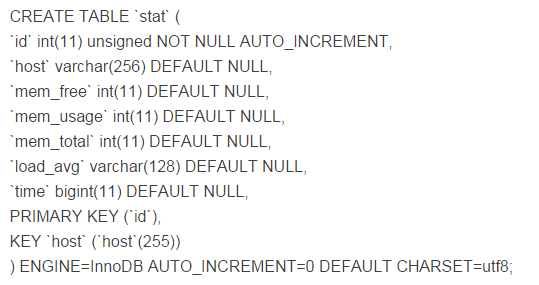
首先数据库建表
建立一个数据库“falcon”,建表语句如下:
首先我们设计一个web服务,实现如下功能:
完成监控页面展示
接受POST提交上来的数据
提供json数据GET接口
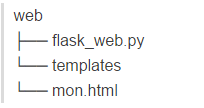
目录结构如下:
flask_web.py
import MySQLdb as mysql
import json
from flask import Flask, request, render_template
app = Flask(__name__)
db = mysql.connect(user="reboot", passwd="reboot123", \
db="falcon", charset="utf8")
db.autocommit(True)
c = db.cursor()

@app.route("/", methods=["GET", "POST"])
def hello():
sql = ""
if request.method == "POST":
data = request.json
try:
sql = "INSERT INTO `stat` (`host`,`mem_free`,`mem_usage`,`mem_total`,`load_avg`,`time`) VALUES('%s', '%d', '%d', '%d', '%s', '%d')" % (data['Host'], data['MemFree'], data['MemUsage'], data['MemTotal'], data['LoadAvg'], int(data['Time']))
ret = c.execute(sql)
except mysql.IntegrityError:
pass
return "OK"
else:
return render_template("mon.html")

@app.route("/data", methods=["GET"])
def getdata():
c.execute("SELECT `time`,`mem_usage` FROM `stat`")
ones = [[i[0]*1000, i[1]] for i in c.fetchall()]
return "%s(%s);" % (request.args.get('callback'), json.dumps(ones))

if __name__ == "__main__":
app.run(host="0.0.0.0", port=8888, debug=True)
这个template页面是我抄的highstock的示例,mon.html
简单起见我们只展示mem_usage信息到页面上
<title>51reboot.com</title>
<!DOCTYPE HTML>
<html>
<head>
<meta http-equiv="Content-Type" content="text/html; charset=utf-8">
<title>Highstock Example</title>

<script type="text/javascript" src="http://ajax.googleapis.com/ajax/libs/jquery/1.8.2/jquery.min.js"></script>
<style type="text/css">
${demo.css}
</style>
<script type="text/javascript">
$(function () {
$.getJSON('/data?callback=?', function (data) {

// Create the chart
$('#container').highcharts('StockChart', {

rangeSelector: {
inputEnabled: $('#container').width() > 480,
selected: 1
},

title: {
text: '51Reboot.com'
},

series: [{
name: '51Reboot.com',
data: data,
type: 'spline',
tooltip: {
valueDecimals: 2
}
}]
});
});
});
</script>
</head>
<body>
<script src="http://cdnjs.cloudflare.com/ajax/libs/highstock/2.0.4/highstock.js"></script>
<script src="http://code.highcharts.com/modules/exporting.js"></script>

<div id="container" style="height: 400px"></div>
</body>
</html>
web展示页面完成了,运行起来:
Python flask_web.py 监听在8888端口上
我们需要做一个Agent来采集数据,并上传数据库
moniItems.py
#!/usr/bin/env python
import inspect
import time
import urllib, urllib2
import json
import socket

class mon:
def __init__(self):
self.data = {}

def getTime(self):
return str(int(time.time()) + 8 * 3600)

def getHost(self):
return socket.gethostname()

def getLoadAvg(self):
with open('/proc/loadavg') as load_open:
a = load_open.read().split()[:3]
return ','.join(a)

def getMemTotal(self):
with open('/proc/meminfo') as mem_open:
a = int(mem_open.readline().split()[1])
return a / 1024

def getMemUsage(self, noBufferCache=True):
if noBufferCache:
with open('/proc/meminfo') as mem_open:
T = int(mem_open.readline().split()[1])
F = int(mem_open.readline().split()[1])
B = int(mem_open.readline().split()[1])
C = int(mem_open.readline().split()[1])
return (T-F-B-C)/1024
else:
with open('/proc/meminfo') as mem_open:
a = int(mem_open.readline().split()[1]) - int(mem_open.readline().split()[1])
return a / 1024

def getMemFree(self, noBufferCache=True):
if noBufferCache:
with open('/proc/meminfo') as mem_open:
T = int(mem_open.readline().split()[1])
F = int(mem_open.readline().split()[1])
B = int(mem_open.readline().split()[1])
C = int(mem_open.readline().split()[1])
return (F+B+C)/1024
else:
with open('/proc/meminfo') as mem_open:
mem_open.readline()
a = int(mem_open.readline().split()[1])
return a / 1024

def runAllGet(self):
#自动获取mon类里的所有getXXX方法,用XXX作为key,getXXX()的返回值作为value,构造字典
for fun in inspect.getmembers(self, predicate=inspect.ismethod):
if fun[0][:3] == 'get':
self.data[fun[0][3:]] = fun[1]()
return self.data

if __name__ == "__main__":
while True:
m = mon()
data = m.runAllGet()
print data
req = urllib2.Request("http://51reboot.com:8888", json.dumps(data), {'Content-Type': 'application/json'})
f = urllib2.urlopen(req)
response = f.read()
print response
f.close()
time.sleep(60)
nohup python moniItems.py >/dev/null 2>&1 & 运行起来
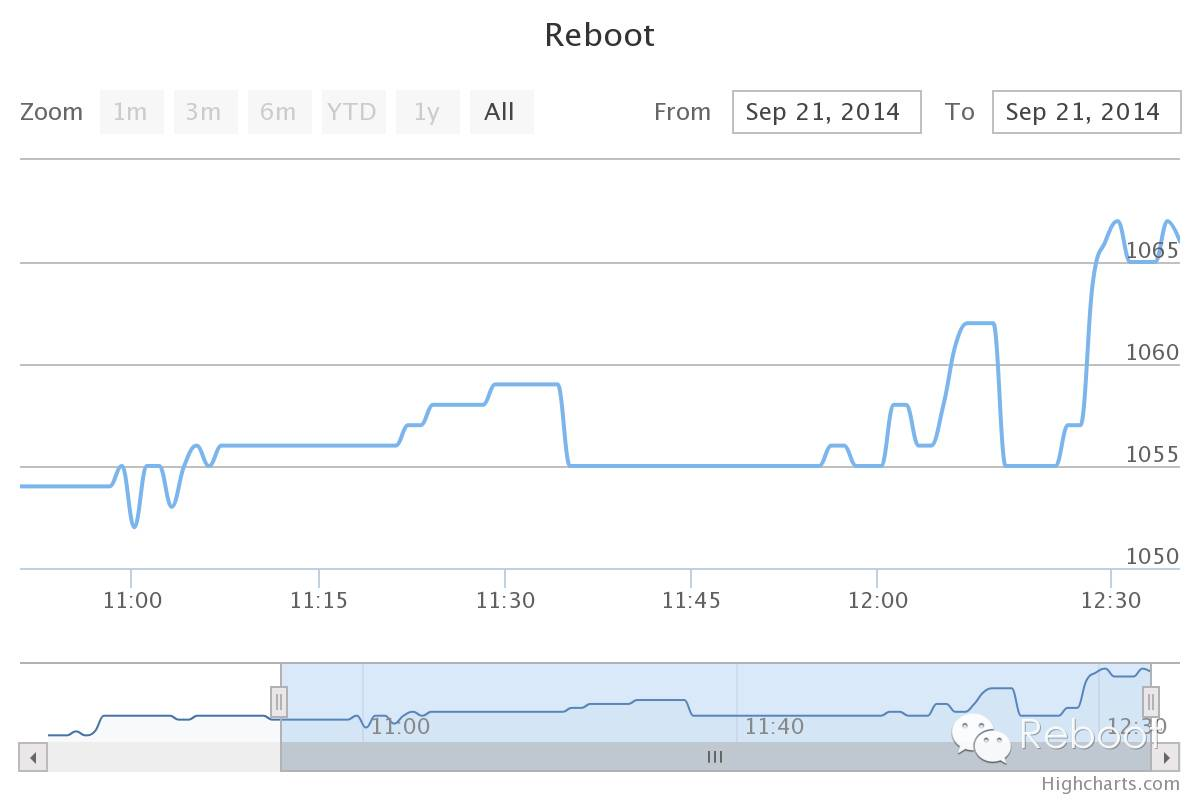
监控效果图如下:
Python 学习交流群:238757010
Python运维三十六式:用Python写一个简单的监控系统的更多相关文章
- python运维开发(十六)----Dom&&jQuery
内容目录: Dom 查找 操作 事件 jQuery 查找 筛选 操作 事件 扩展 Dom 文档对象模型(Document Object Model,DOM)是一种用于HTML和XML文档的编程接口.它 ...
- python运维开发(十八)----Django(二)
内容目录 路由系统 模版 Ajax model数据库操作,ORM 路由系统 django中的路由系统和其他语言的框架有所不同,在django中每一个请求的url都要有一条路由映射,这样才能将请求交给对 ...
- python运维开发(十)----IO多路复用线程基本使用
内容目录: python作用域 python2.7和python3.5的多继承区别 IO多路复用 socketserver模块源分析 多线程.进程.协程 python作用域 python中无块级作用 ...
- python运维开发(十五)----JavaScript
内容目录: HTML补充 javascript HTML补充 1.display标签 display的inline-block 属性会自动带3px的宽度 <span style="di ...
- python运维开发(十二)----rabbitMQ、pymysql、SQLAlchemy
内容目录: rabbitMQ python操作mysql,pymysql模块 Python ORM框架,SQLAchemy模块 Paramiko 其他with上下文切换 rabbitMQ Rabbit ...
- 学以致用三十六-----弄懂python装饰器
看了海峰老师讲解的装饰器视频,讲解的非常棒.根据视频,记录笔记如下: 装饰器: 1.本质是函数,用def来定义.功能就是用来(装饰)其他函数,为其他函数添加附加功能 现有两个函数如下, def tes ...
- Python学习日记(三十六) Mysql数据库篇 四
MySQL作业分析 五张表的增删改查: 完成所有表的关系创建 创建教师表(tid为这张表教师ID,tname为这张表教师的姓名) create table teacherTable( tid int ...
- python接口自动化测试三十六:数据驱动参数化之paramunittest
官方文档1.官方文档地址:https://pypi.python.org/pypi/ParamUnittest/2.github源码下载地址:https://github.com/rik0/Param ...
- python运维开发(十九)----Django后台表单验证、session、cookie、model操作
内容目录: Django后台表单验证 CSRF加密传输 session.cookie model数据库操作 Django后台Form表单验证 Django中Form一般有2种功能: 1.用于做用户提交 ...
随机推荐
- docker-5-容器数据卷
1.是什么 一句话:有点类似我们Redis里面的rdb和aof文件 先来看看Docker的理念: * 将运用与运行的环境打包形成容器运行 ,运行可以伴随着容器,但是我们对数据的要求希望是持久化的 ...
- PAT——1071. 小赌怡情
常言道“小赌怡情”.这是一个很简单的小游戏:首先由计算机给出第一个整数:然后玩家下注赌第二个整数将会比第一个数大还是小:玩家下注t个筹码后,计算机给出第二个数.若玩家猜对了,则系统奖励玩家t个筹码:否 ...
- PAT——1026. 程序运行时间
要获得一个C语言程序的运行时间,常用的方法是调用头文件time.h,其中提供了clock()函数,可以捕捉从程序开始运行到clock()被调用时所耗费的时间.这个时间单位是clock tick,即“时 ...
- Linux mysql 5.5.10 二进制安装过程记录和 修改 密码 登录
1.useradd clouder2.解压缩mysql.tar.bz2到/home/clouder2.mv /etc/my.cnf /etc/my.cnf.bak3./home/clouder/mys ...
- RabbitMQ镜像模式双节点部署时故障转移过程中队列中消息的状态
场景 现有节点Node1和Node2,建立Exchange:yu.exchange,创建队列yu1.queue镜像队列master位于Node1,yu2.queue镜像队列位于Node2,使用topi ...
- SSM项目引入文件失败
<mvc:resources mapping="/styles/**" location="/css/"/> <mvc:resources m ...
- 协议类接口 - NAND
一.引脚的含义 先看下nand flash是怎么接的,如下所示便为某一款nand存储芯片的引脚图.发现其连地址信号都没有.那么是如何访问地址数据的呢? 查阅该nand flash的数据手册可得其各个引 ...
- 实际SQL案例解决方法整理_LEAD函数相关
表结构及数据如下: 需求: 将记录按照时间顺序排列,每三条记录为一组,若第二条记录与第一条记录相差5分钟,则删除该记录,若第三条与第二条记录相差5分钟,则删除该记录, 第二组同理,遍历全表,按要求删除 ...
- 使用Mybatis连接到Mysql报错,WARN: Establishing SSL connection without server's identity verification is not recommended. According to MySQL 5.5.45+, 5.6.26+ and 5.7.6+ requirements SSL connection must be esta
在Eclipse中使用springboot整合Mybatis,连接到5.7版本Mysql报错WARN: Establishing SSL connection without server's ide ...
- Docker学习系列(一)-CentOS7下安装Docker
CentOS7下Docker的安装 一.操作系统要求 CentOS 7 64位 Kernel 3.10+ 本机系统信息 二.卸载旧版本 如果之前安排过旧版本的Docker,先卸载掉旧版Docker以及 ...