
Nginx+tomcat+redis 集群session共享
插件资源下载地址:https://github.com/ran-jit/tomcat-cluster-redis-session-manager/releases/tag/2.0.2
一、前置条件
JDK:jdk1.8.0_161, Nginx:nginx-1.13.9 , tomcat:Apache Tomcat/8.5.16
Nginx:192.168.22.100
Redis:192.168.22.100
tomcat1:192.168.22.105:8081
tomcat2:192.168.22.106:8082
二、配置Nginx服务器的nginx.conf文件(/usr/local/nginx/conf)
user  www;

worker_processes  1;

#error_log  logs/error.log;

#error_log  logs/error.log  notice;

#error_log  logs/error.log  info;

#pid        logs/nginx.pid;

events {

    worker_connections  65535;

    use epoll;

}

http {

    include       mime.types;

    default_type  application/octet-stream;

    #log_format  main  '$remote_addr - $remote_user [$time_local] "$request" '

    #                  '$status $body_bytes_sent "$http_referer" '

    #                  '"$http_user_agent" "$http_x_forwarded_for"';

    #access_log  logs/access.log  main;

    server_tokens  off;

    sendfile        on;

    tcp_nopush     on;

    tcp_nodelay    on;

    #keepalive_timeout  0;

    keepalive_timeout  10;

    gzip  on;

    server {

        listen       80;

        server_name  localhost;

        #charset koi8-r;

        #access_log  logs/host.access.log  main;

        location / {

            root   html;

            index  index.html index.htm;

        }

    #location /filestore/ {

        #    root   /usr/local/nginx/html/filestore/;

        #    autoindex on;

        #}

        #error_page  404              /404.html;

        # redirect server error pages to the static page /50x.html

        #

        error_page   500 502 503 504  /50x.html;

        location = /50x.html {

            root   html;

        }

        # proxy the PHP scripts to Apache listening on 127.0.0.1:80

        #

        #location ~ \.php$ {

        #    proxy_pass   http://127.0.0.1;

        #}

        # pass the PHP scripts to FastCGI server listening on 127.0.0.1:9000

        #

        #location ~ \.php$ {

        #    root           html;

        #    fastcgi_pass   127.0.0.1:9000;

        #    fastcgi_index  index.php;

        #    fastcgi_param  SCRIPT_FILENAME  /scripts$fastcgi_script_name;

        #    include        fastcgi_params;

        #}

        # deny access to .htaccess files, if Apache's document root

        # concurs with nginx's one

        #

        #location ~ /\.ht {

        #    deny  all;

        #}

    }

    # another virtual host using mix of IP-, name-, and port-based configuration

    #

    #server {

    #    listen       8000;

    #    listen       somename:8080;

    #    server_name  somename  alias  another.alias;

    #    location / {

    #        root   html;

    #        index  index.html index.htm;

    #    }

    #}

upstream tomcat {

    server 192.168.22.105:8081 weight=1 fail_timeout=3s max_fails=2;

    server 192.168.22.106:8082 weight=1 fail_timeout=3s max_fails=2;

}

##HTTPS server

server {

        listen       443 ssl;

        server_name  localhost;

        ssl on;

        root html;
  #添加错误页面

  error_page 404 = https://xxxxxx/errorHtml/404.html;
error_page 500 = https://xxxxxx/errorHtml/500.html;
        index index.html index.htm;

        ssl_certificate   /usr/local/nginx/cert/xxxxxxxxx.pem;

        ssl_certificate_key  /usr/local/nginx/cert/xxxxxxxx.key;

        ssl_session_timeout 5m;

        ssl_ciphers ECDHE-RSA-AES128-GCM-SHA256:ECDHE:ECDH:AES:HIGH:!NULL:!aNULL:!MD5:!ADH:!RC4;

        ssl_protocols TLSv1 TLSv1.1 TLSv1.2;

        ssl_prefer_server_ciphers on;

        location / {

                proxy_set_header X-Forwarded-For $proxy_add_x_forwarded_for;

                proxy_set_header Host $http_host;
 proxy_intercept_errors on;//错误页面开关

                proxy_set_header X-Forwarded-Proto https;

                proxy_redirect off;

                proxy_connect_timeout      240;

                proxy_send_timeout         240;

                proxy_read_timeout         240;

                # note, there is not SSL here! plain HTTP is used

                proxy_pass http://tomcat;

        }

    }

}
三、下载tomcat-cluster-redis-session-manager插件
①下载完,解压然后将tomcat-cluster-redis-session-manager\tomcat-cluster-redis-session-manager\lib目录下的jar包复制到tomcat\lib下
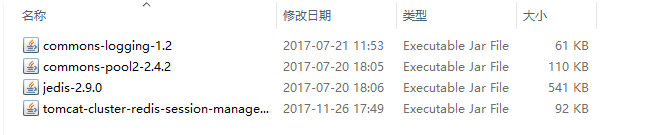
②将tomcat-cluster-redis-session-manager\tomcat-cluster-redis-session-manager\conf\redis-data-cache.properties复制到tomcat\conf下。注意将redis.hosts改为redis对用的地址
#-- Redis data-cache configuration

#- redis hosts ex: 127.0.0.1:6379, 127.0.0.2:6379, 127.0.0.2:6380, ....

redis.hosts=192.168.22.100:6379

#- redis password (for stand-alone mode)

#redis.password=

#- set true to enable redis cluster mode

redis.cluster.enabled=false

#- redis database (default 0)

#redis.database=0

#- redis connection timeout (default 2000)

#redis.timeout=2000
四、修改tomcat目录下的contex.xml(/opt/weixins1/tomcat1/conf)
<?xml version="1.0" encoding="UTF-8"?>

<!--

  Licensed to the Apache Software Foundation (ASF) under one or more

  contributor license agreements.  See the NOTICE file distributed with

  this work for additional information regarding copyright ownership.

  The ASF licenses this file to You under the Apache License, Version 2.0

  (the "License"); you may not use this file except in compliance with

  the License.  You may obtain a copy of the License at

      http://www.apache.org/licenses/LICENSE-2.0

  Unless required by applicable law or agreed to in writing, software

  distributed under the License is distributed on an "AS IS" BASIS,

  WITHOUT WARRANTIES OR CONDITIONS OF ANY KIND, either express or implied.

  See the License for the specific language governing permissions and

  limitations under the License.

-->

<!-- The contents of this file will be loaded for each web application -->

<Context>

    <!-- Default set of monitored resources. If one of these changes, the    -->

    <!-- web application will be reloaded.                                   -->

    <WatchedResource>WEB-INF/web.xml</WatchedResource>

    <WatchedResource>${catalina.base}/conf/web.xml</WatchedResource>

    <!-- Uncomment this to disable session persistence across Tomcat restarts -->

    <!--

    <Manager pathname="" />

    -->

    <Valve className="tomcat.request.session.redis.SessionHandlerValve" />

    <Manager className="tomcat.request.session.redis.SessionManager" />

</Context>
至此,所有的配置已经完成。
环境搭建好后,历经几天后,发现文件上传后,某台服务器上的上传文件始终没有访问的权限!
前置条件,启动Nginx的用户是www(组:webgroup),启动tomcat1的用户是javatest(组:webgroup),启动tomcat2的用户是javatest(组:webgroup)。
现在出现的状况是,文件共享的一个文件夹,在每次访问后文件读写权限就变成了另一个不存在的用户。
原因:
- Nginx的/usr/local/nginx/conf/nginx.conf文件中user 后面是组 用户,不能单纯的用用户
- 参与负载均衡的两台服务器的用户信息要一致,组===组,用户===用户
uid=1000(javatest) gid=1000(webgroup) 组=1000(webgroup) 环境=unconfined_u:unconfined_r:unconfined_t:s0-s0:c0.c1023
参考文档:http://www.nginx.cn/doc/
Nginx+tomcat+redis 集群session共享的更多相关文章
- 【转】Nginx+Tomcat+Memcached集群Session共享
cookie是怎样工作的? 例 如,我们创建了一个名字为login的Cookie来包含访问者的信息,创建Cookie时,服务器端的Header如下面所示,这里假设访问者的注册名 是“Michael J ...
- tomcat redis 集群 session共享
jcoleman/tomcat-redis-session-manager: Redis-backed non-sticky session store for Apache Tomcathttps: ...
- session服务器Nginx+Tomcat+Memcached集群Session共享
cookie是怎样工作的? 例如,我们创立了一个名字为login的Cookie来包含访问者的信息,创立Cookie时,服务器端的Header如下面所示,这里假设访问者的注册名是“Michael Jor ...
- 细说tomcat之集群session共享方案
1. Tomcat Cluster官网:http://tomcat.apache.org/tomcat-7.0-doc/cluster-howto.htmlTomcat原生支持的集群方案,通过组播消息 ...
- Nginx+tomcat+redis集群共享session实现负载均衡
1.nginx是一款轻量级兼备高性能的Http和反向代理服务器.所谓反向代理就是指用户发起访问请求,由代理服务器接受,然后将请求转发给正式服务器,并且将正式服务器处理完的数据返回给客户单,此时代理服务 ...
- keepalived+nginx+tomcat+redis集群环境部署
1.所需软件.jar包.配置文件下载:http://pan.baidu.com/s/1dFgntst 2.环境说明: centos6.5 64位 主节点:192.168.40.121 副节点:192 ...
- nginx+tomcat+redis的集群+session共享
nginx+tomcat+redis的集群+session共享 环境准备 1.tomcat版本:tomcat7 tomcat下载及安装,目前很多好的资源和步骤,此处省略. 2.jdk版本:jdk1.7 ...
- nginx+tomcat实现集群,redis实现session共享,软连接实现文件共享:http://blog.csdn.net/hua1586981/article/details/78132710
转载 2017年02月08日 16:52:41 730 相信很多人都听过nginx,这个小巧的东西慢慢地在吞食apache和IIS的份额.那究竟它有什么作用呢?可能很多人未必了解. 说到反向代理,可能 ...
- Shiro+Redis实现tomcat集群session共享
一.背景 当我们使用了nginx做项目集群以后,就会出现一个很严重的问题亟待解决,那就是:tomcat集群之间如何实现session共享的问题,如果这个问题不解决,就会出现登陆过后再次请求资源依旧 ...
随机推荐
- 设置VS快捷代码片段
一.自定义sinppets方式 1.在VS安装路径[D:\vs2013\VC\Snippets\2052\Visual C++]下新建一个snippt文件 2.添加代码 <?xml versio ...
- HDU 3339 In Action(最短路+背包)题解
思路:最短路求出到每个点的最小代价,然后01背包,求出某一代价所能拿到的最大价值,然后搜索最后结果. 代码: #include<cstdio> #include<set> #i ...
- sql server timeout
SqlConnection.ConnectionTimeout https://docs.microsoft.com/en-us/dotnet/api/system.data.sqlclient.sq ...
- hdu 4745 Two Rabbits 区间DP
http://acm.hdu.edu.cn/showproblem.php?pid=4745 题意: 有两只兔子Tom Jerry, 他们在一个用石头围城的环形的路上跳, Tom只能顺时针跳,Jerr ...
- 使用 switch 对值进行分支
与处理 TRUE 和 FALSE 条件的 if 相比,switch 语句则是用来处理数字或者字符串,并根据输入返回某个分支.假设输入一个整数 n,switch 返回从第 1 个参数开始的第 n 个参数 ...
- 进入mac U盘文件夹命令
cd /Volumes 这条命令进入到你的u盘的上层文件夹,在这个文件夹里面包含了你的u盘,比如我的u盘名为SONG 则进入u盘的命令为 cd /Volumes/SONG
- JAVA消息 JMS 很重要
首先大致讲一下,java 消息模块 消息,个人理解分为两种:1.同步消息(RPC调用) 2.异步消息(本篇讲解部分) 一.同步消息java提供了多种方案: 最新比较常用的方式就是spring Http ...
- 如何获取Android应用的packageName和ActivityName,识别应用中的控件
1.获取Android应用的packageName和ActivityName A:adb logcat >log.txt 在log中搜索package B:adb shell logcat | ...
- @Query 注解实现查询(二十四)
为了节约时间使得各位看官看起来更加简单舒适,这一节把测试方法和测试代码放在一起. 测试方法: // ------------------------------------ 使用 @Query 注解 ...
- android中string.xml中%一$s、%1$d等的用法
%n$ms:代表输出的是字符串,n代表是第几个参数,设置m的值可以在输出之前放置空格 %n$md:代表输出的是整数,n代表是第几个参数,设置m的值可以在输出之前放置空格,也可以设为0m,在输出之前放置 ...