
Nginx+tomcat+redis集群共享session实现负载均衡
1.nginx是一款轻量级兼备高性能的Http和反向代理服务器。所谓反向代理就是指用户发起访问请求,由代理服务器接受,然后将请求转发给正式服务器,并且将正式服务器处理完的数据返回给客户单,此时代理服务器就表现为一个服务器。

进入nginx的安装目录后,输入相关命令,一个窗口一闪而过,在任务管理器中可以找到它的进程。

浏览器输入localhost,可以看到nginx的欢迎页面!
修改nginx的配置文件,
worker_processes:工作进程个数,
worker_connections:单个进程最大连接数,
server:每一个server相当于一个代理服务器,
listern:监听端口,默认80,
server_name:当前服务的域名,可以有多个,用空格分割,
location:表示匹配的路径,配置/ 表示所有请求都被匹配到这里,
index:当没有指定主页时,默认会选择这个指定的文件,可多个,空格分割 ,
proxy_pass:请求转向自定义的服务器列表,
upstream name{} :服务器集群名称
- 然后再cmd中输入命令nginx -s reload重启nginx;
- 部署三个Tomcat,分别修改server.xml 和context.xml
server.xml依次修改 Server的port为8005,8006,8007 ,Connector的port为8081 8082 8083,8009 8010 8011



context.xml增加

并在webapps\ROOT下增加session.jsp ,加上标记tomcat 1 tomcat 2 tomcat 3
<%@ page language="java" contentType="text/html; charset=UTF-8" pageEncoding="UTF-8"%>

<!DOCTYPE html>

<html>

<head>

<meta http-equiv="Content-Type" content="text/html; charset=UTF-8">

<title>shared session</title>

</head>

<body>

    <br>session id=<%=session.getId()%>

    <br>tomcat 1

</body>

</html>
将如下几个jar包复制到${TOMCAT_HOME}/lib下
tomcat-redis-session-manager-VERSION.jar

jedis-2.5.2.jar

commons-pool2-2.2.jar

3.修改Ngnix的配置文件增加负载均衡配置
#user  nobody;

#nginx进程数,建议设置为等于CPU总核心数

worker_processes  4;

error_log  logs/error.log;

#error_log  logs/error.log  notice;

#error_log  logs/error.log  info;

#进程pid文件

pid        logs/nginx.pid;

events {

    worker_connections  65535;

}

http {

    include       mime.types;

    default_type  application/octet-stream;

    #log_format  main  '$remote_addr - $remote_user [$time_local] "$request" '

    #                  '$status $body_bytes_sent "$http_referer" '

    #                  '"$http_user_agent" "$http_x_forwarded_for"';

    #access_log  logs/access.log  main;

    sendfile        on;

    #tcp_nopush     on;

    #keepalive_timeout  0;

    keepalive_timeout  65;

    #gzip  on;

	upstream mt.com {

		#upstream的负载均衡,weight是权重,可根据机器配置定义权重.weight参数表示权值,权值越高被分配的几率越大.

		server 127.0.0.1:8081 weight=1;

		server 127.0.0.1:8082 weight=2;

		server 127.0.0.1:8083 weight=3;

	}

    server {

        listen       80;

        server_name  localhost;

        #charset koi8-r;

        #access_log  logs/host.access.log  main;

        location / {

            #root   html;

            index  index.html index.htm;

			proxy_pass http://mt.com;

			proxy_set_header X-Real-IP $remote_addr;

			#允许客户端请求的最大单文件字节数

			client_max_body_size 100m;

        }

        #error_page  404              /404.html;

        # redirect server error pages to the static page /50x.html

        #

        error_page   500 502 503 504  /50x.html;

        location = /50x.html {

            root   html;

        }

        # proxy the PHP scripts to Apache listening on 127.0.0.1:80

        #

        #location ~ \.php$ {

        #    proxy_pass   http://127.0.0.1;

        #}

        # pass the PHP scripts to FastCGI server listening on 127.0.0.1:9000

        #

        #location ~ \.php$ {

        #    root           html;

        #    fastcgi_pass   127.0.0.1:9000;

        #    fastcgi_index  index.php;

        #    fastcgi_param  SCRIPT_FILENAME  /scripts$fastcgi_script_name;

        #    include        fastcgi_params;

        #}

        # deny access to .htaccess files, if Apache's document root

        # concurs with nginx's one

        #

        #location ~ /\.ht {

        #    deny  all;

        #}

    }

    # another virtual host using mix of IP-, name-, and port-based configuration

    #

    #server {

    #    listen       8000;

    #    listen       somename:8080;

    #    server_name  somename  alias  another.alias;

    #    location / {

    #        root   html;

    #        index  index.html index.htm;

    #    }

    #}

    # HTTPS server

    #

    #server {

    #    listen       443 ssl;

    #    server_name  localhost;

    #    ssl_certificate      cert.pem;

    #    ssl_certificate_key  cert.key;

    #    ssl_session_cache    shared:SSL:1m;

    #    ssl_session_timeout  5m;

    #    ssl_ciphers  HIGH:!aNULL:!MD5;

    #    ssl_prefer_server_ciphers  on;

    #    location / {

    #        root   html;

    #        index  index.html index.htm;

    #    }

    #}

}
4.启动redis,tomcat1,tomcat2,tomcat3 访问localhost/session.jsp且不断刷新



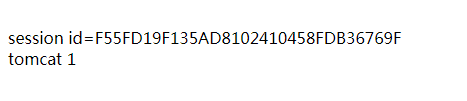
可以看到每次刷新都可能访问不同的tomcat,实现了负载均衡,而且session都是一致的,保证了session的一致性
原文参照: https://www.cnblogs.com/zhrxidian/p/5432886.html
https://www.cnblogs.com/linjiqin/p/5761281.html
http://blog.csdn.net/lipc_/article/details/52766884
https://www.cnblogs.com/machanghai/p/5956195.html
Nginx+tomcat+redis集群共享session实现负载均衡的更多相关文章
- Nginx+tomcat+redis 集群session共享
插件资源下载地址:https://github.com/ran-jit/tomcat-cluster-redis-session-manager/releases/tag/2.0.2 一.前置条件 J ...
- nginx+tomcat的集群和session复制
前端服务器采用nginx,后端应用服务器采用tomcat.nginx负责负载均衡,session复制在tomcat上处理. 1.nginx安装(略) 2.nginx配置负载均衡 http { incl ...
- keepalived+nginx+tomcat+redis集群环境部署
1.所需软件.jar包.配置文件下载:http://pan.baidu.com/s/1dFgntst 2.环境说明: centos6.5 64位 主节点:192.168.40.121 副节点:192 ...
- nginx+tomcat实现集群,redis实现session共享,软连接实现文件共享:http://blog.csdn.net/hua1586981/article/details/78132710
转载 2017年02月08日 16:52:41 730 相信很多人都听过nginx,这个小巧的东西慢慢地在吞食apache和IIS的份额.那究竟它有什么作用呢?可能很多人未必了解. 说到反向代理,可能 ...
- tomcat redis 集群 session共享
jcoleman/tomcat-redis-session-manager: Redis-backed non-sticky session store for Apache Tomcathttps: ...
- 图文解说:Nginx+tomcat配置集群负载均衡
图文解说:Nginx+tomcat配置集群负载均衡 博客分类: appserver nginxTomcatUbuntuLinux网络应用 作者:niumd Blog:http://ari.iteye ...
- Nginx+Tomcat+MemCached 集群配置手册
系统实施文档 Nginx+Tomcat+MemCached 集群配置手册 目 录 第1章 概述 1.1 目标 互联网的快速发展带来了互联网系统的高负载和高可用性, 这要求我们在设计系统架 ...
- Nginx + Tomcat搭建集群
一.Tomcat集群带来的好处 1.提高服务的性能,并发能力,以及高可用性 2.提供项目架构的横向扩展能力 二.Tomcat集群实现原理 通过Nginx负载均衡进行请求转发 三.Nginx + Tom ...
- LVS集群中的IP负载均衡技术
LVS集群中的IP负载均衡技术 章文嵩 (wensong@linux-vs.org) 转自LVS官方参考资料 2002 年 4 月 本文在分析服务器集群实现虚拟网络服务的相关技术上,详细描述了LVS集 ...
随机推荐
- Struts2知识点小结(二)
一.结果视图的配置 <result name="success">/success.jsp</result> 1.局部结果视图 ...
- notepad++实现python运行
一.先确保windows电脑上先安装python解释器 方法参考:https://www.cnblogs.com/hepeilinnow/p/9727922.html 二.打开notepad++,写一 ...
- 关于SSM项目注解事务不回滚的问题
<!--扫描service包(包含子包)下所有使用注解的类型--> <context:component-scan base-package="com.song.ssm.s ...
- C++ 求阶乘
#include<iostream> using namespace std; ; //输入阶乘数 int main() { long long factorial[size]; fact ...
- Git的升级版本
关于升级版本,例如我们要升级service版本,我们可以这样子操作 1.在master里面pull完了之后,到自己的分支,然后merge master里面的代码,然后把pom文件 里面的版本升一级,然 ...
- HBase java API 的使用范例(增,删,查,扫描)
编辑pom.xml <dependency> <groupId>org.apache.hbase</groupId> <artifactId>hbase ...
- Hadoop学习(一) Hadoop是什么
Hadoop是什么? Hadoop是一个开发和运行处理大规模数据的软件平台,是Appach的一个用Java语言实现开源软件框架,实现在大量计算机组成的集群中对海量数据进行分布式计算. Hadoop框架 ...
- 读取hbase数据到mysql
先写一个自己的MyRecordWriter类 extends RecordWriter package calllog; import java.io.IOException; import java ...
- 史上最全的PHP正则表达式
首先看下正则表达式思维导图: 一.校验数字的表达式 1 数字:^[0-9]*$2 n位的数字:^\d{n}$3 至少n位的数字:^\d{n,}$4 m-n位的数字:^\d{m,n}$5 零和非零开头 ...
- c#一些常用的方法集合
是从一个asp.net mvc的项目里看到的.挺实用的. 通过身份证号码获取出生日期和性别 通过身份证号码获取出生日期和性别 #region 由身份证获得出生日期 public static stri ...