
springcloud20---Config加入eureka
Config server也可以加用户名和密码。Config client通过用户名和密码访问。
Config server也可以做成高可用集群。
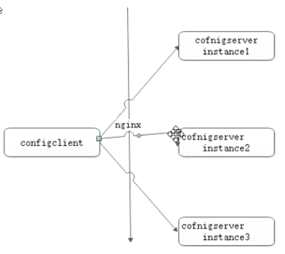
Config与eureka配置使用。把Config server注册到eureka。Config client也要注册到eureka。
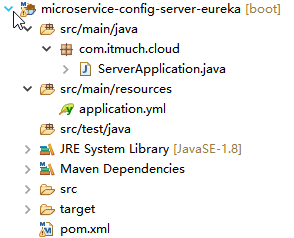
package com.itmuch.cloud;

import org.springframework.boot.SpringApplication;

import org.springframework.boot.autoconfigure.SpringBootApplication;

import org.springframework.cloud.client.discovery.EnableDiscoveryClient;

import org.springframework.cloud.config.server.EnableConfigServer;

@SpringBootApplication

@EnableConfigServer

@EnableDiscoveryClient

public class ServerApplication {

  public static void main(String[] args) {

    SpringApplication.run(ServerApplication.class, args);

  }

}
server:

  port: 8080

spring:

  cloud:

    config:

      server:

        git:

          uri: https://git.oschina.net/it-much/config-repo-51cto-video

          username:

          password:

  application:

    name: microservice-config-server-eureka

eureka:  #config-server注册到eureka

  client:

    serviceUrl:

      defaultZone: http://user:password123@localhost:8761/eureka

  instance:

    prefer-ip-address: true
<project xmlns="http://maven.apache.org/POM/4.0.0" xmlns:xsi="http://www.w3.org/2001/XMLSchema-instance"

    xsi:schemaLocation="http://maven.apache.org/POM/4.0.0 http://maven.apache.org/xsd/maven-4.0.0.xsd">

    <modelVersion>4.0.0</modelVersion>

    <parent>

        <groupId>com.itmuch.cloud</groupId>

        <artifactId>microservice-spring-cloud</artifactId>

        <version>0.0.1-SNAPSHOT</version>

    </parent>

    <artifactId>microservice-config-server-eureka</artifactId>

    <packaging>jar</packaging>

    <properties>

        <project.build.sourceEncoding>UTF-8</project.build.sourceEncoding>

    </properties>

    <dependencies>

        <!-- config-server的依赖,config-server注册到rureka -->

        <dependency>

            <groupId>org.springframework.cloud</groupId>

            <artifactId>spring-cloud-config-server</artifactId>

        </dependency>

        <!-- eureka-client的依赖 -->

        <dependency>

            <groupId>org.springframework.cloud</groupId>

            <artifactId>spring-cloud-starter-eureka</artifactId>

        </dependency>

    </dependencies>

    <build>

        <defaultGoal>compile</defaultGoal>

        <plugins>

            <plugin>

                <groupId>org.apache.maven.plugins</groupId>

                <artifactId>maven-surefire-plugin</artifactId>

                <version>2.12.3</version>

                <configuration>

                    <groups>unit</groups>

                </configuration>

            </plugin>

            <plugin>

                <groupId>org.apache.maven.plugins</groupId>

                <artifactId>maven-compiler-plugin</artifactId>

                <version>3.0</version>

                <configuration>

                  <verbose>true</verbose>

                  <fork>true</fork>

                  <compilerVersion>1.5</compilerVersion>

                </configuration>

            </plugin>

        </plugins>

    </build>

</project>
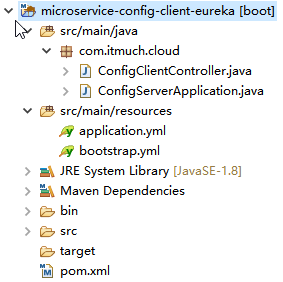
package com.itmuch.cloud;

import org.springframework.beans.factory.annotation.Value;

import org.springframework.web.bind.annotation.GetMapping;

import org.springframework.web.bind.annotation.RestController;

@RestController

public class ConfigClientController {

  @Value("${profile}")

  private String profile;

  @GetMapping("/profile")

  public String getProfile() {

    return this.profile;

  }

}
package com.itmuch.cloud;

import org.springframework.boot.SpringApplication;

import org.springframework.boot.autoconfigure.SpringBootApplication;

import org.springframework.cloud.client.discovery.EnableDiscoveryClient;

@SpringBootApplication

@EnableDiscoveryClient

public class ConfigServerApplication {

  public static void main(String[] args) {

    SpringApplication.run(ConfigServerApplication.class, args);

  }

}
application.yml
server:

  port: 8081
bootstrap.yml
spring:

  cloud:

    config:

      discovery:

        enabled: true

        service-id: microservice-config-server-eureka  #config server在eureka的名字

  application:

    name: foobar

eureka:  #把config client注册到eureka

  client:

    serviceUrl:

      defaultZone: http://user:password123@localhost:8761/eureka

  instance:

    prefer-ip-address: true
<project xmlns="http://maven.apache.org/POM/4.0.0" xmlns:xsi="http://www.w3.org/2001/XMLSchema-instance"

    xsi:schemaLocation="http://maven.apache.org/POM/4.0.0 http://maven.apache.org/xsd/maven-4.0.0.xsd">

    <modelVersion>4.0.0</modelVersion>

    <parent>

        <groupId>com.itmuch.cloud</groupId>

        <artifactId>microservice-spring-cloud</artifactId>

        <version>0.0.1-SNAPSHOT</version>

    </parent>

    <artifactId>microservice-config-client-eureka</artifactId>

    <packaging>jar</packaging>

    <properties>

        <project.build.sourceEncoding>UTF-8</project.build.sourceEncoding>

    </properties>

    <dependencies>

        <dependency>

            <groupId>org.springframework.cloud</groupId>

            <artifactId>spring-cloud-starter-config</artifactId>

        </dependency>

        <dependency>

            <groupId>org.springframework.boot</groupId>

            <artifactId>spring-boot-starter-web</artifactId>

        </dependency>

        <dependency>

            <groupId>org.springframework.cloud</groupId>

            <artifactId>spring-cloud-starter-eureka</artifactId>

        </dependency>

        <dependency>

            <groupId>org.springframework.boot</groupId>

            <artifactId>spring-boot-starter-actuator</artifactId>

        </dependency>

    </dependencies>

</project>
配置属性加解密:
配置在git仓库里面是明文,
下载jce8 :
http://www.oracle.com/technetwork/java/javase/downloads/jce8-download-2133166.html
下载之后解压:
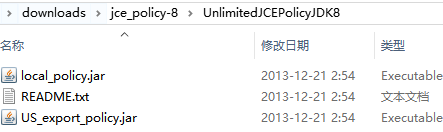
里面是2个加解密的策略文件。用这2个策略文件替换jdk里面的策略文件就可以了。
springcloud20---Config加入eureka的更多相关文章
- spring cloud config与eureka配合使用
前面两篇介绍了Spring Cloud Config服务端和客户端的简单配置,本篇介绍Spring Cloud Config与Eureka配合使用 前言 默认情况下,配置客户端启动时,都是通过配置属性 ...
- Spring Cloud(九)高可用的分布式配置中心 Spring Cloud Config 集成 Eureka 服务
上一篇文章,讲了SpringCloudConfig 集成Git仓库,这一篇我们讲一下SpringCloudConfig 配和 Eureka 注册中心一起使用 在分布式系统中,由于服务数量巨多,为了方便 ...
- 使用docker-compose运行微服务项目#eureka+config+auth+gateway+module
微服务架构中我们使用了必须的四个组件,eureka config gateway auth 其中config依赖eureka,auth依赖前两者,gateway又依赖auth 这样就确定了四个组件的启 ...
- Spring Cloud Eureka 实现服务注册与发现
微服务 是一种架构模式,跟具体的语言实现无关,微服务架构将业务逻辑分散到了各个服务当中,服务间通过网络层进行通信共同协作:这样一个应用就可以划分为多个服务单独来维护发布.构建一个可靠微服务系统是需要具 ...
- Spring Cloud Config 配置中心高可用
详细参见 <Spring Cloud 与 Docker微服务架构实战> p163-9.10 Spring Cloud Config 与 Eureka 配合使用 p163-9.12 Conf ...
- Spring Cloud Config 配置高可用集群
详细参考:<Sprin Cloud 与 Docker 微服务架构实战>p163-9.10节 spring cloud config 与 eureka 配合使用 我就不写了,请参见本书章节.
- Spring Cloud(9):Config配置中心
Config配置中心作用简单来讲:统一配置,方便管理 开源配置中心: 1.百度Disconf 2.阿里Diamand 3.Spring Cloud Config 搭建Config-Server 快速上 ...
- Spring Cloud Config 实现配置中心,看这一篇就够了
Spring Cloud Config 是 Spring Cloud 家族中最早的配置中心,虽然后来又发布了 Consul 可以代替配置中心功能,但是 Config 依然适用于 Spring Clou ...
- Spring-Cloud之Config配置中心-7
一.我们前面基本上都是讲解的Spring Cloud Netflix的组件,下面我们会重点说Spring Cloud Config分布式配置中心.为什么需要这个组件来管理配置呢?在分布式应用开发过程中 ...
随机推荐
- SPI接口功能描述
- CentOs 设置静态IP 方法[测试没问题]
首先关闭VMware的DHCP: Edit->Virtual Network Editor 选择VMnet8,去掉Use local DHCP service to distribute IP ...
- 安装安全狗后,MP4无法播放
- LeetCode - PlusOne
题意:给一个数按位存放在一个int数组中,要求返回这个数加一后的数组. 懒人解法: public class Solution { public int[] plusOne(int[] digits) ...
- 关于OS命令注入的闭合问题
1.在Windows下 windows下非常好办,只需要&肯定可以执行: C:\Users\xxx\Desktop>aaaa | 127.0.0.1 'aaaa' 不是内部或外部命令,也 ...
- 【BZOJ3935】Rbtree 树形DP
[BZOJ3935]Rbtree Description 给定一颗 N 个点的树,树上的每个点或者是红色,或者是黑色. 每个单位时间内,你可以任选两个点,交换它们的颜色. 出于某种恶趣味,你希望用最少 ...
- 【BZOJ1500】[NOI2005]维修数列 Splay
[BZOJ1500][NOI2005]维修数列 Description Input 输入的第1 行包含两个数N 和M(M ≤20 000),N 表示初始时数列中数的个数,M表示要进行的操作数目.第2行 ...
- linux的~和/的区别
转自:https://zhidao.baidu.com/question/166486946.html /是目录层的分隔.表示符.只有一个/表明是root,/etc/表明是根目录下面的etc目录(当然 ...
- angular -- ng-class该如何使用?
ng-class是一个判断是否给某一个元素添加类名的属性: 例如:下面是判断 是否添加 aHover 这个类名: <ul class="nav fl w120 o"> ...
- ThinkPHP简单结构介绍!
thinkPHP简单结构介绍: application : 应用 extend:扩展 扩展内库 public:入口文件 index.php 在里面 runtime:缓存文件(里面的文件可以随便删除) ...