
【C#/WPF】调节图像的对比度(Contrast)
关于对比度:
调节对比度直观感受是,高对比度的图像明暗关系更明显,色彩更鲜艳;低对比度的图像表面像是蒙上一层灰,色彩不鲜艳。
需求:
制作一个面板,一个滑动条,拖动滑动条可以修改目标图片的对比度。
资料参考:
界面滑动条两端的值是-30~30,默认处于中间位置0。已知目标图像的Bitmap数据。
- 修改Bitmap的对比度。
- 将修改之后的Bitmap重新赋值给界面Image控件显示。
        /// <summary>

        /// 调节对比度

        /// </summary>

        /// <param name="sender"></param>

        /// <param name="e"></param>

        private void Contrast_ValueChanged(object sender, RoutedPropertyChangedEventArgs<double> e)

        {

            // 滑动条是值是-30~30

            // originalBitmap是目标图像的Bitmap

            int threshold = (int)e.NewValue;

            Bitmap newBitmap = BitmapHelper.Contrast(originalBitmap, threshold);

            // 重新给Image控件赋值新图像

            image.Source = SystemUtils.ConvertBitmapToBitmapImage(newBitmap);

        }
下面调节图像对比度的工具方法:
    /// <summary>

    /// 代码来自:https://softwarebydefault.com/2013/04/20/image-contrast/

    /// </summary>

    public static class BitmapHelper

    {

        /// <summary>

        /// 调节图像的对比度

        /// </summary>

        /// <param name="sourceBitmap"></param>

        /// <param name="threshold">阈值,通过该参数控制调节</param>

        /// <returns></returns>

        public static Bitmap Contrast(this Bitmap sourceBitmap, int threshold)

        {

            BitmapData sourceData = sourceBitmap.LockBits(new Rectangle(, ,

                                        sourceBitmap.Width, sourceBitmap.Height),

                                        ImageLockMode.ReadOnly, System.Drawing.Imaging.PixelFormat.Format32bppArgb);

            byte[] pixelBuffer = new byte[sourceData.Stride * sourceData.Height];

            Marshal.Copy(sourceData.Scan0, pixelBuffer, , pixelBuffer.Length);

            sourceBitmap.UnlockBits(sourceData);

            double contrastLevel = Math.Pow((100.0 + threshold) / 100.0, );

            double blue = ;

            double green = ;

            double red = ;

            for (int k = ; k +  < pixelBuffer.Length; k += )

            {

                blue = ((((pixelBuffer[k] / 255.0) - 0.5) *

                            contrastLevel) + 0.5) * 255.0;

                green = ((((pixelBuffer[k + ] / 255.0) - 0.5) *

                            contrastLevel) + 0.5) * 255.0;

                red = ((((pixelBuffer[k + ] / 255.0) - 0.5) *

                            contrastLevel) + 0.5) * 255.0;

                if (blue > )

                { blue = ; }

                else if (blue < )

                { blue = ; }

                if (green > )

                { green = ; }

                else if (green < )

                { green = ; }

                if (red > )

                { red = ; }

                else if (red < )

                { red = ; }

                pixelBuffer[k] = (byte)blue;

                pixelBuffer[k + ] = (byte)green;

                pixelBuffer[k + ] = (byte)red;

            }

            Bitmap resultBitmap = new Bitmap(sourceBitmap.Width, sourceBitmap.Height);

            BitmapData resultData = resultBitmap.LockBits(new Rectangle(, ,

                                        resultBitmap.Width, resultBitmap.Height),

                                        ImageLockMode.WriteOnly, PixelFormat.Format32bppArgb);

            Marshal.Copy(pixelBuffer, , resultData.Scan0, pixelBuffer.Length);

            resultBitmap.UnlockBits(resultData);

            return resultBitmap;

        }

    }
下面是将Bitmap转换为BitmapImage的工具方法,以供WPF的Image控件使用图像:
    public static class SystemUtils
    {

        /// <summary>

        /// 转换类型:Bitmap --> BitmapImage

        /// <summary>

        /// <returns></returns>

        public static BitmapImage ConvertBitmapToBitmapImage(Bitmap bitmap)

        {

            using (MemoryStream stream = new MemoryStream())

            {

                bitmap.Save(stream, ImageFormat.Png);

                stream.Position = ;

                BitmapImage bi = new BitmapImage();

                bi.BeginInit();

                // According to MSDN, "The default OnDemand cache option retains access to the stream until the image is needed."

                // Force the bitmap to load right now so we can dispose the stream.

                bi.CacheOption = BitmapCacheOption.OnLoad;

                bi.StreamSource = stream;

                bi.EndInit();

                bi.Freeze();

                return bi;

            }

        }

    }
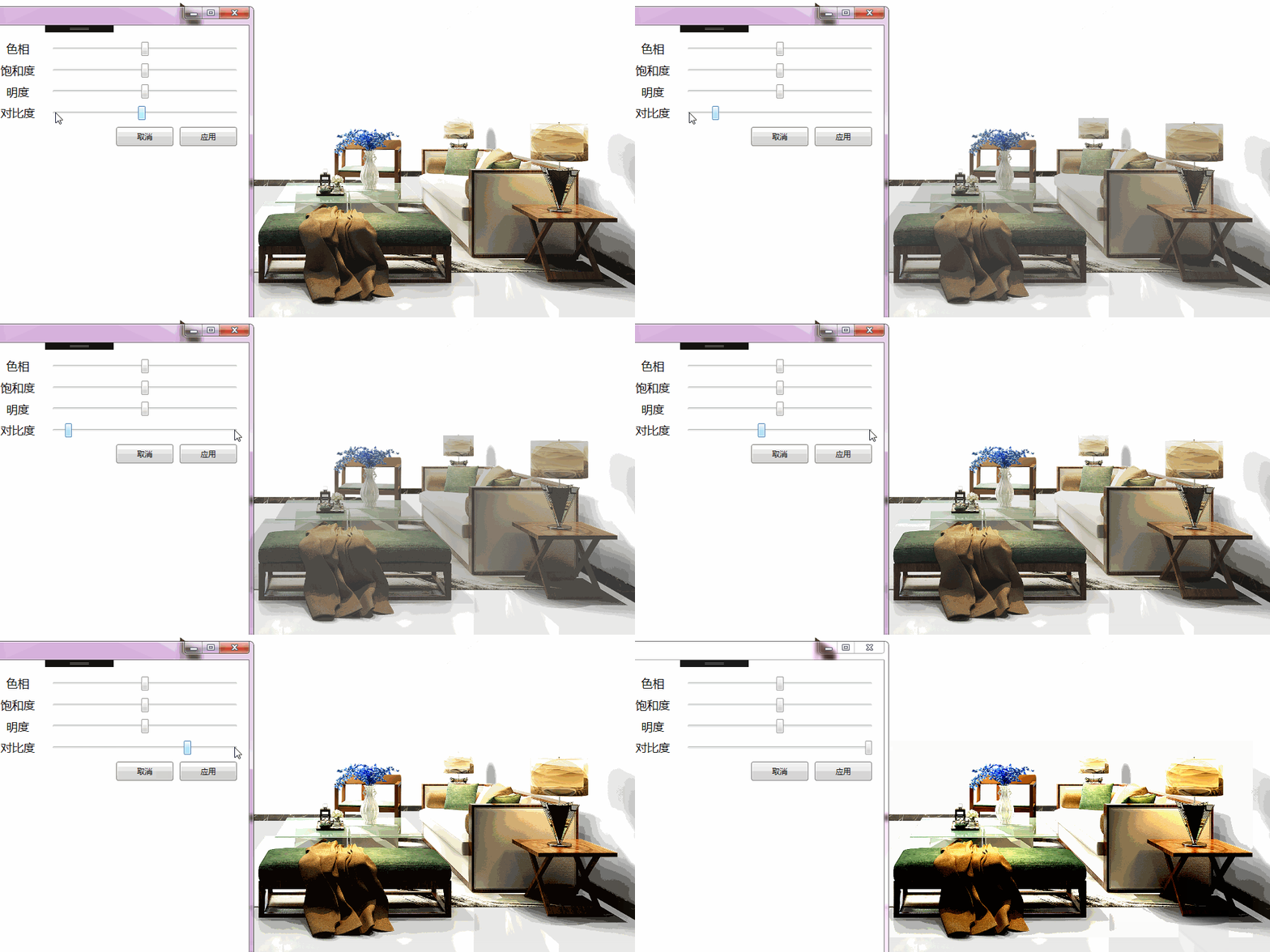
测试效果如下:
另外,关于图像的HSL(色相、饱和度、明度)的调节,可参考在下的另一篇博文:
参考资料:
【C#/WPF】调节图像的对比度(Contrast)的更多相关文章
- 【C#/WPF】调节图像的HSL(色相Hue、饱和度Saturation、明亮度Lightness)
先说概念: HSL是一种描述颜色的方式,其他颜色描述方式还有大家熟悉的RGB值.HSL三个字母分别表示图像的Hue色相.Saturation饱和度.Lightness明亮度. 需求: 制作一个面板,包 ...
- 【C#/WPF】调节图像的HSL(色相、饱和度、明亮度)
原文:[C#/WPF]调节图像的HSL(色相.饱和度.明亮度) 先说概念: HSL是一种描述颜色的方式(其他颜色描述方式还有大家熟悉的RGB值).HSL三个字母分别表示图像的Hue色相.Saturat ...
- OpenCV学习:改变图像的对比度和亮度
本实例演示简单地改变图像的对比度和亮度,使用了如下线性变换来实现像素值的遍历操作: The parameters α > 0 and β often called the gain and bi ...
- Python: PS 图像调整--对比度调整
本文用 Python 实现 PS 里的图像调整–对比度调整.具体的算法原理如下: (1).nRGB = RGB + (RGB - Threshold) * Contrast / 255 公式中,nRG ...
- OpenCV --- 修改图像的对比度、亮度 、RGB转Gray图像、修改图像的尺寸
#include <opencv2/core.hpp> #include <opencv2/imgcodecs.hpp> #include <opencv2/highgu ...
- 借助Photoshop,Illustrator等设计软件进行WPF图形图像的绘制
原文:借助Photoshop,Illustrator等设计软件进行WPF图形图像的绘制 本文所示例子是借助第三方设计软件,制作复杂的矢量图形,转成与XAML酷似的SVG,再转换成xaml而实现的. 这 ...
- theano 实现图像局部对比度归一化
很多时候我们需要对图像进行局部对比度归一化,比如分块CNN的预处理阶段.theano对此提供了一些比较方便的操作. 局部归一化的一种简单形式为: 其中μ和σ分别为局部(例如3x3的小块)的均值和标准差 ...
- WPF图形图像相关类
BitmapMetadata类: 继承自抽象类ImageMetadata,包含图像的原数据信息,如相机型号.图像修改程序名称.拍照日期.拍照地点等.ImageSoure类包含ImageMetadata ...
- OpenCV 改变图像的对比度和亮度
#include <opencv2/core/core.hpp> #include <opencv2/highgui/highgui.hpp> #include <ios ...
随机推荐
- JavaScript中的闭包(closure)
闭包的特性 1.函数嵌套函数 2.函数内部可以引用外部的参数和变量 3.参数和变量不会被垃圾回收机制回收 闭包的缺点就是常驻内存,会增大内存使用量,使用不当很容易造成内存泄露,主要用于私有的方法和变 ...
- [转载]linux 文件改名,移动
原文地址:linux 文件改名,移动作者:我的足迹 文件改名命令mv(DOS下为REN或rename),在linux中用mv命令给文件改名,例: mv /mntfloppy p相当于 ren ...
- Codeigniter base_url() 返回的怎么是ip地址
本篇文章由:http://xinpure.com/codeigniter-base-url-to-return-what-is-an-ip-address/ 简单说说情况 虽然也是有一段时间没有用过 ...
- GitHub搭建博客过程
1.参考 我的 Github 个人博客是怎样炼成的 http://www.jianshu.com/p/4fd3cb0a11da 到了第三节"三.使用 Jekyll 搭建个人博客"时 ...
- HDUOJ-----(1329)Calling Extraterrestrial Intelligence Again
Calling Extraterrestrial Intelligence Again Time Limit: 2000/1000 MS (Java/Others) Memory Limit: ...
- JFinal常见问题和知识点笔记
1.当主键Id命名不是“id”时,应该显式地将自定义的id指出来 例如: Db.deleteById("post_user","user_id", 5); 2. ...
- 摘:分配和释放BSTR的内存
当您创建 BSTR的并将它们使用以避免内存泄漏的它们在COM对象之间时,必须注意在将内存的. 当 BSTR 在接口中保持,必须释放其内存,当处理它. 但是,那么,当 BSTR ...
- Effective C++:条款33:避免遮掩继承而来的名称
(一) 以下这段代码: int x; void someFunc() { double x; //local variable std::cin>>x; //read a new valu ...
- mysql 怎么给一个表一次增加多个字段, mysql 添加 多个 字段
sql 语句: ALTER TABLE oversea_liveauctioneers_detail_info_2018 ADD `result` LONGTEXT, ADD `buyer_premi ...
- django1.8输出一些非HTML内容
在reportlab库中可以生成pdf文件 在https://www.reportlab.com/pypi/packages/ 下载需要的版本然后,在命令行里通过pip安装.pip instal ...