
javaWeb项目springMVC框架下利用ITextpdf 工具打印PDF文件的方法(打印表单、插入图片)
方法一:打印PDF表单以及在PDF中加入图片
需要的资料:
jar包:iTextAsian.jar ,itext-2.1.7.jar;
源码:
 public static void main(String args[]) throws IOException, DocumentException {

         String fileName = "D:/testPDF.pdf"; // pdf模板

         InputStream input = new FileInputStream(new File(fileName));

         PdfReader reader = new PdfReader(input);

         PdfStamper stamper = new PdfStamper(reader, new FileOutputStream("D:/contract.pdf"));

         AcroFields form = stamper.getAcroFields();

         fillData(form, data());

         stamper.setFormFlattening(true);

         Image image = Image.getInstance("D:/testPhoto.jpg");

         image.scaleToFit(100, 125);

         PdfContentByte content=null;

         int pageCount=reader.getNumberOfPages();//获取PDF页数

         System.out.println("pageCount="+pageCount);

         content =stamper.getOverContent(pageCount);

         image.setAbsolutePosition(100, 700);

         content.addImage(image);

         stamper.close();

         reader.close();

     }

     public static void fillData(AcroFields fields, Map<String, String> data) throws IOException, DocumentException {

         for (String key : data.keySet()) {

             String value = data.get(key);

             System.out.println(key+"= "+fields.getField(key)+" value="+value);

             fields.setField(key, value);

         }

     }

     public static Map<String, String> data() {

         Map<String, String> data = new HashMap<String, String>();

         data.put("trueName", "xxxxxx");

         data.put("idCard", "xxxxxx");

         data.put("userName", "xxxx");

         data.put("address", "12");

         data.put("telephone", "123456");

         data.put("signName","xxx");

         return data;

     }
注意以上引入的包一定是一下的方式,否则PDF表单中的字段不能赋值
//AcroFields

import com.lowagie.text.DocumentException;

import com.lowagie.text.Image;

import com.lowagie.text.pdf.AcroFields;

import com.lowagie.text.pdf.AcroFields.Item;

import com.lowagie.text.pdf.PdfContentByte;

import com.lowagie.text.pdf.PdfReader;

import com.lowagie.text.pdf.PdfStamper;
制作PDF表单:
利用工具Adobe Acrobat制作PDF表单
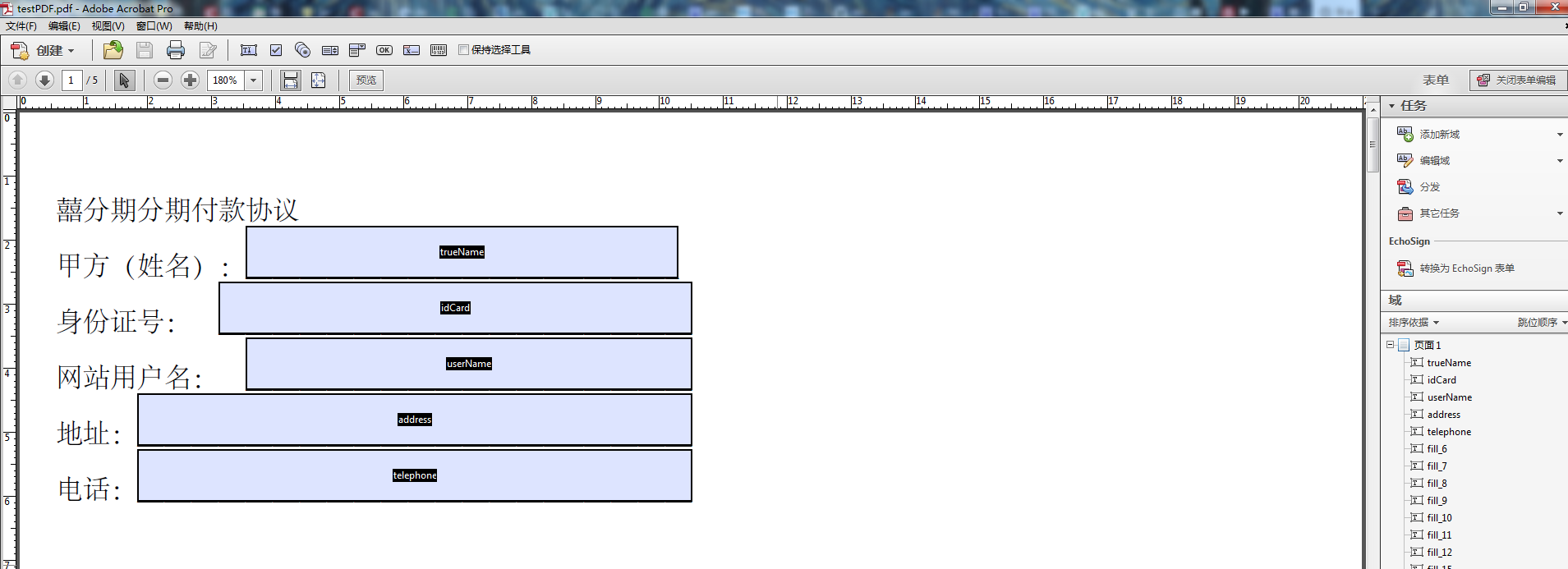
将制作好的表单保存到:D:/testPDF.pdf,这样点击运行代码会根据设置的字段添加对应的值。
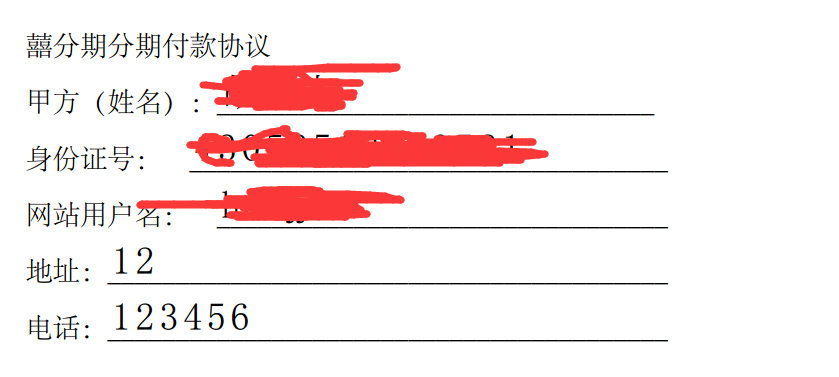
注意:此方法中还包含怎样将图片随pdf打印出来,因为jar的原因,此种方法只能获得pdf的页数,不能获得某一个字段的具体位置,因此只能将其的位置初始化。
源码:
置于插入图片:还有一种能获取具体某一个字段的具体位置的方法,但是因为引入jar包的原因不能保证既满足读取pdf获取具体位置又能将PDF表单赋值
 // 模板文件路径

     String templatePath = "template.pdf";

     // 生成的文件路径

     String targetPath = "target.pdf";

     // 书签名

     String fieldName = "field";

     // 图片路径

     String imagePath = "image.jpg";

     // 读取模板文件

     InputStream input = new FileInputStream(new File(templatePath));

     PdfReader reader = new PdfReader(input);

     PdfStamper stamper = new PdfStamper(reader, new FileOutputStream(targetPath));

     // 提取pdf中的表单

     AcroFields form = stamper.getAcroFields();

     form.addSubstitutionFont(BaseFont.createFont("STSong-Light","UniGB-UCS2-H", BaseFont.NOT_EMBEDDED));

     // 通过域名获取所在页和坐标,左下角为起点

     int pageNo = form.getFieldPositions(fieldName).get(0).page;

     Rectangle signRect = form.getFieldPositions(fieldName).get(0).position;

     float x = signRect.getLeft();

     float y = signRect.getBottom();

     // 读图片

     Image image = Image.getInstance(imagePath);

     // 获取操作的页面

     PdfContentByte under = stamper.getOverContent(pageNo);

     // 根据域的大小缩放图片

     image.scaleToFit(signRect.getWidth(), signRect.getHeight());

     // 添加图片

     image.setAbsolutePosition(x, y);

     under.addImage(image);

     stamper.close();

     reader.close();
但引入的包:
import com.itextpdf.text.Document;

import com.itextpdf.text.DocumentException;

import com.itextpdf.text.pdf.PdfWriter;

import com.itextpdf.tool.xml.XMLWorkerHelper;
只有这样以下方法才可用:
Rectangle signRect = form.getFieldPositions(fieldName).get(0).position;
方法二:将html页面打印成PDF
此种方法需要引入的jar包:itextpdf-5.3.2.jar, xmlworker-5.5.3。(注意:如果xmlworker版本不对会报:java.lang.NoSuchMethodError: com.itextpdf.tool.xml.html.pdfelement.NoNewLineParagraph.setMultipliedLeading(F)V )
源码:
import com.itextpdf.text.Document;

import com.itextpdf.text.DocumentException;

import com.itextpdf.text.pdf.PdfWriter;

import com.itextpdf.tool.xml.XMLWorkerHelper;
 public static final String HTML = "D:/template.html";

        public static final String DEST = "D:/helo.pdf";

        public void createPdf(String file) throws IOException, DocumentException {

            // step 1

            Document document = new Document();

            // step 2

            PdfWriter writer = PdfWriter.getInstance(document, new FileOutputStream(file));

            // step 3

            document.open();

            // step 4

            XMLWorkerHelper.getInstance().parseXHtml(writer, document,

                    new FileInputStream(HTML), Charset.forName("UTF-8"));

            // step 5

            document.close();

        }

        public static void main(String[] args) throws IOException, DocumentException {

            File file = new File(DEST);

            file.getParentFile().mkdirs();

            new TestPdf().createPdf(DEST);

        }
测试中文字体:
在网上找到一篇资料:
直接上源码:http://www.bubuko.com/infodetail-1301851.html
public void fillTemplate(){//利用模板生成pdf

                //模板路径

        String templatePath = "pdfFolder/template_demo.pdf";

                //生成的新文件路径

        String newPDFPath = "pdfFolder/newPdf.pdf";

        PdfReader reader;

        FileOutputStream out;

        ByteArrayOutputStream bos;

        PdfStamper stamper;

        try {

            out = new FileOutputStream(newPDFPath);//输出流

            reader = new PdfReader(templatePath);//读取pdf模板

            bos = new ByteArrayOutputStream();

            stamper = new PdfStamper(reader, bos);

            AcroFields form = stamper.getAcroFields();

            String[] str = {"123456789","小鲁","男","1994-00-00",

                    "130222111133338888"

                    ,"河北省唐山市"};

            int i = 0;

            java.util.Iterator<String> it = form.getFields().keySet().iterator();

            while(it.hasNext()){

                String name = it.next().toString();

                System.out.println(name);

                form.setField(name, str[i++]);

            }

            stamper.setFormFlattening(true);//如果为false那么生成的PDF文件还能编辑,一定要设为true

            stamper.close();

            Document doc = new Document();

            PdfCopy copy = new PdfCopy(doc, out);

            doc.open();

            PdfImportedPage importPage = copy.getImportedPage(

                    new PdfReader(bos.toByteArray()), 1);

            copy.addPage(importPage);

            doc.close();

        } catch (IOException e) {

            System.out.println(1);

        } catch (DocumentException e) {

            System.out.println(2);

        }

    }
输出英文:没问题!
1 public void test1(){//生成pdf

 2         Document document = new Document();

 3         try {

 4             PdfWriter.getInstance(document, new FileOutputStream("pdfFolder/1.pdf"));

 5             document.open();

 6             document.add(new Paragraph("hello word"));

 7             document.close();

 8         } catch (FileNotFoundException | DocumentException e) {

 9             System.out.println("file create exception");

10         }

11     }
可是如果要输出中文呢,上面这个就不行了,就要用到语言包了
最新亚洲语言包:http://sourceforge.net/projects/itext/files/extrajars/
pdf显示中文:
 1 public void test1_1(){

 2         BaseFont bf;

 3         Font font = null;

 4         try {

 5             bf = BaseFont.createFont( "STSong-Light", "UniGB-UCS2-H",

 6                     BaseFont.NOT_EMBEDDED);//创建字体

 7             font = new Font(bf,12);//使用字体

 8         } catch (DocumentException | IOException e) {

 9             e.printStackTrace();

10         }

11         Document document = new Document();

12         try {

13             PdfWriter.getInstance(document, new FileOutputStream("pdfFolder/2.pdf"));

14             document.open();

15             document.add(new Paragraph("hello word 你好 世界",font));//引用字体

16             document.close();

17         } catch (FileNotFoundException | DocumentException e) {

18             System.out.println("file create exception");

19         }

20     }
另外一种方法:我不用第三方语言包:
我是在工程目录里面新建了一个字体文件夹Font,然后把宋体的字体文件拷贝到这个文件夹里面了
上程序:
 1 public void test1_2(){

 2         BaseFont bf;

 3         Font font = null;

 4         try {

 5             bf = BaseFont.createFont("Font/simsun.ttc,1", //注意这里有一个,1

 6                     BaseFont.IDENTITY_H, BaseFont.NOT_EMBEDDED);

 7             font = new Font(bf,12);

 8         } catch (DocumentException | IOException e) {

 9             e.printStackTrace();

10         }

11         Document document = new Document();

12         try {

13             PdfWriter.getInstance(document, new FileOutputStream("pdfFolder/3.pdf"));

14             document.open();

15             document.add(new Paragraph("使用中文另外一种方法",font));

16             document.close();

17         } catch (FileNotFoundException | DocumentException e) {

18             System.out.println("file create exception");

19         }

20     }
javaWeb项目springMVC框架下利用ITextpdf 工具打印PDF文件的方法(打印表单、插入图片)的更多相关文章
- (转)springMVC框架下JQuery传递并解析Json数据
springMVC框架下JQuery传递并解析Json数据 json作为一种轻量级的数据交换格式,在前后台数据交换中占据着非常重要的地位.Json的语法非常简单,采用的是键值对表示形式.JSON 可以 ...
- 使用Javamelody验证struts-spring框架与springMVC框架下action的訪问效率
在前文中我提到了关于为何要使用springMVC的问题,当中一点是使用springMVC比起原先的struts+spring框架在效率上是有优势的.为了验证这个问题,我做了两个Demo来验证究竟是不是 ...
- springMVC框架下JQuery传递并解析Json数据
springMVC框架下JQuery传递并解析Json数据
- springmvc框架下ajax请求传参数中文乱码解决
springmvc框架下jsp界面通过ajax请求后台数据,传递中文参数到后台显示乱码 解决方法:js代码 运用encodeURI处理两次 /* *掩码处理 */ function maskWord( ...
- 在SpringMVC框架下实现文件的 上传和 下载
在eclipse中的javaEE环境下:导入必要的架包 web.xml的配置文件: <?xml version="1.0" encoding="UTF-8" ...
- C#下利用正则表达式实现字符串搜索功能的方法(转)
关键字:正则表达式.元字符.字符串.匹配: 1.正则表达式简介:正则表达式提供了功能强大.灵活而又高效的方法来处:.NET框架正则表达式并入了其他正则表达式实现的: 2.字符串搜索:正则表达式语言由两 ...
- 【java】 linux下利用nohup后台运行jar文件包程序
Linux 运行jar包命令如下: 方式一: java -jar XXX.jar 特点:当前ssh窗口被锁定,可按CTRL + C打断程序运行,或直接关闭窗口,程序退出 那如何让窗口不锁定? 方式二 ...
- Django框架之第二篇--app注册、静态文件配置、form表单提交、pycharm连接数据库、django使用mysql数据库、表字段的增删改查、表数据的增删改查
本节知识点大致为:静态文件配置.form表单提交数据后端如何获取.request方法.pycharm连接数据库,django使用mysql数据库.表字段的增删改查.表数据的增删改查 一.创建app,创 ...
- 利用private font改变PDF文件的字体
利用private font改变PDF文件的字体 前几天做项目,需要使用未安装的字体来改变PDF的文件.以前并没有实现过类似的功能,幸运的是我在网上找到了类似的教程,并成功实现了这个功能. 下面就跟大 ...
随机推荐
- snmp trap编写
1.MIB库查看net-snmp的安装目录./usr/share/snmp/mibs目录下: NET-SNMP-EXAMPLES-MIB.mib本件部分内容如下: netSnmpExampleHear ...
- JavaScript 杂乱的小总结
基本类型只有String.number.boolean.null.undefined,还有一个Object.存在装箱类型,不过后台自动转换. 通过new创建对象时,如果没有参数,可以省略“()”.-- ...
- 第二百八十二节,MySQL数据库-MySQL视图
MySQL数据库-MySQL视图 1.视图是一个虚拟表(非真实存在),其本质是[根据SQL语句获取动态的数据集,并为其命名],用户使用时只需使用[名称]即可获取结果集,并可以将其当作表来使用. 2.也 ...
- 关于Random中的随机数种子Seed
Random初始化的时候,可以以一个INT32作为参数,称为seed,MSDN上的解释是:“伪随机数是以相同的概率从一组有限的数字中选取的......随机数的生成是从种子值开始......” 所有标准 ...
- c++ 参赛设置
void report(LogWriter& lw); 代表引用原对象 void report(LogWriter lw); 代表重新拷贝构造一个对象
- delphi中设置listview行高的方法
第一步.在form中放置一个ImageList: 第二步.将ListView的SmallImages设置为第一步中放置的ImageList: 第三部.将imageList的height设置成自己需要的 ...
- python中 decimal不能直接应用于float数据
今天将程序部署到linux服务器上,出现很奇怪的现象. 在windows上运行正常的decimal,到了linux环境下不能正常运行,报出下面的错误. 代码为: income = get_dashbo ...
- ZooKeeper(七)-- ZK原生API实现分布式锁
一.使用场景 在分布式应用,往往存在多个进程提供同一服务.这些进程有可能在相同的机器上,也有可能分布在不同的机器上. 如果这些进程共享了一些资源,可能就需要分布式锁来锁定对这些资源的访问. 二.实现分 ...
- CentOS5.5环境下布署LVS+keepalived
原创作品,允许转载,转载时请务必以超链接形式标明文章 原始出处 .作者信息和本声明.否则将追究法律责任.http://kerry.blog.51cto.com/172631/401253 #!/bin ...
- 浅谈MVC和MVVM模式
MVC I’m dating with a model… and a view, and a controller. 众所周知,MVC 是开发客户端最经典的设计模式,iOS 开发也不例外,但是 MVC ...