
Unity3d + PureMVC框架搭建
0、流程:LoginView-SendNotification()---->LoginCommand--Execute()--->调用proxy中的函数操作模型数据--LoginProxy---->接收服务器返回-操作数据-返回通知视图控制器--LoginMediator--->操作视图。
(虽然很繁琐,一个功能需要写很多个文件,但是对于大型项目来说使用起来是很舒服的。比如A复制背包,B复制商场,这里都需要用到人物的金币信息,对与A/B来说我只要监听到了金币更新的操作,我就通过视图控制器来做update操作就可以了,不关心是谁的操作引起的金币变化。好处就不多说了,看下面代码吧)
1、下载puremvc,http://www.puremvc.org/
2、复制puremvc源代码到项目scripts目录下
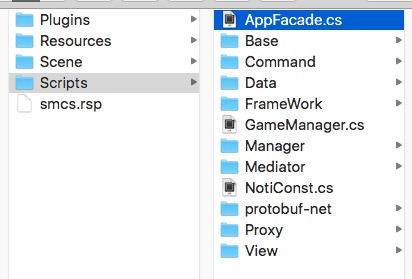
3、AppFacade.cs文件,这是puremvc的启动文件
 using UnityEngine;

 using System.Collections;

 using PureMVC.Patterns;

 using PureMVC.Interfaces;

 public class AppFacade : Facade,IFacade {

     public const string STARTUP = "starup";

     public const string LOGIN = "login";

     private static AppFacade _instance;

     public static AppFacade getInstance

     {

         get{

             if (_instance == null) {

                 _instance = new AppFacade ();

             }

             return _instance;

         }

     }

     protected override void InitializeController ()

     {

         base.InitializeController ();

         RegisterCommand (STARTUP, typeof(StartupCommand));

         RegisterCommand (NotiConst.S_LOGIN, typeof(LoginCommand));

     }

     public void startup()

     {

         SendNotification (STARTUP);

     }

 }
4、在场景中创建一个GameManager.cs文件,挂在Main Camera上
 using UnityEngine;

 using System.Collections;

 public class GameManager : MonoBehaviour {

     // Use this for initialization

     void Start () {

         DontDestroyOnLoad (this.gameObject);

         AppFacade.getInstance.startup ();

     }

     // Update is called once per frame

     void Update () {

     }

 }
5、编写StartupCommand.cs文件,在这里注册所有的command。
 using UnityEngine;

 using System.Collections;

 using PureMVC.Patterns;

 public class StartupCommand : MacroCommand {

     protected override void InitializeMacroCommand ()

     {

         AddSubCommand (typeof(ModelPreCommand));

     }

 }
5、创建ModelPreCommand.cs文件,这里注册proxy文件。
 // 创建Proxy,并注册。

 public class ModelPreCommand : SimpleCommand {

     public override void Execute (PureMVC.Interfaces.INotification notification)

     {

         Facade.RegisterProxy (new LoginProxy());

     }

 }
6、在AppFacade.cs文件InitializeController方法中注册消息号与Command直接的监听关系。这里使用了NotiConst来定义所有的消息号。
7、创建LoginView.cs这是一个视图文件,同时创建LoginViewMediator.cs文件。
 using UnityEngine;

 using System.Collections;

 using System.Collections.Generic;

 using PureMVC.Patterns;

 using PureMVC.Interfaces;

 public class LoginViewMediator : Mediator,IMediator {

     public const string NAME = "LoginViewMediator";

     public LoginViewMediator(LoginView _view):base(NAME,_view){

     }

     //需要监听的消息号

     public override System.Collections.Generic.IList<string> ListNotificationInterests ()

     {

         List<string> list = new List<string>();

         list.Add (NotiConst.R_LOGIN);

         return list;

     }

     //接收消息到消息之后处理

     public override void HandleNotification (PureMVC.Interfaces.INotification notification)

     {

         string name = notification.Name;

         object vo = notification.Body;

         switch (name) {

         case NotiConst.R_LOGIN:

                 (this.ViewComponent as LoginView).receiveMessage (vo);

                 break;

         }

     }

 }
LoginView.cs
 void Start () {

 //注册mediator

         AppFacade.getInstance.RegisterMediator (new LoginViewMediator (this));

     }

 void OnDestory(){

         AppFacade.getInstance.RemoveMediator (LoginViewMediator.NAME);

     }
8、编写LoginCommand.cs文件,监听发送过来的消息。
在AppFacade里面InitializeController注册:RegisterCommand (NotiConst.S_LOGIN, typeof(LoginCommand));
 using UnityEngine;

 using System.Collections;

 using PureMVC.Patterns;

 public class LoginCommand : SimpleCommand {

     public override void Execute (PureMVC.Interfaces.INotification notification)

     {

         Debug.Log ("LoginCommand");

         object obj = notification.Body;

         LoginProxy loginProxy;

         loginProxy = Facade.RetrieveProxy (LoginProxy.NAME) as LoginProxy;

         string name = notification.Name;

         switch (name) {

         case NotiConst.S_LOGIN:

             loginProxy.sendLogin (obj);

             break;

         }

     }

 }
9、创建LoginProxy.cs文件,这里复制数据处理,与服务器通讯等操作。
 using UnityEngine;

 using System.Collections;

 using PureMVC.Patterns;

 using PureMVC.Interfaces;

 using LitJson;

 public class LoginProxy : Proxy,IProxy {

     public const string NAME = "LoginProxy";

     // Use this for initialization

     public LoginProxy():base(NAME){}

     //请求登陆

     public void sendLogin(object data)

     {

         //与服务器通讯,返回消息处理玩之后,如果需要改变试图则调用下面消息

         receiveLogin();

     }

     // 登陆返回

     private void receiveLogin(JsonData rData)

     {

        SendNotification (NotiConst.R_LOGIN, rData);

     }

 }
10、测试。在视图里面创建一个按钮点击按钮发送登陆消息。
 void sendNotice(){

     int obj = ;

     AppFacade.getInstance.SendNotification (NotiConst.S_LOGIN,obj);

 }
然后在写一个接收到服务器端返回数据的操作函数
 public void receiveLogin(object obj){

     //下一步操作

 }
原文地址:https://my.oschina.net/u/1582495/blog/601547
Unity3d + PureMVC框架搭建的更多相关文章
- Unity3d中PureMVC框架的搭建及使用资料
1.下载PureMVC框架 https://github.com/PureMVC/puremvc-csharp-multicore-framework https://github.com/PureM ...
- Unity 游戏框架搭建 (一) 概述
为了重构手头的一款项目,翻出来当时未接触Unity时候收藏的视频<Unity项目架构设计与开发管理>,对于我这种初学者来说全是干货.简单的总结了一下,以后慢慢提炼. 关于Unity的架 ...
- Unity 游戏框架搭建 (六) 关于框架的一些好文和一些思考
在进行项目架构阶段,游戏框架可以解决一部分问题.剩下的架构问题还需要根据不同的项目解决.总之游戏框架是游戏架构的一部分. 关于锤子和钉子: 最近又拿起了<代码大全>和<暗时间 ...
- SpringMVC笔记——SSM框架搭建简单实例
落叶枫桥 博客园 首页 新随笔 联系 订阅 管理 SpringMVC笔记——SSM框架搭建简单实例 简介 Spring+SpringMVC+MyBatis框架(SSM)是比较热门的中小型企业级项目开发 ...
- Unity 游戏框架搭建 (十一) 简易AssetBundle打包工具(一)
最近在看Unity官方的AssetBundle(以下简称AB)的教程,也照着做了一遍,不过做出来的AssetBundleManager的API设计得有些不太习惯.目前想到了一个可行的解决方案.AB相关 ...
- Unity 游戏框架搭建 (九) 减少加班利器-QConsole
为毛要实现这个工具? 在我小时候,每当游戏在真机运行时,我们看到的日志是这样的. 没高亮啊,还有乱七八糟的堆栈信息,好干扰日志查看,好影响心情. 还有就是必须始终连着usb线啊,我想要想躺着测试... ...
- Angular企业级开发(5)-项目框架搭建
1.AngularJS Seed项目目录结构 AngularJS官方网站提供了一个angular-phonecat项目,另外一个就是Angular-Seed项目.所以大多数团队会基于Angular-S ...
- 一步一步使用ABP框架搭建正式项目系列教程之本地化详解
返回总目录<一步一步使用ABP框架搭建正式项目系列教程> 本篇目录 扯扯本地化 ABP中的本地化 小结 扯扯本地化 本节来说说本地化,也有叫国际化.全球化的,不管怎么个叫法,反正道理都是一 ...
- ABP框架搭建项目系列教程基础版完结篇
返回总目录<一步一步使用ABP框架搭建正式项目系列教程> 经过前面十二篇的基础教程,现在终于该做个总结了. 回顾 第一篇,我们建议新手朋友们先通过ABP官网的启动模板生成解决方案,因为这样 ...
随机推荐
- Wireshark分析网络慢
tcp.analysis.retransmission tcp.flags.reset==1
- 浅谈CPU,GPU,TPU,DPU,NPU,BPU
https://www.sohu.com/a/191538165_777155 A12宣传的每秒5万亿次运算,用计算机语言描述就是5Tops. 麒麟970 NPU,根据资料是 1.92Tops. 麒麟 ...
- Hibernate 的一级缓存和二级缓存总结
缓存:缓存是什么,解决什么问题? 位于速度相差较大的两种硬件/软件之间的,用于协调两者数据传输速度差异的结构,均可称之为缓存Cache.缓存目的:让数据更接近于应用程序,协调速度不匹配,使访问速度更快 ...
- [phpcms v9]自定义表单添加验证码验证功能
修改 \phpcms\templates\default\formguide\show.html 中添加验证码显示 <input type="text" id=" ...
- zookeeper 安装 配置集群
https://mirrors.tuna.tsinghua.edu.cn/apache/zookeeper/ [root@znode01 src]# tar -xzvf zookeeper--alph ...
- 使用post向webservice发送请求,并且返回值
注意,这个方法仅仅适用于:该post页面处于websercive 站点下,或者是与webservice同属于一个主站点,即在iis里属于同一主站点的同级虚拟目录. protected void btn ...
- Object.defineProperty()属性设置介绍
注释: 本文宅自https://segmentfault.com/a/1190000007434923,仅学习方便,没有任何商业用途 对象是由多个名/值对组成的无序的集合.对象中每个属性对应任意类型的 ...
- Linux下crontab内环境变量与Shell环境变量的关系【转】
crontab,总是不会缺省的从用户profile文件中读取环境变量参数 经常导致在手工执行某个脚本时是成功的,但是到crontab中试图执行时就会报错. 解决办法如下: 方法一:在shell文件中获 ...
- wp中的双向绑定
using System; using System.Collections.Generic; using System.ComponentModel; using System.Linq; usin ...
- linux性能评估与分析工具
linux是一个开源系统,其内核负责管理系统的进程,内存,设备驱动程序,文件和网络系统, 决定着系统的性能和稳定性.由于内核源码很容易获取,任何人都可以将自己认为优秀的代码 加入到其中.linux默认 ...