
click through rate prediction
包括内容如下图:
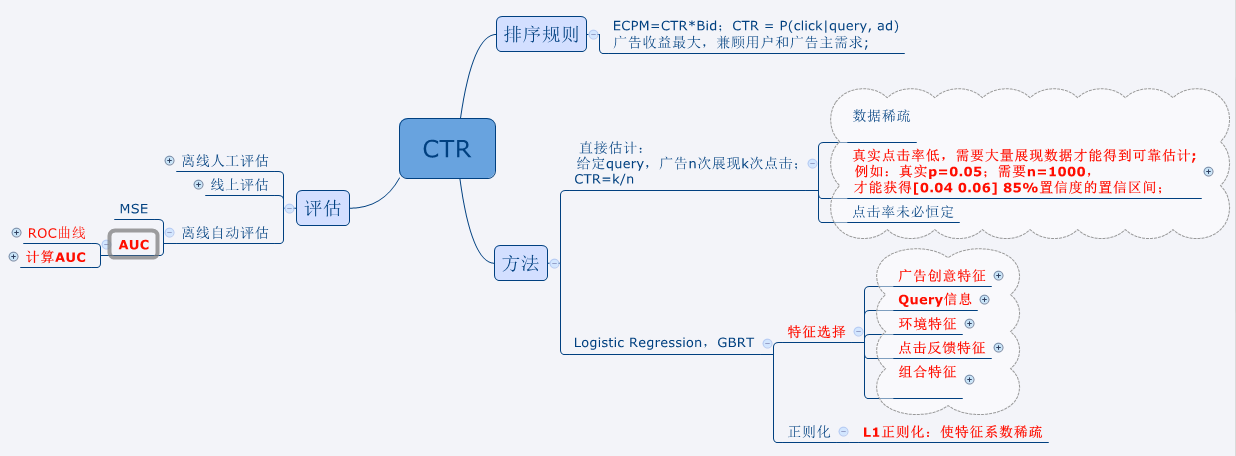
使用直接估计法,置信区间置信率的估计:
1.使用二项分布直接估计
$p(0.04<\hat{p}<0.06) = \sum_{0.04n\leq k \leq 0.06n}{n \choose k}0.05^{k}0.95^{n-k}$
low=ceil(n*0.04);%上取整

high=floor(n*0.06);%下取整

prob = 0;

for i=low:1:high

    prob = prob+nchoosek(n,i)*(0.05^i)*(0.95^(n-i));

end
2.使用正态分布近似
$\mu = p = 0.05,\sigma^2 = \frac{p(1-p)}{n} = \frac{0.05*0.95}{n}$
normcdf(0.06,0.05,sigma/x(i)^0.5) - normcdf(0.04,0.05,sigma/x(i)^0.5)
warning off all;

clear all;clc;close all;

x=500:1:1500;

y = zeros(1,size(x,2));

y2 = zeros(1,size(x,2));

sigma = sqrt(0.05*0.95);

for i =1:size(x,2)

    y(i) = adPredict(x(i));

    y2(i) = normcdf(0.06,0.05,sigma/x(i)^0.5) - normcdf(0.04,0.05,sigma/x(i)^0.5);

end

plot(x,y,'b-'); hold on;

plot(x,y2,'r-');

hold on;

x1=[500 1500];

y1=[0.85 0.85];

plot(x1,y1,'y-');
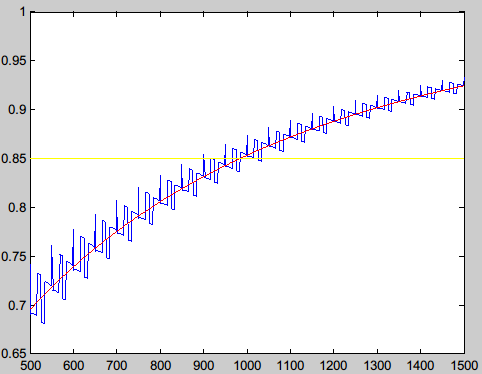
打印曲线:观测到,n=1000,差不多置信度会到达0.85
AUC概念及计算:
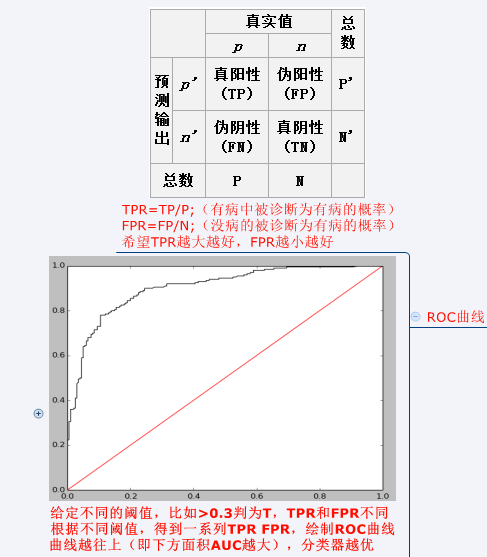
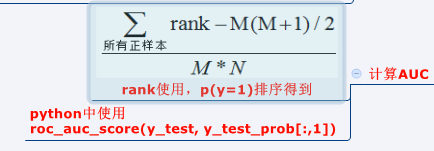
sklearn代码:sklearn中有现成方法,计算一组TPR,FPR,然后plot就可以;AUC也可以直接调用方法。
import numpy as np

import matplotlib.pyplot as plt

from sklearn.linear_model import LogisticRegression

from sklearn import datasets

from sklearn.preprocessing import StandardScaler

from sklearn.metrics import roc_auc_score

from sklearn.metrics import roc_curve

digits = datasets.load_digits()

X, y = digits.data, digits.target

X = StandardScaler().fit_transform(X)

# classify small against large digits

y = (y > 4).astype(np.int)

X_train = X[:-400]

y_train = y[:-400]

X_test = X[-400:]

y_test = y[-400:]

lrg = LogisticRegression(penalty='l1')

lrg.fit(X_train, y_train)

y_test_prob=lrg.predict_proba(X_test)

P = np.where(y_test==1)[0].shape[0];

N  = np.where(y_test==0)[0].shape[0];

dt = 10001

TPR = np.zeros((dt,1))

FPR = np.zeros((dt,1))

for i in range(dt):

    y_test_p = y_test_prob[:,1]>=i*(1.0/(dt-1))

    TP = np.where((y_test==1)&(y_test_p==True))[0].shape[0];

    FN = P-TP;

    FP = np.where((y_test==0)&(y_test_p==True))[0].shape[0];

    TN = N - FP;

    TPR[i]=TP*1.0/P

    FPR[i]=FP*1.0/N

plt.plot(FPR,TPR,color='black')

plt.plot(np.array([[0],[1]]),np.array([[0],[1]]),color='red')

plt.show()

#use sklearn method

# fpr, tpr, thresholds = roc_curve(y_test,y_test_prob[:,1],pos_label=1)

# plt.plot(fpr,tpr,color='black')

# plt.plot(np.array([[0],[1]]),np.array([[0],[1]]),color='red')

# plt.show()

rank = y_test_prob[:,1].argsort()

rank = rank.argsort()+1

auc = (sum(rank[np.where(y_test==1)[0]])-(P*1.0*(P+1)/2))/(P*N);

print auc

print roc_auc_score(y_test, y_test_prob[:,1])
click through rate prediction的更多相关文章
- 微软的一篇ctr预估的论文:Web-Scale Bayesian Click-Through Rate Prediction for Sponsored Search Advertising in Microsoft’s Bing Search Engine。
周末看了一下这篇论文,觉得挺难的,后来想想是ICML的论文,也就明白为什么了. 先简单记录下来,以后会继续添加内容. 主要参考了论文Web-Scale Bayesian Click-Through R ...
- 【论文笔记】用反事实推断方法缓解标题党内容对推荐系统的影响 Click can be Cheating: Counterfactual Recommendation for Mitigating Clickbait Issue
Click can be Cheating: Counterfactual Recommendation for Mitigating Clickbait Issue Authors: 王文杰,冯福利 ...
- 【点击模型学习笔记】Predicting Clicks_Estimating the Click-Through Rate for New Ads_MS_www2007
概要: 微软研究院的人写的文章,提出用逻辑回归来解决ctr预估问题,是以后ctr的经典解决方式,经典文章. 详细内容: 名词: CPC -- cost per click CTR -- click t ...
- python命令行神器Click
原文: http://www.lengirl.com/code/python-click.html Click 是用Python写的一个第三方模块,用于快速创建命令行.我们知道,Python内置了一个 ...
- Bayesian CTR Prediction for Bing
Microsoft published a paper in ICML 2009 named ‘Web-Scale Bayesian Click-Through Rate Prediction for ...
- 【python】命令行神器 Click 简明笔记
全文拷贝自 命令行神器 Click 简明笔记 Click Click 是用 Python 写的一个第三方模块,用于快速创建命令行.我们知道,Python 内置了一个 Argparse 的标准库用于创建 ...
- 命令行神器 Click 简明笔记
Click 是用 Python 写的一个第三方模块,用于快速创建命令行.我们知道,Python 内置了一个 Argparse 的标准库用于创建命令行,但使用起来有些繁琐,Click 相比于 Argpa ...
- Andrew 机器学习课程笔记
Andrew 机器学习课程笔记 完成 Andrew 的课程结束至今已有一段时间,课程介绍深入浅出,很好的解释了模型的基本原理以及应用.在我看来这是个很好的入门视频,他老人家现在又出了一门 deep l ...
- 主流CTR预估模型的演化及对比
https://zhuanlan.zhihu.com/p/35465875 学习和预测用户的反馈对于个性化推荐.信息检索和在线广告等领域都有着极其重要的作用.在这些领域,用户的反馈行为包括点击.收藏. ...
随机推荐
- Fire Net--hdu1045
Fire Net Time Limit: 2000/1000 MS (Java/Others) Memory Limit: 65536/32768 K (Java/Others)Total Su ...
- 【写一个自己的js库】 5.添加修改样式的方法
1.根据id或class或tag修改样式,样式名是-连接格式的. function setStyleById(elem, styles){ if(!(elem = $(elem)) return fa ...
- OneNote Count
用OneNote的时候,某个分区的笔记多的话,想数一下一共有多少笔记是个麻烦的活儿. OneNote没有自带这功能 于是写了个C#的小程序实现这功能 https://github.com/02xiao ...
- Eclipse Velocity插件安装
打开eclipse安装velocity插件,这里有两种eclipse velocity的安装 方式一:不推荐的安装(安装会失败) Help>install new software>add ...
- RTNETLINK answers: Operation not permitted
如果出现:RTNETLINK answers: Operation not permitted,那是因为没有权限. 解决办法:su,输入root密码.
- Windows下搭建Eclipse+Android4.0开发环境
官方搭建步骤: http://developer.android.com/index.html 搭建好开发环境之前须要下载以下几个文件包: 一.安装Java执行环境JRE(没这个Eclipse执行不起 ...
- 十分钟让你明白Objective-C的语法(和Java、C++的对比)
很多想开发iOS,或者正在开发iOS的程序员以前都做过Java或者C++,当第一次看到Objective-C的代码时都会头 疼,Objective-C的代码在语法上和Java, C++有着很大的区别, ...
- mysql 主从不同步处理--数据库初始化
问题处理借鉴至网上的内容 又一次做主从,全然同步 在主库新建一张表后.在slave 段发现数据没有同步过去. mysql version:5.6.10 os :rhel 5.6 解决过程例如以下: 1 ...
- blog开篇
本来是写java学习开篇的,现在就把它改为博客开篇吧. 其实一直都想着记录一下自己学习的过程,或者说是借口,一直在忙,也从重庆辗转到广州,又从广州辗转到天津了,又一个新阶段开始了,猴年马月都到了,哈哈 ...
- HDU 1017 - A Mathematical Curiosity
题目简单,格式酸爽.. #include <iostream> using namespace std; int ans,n,m,p; int main() { cin>>p; ...