
click through rate prediction
包括内容如下图:
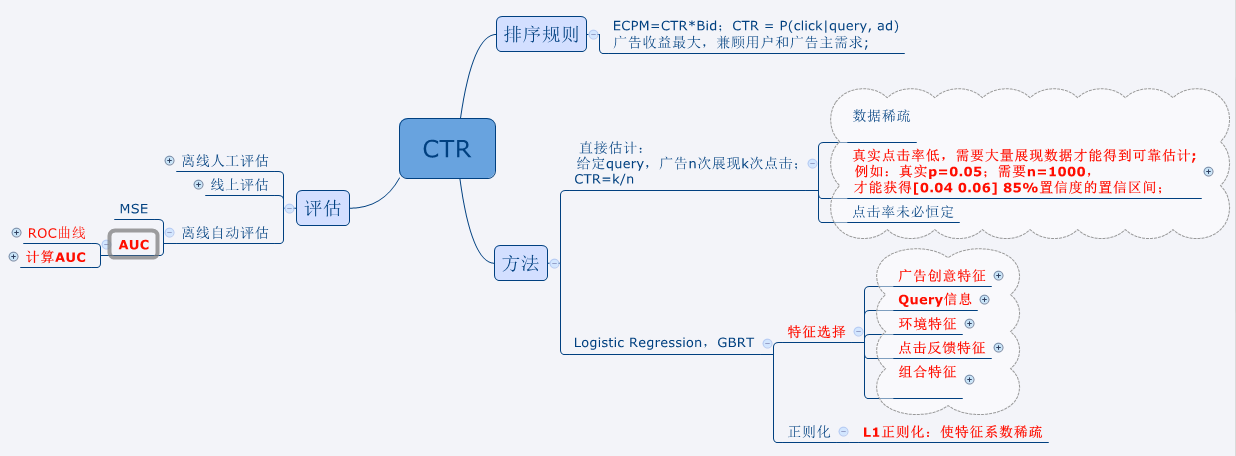
使用直接估计法,置信区间置信率的估计:
1.使用二项分布直接估计
$p(0.04<\hat{p}<0.06) = \sum_{0.04n\leq k \leq 0.06n}{n \choose k}0.05^{k}0.95^{n-k}$
low=ceil(n*0.04);%上取整

high=floor(n*0.06);%下取整

prob = 0;

for i=low:1:high

    prob = prob+nchoosek(n,i)*(0.05^i)*(0.95^(n-i));

end
2.使用正态分布近似
$\mu = p = 0.05,\sigma^2 = \frac{p(1-p)}{n} = \frac{0.05*0.95}{n}$
normcdf(0.06,0.05,sigma/x(i)^0.5) - normcdf(0.04,0.05,sigma/x(i)^0.5)
warning off all;

clear all;clc;close all;

x=500:1:1500;

y = zeros(1,size(x,2));

y2 = zeros(1,size(x,2));

sigma = sqrt(0.05*0.95);

for i =1:size(x,2)

    y(i) = adPredict(x(i));

    y2(i) = normcdf(0.06,0.05,sigma/x(i)^0.5) - normcdf(0.04,0.05,sigma/x(i)^0.5);

end

plot(x,y,'b-'); hold on;

plot(x,y2,'r-');

hold on;

x1=[500 1500];

y1=[0.85 0.85];

plot(x1,y1,'y-');
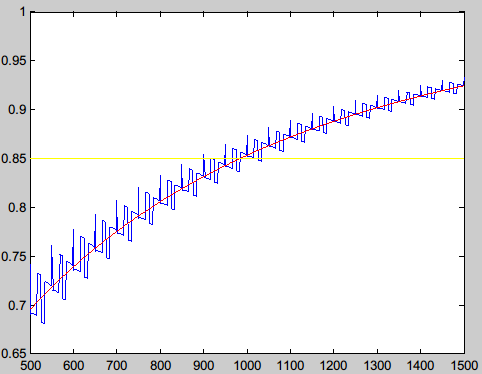
打印曲线:观测到,n=1000,差不多置信度会到达0.85
AUC概念及计算:
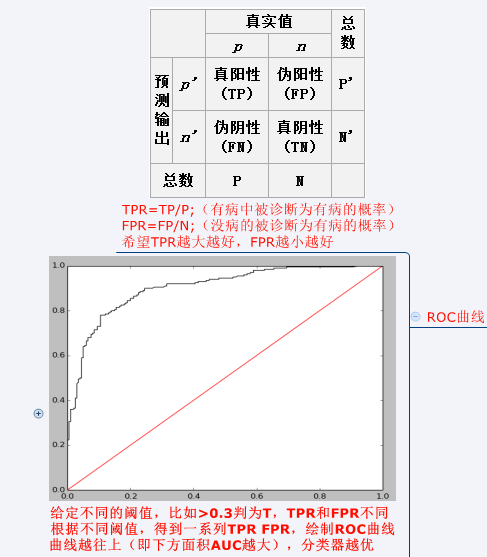
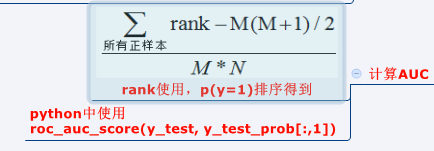
sklearn代码:sklearn中有现成方法,计算一组TPR,FPR,然后plot就可以;AUC也可以直接调用方法。
import numpy as np

import matplotlib.pyplot as plt

from sklearn.linear_model import LogisticRegression

from sklearn import datasets

from sklearn.preprocessing import StandardScaler

from sklearn.metrics import roc_auc_score

from sklearn.metrics import roc_curve

digits = datasets.load_digits()

X, y = digits.data, digits.target

X = StandardScaler().fit_transform(X)

# classify small against large digits

y = (y > 4).astype(np.int)

X_train = X[:-400]

y_train = y[:-400]

X_test = X[-400:]

y_test = y[-400:]

lrg = LogisticRegression(penalty='l1')

lrg.fit(X_train, y_train)

y_test_prob=lrg.predict_proba(X_test)

P = np.where(y_test==1)[0].shape[0];

N  = np.where(y_test==0)[0].shape[0];

dt = 10001

TPR = np.zeros((dt,1))

FPR = np.zeros((dt,1))

for i in range(dt):

    y_test_p = y_test_prob[:,1]>=i*(1.0/(dt-1))

    TP = np.where((y_test==1)&(y_test_p==True))[0].shape[0];

    FN = P-TP;

    FP = np.where((y_test==0)&(y_test_p==True))[0].shape[0];

    TN = N - FP;

    TPR[i]=TP*1.0/P

    FPR[i]=FP*1.0/N

plt.plot(FPR,TPR,color='black')

plt.plot(np.array([[0],[1]]),np.array([[0],[1]]),color='red')

plt.show()

#use sklearn method

# fpr, tpr, thresholds = roc_curve(y_test,y_test_prob[:,1],pos_label=1)

# plt.plot(fpr,tpr,color='black')

# plt.plot(np.array([[0],[1]]),np.array([[0],[1]]),color='red')

# plt.show()

rank = y_test_prob[:,1].argsort()

rank = rank.argsort()+1

auc = (sum(rank[np.where(y_test==1)[0]])-(P*1.0*(P+1)/2))/(P*N);

print auc

print roc_auc_score(y_test, y_test_prob[:,1])
click through rate prediction的更多相关文章
- 微软的一篇ctr预估的论文:Web-Scale Bayesian Click-Through Rate Prediction for Sponsored Search Advertising in Microsoft’s Bing Search Engine。
周末看了一下这篇论文,觉得挺难的,后来想想是ICML的论文,也就明白为什么了. 先简单记录下来,以后会继续添加内容. 主要参考了论文Web-Scale Bayesian Click-Through R ...
- 【论文笔记】用反事实推断方法缓解标题党内容对推荐系统的影响 Click can be Cheating: Counterfactual Recommendation for Mitigating Clickbait Issue
Click can be Cheating: Counterfactual Recommendation for Mitigating Clickbait Issue Authors: 王文杰,冯福利 ...
- 【点击模型学习笔记】Predicting Clicks_Estimating the Click-Through Rate for New Ads_MS_www2007
概要: 微软研究院的人写的文章,提出用逻辑回归来解决ctr预估问题,是以后ctr的经典解决方式,经典文章. 详细内容: 名词: CPC -- cost per click CTR -- click t ...
- python命令行神器Click
原文: http://www.lengirl.com/code/python-click.html Click 是用Python写的一个第三方模块,用于快速创建命令行.我们知道,Python内置了一个 ...
- Bayesian CTR Prediction for Bing
Microsoft published a paper in ICML 2009 named ‘Web-Scale Bayesian Click-Through Rate Prediction for ...
- 【python】命令行神器 Click 简明笔记
全文拷贝自 命令行神器 Click 简明笔记 Click Click 是用 Python 写的一个第三方模块,用于快速创建命令行.我们知道,Python 内置了一个 Argparse 的标准库用于创建 ...
- 命令行神器 Click 简明笔记
Click 是用 Python 写的一个第三方模块,用于快速创建命令行.我们知道,Python 内置了一个 Argparse 的标准库用于创建命令行,但使用起来有些繁琐,Click 相比于 Argpa ...
- Andrew 机器学习课程笔记
Andrew 机器学习课程笔记 完成 Andrew 的课程结束至今已有一段时间,课程介绍深入浅出,很好的解释了模型的基本原理以及应用.在我看来这是个很好的入门视频,他老人家现在又出了一门 deep l ...
- 主流CTR预估模型的演化及对比
https://zhuanlan.zhihu.com/p/35465875 学习和预测用户的反馈对于个性化推荐.信息检索和在线广告等领域都有着极其重要的作用.在这些领域,用户的反馈行为包括点击.收藏. ...
随机推荐
- java.lang.NoClassDefFoundError: org/apache/commons/io/output/DeferredFileOutputStream(转)
java.lang.NoClassDefFoundError: org/apache/commons/io/output/DeferredFileOutputStream 使用Tomcat的Manag ...
- Android之SurfaceView学习
首先我们先来看下官方API对SurfaceView的介绍 SurfaceView的API介绍 Provides a dedicated drawing surface embedded inside ...
- Jar
http://docs.oracle.com/javase/6/docs/technotes/guides/jar/jar.html#Intro http://docs.oracle.com/java ...
- MFC窗口的父子关系和层级关系
一直对窗口之间的关系有些混乱,遇到需要指定父窗口的函数时常常要考虑很久,究竟父窗口是哪个窗口,遂上网查资料,略有所悟,简记如下: 对话框中的所有控件(比如Button等)都是其子窗口. ...
- 二探ListView
使用draw9patch 打开内置terminal 输入CD C:\Users\Gaby\AppData\Local\Android\sdk 在该目录下输入draw9patch 导入图片,开始绘制 本 ...
- 【LeetCode练习题】Minimum Window Substring
找出包含子串的最小窗口 Given a string S and a string T, find the minimum window in S which will contain all the ...
- CURL使用HTTPS的技术小结
摘自http://www.51testing.com/html/14/175414-248202.html CURL使用HTTPS的技术小结 cURL是linux下命令行提交HTTP(S)请求的一个很 ...
- ubuntu设置系统时间与网络时间同步和时区
Linux的时间分为System Clock(系统时间)和Real Time Clock (硬件时间,简称RTC). 系统时间:指当前Linux Kernel中的时间. 硬件时间:主板上有电池供电的时 ...
- 简易实现 TextView单行文本水平触摸滑动效果
为了方便查看,已使用markdown编辑形成新博文. 本文Mardown地址 近期做应用的时候实用到TextView单行长文本,当文本内容过长时候又想实现触摸水平滑动效果. 网上找了非常多,都没有看到 ...
- 微信内移动前端开发抓包调试工具fiddler使用教程
在朋友圈看到一款疯转的H5小游戏,想要copy,什么?只能在微信里打开?小样,图样图森破,限制了oauth.微信浏览器内打开,照样能看你源码~ 使用fiddler来抓包 需要先做一些简单的准备工作: ...