
C# 制作 仪表
以前在百度写的文档,转移到此处
前些天在做NetAnalyzer时,需要使用一个指针仪表,网上看了一下,也有人做过,但是大部分都是收费的,本着自力更生的原则,于是决定自己设计一个,今天拿出来有读者分享一下。
首先是截图:
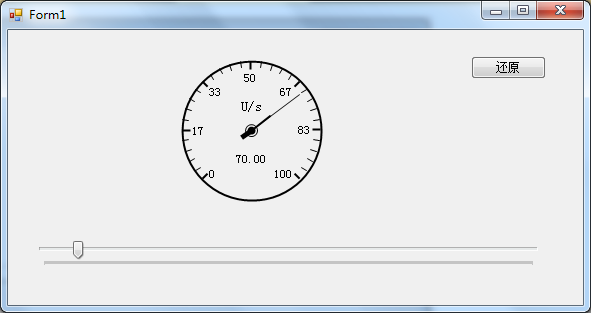
该仪表是以控件形式提供
在开始之前还要赘述一点关于GDI+中角度的计算
如下图
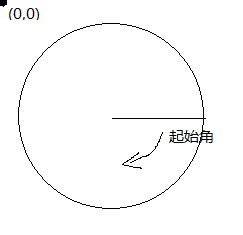
在WinForm中左上角的点位(0,0),即原点,而其起始角则是图中划线处开始的,即为 rad=0;
在绘图时,尤其是做过扇形统计图的人应该比较清楚。
--------------------------------------------------------
接下来就是正式开始
首先新建控件,设置为witdth=height=150 ,可以自己定义,我在这里时可以自适应的
将背景颜色设置为Transparent(透明色),方便以后使用时减少干扰
在该仪表中主要分为两部分:背景部分(外框,刻度,单位等一些列基本不需要频繁变化的部分),前景部分(指针部分)
所以为了不是两个图层不相互影响,我们将背景绘制在控件的BackgroundImage 属性上,而指针部分则需要一个pictrueBox控件作为载体。
首先画背景
在绘制背景时,又分为外框、刻度,指针固定中心等
   // 绘制背景 用来总体控制背景的绘制

         private void DrawBackImg()

         {

             Bitmap bit = new Bitmap(this.Width, this.Height);

             Graphics gp = Graphics.FromImage(bit);

             gp.SmoothingMode = System.Drawing.Drawing2D.SmoothingMode.HighQuality;

             #region 在这里可以扩展需要绘制的背景项目

             //外框

             drawFrame(gp);

             // 画刻度

             DrawRuling(gp);

             //画点

             drawPoint(gp);

             //绘制单位

             DrawUnitStr(gp);

             #endregion

            //当绘制完成后,直接直接设置为背景

             this.BackgroundImage = bit;

         }

       //绘制单位

        private void DrawUnitStr(Graphics gp)

         {

             int cer = _diameter / ;

             gp.DrawString(_unitStr, new Font("宋体", ), new SolidBrush(_frameColor), new PointF(cer, (float)(cer - cer * 0.3)), strFormat);

         }

         /// <summary>

         /// 画外框

         /// </summary>

         /// <param name="gp"></param>

         private void drawFrame(Graphics gp)

         {

             Pen pen = new Pen(_frameColor, );

             Rectangle rec = new Rectangle(, , _diameter - , _diameter - );

             gp.DrawEllipse(pen, rec);

         }

         // 画刻度  此次较为复杂,主要是在绘制刻度值时需要处理

         private void DrawRuling(Graphics gp)

         {

             //刻度

             int cerX = _diameter / ;

             int cerY = _diameter / ;

            //这里需要注意,因外在上面的图中标识了rad=0的位置,而我们的仪表时270度的,0点在135度处,

            //为了符合该效果所以起始位置设为135度。

             float start = ;

             float sweepShot = ;

             int dx = ;

             int dy = ;

             int soildLenght = ;

             Pen linePen = new Pen(_frameColor, );

             float span = (float)(_maxValue / );

             float sp = ;

             //用于右边数字右对齐

             StringFormat stf = new StringFormat();

             stf.Alignment = StringAlignment.Far;

             StringFormat stfMid = new StringFormat();

             stfMid.Alignment = StringAlignment.Center;

             stfMid.LineAlignment = StringAlignment.Center;

             for (int i = ; i <= ; i++)

             {

                 //注意此处,C#提供的三角函数计算中使用的弧度值,而此处获取的是角度值,需要转化

                 double rad = (sweepShot + start) * Math.PI / ;

                 float radius = _diameter /  - ;

                 int px = (int)(cerX + radius * Math.Cos(rad));

                 int py = (int)(cerY + radius * Math.Sin(rad));

                 if (sweepShot %  == )

                 {

                     linePen.Width = ;

                    //计算刻度中的粗线

                     dx = (int)(cerX + (radius - soildLenght) * Math.Cos(rad));

                     dy = (int)(cerY + (radius - soildLenght) * Math.Sin(rad));

                     //绘制刻度值,注意字串对其方式

                     string str = sp.ToString("f0");

                     if (sweepShot <= )

                     {

                         gp.DrawString(str, new Font("宋体", ), new SolidBrush(_frameColor), new PointF(dx, dy - ));

                     }

                     else if (sweepShot >  && sweepShot < )

                     {

                         gp.DrawString(str, new Font("宋体", ), new SolidBrush(_frameColor), new PointF(dx, dy));

                     }

                     else if (sweepShot == )

                     {

                         gp.DrawString(str, new Font("宋体", ), new SolidBrush(_frameColor), new PointF(dx, dy + ), stfMid);

                     }

                     else if (sweepShot >  && sweepShot < )

                     {

                         gp.DrawString(str, new Font("宋体", ), new SolidBrush(_frameColor), new PointF(dx, dy), stf);

                     }

                     else if (sweepShot >= )

                     {

                         gp.DrawString(str, new Font("宋体", ), new SolidBrush(_frameColor), new PointF(dx, dy - ), stf);

                     }

                 }

                 else

                 {

                     //计算刻度中细线

                     linePen.Width = ;

                     dx = (int)(cerX + (radius - soildLenght + ) * Math.Cos(rad));

                     dy = (int)(cerY + (radius - soildLenght + ) * Math.Sin(rad));

                 }

                  //绘制刻度线

                 gp.DrawLine(linePen, new Point(px, py), new Point(dx, dy));

                 sp += span;

                 sweepShot += ;

             }

         }

         //画中间的点

         private void drawPoint(Graphics gp)

         {

             Pen p = new Pen(_frameColor);

             int tmpWidth = ;

             int px = _diameter /  - tmpWidth;

             gp.DrawEllipse(p, new Rectangle(px, px,  * tmpWidth,  * tmpWidth));

             //在画点时,我使用了指针的颜色,这样看起来,更真实一点

             gp.FillEllipse(new SolidBrush(_pinColor), new Rectangle(px + , px + ,  * tmpWidth - ,  * tmpWidth - ));

         }

 -------------------------------------------

 画指针

 绘制指正时,最大的问题就是界面闪速,除了在控件构造方法里添加如下代码:

         SetStyle(ControlStyles.OptimizedDoubleBuffer | ControlStyles.ResizeRedraw | ControlStyles.AllPaintingInWmPaint, true);

         UpdateStyles();

 绘制方式也需要调整,方法如下:

   //为了方式绘制指针时产生的闪烁,PictureBox添加该事件方法

         private void pic_Paint(object sender, PaintEventArgs e)

         {

               DrawForeImg(e.Graphics);

        }

       //使用方法

          public double ChangeValue

         {

             get { return _changeValue; }

             set

             {

                 if (value <= _maxValue)

                     _changeValue = value;

                 else

                 {

                     //完成自适应性

                     MaxValue = value;

                     _changeValue = value;

                 }

                //通过该方法,可以使指针自动绘制(其实就是强制重绘)

                pic.Invalidate();

             }

         }

         //指针的具体画法

         private void DrawForeImg(Graphics gp)

         {

             Bitmap bit = new Bitmap(this.Width, this.Height);

             Graphics g = Graphics.FromImage(bit);

             g.SmoothingMode = System.Drawing.Drawing2D.SmoothingMode.HighQuality;

             //画针

             DrawPin(g);

             DrawString(g);

             //注意此处的绘制方式,这样可以有效减少界面的闪烁问题。

             gp.DrawImage(bit, new Point(, ));

             g.Dispose();

         }

         //画针

         private void DrawPin(Graphics g)

         {

             int cer = _diameter / ;

             float start = ;

             float sweepShot = (float)(_changeValue / _maxValue * );

             Pen linePen = new Pen(_pinColor, );

             Pen NxPen = new Pen(_pinColor, );

             Pen xPen = new Pen(_pinColor, );

             double rad = (sweepShot + start) * Math.PI / ;

             float radius = _diameter /  - ;

             int dx = (int)(cer + (_PinLen) * Math.Cos(rad));

             int dy = (int)(cer + (_PinLen) * Math.Sin(rad));

             int px = (int)(cer + (_PinLen * 0.4) * Math.Cos(rad));

             int py = (int)(cer + (_PinLen * 0.4) * Math.Sin(rad));

             int nx = (int)(cer - (NxPinLen) * Math.Sin(rad));

             int ny = (int)(cer - (NxPinLen) * Math.Cos(rad));

             g.DrawLine(linePen, new Point(cer, cer), new Point(dx, dy));

             g.DrawLine(NxPen, new Point(cer, cer), new Point(px, py));

             g.DrawLine(xPen, new Point(cer, cer), new Point(ny, nx));

         }

        //绘制在仪表下面的值

         private void DrawString(Graphics g)

         {

             int cer = _diameter / ;

             string str = _changeValue.ToString("F2");

             g.DrawString(str, new Font("宋体", ), new SolidBrush(_pinColor), new PointF(cer, (float)(cer + cer * 0.4)), strFormat);

         }
C# 制作 仪表的更多相关文章
- Dynamics CRM教程:制作普通图表并放入仪表盘中
关注本人微信和易信公众号: 微软动态CRM专家罗勇,回复143或者20150325可方便获取本文,同时可以在第一时间得到我发布的最新的博文信息,follow me! 我有个小需求,就是看我家特 ...
- Swift - 制作一个录音机(声音的录制与播放)
1,技术介绍 (1)AVFoundation.framework框架提供了AVAudioRecorder类.它可以实现录音功能. (2)而使用该框架的AVAudioPlayer类,可以实现声音的播放. ...
- intouch制作历史趋势公用弹窗
在先前项目中,历史趋势都是作为一个总体的画面,然后添加下拉菜单选择来配合使用.在新项目中,业主要求在相应的仪表上直接添加历史趋势,这就需要利用公用弹窗来制作历史趋势了. 1.窗体建立 窗体建立是比较简 ...
- 用Smartbi与Tableau制作仪表盘有什么不同?
随着数据应用程度的加深,用户.尤其是业务部门用户越来越希望能够了解业务表现数据更深层次的原因.导致到越来越多的业务人员参于数据分析.这样传统的BI就面临新模式的挑战了.哪我们即然花大量时间授人以鱼,为 ...
- Excel制作图表太单调了,用哪些可视化分析工具?
那么在如今"颜值为王"的现在,如何将数据展现得更好看,让别人更愿意看,这也是一个技术活.好比公司领导让你对某一个项目得研究成果做汇报,那么你不可能给他看单纯的数据一样,你需要让数 ...
- 【AR实验室】ARToolKit之制作自己的Marker/NFT
0x00 - 前言 看过example后,就会想自己动动手,这里改改那里修修.我们先试着添加自己喜欢的marker/nft进行识别. 比如我做了一个法拉利的marker: 还有网上找了一个法拉利log ...
- Unity3d学习 制作地形
这周学习了如何在unity中制作地形,就是在一个Terrain的对象上盖几座小山,在山底种几棵树,那就讲一下如何完成上述内容. 1.在新键得项目的游戏的Hierarchy目录中新键一个Terrain对 ...
- 制作类似ThinkPHP框架中的PATHINFO模式功能
一.PATHINFO功能简述 搞PHP的都知道ThinkPHP是一个免费开源的轻量级PHP框架,虽说轻量但它的功能却很强大.这也是我接触学习的第一个框架.TP框架中的URL默认模式即是PathInfo ...
- 使用Visual Studio SDK制作GLSL词法着色插件
使用Visual Studio SDK制作GLSL词法着色插件 我们在Visual Studio上开发OpenGL ES项目时,避免不了写Shader.这时在vs里直接编辑shader就会显得很方便. ...
随机推荐
- uva 11081 - Strings(LCS)
题目链接:11081 - Strings 题目大意:给出三个字符串,从分别从第一个字符串和第二个字符串中挑选子串a,b,用a和b组成第三个字符串,问可组成的子串有多少种. 解题思路:说起来惭愧啊,题目 ...
- Eclipse 将projectBuild Path中引用的jar包自己主动复制到WEB-INF下的lib目录下
在用用 Eclipse进行Java Web开发时,web应用中引用的jar须要复制到WEB-INF下的lib目录下,否则常常出现ClassNotFound异常. 通过以下方法,能够不用手动拷贝jar包 ...
- Win32多线程编程(3) — 线程同步与通信
一.线程间数据通信 系统从进程的地址空间中分配内存给线程栈使用.新线程与创建它的线程在相同的进程上下文中运行.因此,新线程可以访问进程内核对象的所有句柄.进程中的所有内存以及同一个进程中其他所有线 ...
- Android Notification使用及取消
//发送通知 NotificationManager manger = (NotificationManager) this.getSystemService(NOTIFICATION_SERVICE ...
- sql获取第n条数据
select * from (select top n * from students) aa where not exists(select * from (select top n-1 * fro ...
- asp net 编程问题 实现下一篇 和上一篇效果
首先是access数据库,有一个名为news的表,里面有三个字段,分别为id,classid 和name 其中id为主键,classid可以重复 现在有以下数据: id classid name 1 ...
- Javascript实现表格行排序
网站开发中凡是用到表格来展示数据的,往往都要根据某个列来对行排序,下面是我从书上看到的一个行排序例子,看过后受益匪浅,故分享出来. 直接献上完整代码: <!doctype html> &l ...
- String StringBuffer StringBuilder (转)
转自:http://www.iteye.com/topic/522167 众所周知,String是由字符组成的串,在程序中使用频率很高.Java中的String是一个类,而并非基本数据类型. 不过她却 ...
- C#读取USB的一些相关信息
在USB\VID_05A9&PID_2800\5&1BFE1C47&0&8里面,USB代表设备类型,5&1BFE1C47&0&8代表设备连接位置 ...
- 内存管理pbuf.c源码解析——LwIP学习
声明:个人所写所有博客均为自己在学习中的记录与感想,或为在学习中总结他人学习成果,但因本人才疏学浅,如果大家在阅读过程中发现错误,欢迎大家指正. 本文自己尚有认为写的不完整的地方,源代码没有完全理清, ...