
Dynamics CRM 2015-Form之添加Ribbon Button
说到在CRM Form上添加Ribbon Button,那就不得不提到一个Tool:Ribbon Workbench,使用这个Tool,能为我们添加button带来不少便利。
Ribbon Workbench下载地址:https://www.develop1.net/public/rwb/ribbonworkbench.aspx
关于Tool如何使用,这个在网上可以搜到不少文章,这里就不再赘述了。这里想要讲解的是,再好用的Tool,也并非是完美的,总有力所不逮的时候,所以我们不仅要会使用Tool,还应该认识隐藏在这之后的<RibbonDiffXml>,提高对Button配置的理解。
下面拿个简单的例子来说明:
<RibbonDiffXml xmlns:xsd="http://www.w3.org/2001/XMLSchema" xmlns:xsi="http://www.w3.org/2001/XMLSchema-instance">

  <CustomActions>

    <CustomAction Id="new.testentity.SendMessage.Button.CustomAction" Location="Mscrm.Form.testentity.MainTab.Save.Controls._children" Sequence="38">

      <CommandUIDefinition>

        <Button Command="new.testentity.sendemailrule" Id="new.testentity.SendMessage.Button" Image32by32="/_imgs/ribbon/SaveAndClose_32.png" Image16by16="/_imgs/FormEditorRibbon/SaveAndClose_16.png" LabelText="$LocLabels:new.testentity.SendMessage.Button.LabelText" Sequence="38" TemplateAlias="o1" />

      </CommandUIDefinition>

    </CustomAction>

  </CustomActions>

  <Templates>

    <RibbonTemplates Id="Mscrm.Templates" />

  </Templates>

  <CommandDefinitions>

    <CommandDefinition Id="new.testentity.sendemailrule">

      <EnableRules />

      <DisplayRules />

      <Actions>

        <JavaScriptFunction FunctionName="alertFunc" Library="$webresource:new_alertButton.js" />

      </Actions>

    </CommandDefinition>

  </CommandDefinitions>

  <RuleDefinitions>

    <TabDisplayRules />

    <DisplayRules />

    <EnableRules />

  </RuleDefinitions>

  <LocLabels>

    <LocLabel Id="new.testentity.SendMessage.Button.LabelText">

      <Titles>

        <Title description="Alert Button" languagecode="1033" />

      </Titles>

    </LocLabel>

  </LocLabels>

</RibbonDiffXml>
这个RibbonDiffXml,描述的是:在testentity这个Entity的Form上,添加一个Alert Button,Button的位置是在Save Group组里,序列是38,点击这个Button,会触发new_alertButton.js中的alertFunc方法。
那么如何将Xml和上面的描述信息去一一对应呢?
添加一个Button,首先是在Ribbon上添加Item,也就是用<CustomAction>来表示。

Id:就是Action的唯一标识,虽然没有强制要求如何命名,但是微软还是给了强烈的命名规则建议。
[solution identifier].[entity].[ribbon].[function].[element name]. For example: MyISV.account.form.SendToOtherSystem.Button.
Location:一个Item,是会在具体的Group里,这个用Tool可以看到,那么这个的命名规则就是Group名+".Controls"+"._children"。
Sequence:通过跟其它已存在的Item的Sequence进行比较,用来控制Item的位置的。
<CustomAction Id="new.testentity.SendMessage.Button.CustomAction" Location="Mscrm.Form.testentity.MainTab.Save.Controls._children" Sequence="38">
再回到例子里面,就不难理解,说的意思就是Item是在Save Group里,序列号是38。
接着我们看到<CommandUIDefinition>里面放着<Button>节点。
CRM用<CommandUIDefinition>来表示具体可见的Ribbon Element。

例子中是放了一个<Button>节点
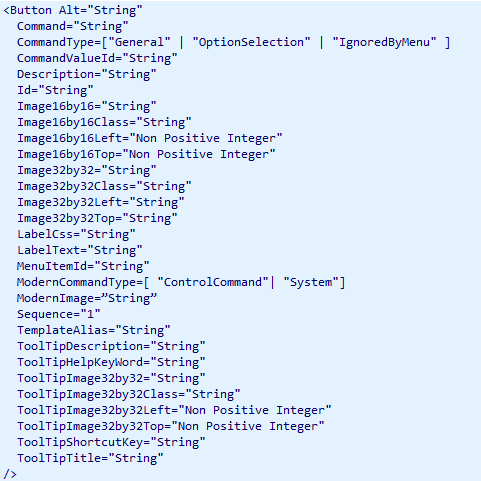
除了Id属性是必填的以外,其它的属性都不是必填的,我们定制一个button,当然不是为了放着好看,我们需要这个button,在点击的时候,能够触发一些定制,所以例子中用到了Command属性。
Id:Ribbon Element的唯一标识。建议命名规则[solution identifier].[entity].[ribbon].[function].[element name]. For example: MyISV.account.form.SendToOtherSystem.Button.
Command:指定的是已存在的CommandDefinication.Id,而CommandDefinication后面会讲到,是用来指定事件的。
LabelText:指定Button的显示名,例子中指定的是LocLabel对象。
<Button Command="new.testentity.sendemailrule" Id="new.testentity.SendMessage.Button" Image32by32="/_imgs/ribbon/SaveAndClose_32.png" Image16by16="/_imgs/FormEditorRibbon/SaveAndClose_16.png" LabelText="$LocLabels:new.testentity.SendMessage.Button.LabelText" Sequence="38" TemplateAlias="o1" />
例子中的这段,对应起来理解就是,添加一个Button Element,名字是"$LocLabels:new.testentity.SendMessage.Button.LabelText",点击触发"new.testentity.sendemailrule"配置的事件。
下面再来看<CommandDefinitions>
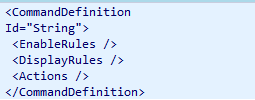
Id:唯一标识。命名规则[solution identifier].[entity].[ribbon].[function].[element name]. For example: MyISV.account.form.SendToOtherSystem.Button.
EnableRules和DisplayRules,顾名思义,就是控制只读和显示的。
Actions:指定要执行的命令。

这里我们使用的是<JavaScriptFunction>

必填项有两个:FunctionName和Library。
    <CommandDefinition Id="new.testentity.sendemailrule">

      <EnableRules />

      <DisplayRules />

      <Actions>

        <JavaScriptFunction FunctionName="alertFunc" Library="$webresource:new_alertButton.js" />

      </Actions>

    </CommandDefinition>
那么这段描述的就是执行new_alertButton.js中的Funtion alertFunc。
    <LocLabel Id="new.testentity.SendMessage.Button.LabelText">

      <Titles>

        <Title description="Alert Button" languagecode="1033" />

      </Titles>

    </LocLabel>
这段很好理解,就是定义了个Lable指定Button名。
到这里,这个RibbonXml的例子,我们就理解完毕了。所以其实就算没有Tool,我们自己就可以做到添加Ribbon Button。
纯手工打造的话,又如何操作呢?
首先是导出包含你要添加button的Entity的CRM Soluton,解压缩之后,打开customizations.xml,然后在</SavedQueries>节点后,添加手工打造的<RibbonDiffXml>

需要注意的是,如果涉及到WebResource的使用,记得在Solution中把WebReousce加上,然后再压缩,导入CRM,就能看到Button效果了。
Dynamics CRM 2015-Form之添加Ribbon Button的更多相关文章
- Dynamics CRM 2015 Online Update1 UI界面的更新变化
听说出 Dynamics CRM 2015 Online Update1了,立马跑去申请了个30天试用版简单的看了下,UI上的变化还是让人耳目一新的,也可能是被CRM2013的UI蹂躏太久了没 ...
- 在标准实体特殊消息上注册插件及Dynamics CRM 2015中计算字段的使用
关注本人微信和易信公众号: 微软动态CRM专家罗勇 ,回复157或者20151005可方便获取本文,同时可以在第一时间得到我发布的最新的博文信息,follow me! 前面的 插件系列博客教程 讲述了 ...
- Microsoft Dynamics CRM 2015 服务器系统的性能维护,追踪, 也可以用到任务管理器哟...
Microsoft Dynamics CRM 2015 的追踪是一个很有用的function,它能为我们的CRM调试,评估 提供有价值的信息:我们可以用window的性能监控工具来了解CRM的性能状态 ...
- Dynamics CRM 2013 SP1 升级到Dynamics CRM 2015
首先截图一下我要升级的Dynamics CRM 2013版本如下图,可以看到是打了SP1后的CRM 2013. 运行CRM 2015简体中文版的安装文件CRM2015-Server- ...
- 在Dynamics CRM 2015中通过3CX插件(以及3CX windows phone)拨出电话
背景 在On-premises部署的Dynamics CRM中实现通过网页拨通客户电话的功能 要点 3CX 提供了开箱即用的Dynamics CRM Solution,只需要在Microsoft Dy ...
- Microsoft Dynamics CRM 2015 and Microsoft Dynamics CRM 2016 Performance and Scalability Documentation
摘要: 本人微信公众号:微软动态CRM专家罗勇 ,回复285或者20181126可方便获取本文,同时可以在第一间得到我发布的最新博文信息,follow me!我的网站是 www.luoyong.me ...
- Dynamics CRM 2015 New Feature (9): Services Changes
Dynamics CRM 2015 为开发者加入了一些新的Service Request以及一个帮助类库XrmTooling,它支持连接各种环境下的CRM,比方:Online,O365,On Prem ...
- Dynamics CRM 2015/2016新特性之三十二:新增乐观并发处理
关注本人微信和易信公众号: 微软动态CRM专家罗勇 ,回复215或者20160328可方便获取本文,同时可以在第一间得到我发布的最新的博文信息,follow me!我的网站是 www.luoyong. ...
- Dynamics CRM 2015/2016新特性之三十三:有了ExecuteTransactionRequest,再也不用担心部分成功部分失败了
关注本人微信和易信公众号: 微软动态CRM专家罗勇 ,回复216或者20160329可方便获取本文,同时可以在第一间得到我发布的最新的博文信息,follow me!我的网站是 www.luoyong. ...
随机推荐
- 21、手把手教你Extjs5(二十一)模块Form的自定义的设计
前面几节完成了模块Grid的自定义,模块Form自定义的过程和Grid的过程类似,但是要更复杂一些.先来设计一下要完成的总体目标. 1、可以有多个Form方案,对应于显示.新增.修改.审核.审批等功能 ...
- coreGraphs和动画
http://www.jianshu.com/p/b71c3d450e8e http://blog.csdn.net/volcan1987/article/details/9969455 http:/ ...
- SpringJDBC学习之路(1)
本人从事java开发也有一段时间了,项目开发也有好几个.但感觉所有写的代码无非就是搬数据取数据.service层写的逻辑多一点,最近做的一个项目整个项目的结构以及层次发现代码过于臃肿冗余.同样一个方法 ...
- iOS tableViewCell plane格式下,接近section边缘不显示分割线却被复用解决办法
今天做公司产品的时候遇到了如题问题,困扰我很长时间,用尽各种办法不能解决,究其原因不知为何,自定义cell低端有view划线的时候,划线一般的显示1像素,而贴着section的显示很少 顶多0.3像素 ...
- 【转】Linux强大命令 Awk 20分钟入门介绍
什么是Awk Awk是一种小巧的编程语言及命令行工具.(其名称得自于它的创始人Alfred Aho.Peter Weinberger 和 Brian Kernighan姓氏的首个字母).它非常适合服务 ...
- [noip2013]货车运输(kruskal + 树上倍增)
描述 A 国有 n 座城市,编号从 1 到 n,城市之间有 m 条双向道路.每一条道路对车辆都有重量限制,简称限重.现在有 q 辆货车在运输货物,司机们想知道每辆车在不超过车辆限重的情况下,最多能运多 ...
- yield return 和yield break
这个还是有点意思,两个都是有返回的意思,但是区别在哪里呢? 1.return 会销毁函数的局部变量,下次调用的时候又会产生新的值 2.yield 当退出函数的时候,变量人然存在,函数下次调用的时候变量 ...
- C语言-数组
C语言中使用数组来存储相同类型的大批量数据. 数组: 数组名:起名规则和变量名一样: 定义数组:数组每个元素存储的数据类型+数组名[常量(时表示数组分配存储数据类型的个数也就是长度)]={每个元素,以 ...
- ZOJ 1012 Mainframe
题目大意:有一台主机,有m个cpu和n的内存,有l个任务,每个任务需消耗一定的cpu和内存,给出任务的开始时间和截止时间,完成任务可获得一定的金钱,同时提前完成有奖金,延后完成要扣钱.计算到某个时间所 ...
- YII 1.0 设置关联模型
在model中设置如下 /* * 设置关联 */ public function relations(){ return array( 'cate'=>array(self::BELONGS_T ...