
在标准实体特殊消息上注册插件及Dynamics CRM 2015中计算字段的使用
| 状态 | Status | 状态值 | 状态描述 | Status Reason | 状态描述值 |
| 可用 | Active | 0 | 正在进行 | In Progress | 1 |
| 暂侯 | On Hold | 2 | |||
| 等待详情 | Waiting for Details | 3 | |||
| 正在研究 | Researching | 4 | |||
| 已解析 | Resolved | 1 | 问题已解决 | Problem Solved | 5 |
| 提供的信息 | Information Provided | 1000 | |||
| 已取消 | Canceled | 2 | 已取消 | Canceled | 6 |
| 合并 | Merged | 2000 |
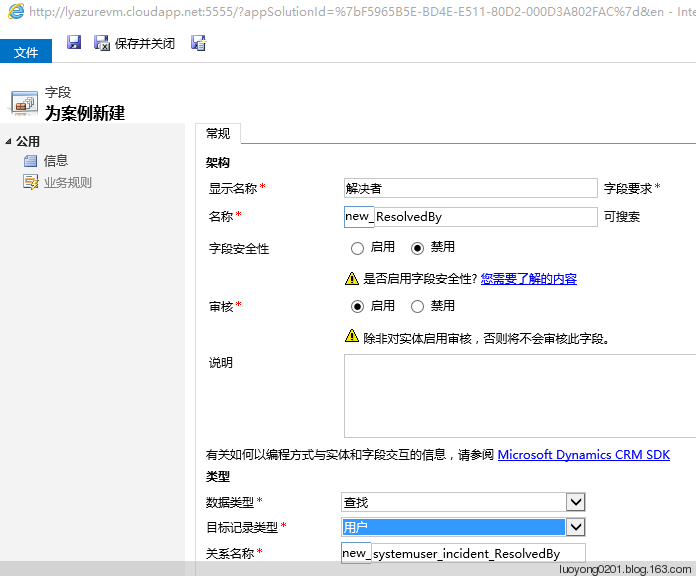
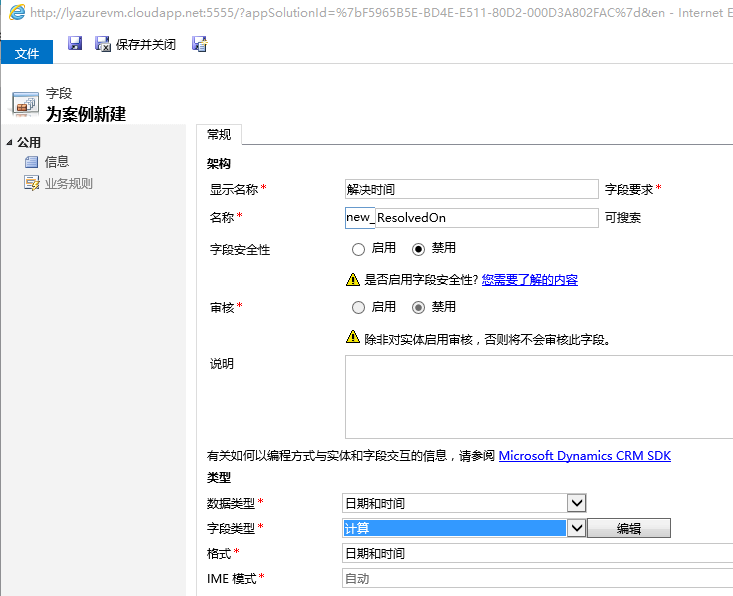
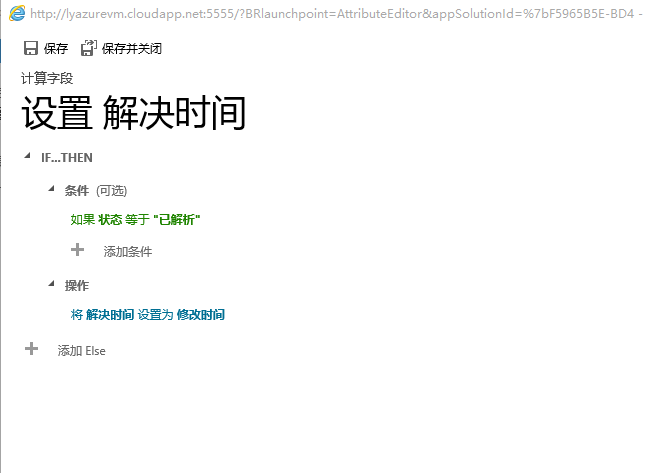

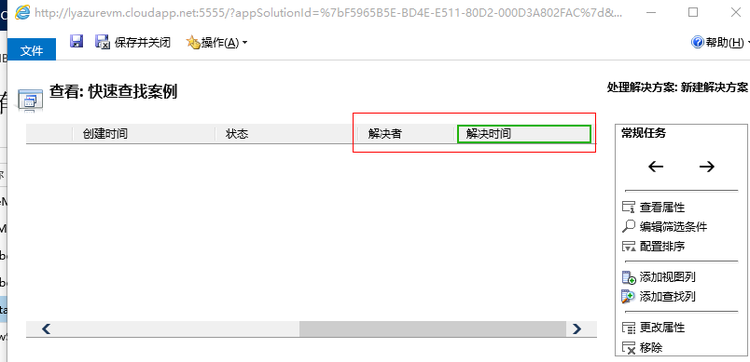
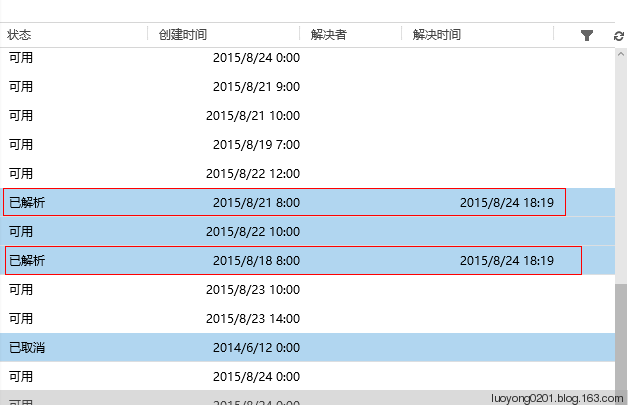
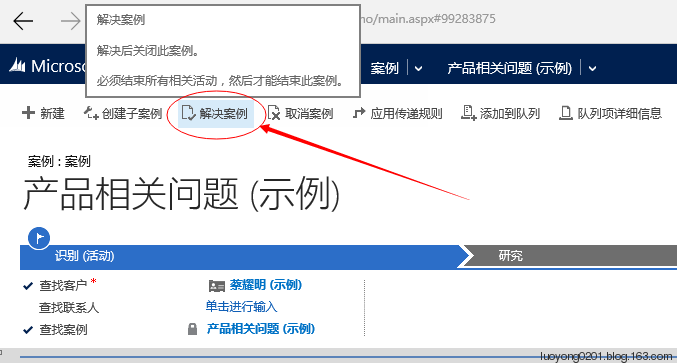
为了方便查看结果,我还在公共视图 可用案例 、 所有案例 、 已解决案例 、快速查找案例 四个视图中添加显示列 解决者 和 解决时间 两个列。
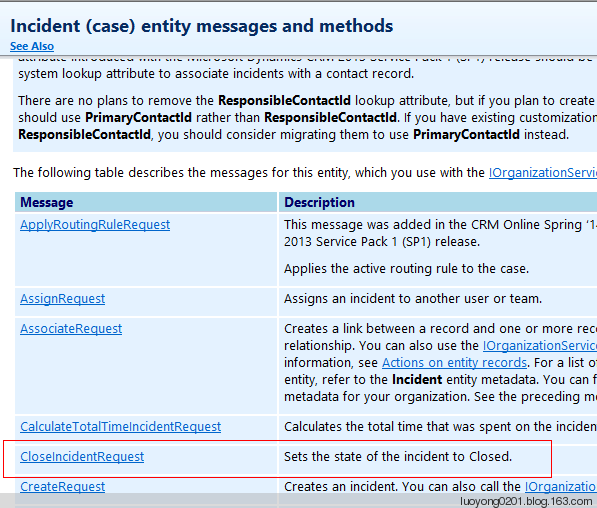
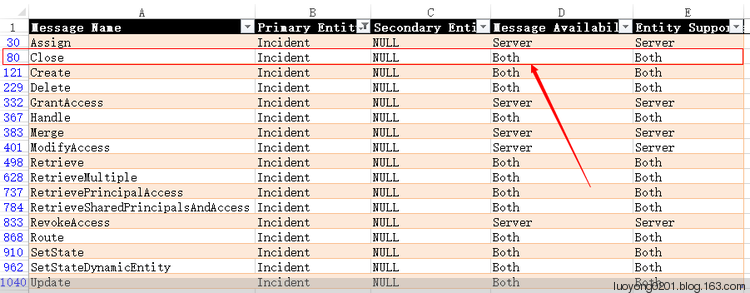
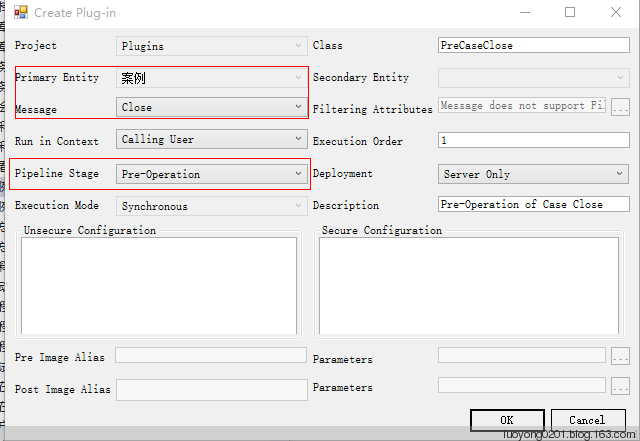
        protected void ExecutePreCaseClose(LocalPluginContext localContext)

        {

            if (localContext == null)

            {

                throw new ArgumentNullException("localContext");

            }

            // TODO: Implement your custom Plug-in business logic.

            IPluginExecutionContext context = localContext.PluginExecutionContext;

            IOrganizationService service = localContext.OrganizationService;

            Entity incidentResolutionEntity = context.InputParameters.Contains("IncidentResolution") ? (Entity)context.InputParameters["IncidentResolution"] : null;

            if (incidentResolutionEntity != null)

            {

                Entity incidentEntity = service.Retrieve("incident", incidentResolutionEntity.GetAttributeValue<EntityReference>("incidentid").Id, new ColumnSet("new_resolvedby"));

                incidentEntity["new_resolvedby"] = new EntityReference("systemuser", context.InitiatingUserId);

                service.Update(incidentEntity);

            }

        }
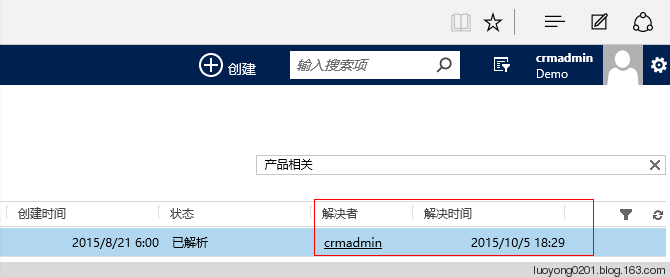
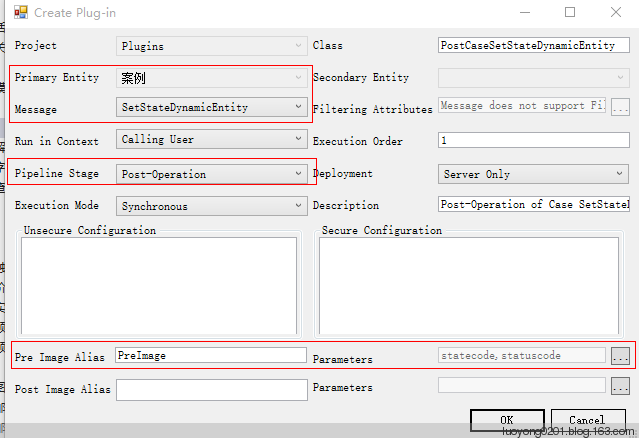
我们知道案例是可以重新激活的,也可以取消的,从前面的博文知道,我们需要在 SetStateDanamicEntity消息上注册插件,我这里注册的插件如下,注意要使用Post-Operation 阶段,这也是考虑到案例在某些状态下只读。
        protected void ExecutePostCaseSetStateDynamicEntity(LocalPluginContext localContext)

        {

            try

            {

                if (localContext == null)

                {

                    throw new ArgumentNullException("localContext");

                }

                IPluginExecutionContext context = localContext.PluginExecutionContext;

                IOrganizationService service = localContext.OrganizationService;

                Entity preImageEntity = (context.PreEntityImages != null && context.PreEntityImages.Contains(this.preImageAlias)) ? context.PreEntityImages[this.preImageAlias] : null;

                // TODO: Implement your custom Plug-in business logic.

                OptionSetValue preStateCode = preImageEntity.Contains("statecode") ? preImageEntity.GetAttributeValue<OptionSetValue>("statecode") : null;

                OptionSetValue preStatusCode = preImageEntity.Contains("statuscode") ? preImageEntity.GetAttributeValue<OptionSetValue>("statuscode") : null;

                if (context.InputParameters.Contains("EntityMoniker") && context.InputParameters["EntityMoniker"] is EntityReference)

                {

                    EntityReference currentEntityRef = (EntityReference)context.InputParameters["EntityMoniker"];

                    OptionSetValue postStateCode = context.InputParameters.Contains("State") ? (OptionSetValue)context.InputParameters["State"] : null;

                    OptionSetValue postStatusCode = context.InputParameters.Contains("Status") ? (OptionSetValue)context.InputParameters["Status"] : null;

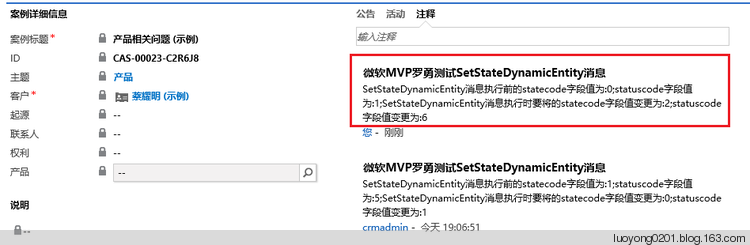
                    var noteText = new StringBuilder("SetStateDynamicEntity消息执行前的statecode字段值为:");

                    noteText.Append(preStateCode == null ? "null" : preStateCode.Value.ToString());

                    noteText.Append(";statuscode字段值为:");

                    noteText.Append(preStatusCode == null ? "null" : preStatusCode.Value.ToString());

                    noteText.Append(";SetStateDynamicEntity消息执行时要将的statecode字段值变更为:");

                    noteText.Append(postStateCode == null ? "null" : postStateCode.Value.ToString());

                    noteText.Append(";statuscode字段值变更为:");

                    noteText.Append(postStatusCode == null ? "null" : postStatusCode.Value.ToString());

                    Entity noteEntity = new Entity("annotation");

                    noteEntity["isdocument"] = false;

                    noteEntity["notetext"] = noteText.ToString();

                    noteEntity["objectid"] = currentEntityRef;

                    noteEntity["subject"] = "微软MVP罗勇测试SetStateDynamicEntity消息";

                    service.Create(noteEntity);

                    //下面才是本篇博文新增的代码,其余的代码和前面博文的代码十分类似

                    //如果变更状态前是已解析,变更状态后不是已解析,则需要设置解决者字段为空值Null

                    if (preStateCode != null && preStateCode.Value ==  && postStateCode != null && postStateCode.Value != )

                    {

                        Entity incidentEntity = service.Retrieve("incident", currentEntityRef.Id, new ColumnSet("new_resolvedby"));

                        incidentEntity["new_resolvedby"] = null;

                        service.Update(incidentEntity);

                    }

                }

                else

                {

                    throw new Exception(@"输入参数中不包括EntityMoniker参数,或者包括了EntityMoniker参数但是其类型不是实体引用");

                }

            }

            catch (Exception ex)

            {

                throw new InvalidPluginExecutionException(@"执行消息SetStateDynamicEntity的Post阶段插件出错:" + ex.Message + ex.StackTrace);

            }

        }
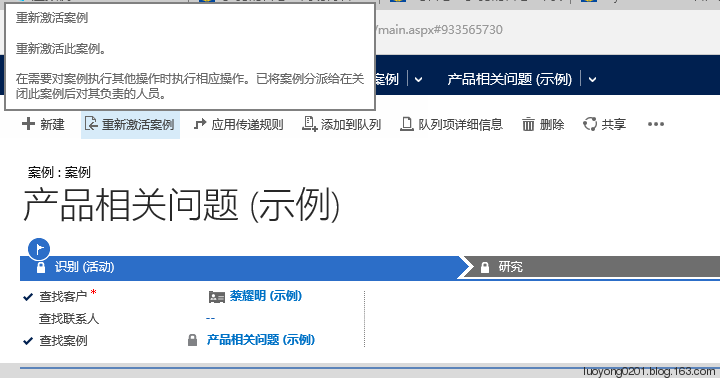
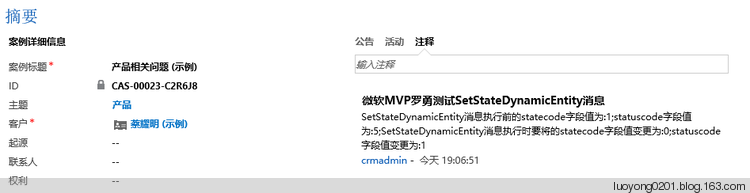
而且 解决者 和 解决时间字段的内容也是空值了,正确。

在标准实体特殊消息上注册插件及Dynamics CRM 2015中计算字段的使用的更多相关文章
- 在Dynamics CRM 2015中通过3CX插件(以及3CX windows phone)拨出电话
背景 在On-premises部署的Dynamics CRM中实现通过网页拨通客户电话的功能 要点 3CX 提供了开箱即用的Dynamics CRM Solution,只需要在Microsoft Dy ...
- Dynamics 365中计算字段与Now进行计算实体导入报错:You can't use Now(), which is of type DateTime, with the current function.
微软动态CRM专家罗勇 ,回复338或者20190521可方便获取本文,同时可以在第一间得到我发布的最新博文信息,follow me. 计算字段是从Dynamics CRM 2015 SP1版本开始推 ...
- Dynamics CRM 2015/2016新特性之三十四:有了插件日志,调试插件so easy!
关注本人微信和易信公众号: 微软动态CRM专家罗勇 ,回复217或者20160330可方便获取本文,同时可以在第一间得到我发布的最新的博文信息,follow me!我的网站是 www.luoyong. ...
- 在VM虚拟机Windows Server r2上部署安装Microsoft Dynamics CRM 2016 步骤详解(一)
应公司需求,最近在学微软的Dynamics CRM.在搭建环境的过程中也遇到了一些雷坑,在这里分享一下安装部署过程当中所遇到的一些问题, 安装Microsoft Dynamics CRM 2016的几 ...
- Dynamics CRM 365中结合注释和WebApi实现图片上传
首先需要在实体上使用注释,然后在窗体上引用WebResource. WebResource的代码: <!DOCTYPE html> <html> <head> &l ...
- Dynamics CRM 2015 站点地图公告配置实体显示名称的变更
CRM更新2015后,在设置里找不到公告配置了 在原来的位置上你会东西一个叫活动源配置的东西,点开看后就是原来的公告配置.
- Dynamics 365中开发和注册插件介绍
我是微软Dynamics 365 & Power Platform方面的工程师罗勇,也是2015年7月到2018年6月连续三年Dynamics CRM/Business Solutions方面 ...
- Flutter Toast消息提示框插件
Flutter Toast消息提示框插件 在开发flutter项目中,想必大家肯定会用到toast消息提示,说到这里, 大家肯定会想到https://pub.dev/ 插件库, 但是插件市场上有太多类 ...
- Microsoft Dynamics CRM 2011 新建实体 需要注意的细节
新建一个实体,需要红色框内的是否勾选的意义,可以进一步加深对CRM的理解.如图: 下面对部分的进行了自我的理解,不对的地方,还请大家指出来.互相学习. 1.CRM2011中,在活动方面加强的新特性包括 ...
随机推荐
- JS---DOM---事件冒泡和阻止事件冒泡,总结事件
事件冒泡: 多个元素嵌套, 有层次关系 ,这些元素都注册了相同的事件, 如果里面的元素的事件触发了, 外面的元素的该事件自动的触发了 事件有三个阶段: 1.事件捕获阶段 :从外向内 2.事件 ...
- Android 插件化开发(一):Java 反射技术介绍
写在前面:学习插件化开发推荐书籍<Android 插件化开发指南>,本系列博客所整理知识部分内容出自此书. 在之前的项目架构的博文中,我们提到了项目插件化架构,提到插件化架构不得不提的到J ...
- 【目录】Cocos2d-x系列
1.Cocos2d-x的坐标系统 2.Cocos2d-x 点击菜单按键居中放大(无需修改底层代码) 3.发布Cocos2d-x的PC端程序 4.Cocos2d-x游戏实例<忍者飞镖>之对象 ...
- 群晖NAS再再折腾
问题 最近电信把我的公网地址收回去了,之前做好的网络端口映射失效了,在公司已经不能愉快地访问家里的网络.原先网络结构示意图如下: (直接访问方案网络结构图) 只需要对电信光猫(也是个路由器)和家用 ...
- Spark Streaming任务延迟监控及告警
概述 StreamingListener 是针对spark streaming的各个阶段的事件监听机制. StreamingListener接口 //需要监听spark streaming中各个阶段的 ...
- 转载 SAP用户权限控制设置及开发
创建用户SU01 事务码:SU01,用户主数据的维护,可以创建.修改.删除.锁定.解锁.修改密码等 缺省:可以设置用户的起始菜单.登录的默认语言.数字显示格式.以及日期和时间的格式设置 参数:SAP很 ...
- MyBatis框架之第三篇
8.Spring与Mybatis整合 框架的整合就是软件之间的集成,它很抽象,因此在做整合之前先想好思路.规划好思路然后按照思路一步一步的做就可以实现框架的整合. 8.1.SM整合思路 8.1.1.思 ...
- DotNet Core中使用RabbitMQ
上一篇随笔记录到RabbitMQ的安装,安装完成,我们就开始使用吧. RabbitMQ简介 AMQP,即Advanced Message Queuing Protocol,高级消息队列协议,是应用层协 ...
- 案例——UDP聊天
UDP聊天案例 做一个网络编程相关的案例,想着用利用UDP的快速且不用连接的优点做一个聊天室,我们一个聊天程序需要可以接收消息,也要可以发送消息,所以我们的DatagramSocket对象不但需要 ...
- ES6中常用的小技巧,用了事半功倍哦
ES6中常用的小技巧,如果能在实际项目中能使用到,必定事半功倍: 1. 强制要求参数 ES6提供了默认参数值机制,允许你为参数设置默认值,防止在函数被调用时没有传入这些参数. 在下面的例子中,我们写了 ...