
Asp.Net Core Authentication Middleware And Generate Token

写在前面
本文版权归博客园和作者吴双本人共同所有 转载和爬虫请注明原文地址 cnblogs.com/tdws
After using OWIN for months for basic OAuth authentication, it’s apparent that Microsoft is abandoning OWIN . This isn’t necessarily a bad thing. .NET Core is built on a similar structure as that which was implemented in OWIN. Essentially, we have a familiar middleware pipeline.
这句话出自老外的博客,在使用Owin的OAuth身份认证几个月后,发现微软在逐渐放弃OWIN,这未必是一件坏事情,.NET Core在一个和OWIN所实现的相似结构之上。我们有一个和OWIN极为相似的中间件管道。
想必了解或者使用过OWIN的朋友们,在做.NET Core应用的时候都会有如上描述的这种感觉。就我个人的理解,微软在早几年推出OWIN的时候,就希望将管道留给用户,就以Startup.cs为管道配置和应用入口,OWIN脱离了Asp.Net管道事件,我们可以将任何中间件在管道中随意插拔。在OWIN中为我们提供了完备的认证流程,和一套完整的规范。比如 Microsoft.Owin.Security.OAuth等,在使用OWIN时,我们可以使用OWIN的默认实现,也可以实现其接口,自定义我们自己的实现方式。有关Microsoft OWIN的内容,不是本篇分享的主题,推荐腾飞的MVC5 - ASP.NET Identity登录原理 - Claims-based认证和OWIN 和蟋蟀哥的 ASP.NET WebApi OWIN 实现 OAuth 2.0 。
Token
本篇分享主要关注在.NET Core的认证机制。无论我们是使用WebApi还是MvcWeb App,了解微软的认证机制总是有好处的。认证是应用API服务器识别用户身份的过程,token是更现代的认证方式,简化权限管理,降低服务器负载。在认证过程中,最重要的就是拿到token, token包含或者应该包含什么信息呢?
1.这个人是谁?
2.这个人可以用此token访问什么样的内容?(scope)
3.token的过期时间 (expire)
4.谁发行的token。
5.其他任何你希望加入的声明(Claims)
那我们为什么要使用token呢?使用session或者用redis来实现stateServer不好吗?
1.token是低(无)状态的,Statelessness
2.token可以与移动端应用紧密结合
3.支持多平台服务器和分布式微服务
拿到token后如何带入HTTP请求传给后台?
答案是两种方式,Cookies和Authorization Header。那么什么时候放到Cookies中,什么时候又放到Authentication中呢?
第一,如果是在Web应用,则放到Cookies当中,并且应该是HttpOnly的,js不能直接对其进行操作,安全性会比将其存在Web Stroage中好一些,因为在Web Storage当中的内容,可以很容的被潜在的XSS脚本攻击并获取。在HttpOnly的cookies当中会相对安全一些,不过也有潜在的CSRF跨站伪造请求的危险,不过这种hack的手段成功率是很低的,有兴趣的朋友可以自行看一下CSRF原理。
第二,如果是手机移动端应用的话,那一定是存储在App本地,并由Authorization Header带到后台并得到身份认证。
WebApp Cookies Authentication
上一段前两周写的最原始的小Demo吧,没有数据库访问等,可根据demo自行改变 ,现在的新代码已经加入了很多业务在其中
startup.cs代码
 using Microsoft.AspNetCore.Authentication.Cookies;

 using Microsoft.AspNetCore.Builder;

 using Microsoft.AspNetCore.Hosting;

 using Microsoft.AspNetCore.Http;

 using Microsoft.AspNetCore.Http.Authentication;

 using Microsoft.Extensions.Configuration;

 using Microsoft.Extensions.DependencyInjection;

 using Microsoft.Extensions.Logging;

 using System.Collections.Generic;

 using System.Security.Claims;

 using Wings.AuthenticationApp.Middleware;

 namespace Wings.AuthenticationApp

 {

     public class Startup

     {

         public Startup(IHostingEnvironment env)

         {

             var builder = new ConfigurationBuilder()

                 .SetBasePath(env.ContentRootPath)

                 .AddJsonFile("appsettings.json", optional: false, reloadOnChange: true)

                 .AddJsonFile($"appsettings.{env.EnvironmentName}.json", optional: true)

                 .AddEnvironmentVariables();

             Configuration = builder.Build();

         }

         public IConfigurationRoot Configuration { get; }

         // This method gets called by the runtime. Use this method to add services to the container.

         public void ConfigureServices(IServiceCollection services)

         {

             // Add framework services.

             services.AddMvc();

         }

         // This method gets called by the runtime. Use this method to configure the HTTP request pipeline.

         public void Configure(IApplicationBuilder app, IHostingEnvironment env, ILoggerFactory loggerFactory)

         {

             loggerFactory.AddConsole(Configuration.GetSection("Logging"));

             loggerFactory.AddDebug();

             app.UseCookieAuthentication(CookieAuthMiddleware.GetOptions());

             app.UseOwin();

             app.UseCors(a => { a.AllowAnyOrigin(); });

             app.UseMvc();

             // Listen for login and logout requests

             app.Map("/login", builder =>

             {

                 builder.Run(async context =>

                 {

                     var name = context.Request.Form["name"];

                     var pwd = context.Request.Form["pwd"];

                     if (name == "wushuang" && pwd == "wushuang")

                     {

                         var claims = new List<Claim>() { new Claim("name", name), new Claim("role", "admin") };

                         var identity = new ClaimsIdentity(claims, "password");

                         var principal = new ClaimsPrincipal(identity);

                         await context.Authentication.SignInAsync(CookieAuthenticationDefaults.AuthenticationScheme, principal);

                         context.Response.Redirect("http://www.baidu.com");

                     }

                     else

                     {

                         await context.Authentication.SignOutAsync(CookieAuthenticationDefaults.AuthenticationScheme);

                         context.Response.Redirect("http://www.google.com");

                     }

                 });

             });

             //app.Map("/logout", builder =>

             //{

             //    builder.Run(async context =>

             //    {

             //        // Sign the user out / clear the auth cookie

             //        await context.Authentication.SignOutAsync(CookieAuthenticationDefaults.AuthenticationScheme);

             //        // Perform a simple redirect after logout

             //        context.Response.Redirect("/");

             //    });

             //});

         }

     }

 }
下面是Middleware---->CookieAuthMiddleware.cs的代码,
using Microsoft.AspNetCore.Authentication.Cookies;

using Microsoft.AspNetCore.Builder;

using Microsoft.AspNetCore.Http;

using System;

using System.Collections.Generic;

using System.Linq;

using System.Security.Claims;

using System.Security.Principal;

using System.Threading.Tasks;

namespace Wings.AuthenticationApp.Middleware

{

    public class CookieAuthMiddleware

    {

        public static CookieAuthenticationOptions GetOptions()

        {

            return new CookieAuthenticationOptions

            {

                AutomaticAuthenticate = true,

                AutomaticChallenge = true,

                LoginPath = new PathString("/login"),

                LogoutPath = new PathString("/logout"),

                AccessDeniedPath = new PathString("/test"),

                CookieHttpOnly = false,  //默认就是True了

                CookieName = "wings_access_token",

                SlidingExpiration = true,

                CookieManager = new ChunkingCookieManager()

            };

        }

    }

    public static class IdentityExtension

    {

        public static string FullName(this IIdentity identity)

        {

            var claim = ((ClaimsIdentity)identity).FindFirst("name");

            return (claim != null) ? claim.Value : string.Empty;

        }

        public static string Role(this IIdentity identity)

        {

            var claim = ((ClaimsIdentity)identity).FindFirst("role");

            return (claim != null) ? claim.Value : string.Empty;

        }

    }

}
对应如上demo,简单测试一下,结果如下:
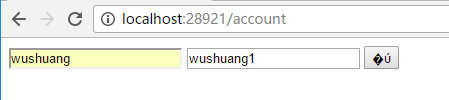
首先使用错误的密码,来请求token endpoint,接下来我们看一下即使窗口,当有请求进入的时候,我用如下代码判断用户的认证情况,拿到的结果必然是false:

接下来,我使用正确的账号密码,来打入token,判断结果一定为true,所以我使用自定义的拓展方法,来获取下,该用户token的信息:
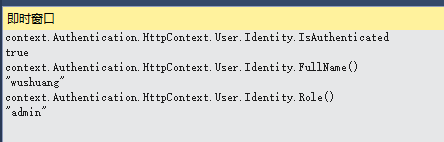
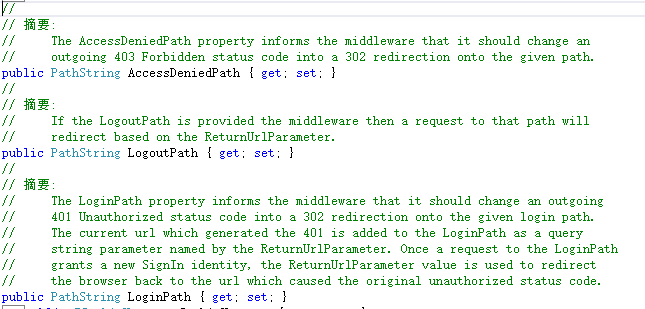
如上demo没有加入一些容错机制,请注意。在用户认证成功后,可以进入带有Authorize Attribute的Action,否则401.如下是几个重要参数的解释
自定义Authentication Middle生产Token
Startup.cs
 using System;

 using System.Collections.Generic;

 using System.Linq;

 using System.Threading.Tasks;

 using Microsoft.AspNetCore.Builder;

 using Microsoft.AspNetCore.Hosting;

 using Microsoft.Extensions.Configuration;

 using Microsoft.Extensions.DependencyInjection;

 using Microsoft.Extensions.Logging;

 using Wings.TokenAuth.Middleware;

 using System.Security.Claims;

 using Microsoft.IdentityModel.Tokens;

 using System.Text;

 using Microsoft.Extensions.Options;

 namespace Wings.TokenAuth

 {

     public class Startup

     {

         public Startup(IHostingEnvironment env)

         {

             var builder = new ConfigurationBuilder()

                 .SetBasePath(env.ContentRootPath)

                 .AddJsonFile("appsettings.json", optional: false, reloadOnChange: true)

                 .AddJsonFile($"appsettings.{env.EnvironmentName}.json", optional: true)

                 .AddEnvironmentVariables();

             Configuration = builder.Build();

         }

         public IConfigurationRoot Configuration { get; }

         // This method gets called by the runtime. Use this method to add services to the container.

         public void ConfigureServices(IServiceCollection services)

         {

             // Add framework services.

             services.AddMvc();

         }

         // The secret key every token will be signed with.

         // In production, you should store this securely in environment variables

         // or a key management tool. Don't hardcode this into your application!

         private static readonly string secretKey = "mysupersecret_secretkey!123";

         public void Configure(IApplicationBuilder app, IHostingEnvironment env, ILoggerFactory loggerFactory)

         {

             loggerFactory.AddConsole(LogLevel.Debug);

             loggerFactory.AddDebug();

             app.UseStaticFiles();

             // Add JWT generation endpoint:

             var signingKey = new SymmetricSecurityKey(Encoding.ASCII.GetBytes(secretKey));

             var options = new TokenProviderOptions

             {

                 Audience = "ExampleAudience",

                 Issuer = "ExampleIssuer",

                 SigningCredentials = new SigningCredentials(signingKey, SecurityAlgorithms.HmacSha256),

             };

             app.UseMiddleware<TokenProviderMiddleware>(Options.Create(options));

             app.UseMvc();

         }

     }

 }
TokenProviderOptions.cs
 using Microsoft.AspNetCore.Http;

 using Microsoft.Extensions.Options;

 using Microsoft.IdentityModel.Tokens;

 using Newtonsoft.Json;

 using System;

 using System.Collections.Generic;

 using System.IdentityModel.Tokens.Jwt;

 using System.Linq;

 using System.Security.Claims;

 using System.Threading.Tasks;

 namespace Wings.TokenAuth.Middleware

 {

     public class TokenProviderOptions

     {

         public string Path { get; set; } = "/token";

         public string Issuer { get; set; }

         public string Audience { get; set; }

         public TimeSpan Expiration { get; set; } = TimeSpan.FromMinutes();

         public SigningCredentials SigningCredentials { get; set; }

     }

     public class TokenProviderMiddleware

     {

         private readonly RequestDelegate _next;

         private readonly TokenProviderOptions _options;

         public TokenProviderMiddleware(

           RequestDelegate next,

           IOptions<TokenProviderOptions> options)

         {

             _next = next;

             _options = options.Value;

         }

         public Task Invoke(HttpContext context)

         {

             // If the request path doesn't match, skip

             if (!context.Request.Path.Equals(_options.Path, StringComparison.Ordinal))

             {
             //use new JwtSecurityTokenHandler().ValidateToken() to valid token

                 return _next(context);

             }

             // Request must be POST with Content-Type: application/x-www-form-urlencoded

             if (!context.Request.Method.Equals("POST")

               || !context.Request.HasFormContentType)

             {

                 context.Response.StatusCode = ;

                 return context.Response.WriteAsync("Bad request.");

             }

             return GenerateToken(context);

         }

         private async Task GenerateToken(HttpContext context)

         {

             var username = context.Request.Form["username"];

             var password = context.Request.Form["password"];

             var identity = await GetIdentity(username, password);

             if (identity == null)

             {

                 context.Response.StatusCode = ;

                 await context.Response.WriteAsync("Invalid username or password.");

                 return;

             }

             var now = DateTime.UtcNow;

             // Specifically add the jti (random nonce), iat (issued timestamp), and sub (subject/user) claims.

             // You can add other claims here, if you want:

             var claims = new Claim[]

             {

     new Claim(JwtRegisteredClaimNames.Sub, username),

     new Claim(JwtRegisteredClaimNames.Jti, Guid.NewGuid().ToString()),

     new Claim(JwtRegisteredClaimNames.Iat, ToUnixEpochDate(now).ToString(), ClaimValueTypes.Integer64)

             };

             // Create the JWT and write it to a string

             var jwt = new JwtSecurityToken(

               issuer: _options.Issuer,

               audience: _options.Audience,

               claims: claims,

               notBefore: now,

               expires: now.Add(_options.Expiration),

               signingCredentials: _options.SigningCredentials);

             var encodedJwt = new JwtSecurityTokenHandler().WriteToken(jwt);

             var response = new

             {

                 access_token = encodedJwt,

                 expires_in = (int)_options.Expiration.TotalSeconds

             };

             // Serialize and return the response

             context.Response.ContentType = "application/json";

             await context.Response.WriteAsync(JsonConvert.SerializeObject(response, new JsonSerializerSettings { Formatting = Formatting.Indented }));

         }

         private Task<ClaimsIdentity> GetIdentity(string username, string password)

         {

             // DON'T do this in production, obviously!

             if (username == "wushuang" && password == "wushuang")

             {

                 return Task.FromResult(new ClaimsIdentity(new System.Security.Principal.GenericIdentity(username, "Token"), new Claim[] { }));

             }

             // Credentials are invalid, or account doesn't exist

             return Task.FromResult<ClaimsIdentity>(null);

         }

         public static long ToUnixEpochDate(DateTime date)

   => (long)Math.Round((date.ToUniversalTime() - new DateTimeOffset(, , , , , , TimeSpan.Zero)).TotalSeconds);

     }

 }
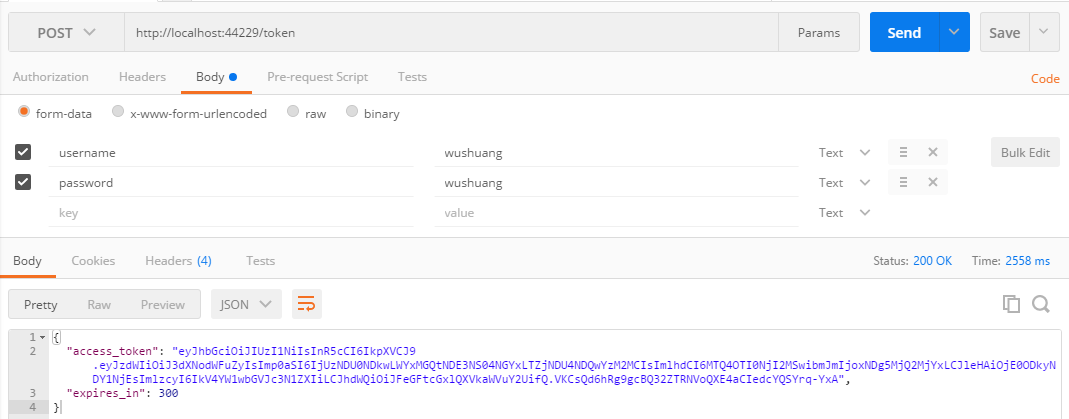
下面上测试结果:
使用错误的账户和密码请求token

使用正确的账户和密码来请求,返回结果如下:
如果,您认为阅读这篇博客让您有些收获,不妨点击一下右下加【推荐】按钮。
如果,您希望更容易地发现我的新博客,不妨点击下方红色【关注】的。
因为,我的分享热情也离不开您的肯定支持。
感谢您的阅读,我将持续输出分享,我是蜗牛, 保持学习,谨记谦虚。不端不装,有趣有梦。
参考文章和论文,不仅限于如下几篇,感谢国外大佬们有深度的分享:
http://stackoverflow.com/questions/29055477/oauth-authorization-service-in-asp-net-core
https://stormpath.com/blog/token-authentication-asp-net-core
https://docs.microsoft.com/en-us/aspnet/core/fundamentals/middleware#fundamentals-middleware
https://docs.microsoft.com/en-us/aspnet/core/security/authentication/cookie#controlling-cookie-options
https://stormpath.com/blog/token-authentication-asp-net-core
Asp.Net Core Authentication Middleware And Generate Token的更多相关文章
- ASP.NET Core Authentication系列(二)实现认证、登录和注销
前言 在上一篇文章介绍ASP.NET Core Authentication的三个重要概念,分别是Claim, ClaimsIdentity, ClaimsPrincipal,以及claims-bas ...
- ASP.NET Core 实战:基于 Jwt Token 的权限控制全揭露
一.前言 在涉及到后端项目的开发中,如何实现对于用户权限的管控是需要我们首先考虑的,在实际开发过程中,我们可能会运用一些已经成熟的解决方案帮助我们实现这一功能,而在 Grapefruit.VuCore ...
- 在ASP.NET Core使用Middleware模拟Custom Error Page功能
一.使用场景 在传统的ASP.NET MVC中,我们可以使用HandleErrorAttribute特性来具体指定如何处理Action抛出的异常.只要某个Action设置了HandleErrorAtt ...
- ASP.NET Core中间件(Middleware)实现WCF SOAP服务端解析
ASP.NET Core中间件(Middleware)进阶学习实现SOAP 解析. 本篇将介绍实现ASP.NET Core SOAP服务端解析,而不是ASP.NET Core整个WCF host. 因 ...
- 利用Asp.Net Core的MiddleWare思想处理复杂业务流程
最近利用Asp.Net Core 的MiddleWare思想对公司的古老代码进行重构,在这里把我的设计思路分享出来,希望对大家处理复杂的流程业务能有所帮助. 背景 一个流程初始化接口,接口中根据传入的 ...
- ASP.NET Core中Middleware的使用
https://www.cnblogs.com/shenba/p/6361311.html ASP.NET 5中Middleware的基本用法 在ASP.NET 5里面引入了OWIN的概念,大致意 ...
- [转]在ASP.NET Core使用Middleware模拟Custom Error Page功能
本文转自:http://www.cnblogs.com/maxzhang1985/p/5974429.html 阅读目录 一.使用场景 二..NET Core实现 三.源代码 回到目录 一.使用场景 ...
- ASP.NET Core WebApi基于Redis实现Token接口安全认证
一.课程介绍 明人不说暗话,跟着阿笨一起玩WebApi!开发提供数据的WebApi服务,最重要的是数据的安全性.那么对于我们来说,如何确保数据的安全将会是需要思考的问题.在ASP.NET WebSer ...
- ASP.NET Core Authentication系列(四)基于Cookie实现多应用间单点登录(SSO)
前言 本系列前三篇文章分别从ASP.NET Core认证的三个重要概念,到如何实现最简单的登录.注销和认证,再到如何配置Cookie 选项,来介绍如何使用ASP.NET Core认证.感兴趣的可以了解 ...
随机推荐
- mysql 使用sqldump来进行数据库还原
MYSQLdump参数详解 mysqldump备份: 复制代码代码如下: mysqldump -u用户名 -p密码 -h主机 数据库 a -w “sql条件” –lock-all-tables > ...
- MyBatis中的大于、小于、like等符号写法
其实就是xml的特殊符号,因为它的配置就是xml,所以可以用下面这种写法转义 < < > > <> <> & & ' ...
- 基于Flex的HTTPService(GET和POST)
一.基于GET的HTTPService: <?xml version="1.0" encoding="utf-8"?><mx:Applicat ...
- pureMVC简单示例及其原理讲解四(Controller层)
本节将讲述pureMVC示例中的Controller层. Controller层有以下文件组成: AddUserCommand.as DeleteUserCommand.as ModelPrepCom ...
- Android离线缓存
android做到一定程度,需要考虑缓存的问题,不信可以掏出手机看看淘宝等一些app是否无网的情况下还可以浏览,不过大部分app并没有考虑到这些问题,解决Android的缓存有哪些方法呢 1.IO流读 ...
- css 清除浮动的方法
/*方法一*/ /*局部清除*/ ;visibility:hidden;display:block;clear:both;} .clr{display:inline-block;} .clr{disp ...
- 表单验证--通过原生js模仿ajax的异步交互
今天给大家带来个福利,我也是刚刚学习的很实用的一个东西,通过原生js模仿ajax的异步交互. 我的博客只是给那些新手看的大神勿喷,写的不好可留言,请指出. 因为当初自己学的时候一个问题不会找人问,知道 ...
- Top K问题的两种解决思路
Top K问题在数据分析中非常普遍的一个问题(在面试中也经常被问到),比如: 从20亿个数字的文本中,找出最大的前100个. 解决Top K问题有两种思路, 最直观:小顶堆(大顶堆 -> 最小1 ...
- Linux上使用shell脚本查看内存情况(超实用)
#!/bin/bashexport chknum=1 #shell搅拌存放目录(输出日志文件执行后也存于该目录)echo 3 > /wls/wls81/shellsyncwhile [ $chk ...
- 学习计划(一)——JavaScript
一:与前端之缘 大一时除了上课和社团外不知道要学点什么,但是又不想睡觉打游戏,常常就是啥都想学,photoshop,premiere,After Effects都学,但始终没有明确的目标. 大二时一直 ...