
纯CSS3实现的图片滑块程序 效果非常酷
之前我们经常会看到很多利用jQuery实现的焦点图插件,种类太多了,今天我想给大家分享一款利用纯CSS3实现的图片滑块应用,完全是利用CSS3的相关特性,没有使用JS,个人觉得还是挺不错的,先来看看效果图:
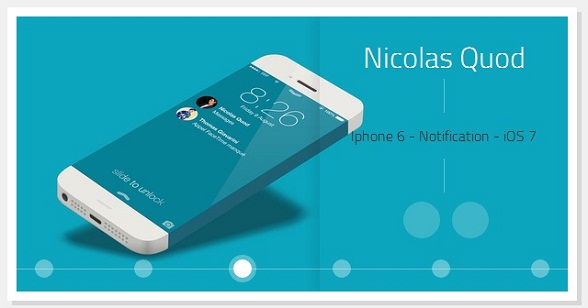
看上去挺不错的吧,简洁、清新、大气。
当然我们也可以在这里查看DEMO演示。
接下来我们一起来分析一下源码,首先是HTML代码,非常简单:
<div id="gal">
<nav class="galnav">
<ul>
<li><input type="radio" name="btn" value="one" checked="checked" />
<label for="btn"></label>
<figure>
<img src="data:images/01_Fabio_Basile.jpg" />
<figcaption>
<h4>Fabio Basile</h4>
<nav role='navigation'>
<p>iPhone 6 Infinity</p>
<ul>
<li><a href="#" class="entypo-dribbble">
</a></li>
<li><a href="#" class="entypo-twitter"></a>
</li>
</ul>
</nav>
</figcaption>
</figure>
</li>
<li><input type="radio" name="btn" value="two" /> <label for="btn">
</label>
<figure class="entypo-forward">
<img src="data:images/08_Brian_Miller.jpg" />
<figcaption>
<h4>Brian Miller</h4>
<nav role='navigation'>
<p>TypeTi.me</p>
<ul>
<li><a href="#" class="entypo-dribbble"></a>
</li>
<li><a href="#" class="entypo-twitter"></a>
</li>
</ul>
</nav>
</figcaption>
</figure>
</li>
<li><input type="radio" name="btn" value="three" /> <label for="btn">
</label>
<figure class="entypo-forward">
<img src="data:images/05_Nicolas_Quod.jpg" />
<figcaption>
<h4>Nicolas Quod</h4>
<nav role='navigation'>
<p>Iphone 6 - Notification - iOS 7</p>
<ul>
<li>
<a href="#" class="entypo-dribbble">
</a></li>
<li>
<a href="#" class="entypo-twitter">
</a></li>
</ul>
</nav>
</figcaption>
</figure>
</li>
<li><input type="radio" name="btn" value="four" /> <label for="btn">
</label>
<figure class="entypo-forward">
<img src="data:images/04_Joffrey.jpg" />
<figcaption>
<h4>Joffrey</h4>
<nav role='navigation'>
<p>鈻?/p> </p>
<ul>
<li><a href="#" class="entypo-dribbble">
</a></li>
<li><a href="#" class="entypo-twitter">
</a></li>
</ul>
</nav>
</figcaption>
</figure>
</li>
<li><input type="radio" name="btn" value="five" /> <label for="btn">
</label>
<figure class="entypo-forward">
<img src="data:images/09_Jared_Long.jpg" />
<figcaption>
<h4>Jared Long</h4>
<nav role='navigation'>
<p>Don't drop your iPhone Infinity</p>
<ul>
<li>
<a href="#" class="entypo-dribbble">
</a></li>
<li>
<a href="#" class="entypo-behance">
</a></li>
</ul>
</nav>
</figcaption>
</figure>
</li>
<li><input type="radio" name="btn" value="six" /> <label for="btn">
</label>
<figure class="entypo-forward">
<img src="data:images/02_Charles_Treece.jpg" />
<figcaption>
<h4>Charles Treece</h4>
<nav role='navigation'>
<p>iPhone 6 Infinity Side Status Bar</p>
<ul>
<li>
<a href="#" class="entypo-dribbble">
</a></li>
<li>
<a href="#" class="entypo-twitter">
</a></li>
</ul>
</nav>
</figcaption>
</figure>
</li>
</ul>
</nav>
</div>
这些HTML代码只是构造了几张图片,等一下可以切换。另外,每张图片都放置一个radio,这个radio来充当切换按钮。
接下来就是CSS代码了:
*, *:before, *:after {

  margin:;

  padding:;

  -webkit-box-sizing:border-box;

  -moz-box-sizing:border-box;

  box-sizing:border-box;

}

#gal {

  position:relative;

  width:600px;

  height:300px;

  margin:0 auto;

  top:100px;

  background:white;

  -webkit-box-shadow:0px 0px 0px 10px white,

             5px 5px 0px 10px rgba(0,0,0,0.1);

  -moz-box-shadow:0px 0px 0px 10px white,

             5px 5px 0px 10px rgba(0,0,0,0.1);

  box-shadow:0px 0px 0px 10px white,

             5px 5px 0px 10px rgba(0,0,0,0.1);

  -webkit-transform:translate3d(0, 0, 0);

  -moz-transform:   translate3d(0, 0, 0);

  -ms-transform:    translate3d(0, 0, 0);

  -o-transform:     translate3d(0, 0, 0);

  transform:        translate3d(0, 0, 0);

}

#gal:after {

  content:'';

  position:absolute;

  bottom:24px;

  right:;

  left:;

  width:100%;

  height:1px;

  background:rgba(255,255,255,0.35);

  z-index:;

}

#gal ul {list-style-type:none;}

input[type="radio"], input[type="radio"] + label {

  position:absolute;

  bottom:15px;

  display:block;

  width:20px;

  height:20px;

  -webkit-border-radius:50%;

  -moz-border-radius:50%;

  border-radius:50%;

  cursor:pointer;

}

input[type="radio"] {

  opacity:;

  z-index:;

}

input[value="one"], input[value="one"] + label {left:20px;}

input[value="two"], input[value="two"] + label {left:128px;}

input[value="three"], input[value="three"] + label {left:236px;}

input[value="four"], input[value="four"] + label {left:344px;}

input[value="five"], input[value="five"] + label {left:452px;}

input[value="six"], input[value="six"] + label {right:20px;}

input[type="radio"] + label {

  background:rgba(255,255,255,0.35);

  z-index:;

  -webkit-box-shadow:0px 0px 0px 0px rgba(255,255,255,0.15);

  -moz-box-shadow:0px 0px 0px 0px rgba(255,255,255,0.15);

  box-shadow:0px 0px 0px 0px rgba(255,255,255,0.15);

  -webkit-transition:all .3s;

  -moz-transition:all .3s;

  -o-transition:all .3s;

  transition:all .3s;

}

[class*="entypo-"]:before {

  position:absolute;

  font-family: 'entypo', sans-serif;

}

figure[class*="entypo-"]:before {

  left:10px;

  top:5px;

  font-size:2rem;

  color:rgba(255,255,255,0);

  z-index:;

  -webkit-transition:color .1s;

  -moz-transition:color .1s;

  -o-transition:color .1s;

  transition:color .1s;

}

a[class*="entypo-"]:before {

  top:8px;

  left:9px;

  font-size:1.5rem;

  color:white;

}

a:hover[class*="entypo-"]:before {

  color:white;

}

figure, figure img, figcaption {

  position:absolute;

  top:;

  right:;

}

figure {

  bottom:;

  left:;

  width:600px;

  height:300px;

  display:block;

  overflow:hidden;

}

figure img {

  bottom:;

  left:;

  display:block;

  width:600px;

  height:300px;

  z-index:;

  -webkit-transform:translateX(600px);

  -moz-transform:translateX(600px);

  -ms-transform:translateX(600px);

  -o-transform:translateX(600px);

  transform:translateX(600px);

  -webkit-transition:all .15s .15s, z-index 0s;

  -moz-transition:all .15s .15s, z-index 0s;

  -o-transition:all .15s .15s, z-index 0s;

  transition:all .15s .15s, z-index 0s;

}

figcaption {

  display:block;

  width:270px;

  height:300px;

  padding-top:20px;

  background-image:radial-gradient(rgba( 255,255,255,0.3), transparent);

  background-size:600px 600px;

  background-repeat:no-repeat;

  background-position:-300px -150px;

  text-align:center;

  z-index:;

  -webkit-box-shadow:-5px 0px 20px rgba(0,0,0,0.1);

  -moz-box-shadow:-5px 0px 20px rgba(0,0,0,0.1);

  box-shadow:-5px 0px 20px rgba(0,0,0,0.1);

  -webkit-transform:translateX(300px);

  -moz-transform:translateX(300px);

  -ms-transform:translateX(300px);

  -o-transform:translateX(300px);

  transform:translateX(300px);

  -webkit-transition:all .35s;

  -moz-transition:all .35s;

  -o-transition:all .35s;

  transition:all .35s;

}

h4 {

  display:inline-block;

  padding:0 15px;

  color:white;

  font-family: 'Titillium Web', sans-serif;

  font-weight:;

  font-size:2rem;

}

figcaption nav ul {display:block;padding-top:10px;}

figcaption nav ul li {display:inline-block;margin-left:5px;}

figcaption nav ul li a {

  position:relative;

  display:block;

  width:40px;

  height:40px;

  background:rgba(255,255,255,0.2);

  text-decoration:none;

  color:white;

  -webkit-border-radius:50%;

  -moz-border-radius:50%;

  border-radius:50%;

  -webkit-box-shadow:inset 0px 0px 0px 0px rgba(255,255,255,0);

  -moz-box-shadow:inset 0px 0px 0px 0px rgba(255,255,255,0);

  box-shadow:inset 0px 0px 0px 0px rgba(255,255,255,0);

  -webkit-transition:all .15s;

  -moz-transition:all .15s;

  -o-transition:all .15s;

  transition:all .15s;

}

figcaption nav ul li a:hover {

  background:rgba(255,255,255,0);

  -webkit-box-shadow:inset 0px 0px 0px 2px rgba(255,255,255,1);

  -moz-box-shadow:inset 0px 0px 0px 2px rgba(255,255,255,1);

  box-shadow:inset 0px 0px 0px 2px rgba(255,255,255,1);

}

figcaption p {

  padding:50px 15px;

  font-family:'Titillium Web', sans-serif;

  font-weight:;

  color:#333;

  background-image:-webkit-gradient(linear, 0 0, 0 100%, from(rgba(255,255,255,0.35)), color-stop(0.3, rgba(255,255,255,0.35)), color-stop(0.3, transparent), color-stop(0.7, transparent), color-stop(0.7, rgba(255,255,255,0.35)), to(rgba(255,255,255,0.35)));

  background-image:-webkit-linear-gradient(rgba(255,255,255,0.35) 0%, rgba(255,255,255,0.35) 30%, transparent 30%, transparent 70%, rgba(255,255,255,0.35) 70%, rgba(255,255,255,0.35) 100%);

  background-image:-moz-linear-gradient(rgba(255,255,255,0.35) 0%, rgba(255,255,255,0.35) 30%, transparent 30%, transparent 70%, rgba(255,255,255,0.35) 70%, rgba(255,255,255,0.35) 100%);

  background-image:-o-linear-gradient(rgba(255,255,255,0.35) 0%, rgba(255,255,255,0.35) 30%, transparent 30%, transparent 70%, rgba(255,255,255,0.35) 70%, rgba(255,255,255,0.35) 100%);

  background-image:linear-gradient(rgba(255,255,255,0.35) 0%, rgba(255,255,255,0.35) 30%, transparent 30%, transparent 70%, rgba(255,255,255,0.35) 70%, rgba(255,255,255,0.35) 100%);

  background-size:1px 100%;

  background-repeat:no-repeat;

  background-position:50% 0%;

}

input[type="radio"]:hover + label {

  background:rgba(255,255,255,0.6);

}

input[type="radio"]:checked + label {

  background:rgba(255,255,255,1);

  -webkit-box-shadow:0px 0px 0px 5px rgba(255,255,255,0.3);

  -moz-box-shadow:0px 0px 0px 5px rgba(255,255,255,0.3);

  box-shadow:0px 0px 0px 5px rgba(255,255,255,0.3);

}

input[type="radio"]:checked + label:before {}

input[type="radio"]:checked ~ figure img {

  z-index:;

  -webkit-transform:translatex(0px);

  -moz-transform:translatex(0px);

  -ms-transform:translatex(0px);

  -o-transform:translatex(0px);

  transform:translatex(0px);

  -webkit-transition:all .15s, z-index 0s;

  -moz-transition:all .15s, z-index 0s;

  -o-transition:all .15s, z-index 0s;

  transition:all .15s, z-index 0s;

}

input[type="radio"]:checked ~ figure[class*="entypo-"]:before {

  z-index:;

  color:rgba(255,255,255,0.5);

  -webkit-transition:color .5s;

  -moz-transition:color .5s;

  -o-transition:color .5s;

  transition:color .5s;

}

input[type="radio"]:checked ~ figure figcaption {

  z-index:;

  -webkit-transform:translateX(0px);

  -moz-transform:translateX(0px);

  -ms-transform:translateX(0px);

  -o-transform:translateX(0px);

  transform:translateX(0px);

  -webkit-transition:all .35s, .7s;

  -moz-transition:all .35s, .7s;

  -o-transition:all .35s, .7s;

  transition:all .35s, .7s;

}

h2 {

  margin-top:150px;

  text-align:center;

  font-family: 'Titillium Web', sans-serif;

  font-weight:;

  font-size:1.2rem;

}

h2 a {

  position:relative;

  color:tomato;

  text-decoration:none;

}

h2 a:after {

  content:'';

  position:absolute;

  bottom:-2px;

  left:;

  width:;

  height:1px;

  background:tomato;

  -webkit-transition:width .1s;

  -moz-transition:width .1s;

  -o-transition:width .1s;

  transition:width .1s;

}

h2 a:hover:after {

  width:100%;

}

body {background:#f0f0f0;}

html, body {

  width:100%;

  height:100%;

}
这个CSS代码相对比较复杂,重点在这个地方:
利用label重写radio的样式,但是又能完成点击label就像点击radio一样的效果,核心代码如下:
input[type="radio"], input[type="radio"] + label {

  position:absolute;

  bottom:15px;

  display:block;

  width:20px;

  height:20px;

  -webkit-border-radius:50%;

  -moz-border-radius:50%;

  border-radius:50%;

  cursor:pointer;

}

input[type="radio"] {

  opacity:;

  z-index:;

}

input[value="one"], input[value="one"] + label {left:20px;}

input[value="two"], input[value="two"] + label {left:128px;}

input[value="three"], input[value="three"] + label {left:236px;}

input[value="four"], input[value="four"] + label {left:344px;}

input[value="five"], input[value="five"] + label {left:452px;}

input[value="six"], input[value="six"] + label {right:20px;}

input[type="radio"] + label {

  background:rgba(255,255,255,0.35);

  z-index:;

  -webkit-box-shadow:0px 0px 0px 0px rgba(255,255,255,0.15);

  -moz-box-shadow:0px 0px 0px 0px rgba(255,255,255,0.15);

  box-shadow:0px 0px 0px 0px rgba(255,255,255,0.15);

  -webkit-transition:all .3s;

  -moz-transition:all .3s;

  -o-transition:all .3s;

  transition:all .3s;

}
最后,源代码上传过来,大家可以自己去学习一下。下载地址>>
纯CSS3实现的图片滑块程序 效果非常酷的更多相关文章
- 纯CSS3实现的图片滑块程序,效果非常酷
接下来我们一起来分析一下源码,首先是HTML代码,非常简单: <div id="gal"> <nav class="galnav"> & ...
- 使用 CSS3 实现 3D 图片滑块效果【附源码下载】
使用 CSS3 的3D变换特性,我们可以通过让元素在三维空间中变换来实现一些新奇的效果. 这篇文章分享的这款 jQuery 立体图片滑块插件,利用了 3D transforms(变换)属性来实现多种不 ...
- 一款纯css3实现的图片3D翻转幻灯片
之前介绍了好多款网页幻灯片,今天要给大家再带来一款纯css3实现的图片3D翻转幻灯片.这款幻灯片图片轮播采用了3D翻转的形式,效果非常不错.一起看下效果图: 在线预览 源码下载 实现的代码. ht ...
- css3伪放大镜(图片放大动画)效果(鼠标移入圆形区域放大图片)
源码: <!DOCTYPE html><html lang="en"><head> <meta charset="UTF-8&q ...
- 使用CSS3实现3D图片滑块效果
使用 CSS3 的3D变换特性,我们可以通过让元素在三维空间中变换来实现一些新奇的效果. 这篇文章分享的这款 jQuery 立体图片滑块插件,利用了 3D transforms(变换)属性来实现多种不 ...
- 使用 CSS3 实现 3D 图片滑块效果
Slicebox – A fresh 3D image slider with graceful fallback 英文原文地址:http://tympanus.NET/codrops/2011/09 ...
- 纯CSS3实现GIF图片动画效果
在线演示 本地下载
- 纯CSS3制作卡通场景汽车动画效果
前言 今天分享一下我昨晚做的CSS3动画效果——卡通场景汽车动画.在接触CSS3动画之前,我之前实现一些简单的动画效果都是使用flash完成的.但是自从CSS3横空出世,在移动端对CSS3动画的运用越 ...
- 纯css3鼠标经过图片显示描述特效
http://***/Article/5582 今天给大家带来的是用css3技术实现鼠标经过图片,显示图片描述的动画效果.鼠标经过图片时,图片动画缩小并渐变显示描述.我们一起看看效果图: 在线预览 ...
随机推荐
- JavaScript 内存
JavaScript 中对内存的一些了解 在使用JavaScript进行开发的过程中,了解JavaScript内存机制有助于开发人员能够清晰的认识到自己写的代码在执行的过程中发生过什么,也能够提高项目 ...
- 解决SMARTFORMS 中table 控件单行跨页的问题
在CX项目中,MM模块做了大量的的单据打印的工作,一个问题困扰了我好久,一直不能解决.当物料描述很长时,table控件在单元格中能自动换行,这样就有可能在换页处出现一行记录的一部分打在上一页,一部分记 ...
- C#读取excel等表格常用方法
0. 利用NPOI. 请查阅此插件的相关文档. 1.方法一:采用OleDB读取EXCEL文件: 把EXCEL文件当做一个数据源来进行数据的读取操作,实例如下: 1 2 3 4 5 6 7 8 9 10 ...
- 【原创】leetCodeOj ---Remove Duplicates from Sorted List II 解题报告
明日深圳行,心情紧张,写博文压压惊 囧 ------------------------------------- 原题地址: https://oj.leetcode.com/problems/rem ...
- html5移动开发--js温馨提示
1.a标签执行js笔试 <a id="myID" href="javascript:myfuction();"></a> 2.实时监听i ...
- UML简单梳理类图
依赖 Dependency Class Car{} Class Person{ int a; static int b public void buy(Car c){ int c; .... } } ...
- 10令人惊叹的模型的影响HTML5应用程序及源代码
HTML5已经越来越流行起来了.尤其是移动互联网的发展,更是带动了HTML5的迅猛发展,我们也是时候学习HTML5了,以防到时候落伍.今天给大家介绍10款效果惊艳的HTML5应用.方便大家学习,也将应 ...
- poj1276--Cash Machine(多背包被判刑了)
Cash Machine Time Limit: 1000MS Memory Limit: 10000K Total Submissions: 27804 Accepted: 9915 Des ...
- ajax jsonp跨域
js跨域问题是指:js不同域进行数据传输或通信之间,让我们用ajax到不同的域请求数据.或js获得在不同领域的框架页(iframe)数据.只有到协议.域名.port无论是有不同的.它们被认为是不同的域 ...
- 自己写CPU第四阶段(2)——验证该第一指令ori实现效果
我们会继续上传新书<自己写CPU>(未公布),今天是12片,四篇 书名又之前的<自己动手写处理器>改为<自己动手写CPU> 4.3 验证OpenMIPS实现效果 4 ...