
css3伪放大镜(图片放大动画)效果(鼠标移入圆形区域放大图片)
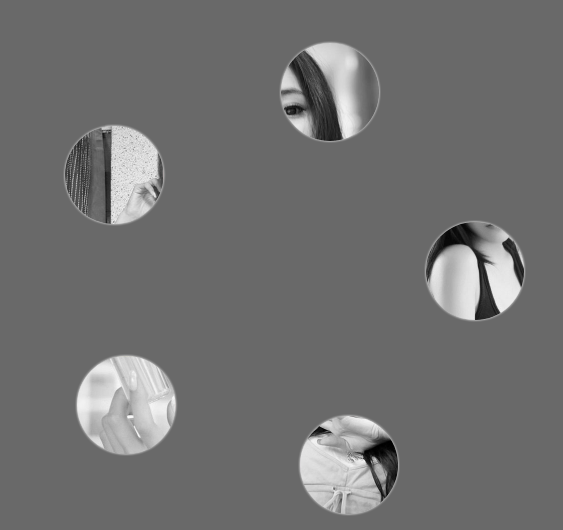
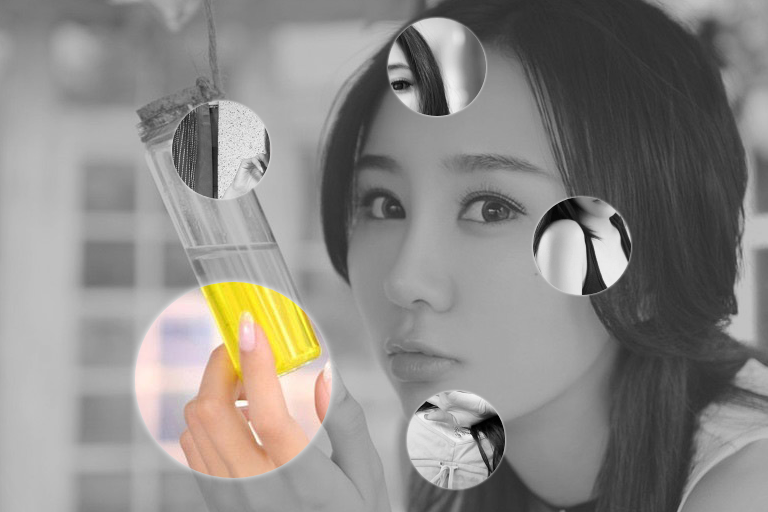
源码:
<!DOCTYPE html>
<html lang="en">
<head>
<meta charset="UTF-8">
<title>css3伪放大镜(图片放大动画)效果</title>
<style>
.gallery{list-style:none}
.gallery:before,.gallery__item:last-child{position:fixed;top:50%;left:50%;margin:-31.25em;width:62.5em;height:62.5em}
.gallery:before{z-index:-1;border-radius:50%;content:'';box-shadow:inset 0 0 5em dimgrey,0 0 0 50vw dimgrey}
.gallery__item{background-blend-mode:luminosity;transition:-webkit-transform .5s cubic-bezier(0.175,0.885,0.32,1.275),background-image .5s}
.gallery__item:not(:last-child){position:absolute;top:50%;left:50%;width:32vmin;height:32vmin;border-radius:50%;box-shadow:0 0 .5em white}
.gallery__item:nth-child(1){margin:13.87457vmin -4.53223vmin;-webkit-transform:scale(0.5);background:url("images/1.jpg") 50% 50% fixed whitesmoke}
.gallery__item:nth-child(1):hover{-webkit-transform:scale(1);background-blend-mode:normal;cursor:pointer}
.gallery__item:nth-child(1):hover ~:last-child{background:url("images/1.jpg") 50% 50% fixed dimgray}
.gallery__item:nth-child(1):hover ~:last-child:after{opacity:.001}
.gallery__item:nth-child(2){margin:4.13825vmin -40.86867vmin;-webkit-transform:scale(0.5);background:url("images/2.jpg") 50% 50% fixed whitesmoke}
.gallery__item:nth-child(2):hover{-webkit-transform:scale(1);background-blend-mode:normal;cursor:pointer}
.gallery__item:nth-child(2):hover ~:last-child{background:url("images/2.jpg") 50% 50% fixed dimgray}
.gallery__item:nth-child(2):hover ~:last-child:after{opacity:.001}
.gallery__item:nth-child(3){margin:-33.42845vmin -42.83746vmin;-webkit-transform:scale(0.5);background:url("images/3.jpg") 50% 50% fixed whitesmoke}
.gallery__item:nth-child(3):hover{-webkit-transform:scale(1);background-blend-mode:normal;cursor:pointer}
.gallery__item:nth-child(3):hover ~:last-child{background:url("images/3.jpg") 50% 50% fixed dimgray}
.gallery__item:nth-child(3):hover ~:last-child:after{opacity:.001}
.gallery__item:nth-child(4){margin:-46.90963vmin -7.71779vmin;-webkit-transform:scale(0.5);background:url("images/4.jpg") 50% 50% fixed whitesmoke}
.gallery__item:nth-child(4):hover{-webkit-transform:scale(1);background-blend-mode:normal;cursor:pointer}
.gallery__item:nth-child(4):hover ~:last-child{background:url("images/4.jpg") 50% 50% fixed dimgray}
.gallery__item:nth-child(4):hover ~:last-child:after{opacity:.001}
.gallery__item:nth-child(5){margin:-17.67475vmin 15.95615vmin;-webkit-transform:scale(0.5);background:url("images/5.jpg") 50% 50% fixed whitesmoke}
.gallery__item:nth-child(5):hover{-webkit-transform:scale(1);background-blend-mode:normal;cursor:pointer}
.gallery__item:nth-child(5):hover ~:last-child{background:url("images/5.jpg") 50% 50% fixed dimgray}
.gallery__item:nth-child(5):hover ~:last-child:after{opacity:.001}
.gallery__item:last-child{z-index:-2}
.gallery__item:last-child:after{position:absolute;top:0;right:0;bottom:0;left:0;opacity:.999;background:dimgrey;transition:opacity 2s;content:''}
</style>
</head>
<body>
<!--代码部分begin-->
<ul class="gallery">
<li class="gallery__item"></li>
<li class="gallery__item"></li>
<li class="gallery__item"></li>
<li class="gallery__item"></li>
<li class="gallery__item"></li>
<li class="gallery__item"></li>
</ul>
<div style="text-align: center;"></div>
<!--代码部分end-->
</body>
</html>
css3伪放大镜(图片放大动画)效果(鼠标移入圆形区域放大图片)的更多相关文章
- jQuery演示10种不同的切换图片列表动画效果以及tab动画演示 2
很常用的一款特效纯CSS完成tab实现5种不同切换对应内容效果 实例预览 下载地址 实例代码 1 2 3 4 5 6 7 8 9 10 11 12 13 14 15 16 17 18 19 20 21 ...
- 推荐9款使用CSS3实现的超酷动画效果
大家都知道,在网页制作时使用CSS技术,可以有效地对页面的布局.字体.颜色.背景和其它效果实现更加精确的控制.只要对相应的代码做一些简单的修改,就可以改变同一页面的不同部分,或者页数不同的网页的外观和 ...
- 实用CSS3的transform实现多种动画效果
查看效果:http://keleyi.com/a/bjad/b6x9q8gs.htm 以下是代码: <!DOCTYPE HTML PUBLIC "-//W3C//DTD HTML 4. ...
- jQuery演示10种不同的切换图片列表动画效果
经常用到的图片插件演示jQuery十种不同的切换图片列表动画效果 在线演示 下载地址 实例代码 <!DOCTYPE html> <html lang="en" c ...
- html5+css3第一屏滚屏动画效果
详细内容请点击 在线预览立即下载 html5+css3第一屏滚屏动画效果. 转载自:http://tympanus.net/codrops/2014/05/22/inspiration-for-art ...
- 【iOS开发】关于显示一连串图片组成动画效果UIImageView的使用
关于使用UIImageView显示一串图片组成动画效果的总结: 1>创建装这一串图片的容器,使用NSArray NSMutableArray *images = [NSMutableArray ...
- JS框架_(JQuery.js)动画效果鼠标跟随
百度云盘 传送门 密码 :4n9u 火狐浏览器上纯CSS_动画效果鼠标跟随效果: (作者:lily_lcj 传送门) <!DOCTYPE html PUBLIC "-//W3C//DT ...
- 纯CSS3制作卡通场景汽车动画效果
前言 今天分享一下我昨晚做的CSS3动画效果——卡通场景汽车动画.在接触CSS3动画之前,我之前实现一些简单的动画效果都是使用flash完成的.但是自从CSS3横空出世,在移动端对CSS3动画的运用越 ...
- [web前端] css3 transition属性实现3d动画效果
cp from : https://www.cnblogs.com/chrxc/p/5123375.html transition属性是一个很强大的3d动画属性,我动手试了一下,很多在网上很火的网页动 ...
随机推荐
- 2.title
1.母版页里写title,标题会:会显示母版页里的. 结果如下: 2.母版页和实现模板页同时都设置了title,会显示实现模板页里的title 运行结果页:
- Linq初探
1.什么是LINQ LINQ是语言集成查询(Language Integrated Query),这项技术是在.net 3.5就已经引入的技术,极大的方便了数据的查询,他可以支持数据库.XML.ADO ...
- Java 笔记20180123
在批量添加数据时候采用List或者Map或者SetSet<Student> students = new Set<Student>();// 客户端验证:js:服务器端验证:必 ...
- 分区默认segment大小变化(64k—>8M)
_partition_large_extents和_index_partition_large_extents 参考: http://www.xifenfei.com/2013/08/%E5%88%8 ...
- SQL基础--查询之二--连接查询
SQL基础--查询之二--连接查询
- day17(JDBC入门&jdbcUtils工具介绍)
day17 JDBC整体思维导图 JDBC入门 导jar包:驱动! 加载驱动类:Class.forName("类名"); 给出url.username.password,其中url ...
- 204-React DOM 元素
一.概述 为了提高性能和跨浏览器兼容性,React实现了一个独立于浏览器的DOM系统. 在React中,所有DOM属性和属性(包括事件处理程序)都应该是camelCased的.例如,HTML属性tab ...
- 布局-EasyUI Panel 面板、EasyUI Tabs 标签页/选项卡、EasyUI Accordion 折叠面板、EasyUI Layout 布局
EasyUI Panel 面板 通过 $.fn.panel.defaults 重写默认的 defaults. 面板(panel)当做其他内容的容器使用.它是创建其他组件(比如:Layout 布局.Ta ...
- FILE 文件的使用 (VC、BCB、Qt)
FILE * fp ;AnsiString filePath="";fp= fopen(filePath.c_str(),"wb");//第二个参数是文件打开方 ...
- Java之Integer源码
1.为什么Java中1000==1000为false而100==100为true? 这是一个挺有意思的讨论话题. 如果你运行下面的代码 Integer a = 1000, b = 1000; Syst ...