
Let’s Encrypt/Certbot移除/remove/revoke不需要的域名证书
1.首先确认你的证书不再需要,如果有必要,请执行下面的命令进行备份
cp /etc/letsencrypt/ /etc/letsencrypt.backup -r
2.撤销证书然后删除证书
[root@localhost certbot-0.34.2]# certbot revoke    ####这个是撤销命令,执行这命令下面会报错要让我指定变量位置

Saving debug log to /var/log/letsencrypt/letsencrypt.log

Error! Exactly one of --cert-path or --cert-name must be specified!

You have new mail in /var/spool/mail/root

[root@localhost certbot-0.34.2]# certbot revoke --cert-path /etc/letsencrypt/archive/pazzn.com/c

cert1.pem   cert2.pem   chain1.pem  chain2.pem

[root@localhost certbot-0.34.2]# certbot revoke --cert-path /etc/letsencrypt/archive/pazzn.com/cert

cert1.pem  cert2.pem

[root@localhost certbot-0.34.2]# certbot revoke --cert-path /etc/letsencrypt/archive/pazzn.com/cert1.pem  ###撤销这个cert1.pem证书,一般默认都是我这个位置

Saving debug log to /var/log/letsencrypt/letsencrypt.log

Starting new HTTPS connection (1): acme-v02.api.letsencrypt.org

- - - - - - - - - - - - - - - - - - - - - - - - - - - - - - - - - - - - - - - -

Would you like to delete the cert(s) you just revoked, along with all earlier

and later versions of the cert?

- - - - - - - - - - - - - - - - - - - - - - - - - - - - - - - - - - - - - - - -

(Y)es (recommended)/(N)o: y  ##确定撤销

[root@localhost certbot-0.34.2]# certbot delete ###删除证书

Saving debug log to /var/log/letsencrypt/letsencrypt.log

Which certificate(s) would you like to delete?

- - - - - - - - - - - - - - - - - - - - - - - - - - - - - - - - - - - - - - - -

1: pazzn.com-0001

2: pazzn.com-0002

3: pazzn.com

- - - - - - - - - - - - - - - - - - - - - - - - - - - - - - - - - - - - - - - -

Select the appropriate numbers separated by commas and/or spaces, or leave input

blank to select all options shown (Enter 'c' to cancel): 1

- - - - - - - - - - - - - - - - - - - - - - - - - - - - - - - - - - - - - - - -

Deleted all files relating to certificate pazzn.com-0001.

- - - - - - - - - - - - - - - - - - - - - - - - - - - - - - - - - - - - - - - -

You have new mail in /var/spool/mail/root

[root@localhost certbot-0.34.2]# certbot delete

Saving debug log to /var/log/letsencrypt/letsencrypt.log

Which certificate(s) would you like to delete?

- - - - - - - - - - - - - - - - - - - - - - - - - - - - - - - - - - - - - - - -

1: pazzn.com-0002

2: pazzn.com

- - - - - - - - - - - - - - - - - - - - - - - - - - - - - - - - - - - - - - - -

Select the appropriate numbers separated by commas and/or spaces, or leave input

blank to select all options shown (Enter 'c' to cancel): 1

- - - - - - - - - - - - - - - - - - - - - - - - - - - - - - - - - - - - - - - -

Deleted all files relating to certificate pazzn.com-0002.

- - - - - - - - - - - - - - - - - - - - - - - - - - - - - - - - - - - - - - - -

[root@localhost certbot-0.34.2]# certbot delete

Saving debug log to /var/log/letsencrypt/letsencrypt.log

Which certificate(s) would you like to delete?

- - - - - - - - - - - - - - - - - - - - - - - - - - - - - - - - - - - - - - - -

1: pazzn.com

- - - - - - - - - - - - - - - - - - - - - - - - - - - - - - - - - - - - - - - -

Select the appropriate numbers separated by commas and/or spaces, or leave input

blank to select all options shown (Enter 'c' to cancel): 1

- - - - - - - - - - - - - - - - - - - - - - - - - - - - - - - - - - - - - - - -

Deleted all files relating to certificate pazzn.com.

- - - - - - - - - - - - - - - - - - - - - - - - - - - - - - - - - - - - - - - -

[root@localhost certbot-0.34.2]# certbot delete ###删除完后再次执行就会说没有证书文件了,根据自己需要删除域名指定证书

Saving debug log to /var/log/letsencrypt/letsencrypt.log

No existing certificates found.

[root@localhost certbot-0.34.2]# certbot revoke

Saving debug log to /var/log/letsencrypt/letsencrypt.log

Error! Exactly one of --cert-path or --cert-name must be specified!

You have new mail in /var/spool/mail/root
3.弄完证书后还得删除在nginx.conf配置文件中的ssl配置内容,不然没有了证书,一般就报404什么的了,所以一定要删除
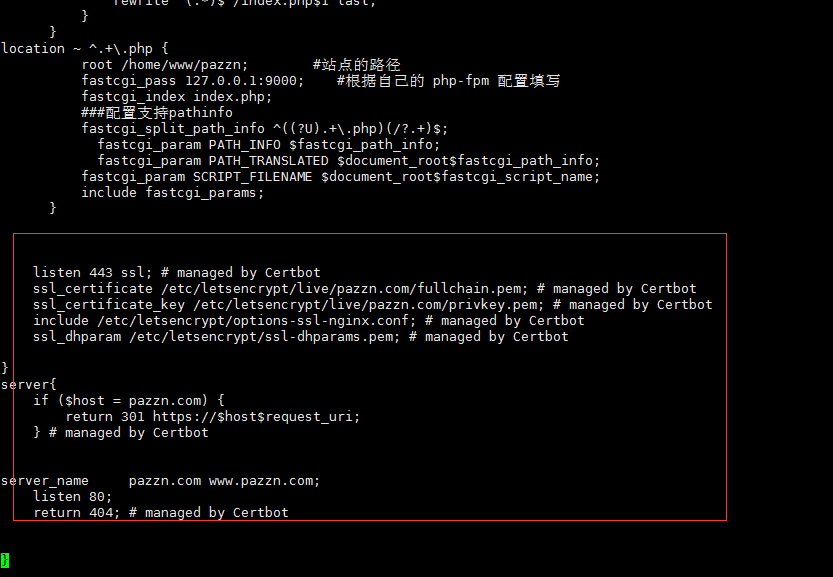
删除后记得重启nginx服务,网页就撤销证书了。
[root@localhost ~]# systemctl restart nginx.service

[root@localhost ~]#
最后如图已经撤销:

参考链接:https://www.jesusamieiro.com/remove-revoke-a-domain-in-lets-encrypt/
Let’s Encrypt/Certbot移除/remove/revoke不需要的域名证书的更多相关文章
- 高效率遍历Map以及在循环过程中移除 remove指定key
//高效率遍历Map以及在循环过程中移除 remove指定key //使用iter循环的时候 可以在循环中移除key,for在循环的过程中移除会报错哦 //本方法效率高 Iterator iter = ...
- 免费SSL证书Let's Encrypt(certbot)安装使用教程
免费SSL证书Let's Encrypt(certbot)安装使用教程 https://www.vpser.net/build/letsencrypt-certbot.html
- let's encrypt部署免费泛域名证书
环境说明 [root@localhost ~]# cat /etc/redhat-release CentOS Linux release 7.5.1804 (Core) [root@localhos ...
- 基于Let's Encrypt生成免费证书-支持多域名泛域名证书
目录 客户端 certbot acme.sh 安装acme.sh 1. 自动安装 2. 手动安装 3. 测试收否安装成功 使用acme.sh生成证书 1. HTTP 方式 2. DNS 方式 1. 生 ...
- CentOS 7配置Let’s Encrypt支持免费泛域名证书
Let’s Encrypt从2018年开始支持泛域名证书,有效期3个月,目前仅支持acme方式申请,暂不支持certbot. 1.安装acme.sh curl https://get.acme.sh ...
- 申请 Let’s Encrypt 泛域名证书 及 Nginx/Apache 证书配置
什么是 Let’s Encrypt? 部署 HTTPS 网站的时候需要证书,证书由 CA (Certificate Authority )机构签发,大部分传统 CA 机构签发证书是需要收费的,这不利于 ...
- Let's Encrypt免费泛域名证书申请
一. 下载acme.sh,以下四条命令任选一条即可 curl https://get.acme.sh | shwget -O - https://get.acme.sh | sh curl https ...
- STL - 移除(remove)和释放(erase)集合元素
remove(移除): 这个操作并不是真正地删除元素,它会移除指定的元素,然后后面的元素依次前移,最后用别的元素来补充. erase(释放): 这个操作会指定释放区间的头和尾迭代器(iterator) ...
- Java - ArrayList List 等迭代集合执行移除(remove) 的正确方法
方法1: List<String> al = new ArrayList<String>(); Iterator<String> it = al.iterator( ...
随机推荐
- 阿里云Centos7.6中部署nginx1.16+uwsgi2.0.18+Django2.0.4
当你购买了阿里云的ecs,涉及ecs的有两个密码,一定要搞清楚,一个密码是远程链接密码,也就是通过浏览器连接服务器的密码,另外一个是实例密码,这个密码就是ecs的root密码,一般情况下,我们经常用到 ...
- Angular实战之使用NG-ZORRO创建一个企业级中后台框架
前言: 在之前的一篇文章已经介绍过了,公司正在使用NG-ZORRO组件库开发后台应用,并且详细的介绍了Angular开发环境的搭建和项目的创建.这篇文章就是为了让大家熟悉了解我们该如何在Angular ...
- Dovecot邮件服务器的正确安装方法
Dovecot邮件服务器的正确安装方法 apt remove dovecot-coredpkg -P dovecot-core sudo apt install dovecot-imapd dovec ...
- Dubbo服务引用源码解析③
上一章分析了服务暴露的源码,这一章继续分析服务引用的源码.在Dubbo中有两种引用方式:第一种是服务直连,第二种是基于注册中心进行引用.服务直连一般用在测试的场景下,线上更多的是基于注册中心的方式 ...
- [从源码学设计]蚂蚁金服SOFARegistry 之 LocalDataServerChangeEvent及数据同步
[从源码学设计]蚂蚁金服SOFARegistry 之 LocalDataServerChangeEvent及数据同步 目录 [从源码学设计]蚂蚁金服SOFARegistry 之 LocalDataSe ...
- 使用@Cacheable注解时,Redis连不上,直接调用方法内部的解决方案
最近redis 域名一致解析错误,导致业务多了很多异常.那么如何在这种情况下直接访问数据库,而不是报错呢 1. 解决方案 其实很简单,在配置 redis 时,只需要多一项配置,继承 CachingCo ...
- checkBox判断是否选中的方法
这里可以分为两种情况:JQuery对象和DOM对象: 通常我们用JQuery判断元素的属性的时候喜欢用 attr("attrName"); 但是尝试过的同学可能都知道,这种方法判断 ...
- springmvc 统一处理异常
1.自定义统一异常处理器 自定义Exception实现 HandlerExceptionResolver接口或继承AbstractHandlerExceptionResolver类 1.实现接口Han ...
- 什么是ResultSet
概述: 在查询数据库后会返回一个ResultSet,它就像是查询结果集的一张数据表. ResultSet对象维护了一个游标,指向当前的数据行.开始的时候这个游标指向的是第一行. 注意: 如果调用了Re ...
- 第十一章节 BJROBOT PS3 手柄控制【ROS全开源阿克曼转向智能网联无人驾驶车】
1.把小车架空平放在地板上. 2.用 USB 线将 PS3 蓝牙手柄连接至小车主控端,初次连接手柄上的 4 个红色指示灯会同时闪烁; 3.按下手柄中间的圆形配对键,然后等待红灯闪烁至停止. 4.此 ...