
【应用服务 App Service】App Service使用Git部署时,遇见500错误
问题描述
Azure App Service在部署的时候支持多种方式,如Zip,VS 2019, VS Code,或者是Git部署,当使用Git部署遇见500错误时,可以通过其他的部署方式来验证是否也同样不可以成功。也可以直接登录到Kudu站点,拖拽文件的方式部署站点。
如以下图片就是在使用Git部署时候遇见的错误:
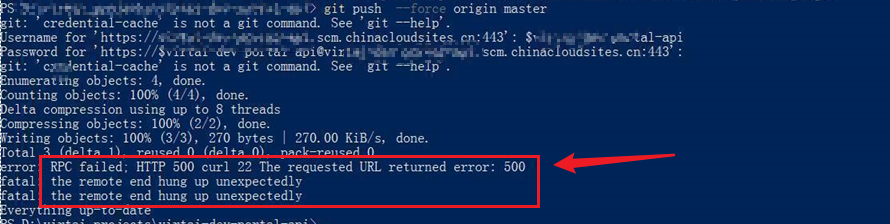
由于这里的错误信息只是返回500,而没有跟多详细的错误日志,所以可以通过 git log -p 命令打印出全部日志。查看是否有可以定位错误的信息,在这次的500错误中,git 日志中没有任何错误描述。
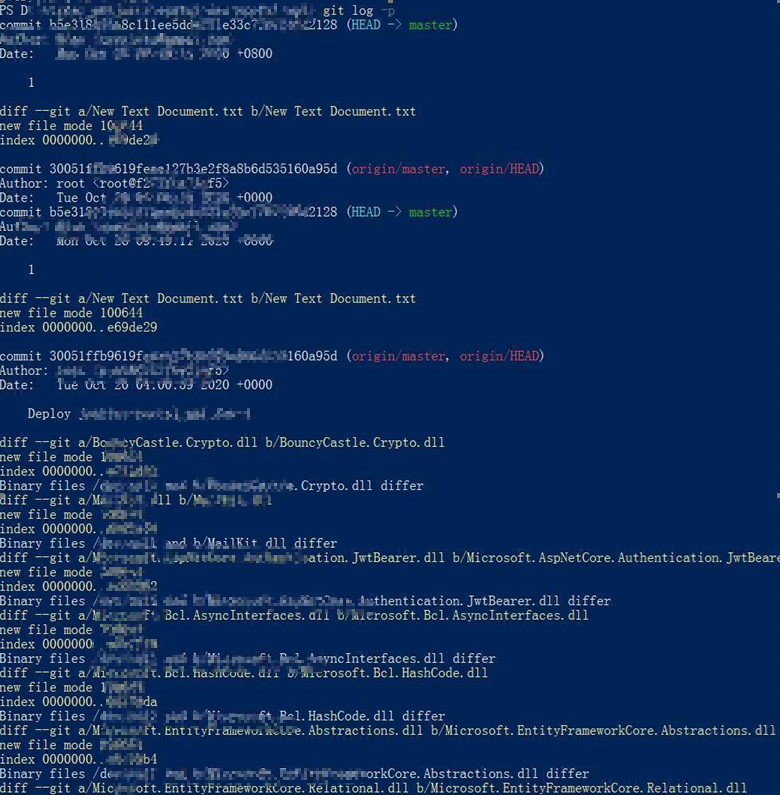
所以针对以上的问题,需要换一种方式来发布文件。查看是否可以发布成功。
最终解决
在后期的继续分析中,发现是App Service的磁盘空间已被占满,出现了OnErrorRequest System.IO.IOException: There is not enough space on the disk的信息,这下就非常明确是磁盘空间不够,解决办法就是清理文件或者是把App Service的定价层升级。得到更多的存储空间。
如果想了解更多关于App Service 文件系统,可以查看github文档:https://github.com/projectkudu/kudu/wiki/Understanding-the-Azure-App-Service-file-system
Understanding the Azure App Service file system
There are three main types of files that an Azure Web App can deal with
Persisted files
This is what you can view as your web site's files. They follow a structure described here. They are rooted in
d:\home, which can also be found using the%HOME%environment variable. For App Service on Linux and Web app for Containers, persistent storage is rooted in/home.These files are persistent, meaning that you can rely on them staying there until you do something to change them. Also, they are shared between all instances of your site (when you scale it up to multiple instances). Internally, the way this works is that they are stored in Azure Storage instead of living on the local file system.
Free and Shared sites get 1GB of space, Basic sites get 10GB, and Standard sites get 50GB. See more details on the Web App Pricing page.
Temporary files
A number of common Windows locations are using temporary storage on the local machine. For instance
%APPDATA%points to something likeD:\local\AppData.%TMP%goes toD:\local\Temp.Unlike Persisted files, these files are not shared among site instances. Also, you cannot rely on them staying there. For instance, if you restart a web app, you'll find that all of these folders get reset to their original state.
For Free, Shared and Consumption (Functions) sites, there is a 500MB limit for all these locations together (i.e. not per-folder).
For Standard and Basic sites, the limit is higher and differs depending on the SKU. The limit applies to all sites in the same App Service Plan. For instance, if you have 10 sites in S2 App Service Plan, those sites (and their scm sites) will have a combined limit of 15 GB. See limit for other SKU below.
SKU Family B1/S1/etc. B2/S2/etc. B3/S3/etc. Basic, Standard, Premium 11 GB 15 GB 58 GB PremiumV2, Isolated 21 GB 61 GB 140 GB Another important note is that the Main site and the scm site do not share temp files. So if you write some files there from your site, you will not see them from Kudu Console (and vice versa). You can make them use the same temp space if you disable separation (via WEBSITE_DISABLE_SCM_SEPARATION). But note that this is a legacy flag, and its use is not recommended/supported.
You can check your limit and usage in portal by going to "Diagnose and solve problems" section of your App Service blade, selecting "Best Practices", "Best Practices for Availability, Performance", and then "Temp File Usage On Workers". Please note that the displayed usage and limits are per worker, and are aggregated across all apps in the same app service plan.
Machine level read-only files
The Web App is able to access many standard Windows locations like %ProgramFiles% and %windir%. These files can never be modified by the Web App.
【应用服务 App Service】App Service使用Git部署时,遇见500错误的更多相关文章
- Heroku 部署时 time out 错误,对GFW无力吐槽!!!
整理自:http://ruby-china.org/topics/10813 部署到Heroku时输入 git push heroku master. 然后就开始漫长的等待了,最终报错: ssh: c ...
- 使用 Git 同步时出现ssl错误
错误提示 fatal: unable to access 'https://android.googlesource.com/platform/prebuilts/qemu-kernel/': gnu ...
- Git clone时出现fatal:the remote end hung up unexpectedly
以HTTPS方式进行git clone时出现如下错误: 方法1:增大缓存 git config http.postBuffer 524288000 尝试无效: 方法2:配置git的最低速度和最低速度时 ...
- 【Azure 应用服务】App Service 开启了私有终结点(Private Endpoint)模式后,如何来实现公网Git部署呢?
问题描述 因为中国区的App Service对外(公网访问)需要进行ICP备案,所以很多情况下,Web应用部署到App Service后,都是通过Application Gateway(应用程序网关) ...
- 【Azure 应用服务】一个 App Service 同时部署运行两个及多个 Java 应用程序(Jar包)
问题描述 如何在一个AppService下同时部署运行多个Java 应用程序呢? 问题解答 因为App Service的默认根目录为 wwwroot.如果需要运行多个Java 应用程序,需要在 www ...
- 【Azure 应用服务】部署Jar到App Service for Linux,因启动命令路径配置错误而引起:( Application Error 问题
问题描述 App Service for Linux 资源创建完成后,通过FTP方式把 .jar包(logdemo.jar)包上传到 /site/wwwroot/ 文件夹后,在App Service的 ...
- 【应用服务 App Service】App Service中上传文件/图片(> 2M)后就出现500错误(Maximum request length exceeded).
问题描述 在使用App Service (Windows)做文件/图片上传时候,时常遇见上传大文件时候出现错误,这是因为IIS对文件的大小由默认限制.当遇见(Maximum request lengt ...
- Azure App object和Service Principal
为了把Identity(身份)和Access Management function(访问管理功能)委派给Azure AD,必须向Azure AD tenant注册应用程序.使用Azure AD注册应 ...
- Office web app server2013详细的安装和部署
转自:http://blog.csdn.net/u011355311/article/details/9360293 SharePoint 2013集成Office web apps server20 ...
随机推荐
- Zookeeper集群"脑裂"问题 - 运维总结
关于集群中的"脑裂"问题,之前已经在这里详细介绍过,下面重点说下Zookeeper脑裂问题的处理办法.ooKeeper是用来协调(同步)分布式进程的服务,提供了一个简单高性能的协调 ...
- pytest自学第二期
2.1 通过python解释器调用 pytest 我不知道有什么用:-) 以后就这样,如果有自己学过但是不知道的东西,就挂在那里晒着鞭尸,一直不会就一直鞭尸,直到自己参透了其中的道理再回到这里补全 在 ...
- python_用户登录验证
登录验证,三次机会,如何做? 1. 一个用户列表记录合法密码和用户名,一个小黑屋列表记录输错3次的用户, 一个中间列表记录所有用户输入,统计某个用户是否输错3次 2. 通过 in 判断一个元素是否在一 ...
- 配置hive的元数据到Mysql中
在hive的安装目录下,进入conf目录,创建一个hive-site.xml文件 根据官方文档配置参数,拷贝数据到hive-site.xml文件中 https://cwiki.apache.org/c ...
- OpenCV图像处理学习笔记-Day4(完结)
OpenCV图像处理学习笔记-Day4(完结) 第41课:使用OpenCV统计直方图 第42课:绘制OpenCV统计直方图 pass 第43课:使用掩膜的直方图 第44课:掩膜原理及演示 第45课:直 ...
- Java 常用类-程序员头大的日期时间API
第二节.日期时间API 一.JDK8之前日期时间API 1.1 java.lang.System类 System类提供的public static long currentTimeMillis()用来 ...
- Python练习题 010:分解质因数
[Python练习题 010]将一个正整数分解质因数.例如:输入90,打印出90=2*3*3*5. -------------------------------------------------- ...
- JDK1.8新特性之(一)--Lambda表达式
近期由于新冠疫情的原因,不能出去游玩,只能在家呆着.于是闲来无事,开始阅读JDK1.8的源代码.在开始之前也查询了以下JDK1.8的新特性,有针对性的开始了这段旅程. 只看不操作,也是不能心领神会的. ...
- C语言中time_t数据类型详细介绍
包含文件:<time.h> #ifndef __TIME_T #define __TIME_T /* 避免重复定义 time_t */ typedef long time_ ...
- Lane-Detection 近期车道线检测论文阅读总结
近期阅读的几篇关于车道线检测的论文总结. 1. 车道线检测任务需求分析 1.1 问题分析 针对车道线检测任务,需要明确的问题包括: (1)如何对车道线建模,即用什么方式来表示车道线. 从应用的角度来说 ...