
WPF 半透明 模糊效果 Aero效果(1)
先看看效果图

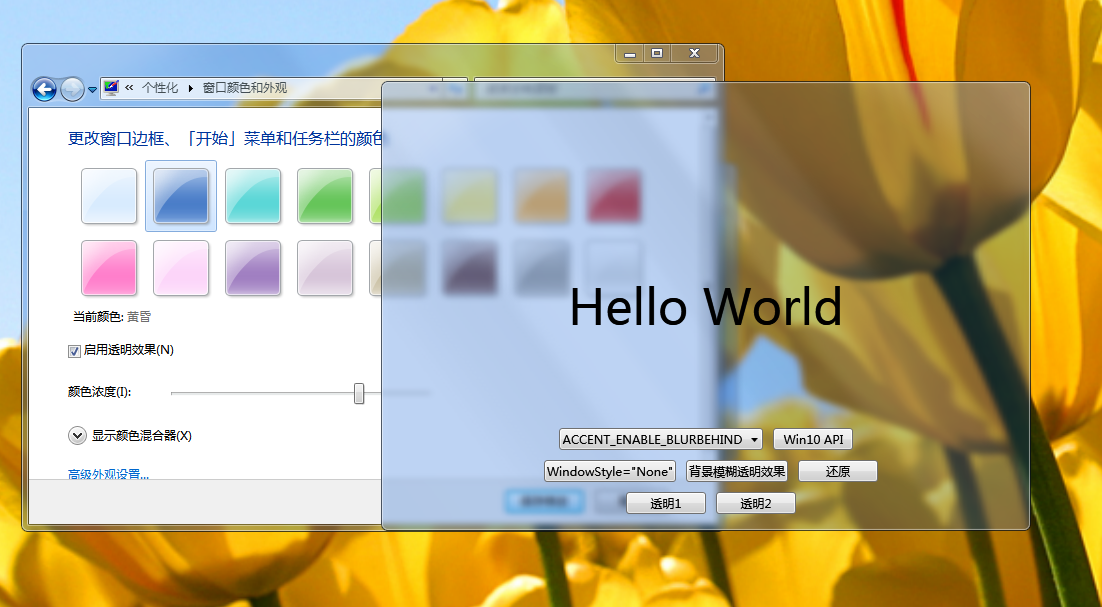
目前网上找到了2种实现方式,一种是 .NET Framework4.5及以后有自带的 WindowChrome 效果,一种是 WindowsAPI dwmapi.dll ,但这两种在win10下面都会失效。win10如何实现在下一篇讲。
1.WindowChrome 效果设置较为简单,如下代码红色部分。WindowChrome更多用法可以查阅官方文档:https://docs.microsoft.com/zh-cn/dotnet/api/system.windows.shell.windowchrome?view=netframework-4.7.2
<Window x:Class="WpfApp1.Window1"

        xmlns="http://schemas.microsoft.com/winfx/2006/xaml/presentation"

        xmlns:x="http://schemas.microsoft.com/winfx/2006/xaml"

        xmlns:d="http://schemas.microsoft.com/expression/blend/2008"

        xmlns:mc="http://schemas.openxmlformats.org/markup-compatibility/2006"

        xmlns:local="clr-namespace:WpfApp1"

        mc:Ignorable="d"

        Title="Window1" Height="300" Width="300" Background="Transparent" WindowStartupLocation="CenterScreen">

    <WindowChrome.WindowChrome>

        <WindowChrome  GlassFrameThickness="-1"/>

    </WindowChrome.WindowChrome>

    <Grid>

        <StackPanel VerticalAlignment="Center" HorizontalAlignment="Center">

            <TextBlock FontSize="40" TextAlignment="Center">

                Hello Wolrd

            </TextBlock>

            <TextBlock FontSize="12" TextAlignment="Center" Margin="0,30,0,0">使用 WindowChrome 实现模糊透明</TextBlock>

        </StackPanel>

    </Grid>

</Window>
2.调用 dwmapi.dll API
页面代码:
<Window x:Class="WpfApp1.Window2"

        xmlns="http://schemas.microsoft.com/winfx/2006/xaml/presentation"

        xmlns:x="http://schemas.microsoft.com/winfx/2006/xaml"

        xmlns:d="http://schemas.microsoft.com/expression/blend/2008"

        xmlns:mc="http://schemas.openxmlformats.org/markup-compatibility/2006"

        xmlns:local="clr-namespace:WpfApp1"

        mc:Ignorable="d"

        Title="Window2" Height="" Width="" WindowStartupLocation="CenterScreen">

    <Grid>

        <StackPanel VerticalAlignment="Center" HorizontalAlignment="Center">

            <TextBlock FontSize="" TextAlignment="Center">

                Hello Wolrd

            </TextBlock>

            <TextBlock FontSize="" TextAlignment="Center" Margin="0,30,0,0">使用 Windows 的 dwmapi 实现模糊透明</TextBlock>

        </StackPanel>

    </Grid>

</Window>
后端代码:
using System;

using System.Collections.Generic;

using System.Linq;

using System.Runtime.InteropServices;

using System.Text;

using System.Threading.Tasks;

using System.Windows;

using System.Windows.Controls;

using System.Windows.Data;

using System.Windows.Documents;

using System.Windows.Input;

using System.Windows.Interop;

using System.Windows.Media;

using System.Windows.Media.Imaging;

using System.Windows.Shapes;

namespace WpfApp1

{

    /// <summary>

    /// Window2.xaml 的交互逻辑

    /// </summary>

    public partial class Window2 : Window

    {

        public Window2()

        {

            InitializeComponent();

        }

        [StructLayout(LayoutKind.Sequential)]

        private struct MARGINS

        {

            public MARGINS(Thickness t)

            {

                Left = (int)t.Left;

                Right = (int)t.Right;

                Top = (int)t.Top;

                Bottom = (int)t.Bottom;

            }

            public int Left;

            public int Right;

            public int Top;

            public int Bottom;

        }

        [DllImport("dwmapi.dll", PreserveSig = false)]

        private static extern void DwmExtendFrameIntoClientArea(IntPtr hWnd, ref MARGINS pMarInset);

        [DllImport("dwmapi.dll", PreserveSig = false)]

        private static extern bool DwmIsCompositionEnabled();

        /// <summary>

        /// win7

        /// </summary>

        /// <param name="window"></param>

        /// <param name="margin"></param>

        /// <returns></returns>

        public static bool ExtendGlassFrame(Window window)

        {

            if (!DwmIsCompositionEnabled())

                return false;

            IntPtr hwnd = new WindowInteropHelper(window).Handle;

            if (hwnd == IntPtr.Zero) throw new InvalidOperationException("The Window must be shown before extending glass.");

            // 将WPF和Win32透视图的背景设置为透明

            window.Background = Brushes.Transparent;

            HwndSource.FromHwnd(hwnd).CompositionTarget.BackgroundColor = Colors.Transparent;

            MARGINS margins = new MARGINS(new Thickness(-));

            DwmExtendFrameIntoClientArea(hwnd, ref margins);

            return true;

        }

        protected override void OnSourceInitialized(EventArgs e)

        {

            base.OnSourceInitialized(e);

            ExtendGlassFrame(this);

        }

    }

}
这两种都能实现透明模糊效果(win7下),但都各自有各自的特点,WindowChrome 的窗口内容都需要自行设置,细心看两个窗口就会发现WindowChrome 的窗口标题都没了,标题高度,边距,调整窗口大小的作用范围等,什么都可以自定义,自我感觉比较难调(可能只是因为我菜),比较适合做自定义窗口,标题栏自定义,标题栏上面还可以加其他按钮,可以隐藏系统标题栏上面的按钮,还有个特点是程序启动时立即生效,dwmapi.dll 会有一个加载的延迟,使用 dwmapi.dll 则窗口内容标题等都是保留原始窗口的内容。
WPF 半透明 模糊效果 Aero效果(1)的更多相关文章
- WPF中,如何将Vista Aero效果扩展到整个窗口
原文:WPF中,如何将Vista Aero效果扩展到整个窗口 WPF中,如何将Vista Aero效果扩展到整个窗口 ...
- iOS开发使用半透明模糊效果方法整理
虽然iOS很早就支持使用模糊效果对图片等进行处理,但尤其在iOS7以后,半透明模糊效果得到大范围广泛使用.包括今年最新发布的iOS8也沿袭了这一设计,甚至在OS X 10.10版Yosemite中也开 ...
- [转]iOS开发使用半透明模糊效果方法整理
转自:http://www.molotang.com/articles/1921.html 虽然iOS很早就支持使用模糊效果对图片等进行处理,但尤其在iOS7以后,半透明模糊效果得到大范围广泛使用.包 ...
- WPF 实现波浪浮动效果
原文:WPF 实现波浪浮动效果 目标:实现界面图标Load时,整体图标出现上下波浪浮动效果,如下图: 前台代码: <Windowxmlns="http://schemas.micros ...
- WPF绘制党徽(立体效果,Cool)
原文:WPF绘制党徽(立体效果,Cool) 前面用WPF方式绘制了党旗(WPF制作的党旗) ,去年3月份利用C# 及GDI+绘制过党徽,这次使用WPF来绘制党徽. ------------------ ...
- WPF 扩大,回弹效果
原文:WPF 扩大,回弹效果 <Window x:Class="Fish.AccountBook.View.Test.PanelWindow" xmlns="htt ...
- WPF 有趣的动画效果
WPF 有趣的动画效果 这一次我要呈上一个简单的文章,关于给你的WPF apps加入美丽的光线动画,可是我对动画这东西可能有点入迷了. 实际上.我对动画如此的入迷,以至 ...
- WPF图形/文字特别效果之一:交叉效果探讨(续)
原文:WPF图形/文字特别效果之一:交叉效果探讨(续) 在"WPF图形/文字特别效果之一:交叉效果探讨"(http://blog.csdn.net/johnsuna/archive ...
- WPF图形/文字特别效果之一:交叉效果探讨
原文:WPF图形/文字特别效果之一:交叉效果探讨 为了说明问题,先看下图:图1 完全重叠的单一颜色文字它是2008几个字的叠加,并且颜色为单一的红色.如果不仔细分辨,你或许无法一下子看出是2008. ...
随机推荐
- Django快速开发实践:Drf框架和xadmin配置指北
步骤 既然是快速开发,那废话不多说,直接说步骤: 安装Djagno 安装Django Rest Framework 定义models 定义Rest framework的serializers 定义Re ...
- 快速认识elasticsearch
快速认识elasticsearch what is Elasticsearch Elasticsearch被称为"Lucene穿了一件json的外衣"---把Lucene用Ne ...
- Spring 5.2.x 源码环境搭建(Windows 系统环境下)
前期准备 1.确保本机已经安装好了 Git 2.Jdk 版本至少为 1.8 3.安装好 IntelliJ IDEA (其他开发工具,如 eclipse.Spring Tool Suite 等也是可以的 ...
- SQLserver , MySQL的区别和各自的一些简单方法案列
SQL Server数据库和MySQL数据库有什么区别呢?今天我们来分析一下这两种数据库的不同之处以及这两种数据库的一些简单用途:SQL Server数据库和MySQL数据库有什么区别: 对于程序开发 ...
- jvm之栈、堆
1. Java Virtual Machine 人群当中,一位叫java的小伙子正向周围一众人群细数着自己取得的荣耀与辉煌.就在此时,c老头和c++老头缓步走来,看着被众人围住的java,c老头感 ...
- Python函数01/函数的初识/函数的定义/函数调用/函数的返回值/函数的参数
Python函数01/函数的初识/函数的定义/函数调用/函数的返回值/函数的参数 内容大纲 1.函数的初识 2.函数的定义 3.函数的调用 4.函数的返回值 5.函数的参数 1.函数初识 # def ...
- 改造 layui 表格组件实现多重排序
layui 的表格组件目前只支持单列排序,在实际应用中并不能很好的支撑我们的业务需求.今天一时手痒,决定改造一番以支持多重排序. 实现思路也比较简单,只需要用一个数组来存放所有排序的列,再把这个数组传 ...
- 009.Nginx缓存及配置
一 浏览器缓存 1.1 缓存概述 缓存对于Web至关重要,尤其对于大型高负载Web站点.Nginx缓存可作为性能优化的一个重要手段,可以极大减轻后端服务器的负载.通常对于静态资源,即较少经常更新的资源 ...
- css :clip rect 正确的使用方法
CSS clip 是一个极少使用,但又确实存在的属性. 而且,它其实在CSS2时代就有了. w3school 上有这么一句话: clip 属性剪裁绝对定位元素. 也就是说,只有 position:ab ...
- sqlserver——merge用法
merge集插入,更新,删除于一体,如果要对一个表同时进行插入,更新,删除2个或3三个操作.效率要高于单个操作. merge into tableb b --被操作表using (select id, ...