
WPF 实现波浪浮动效果
原文:WPF 实现波浪浮动效果
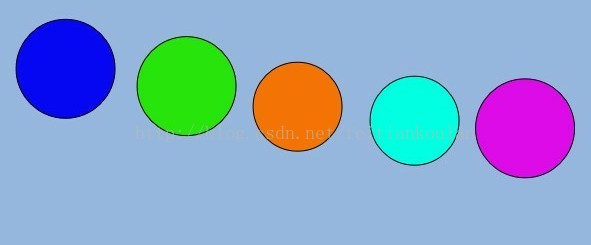
目标:实现界面图标Load时,整体图标出现上下波浪浮动效果,如下图:
前台代码:
<Window
xmlns="http://schemas.microsoft.com/winfx/2006/xaml/presentation"
xmlns:x="http://schemas.microsoft.com/winfx/2006/xaml"
xmlns:d="http://schemas.microsoft.com/expression/blend/2008" xmlns:mc="http://schemas.openxmlformats.org/markup-compatibility/2006" xmlns:Microsoft_Windows_Themes="clr-namespace:Microsoft.Windows.Themes;assembly=PresentationFramework.Aero"
mc:Ignorable="d"
x:Class="目录波浪效果.MainWindow"
x:Name="Window"
Title="MainWindow"
Width="640" Height="480" Loaded="Window_Loaded" Background="#FF97B7DE">
<Window.Resources>
<Storyboard x:Key="Storyboard2">
<DoubleAnimationUsingKeyFrames Storyboard.TargetProperty="(UIElement.RenderTransform).(TransformGroup.Children)[3].(TranslateTransform.Y)" >
<EasingDoubleKeyFrame Value="-300">
<EasingDoubleKeyFrame.EasingFunction>
<BackEase EasingMode="EaseOut"/>
</EasingDoubleKeyFrame.EasingFunction>
</EasingDoubleKeyFrame>
</DoubleAnimationUsingKeyFrames>
</Storyboard>
</Window.Resources>
<Grid x:Name="LayoutRoot">
<Ellipse x:Name="ellipse1" Fill="#FF0707F3" HorizontalAlignment="Left" Margin="31.5,0,0,20" Stroke="Black" Width="100" Height="100" VerticalAlignment="Bottom" RenderTransformOrigin="0.5,0.5" >
<Ellipse.RenderTransform>
<TransformGroup>
<ScaleTransform/>
<SkewTransform/>
<RotateTransform/>
<TranslateTransform/>
</TransformGroup>
</Ellipse.RenderTransform>
</Ellipse>
<Ellipse x:Name="ellipse2" Fill="#FF27E40C" Margin="152.5,0,0,20" Stroke="Black" HorizontalAlignment="Left" Height="100" Width="100" VerticalAlignment="Bottom"
RenderTransformOrigin="0.5,0.5">
<Ellipse.RenderTransform>
<TransformGroup>
<ScaleTransform/>
<SkewTransform/>
<RotateTransform/>
<TranslateTransform/>
</TransformGroup>
</Ellipse.RenderTransform>
</Ellipse>
<Ellipse x:Name="ellipse3" Fill="#FFF57406" Margin="268.5,0,265.5,20" Stroke="Black" Height="90" VerticalAlignment="Bottom" RenderTransformOrigin="0.5,0.5">
<Ellipse.RenderTransform>
<TransformGroup>
<ScaleTransform/>
<SkewTransform/>
<RotateTransform/>
<TranslateTransform/>
</TransformGroup>
</Ellipse.RenderTransform>
</Ellipse>
<Ellipse x:Name="ellipse4" Fill="#FF02FFE2" HorizontalAlignment="Right" Margin="0,0,148.5,20" Stroke="Black" Width="90" Height="90" VerticalAlignment="Bottom" RenderTransformOrigin="0.5,0.5">
<Ellipse.RenderTransform>
<TransformGroup>
<ScaleTransform/>
<SkewTransform/>
<RotateTransform/>
<TranslateTransform/>
</TransformGroup>
</Ellipse.RenderTransform>
</Ellipse>
<Ellipse x:Name="ellipse5" Fill="#FFDE0BE9" Height="100" Width="100" Margin="0,0,33,20" Stroke="Black" VerticalAlignment="Bottom" RenderTransformOrigin="0.5,0.5" HorizontalAlignment="Right" d:LayoutOverrides="Width">
<Ellipse.RenderTransform>
<TransformGroup>
<ScaleTransform/>
<SkewTransform/>
<RotateTransform/>
<TranslateTransform/>
</TransformGroup>
</Ellipse.RenderTransform>
</Ellipse>
</Grid>
</Window>
后台代码:
private void Window_Loaded(object sender, RoutedEventArgs e)
{
int t = 0;
foreach (FrameworkElement element in this.LayoutRoot.Children)
{
t++;
Storyboard storyboard = this.FindResource("Storyboard2") as Storyboard;
DoubleAnimationUsingKeyFrames frames = storyboard.Children[0] as DoubleAnimationUsingKeyFrames;
EasingDoubleKeyFrame eas = frames.KeyFrames[0] as EasingDoubleKeyFrame;
eas.KeyTime = KeyTime.FromTimeSpan(TimeSpan.FromMilliseconds(2000 + t * 200));
Storyboard.SetTargetName(frames, element.Name);
storyboard.Begin();
}
}
WPF 实现波浪浮动效果的更多相关文章
- Jquery广告浮动效果小案例
导入<script src="<%=path%>/html5/js/jquery.js"></script>文件 <SCRIPT type ...
- Unity UGUI在鼠标位置不同时 图片浮动效果
/// <summary> /// 在鼠标位置不同时 图片浮动效果 /// </summary> public class TiltWindow : MonoBehaviour ...
- WPF绘制党徽(立体效果,Cool)
原文:WPF绘制党徽(立体效果,Cool) 前面用WPF方式绘制了党旗(WPF制作的党旗) ,去年3月份利用C# 及GDI+绘制过党徽,这次使用WPF来绘制党徽. ------------------ ...
- iOS CAShapeLayer、CADisplayLink 实现波浪动画效果
iOS CAShapeLayer.CADisplayLink 实现波浪动画效果 效果图 代码已上传 GitHub:https://github.com/Silence-GitHub/CoreAnima ...
- javascript 表格排序和表头浮动效果(扩展SortTable)
前段时间一个项目有大量页面用到表格排序和表头浮动的效果,在网上找了几个表格排序的js代码,最后选择了 Stuart Langridge的SortTable,在SortTable基础上做了些扩展,加上了 ...
- WPF 扩大,回弹效果
原文:WPF 扩大,回弹效果 <Window x:Class="Fish.AccountBook.View.Test.PanelWindow" xmlns="htt ...
- Javascript 广告浮动效果在浏览器中间N秒后移动到右下角
Javascript 广告浮动效果在浏览器中间N秒后移动到右下角 闲着无聊做了一个,本人原创...就是这个页面的广告效果....怎么样???? 刚刚学习的javascript
- WPF 有趣的动画效果
WPF 有趣的动画效果 这一次我要呈上一个简单的文章,关于给你的WPF apps加入美丽的光线动画,可是我对动画这东西可能有点入迷了. 实际上.我对动画如此的入迷,以至 ...
- WPF图形/文字特别效果之一:交叉效果探讨(续)
原文:WPF图形/文字特别效果之一:交叉效果探讨(续) 在"WPF图形/文字特别效果之一:交叉效果探讨"(http://blog.csdn.net/johnsuna/archive ...
随机推荐
- mysql 查询重复 去除重复等等
查找所有重复标题的记录: SELECT * FROM t_info a WHERE ((SELECT COUNT(*) FROM t_info WHERE Title = a.Title) > ...
- PWA之Web 应用清单
原文 简书原文:https://www.jianshu.com/p/5c96242188e8 大纲 1.什么是Web 应用清单 2.“清单文件”:Web App Manifest 规范的应用 3.we ...
- Vue.js如何划分组件
常见的一些页面,大家坐在一起敲代码就可以了,做完这个页面再做别的页面,但是作为一个功能复杂的系统,尤其是使用一些适合模块化开发的框架,这样会显得效率很低,那么我们就单纯的看在Vue里面如何划分组件的. ...
- auto_create_partition
#!/usr/bin/env python # -*- encoding: utf8 -*- import calendar import time import os import sys from ...
- How to use ftp in a shell script
转载How to use ftp in a shell script How to use ftp in a shell script Bruce EdigerBruce Ediger's home ...
- 【C++竞赛 D】树的深度
时间限制:1s 内存限制:32MB 问题描述 数据结构中定义,树的高度为一棵树中所有节点的层次的最大值.现在yyy有一棵树请你帮他求出该树的高度. 输入描述 第一行一个整数T(1≤T≤20)表示数据组 ...
- USB 3.0规范中译本 第3章 USB 3.0体系结构概览
本文为CoryXie原创译文,转载及有任何问题请联系cory.xie#gmail.com. 本章呈现USB 3.0体系结构和关键概念的概览.USB 3.0与前面版本的USB类似,因为它是线缆总线,支持 ...
- Android图表和图形创建库:EazeGraph
EazeGraph是一个 Android 库用于创建漂亮和花哨的图表.它具有易于使用和高度可定制的特点.当前支持四种不同的图表如下: Chart types Bar Chart Stacked Bar ...
- Use Word 2010's Navigation Pane to quickly reorganize documents
Use Word 2010's Navigation Pane to quickly reorganize documents http://www.techrepublic.com/blog/mic ...
- jquery-2 jQuery原理和核心方法(多看学习视频)
jquery-2 jQuery原理和核心方法(多看学习视频) 一.总结 一句话总结:jQuery就是普通的js对象,只不过方法比较多而已,属性就length一个. 1.jquery的链式操作的底层原 ...