
C#使用Aspose.Words操作word文档
最近接到个需求,由于客服这边要导出大量有一定规则的word文件,里面的内容希望系统自动填充,例如
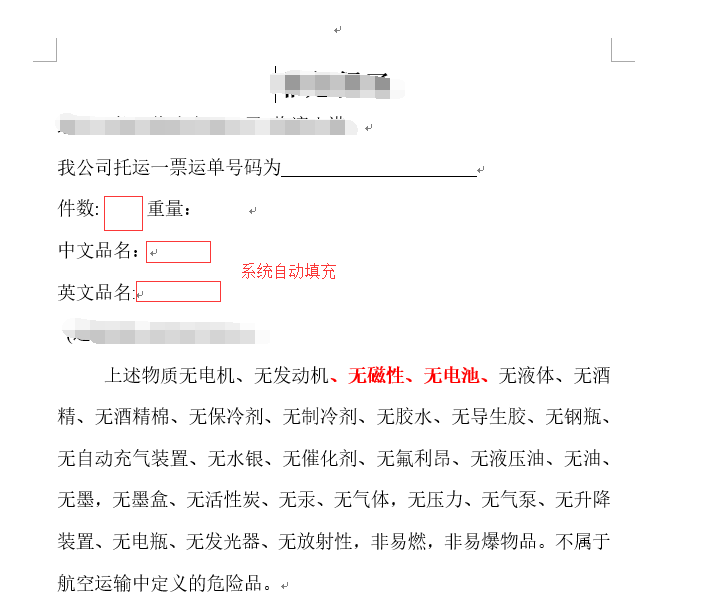
这里我使用Aspose.Words.dll这个类库,
1.首先,我们需要创建模板文件,毕竟有规则的东西才好开发。在各个位置处添加书签,如下:
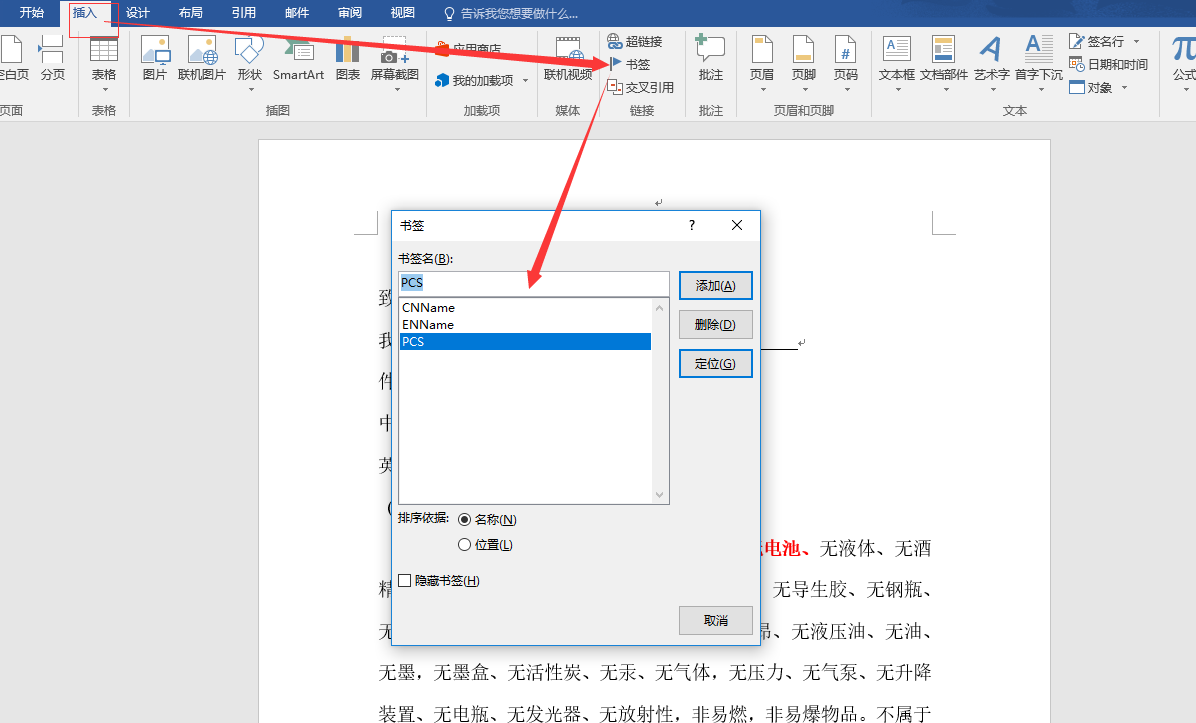
2.核心方法如下,由于我这边需求最多填充四个参数:中文品名、英文描述、HAWB、件数,所以下面方法就定义这几个变量。其中,有些模板若不需要个别参数,直接传空值就行。
 /// <summary>

        /// 非危保函(将指定路径的模板Path_TempleteDoc输出至Path_out路径)

        /// </summary>

        /// <param name="Path_TempleteDoc">模板文件路径,包含文件名</param>

        /// <param name="CNName">中文品名</param>

        /// <param name="ENName">英文描述</param>

        /// <param name="HAWB">HAWB</param>

        /// <param name="PCS">件数</param>

        /// <param name="Path_out">文件输出路径,包含文件名</param>

        private void HandleGuaranteeDoc(string Path_TempleteDoc,string CNName,string ENName,string HAWB,string PCS,string Path_out)

        {

            string tempFile = Path.GetFullPath(Path_TempleteDoc).ToString();      //获取模板路径,这个根据个人模板路径而定。

            Document doc = new Document(tempFile);

            DocumentBuilder builder = new DocumentBuilder(doc);   //操作word

            Dictionary<string, string> dic = new Dictionary<string, string>();   //创建键值对   第一个string 为书签名称 第二个string为要填充的数据

            if (!string.IsNullOrEmpty(CNName))

            {

                dic.Add("CNName", CNName);

            }

            if (!string.IsNullOrEmpty(ENName))

            {

                dic.Add("ENName", ENName);

            }

            if (!string.IsNullOrEmpty(HAWB))

            {

                dic.Add("HAWB", HAWB);

            }

            if (!string.IsNullOrEmpty(PCS))

            {

                dic.Add("PCS", PCS);

            }

            foreach (var key in dic.Keys)   //循环键值对

            {

                builder.MoveToBookmark(key);  //将光标移入书签的位置

                builder.Write(dic[key]);   //填充值

            }

            doc.Save(Path_out); //保存word

        }
另附上文件的复制和整个文件夹的复制
文件复制(路径都准确到文件名):
 /// <summary>

        /// 大文件多次复制文件  true:复制成功   false:复制失败

        /// </summary>

        /// <param name="soucrePath">原始文件路径包含文件名</param>

        /// <param name="targetPath">复制目标文件路径,包含文件名</param>

        /// <returns></returns>

        public bool CopyFile(string soucrePath, string targetPath)

        {

            try

            {

                //读取复制文件流

                using (FileStream fsRead = new FileStream(soucrePath, FileMode.Open, FileAccess.Read))

                {

                    //写入文件复制流

                    using (FileStream fsWrite = new FileStream(targetPath, FileMode.OpenOrCreate, FileAccess.Write))

                    {

                        byte[] buffer = new byte[ *  * ]; //每次读取2M

                        //可能文件比较大,要循环读取,每次读取2M

                        while (true)

                        {

                            //每次读取的数据    n:是每次读取到的实际数据大小

                            int n = fsRead.Read(buffer, , buffer.Count());

                            //如果n=0说明读取的数据为空,已经读取到最后了,跳出循环

                            if (n == )

                            {

                                break;

                            }

                            //写入每次读取的实际数据大小

                            fsWrite.Write(buffer, , n);

                        }

                    }

                }

                return true;

            }

            catch (System.Exception ex)

            {

                return false;

            }

        }
文件夹复制(路径都指到文件夹路径)
/// <summary>

        /// Copy文件夹至

        /// </summary>

        /// <param name="sourceDir">原路径</param>

        /// <param name="toDir">目标路径</param>

        public static void CopyDirectInfo(string sourceDir, string toDir)

        {

            if (!Directory.Exists(sourceDir))

            {

                throw new ApplicationException("Source directory does not exist");

            }

            if (!Directory.Exists(toDir))

            {

                Directory.CreateDirectory(toDir);

            }

            DirectoryInfo directInfo = new DirectoryInfo(sourceDir);

            //copy files

            FileInfo[] filesInfos = directInfo.GetFiles();

            foreach (FileInfo fileinfo in filesInfos)

            {

                string fileName = fileinfo.Name;

                File.Copy(fileinfo.FullName, toDir + @"/" + fileName, true);

            }

            //copy directory

            foreach (DirectoryInfo directoryPath in directInfo.GetDirectories())

            {

                string toDirPath = toDir + @"/" + directoryPath.Name;

                CopyDirectInfo(directoryPath.FullName, toDirPath);

            }

        }
C#使用Aspose.Words操作word文档的更多相关文章
- 使用Aspose.Words将Word文档转换为Tiff格式图片文件
用Aspose组件的优点是操作Word文档不需要安装Office就可以实现. 首先需要引用Aspose.Words.dll,链接地址:链接:https://pan.baidu.com/s/1rJvjp ...
- iText操作word文档总结
操作word文档的工具有很多,除了iText之外还有POI,但是POI擅长的功能是操作excel,虽然也可以操作word,但是能力有限,而且还有很多的bug,技术并不成熟,下面就重点介绍一种操作wor ...
- C#操作Word文档(加密、解密、对应书签插入分页符)
原文:C#操作Word文档(加密.解密.对应书签插入分页符) 最近做一个项目,客户要求对已经生成好的RTF文件中的内容进行分页显示,由于之前对这方面没有什么了解,后来在网上也找了相关的资料,并结合自己 ...
- Aspose.Words给word文档加水印
需求:在一些重要的Word文档需要打印时,添加水印以明出处. 方案:使用Aspose组件给word文档 代码:干货如下 /// <summary> /// Inserts a waterm ...
- 利用Python操作Word文档【图片】
利用Python操作Word文档
- WPF使用Aspose.Words导出Word文档
一.创建Word文档模板 分析需要导出的word文档,将固定的内容和由程序生成的内容分开; 创建一个word(例如:Template.doc)文档,将固定的内容按照一定的格式写入当前文档中; 打开Te ...
- Java文件操作系列[3]——使用jacob操作word文档
Java对word文档的操作需要通过第三方组件实现,例如jacob.iText.POI和java2word等.jacob组件的功能最强大,可以操作word,Excel等格式的文件.该组件调用的的是操作 ...
- QTP操作word文档
QTP可以对word文档进行操作,这里最主要展示的是向word文档写入内容,并保存的功能. Option explicit Dim wordApp Set wordApp = createobject ...
- c#中操作word文档-四、对象模型
转自:http://blog.csdn.net/ruby97/article/details/7406806 Word对象模型 (.Net Perspective) 本文主要针对在Visual St ...
随机推荐
- 2. DVWA亲测CSRF漏洞
DVWA登陆 用户名:admin 密码:password Low级: 查看源代码: <?php if (isset($_GET['Change'])) { // Turn requ ...
- 使用VS Code配合Remote Development插件连接远程服务器(Mac/Linux+Windows) | Using VS Code with Remote Development Connect to Remote Server (Mac/Linux+Windows)
最新版VS Code(2019年6月)出了一系列新的插件,包括Remote Development,Remote SSH等,使得用户可以使用VS Code远程连接服务器写代码,方便了协同工作.具体配置 ...
- 【mysql 统计分组之后统计录数条数】
SELECT count(*) FROM 表名 WHERE 条件 // 这样查出来的是总记录条 SELECT count(*) FROM 表名 WHERE 条件 GROUP BY id //这样统 ...
- C#事件2
今天又来说一下C#中的事件,为什么会有这个又呢?一个是因为以前写过一篇关于事件的东西,二来呢是因为感觉接口这个东西完全可以替换委托来写事件.因为这两个方面的原因,重新过了一遍C#中的事件. 事件这个东 ...
- 51nod 1781 Pinball(线段树)
题面 Pinball的游戏界面由m+2行.n列组成.第一行在顶端.一个球会从第一行的某一列出发,开始垂直下落,界面上有一些漏斗,一共有m个漏斗分别放在第2~m+1行,第i个漏斗的作用是把经过第i+1行 ...
- [Xcode 实际操作]五、使用表格-(2)设置UITableView单元格高度
目录:[Swift]Xcode实际操作 本文将演示如何制作一个自定义行高的表格视图 在项目导航区,打开视图控制器的代码文件[ViewController.swift] import UIKit //首 ...
- [Xcode 实际操作]四、常用控件-(5)UILabel文本标签自定义文字样式
目录:[Swift]Xcode实际操作 本文将演示给标签对象添加描边效果,在项目文件夹上,点击鼠标右键菜单, 选择[Create File]->[Cocoa Touch Class]->[ ...
- 使用HTTP协议访问网络(Android)
在做项目的过程中需要连接服务器访问数据,还没有接触过Android网络编程方面,参考了<Android第一行代码>,在做的过程中遇到了很多的问题,这里就此记录一下. 先给出访问网络的代码: ...
- 10分钟了解什么是BFC
BFC对于已经是一个耳熟能详的词汇了,而且在前端面试中,这题也是一个高频题.虽然我们平时在开发的时候知道如何利用BFC来解决问题,但是我们要具体说出BFC的概念和怎么触发BFC,我相信很多小伙伴也是和 ...
- promise封装小程序的蓝牙类
// pages/bluetooth/bluetooth.js import { BluetoothMode } from '../../models/bluetooth.js' import {Sy ...