
RN控件之View Text
 /**

  * 模仿美团首页部分

  * */

 'use strict'

 import React,{

     AppRegistry,

     Component,

     StyleSheet,

     Text,

     View,

     Image,

 } from 'react-native';

 class TestImage extends Component {

   render(){

     return(

         <View style={styles.containerStyle}>

           <View style={{flexDirection:'row'}}>

                 <View style={{width:70}}>

                 <Image source={require('./images/1.png')}

                 style={styles.imageStyle}/>

                 <Text style={styles.textStyle}>美食</Text>

                 </View>

                 <View style={{width:70}}>

                 <Image source={require('./images/2.png')}

                        style={styles.imageStyle}/>

                 <Text style={styles.textStyle}>酒店</Text>

               </View>

               <View style={{width:70}}>

                 <Image source={require('./images/3.png')}

                 style={styles.imageStyle}/>

                 <Text style={styles.textStyle}>电影</Text>

               </View>

               <View style={{width:70}}>

                 <Image source={require('./images/4.png')}

                 style={styles.imageStyle}/>

                 <Text style={styles.textStyle}>旅游</Text>

               </View>

           </View>

           <View style={{flexDirection:'row',marginTop:10}}>

                 <View style={{width:70}}>

                   <Image source={require('./images/5.png')}

                   style={styles.imageStyle}/>

                   <Text style={styles.textStyle}>外卖</Text>

                 </View>

                 <View style={{width:70}}>

                   <Image source={require('./images/6.png')}

                   style={styles.imageStyle}/>

                   <Text style={styles.textStyle}>周边游</Text>

                 </View>

               <View style={{width:70}}>

                 <Image source={require('./images/7.png')}

                        style={styles.imageStyle}/>

                 <Text style={styles.textStyle}>休闲娱乐</Text>

               </View>

               <View style={{width:70}}>

                 <Image source={require('./images/8.png')}

                        style={styles.imageStyle}/>

                 <Text style={styles.textStyle}>今日新单</Text>

               </View>

           </View>

       </View>

   );

   }

 }

 const styles=StyleSheet.create(

     {

       imageStyle:{

         alignSelf:'center',

         width:45,

         height:45

       },

       textStyle:{

         marginTop:5,

         textAlign:'center',

         fontSize:11,

         color:'#555555'

       },

       containerStyle:{

         marginLeft:5,

         marginTop:10,

         marginRight:5

       }

     }

 );

 //第一个参数是package中name,第二个参数是需要注册的组件

 AppRegistry.registerComponent('MyProject',() =>TestImage);
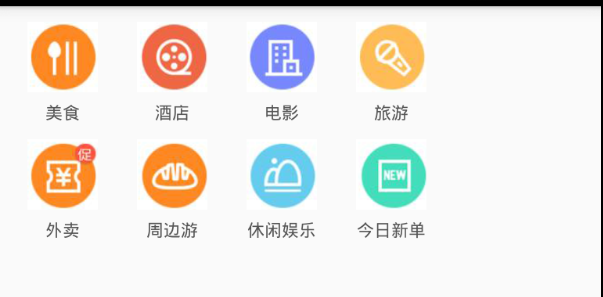
一.View组件介绍
1.View是UI布局最基础,最常用的组件.其支持FlexBox布局,CSS样式以及相关触摸处理的容器组件,可以嵌套在其他View中,也可以包含多种类型的子视图.在Web,Android,IOS三种平台上面对应三种原生视图,分别是<div>,android.view,UIView
2.View中的属性
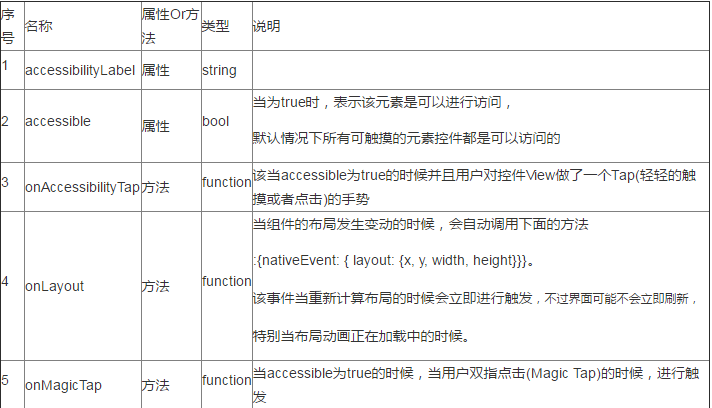
下面是一些响应链的方法:
onMoveShouldSetResponder
onMoveShouldSetResponderCapture
onPresponderGrant,onResponderMove
onResponderReject,onResponderRelease
onResponderTerminate,onResponderTerminationRequest
onStartShouldSetResponder,onStartShouldSetResponderCapture
pointerEvents enum('box-none', 'none', 'box-only', 'auto')(触摸事件是否可以进行穿透控件View)
removeClippedSubviews:该控件由于进行优化性能,尤其在一些滑动控件上面。该属性生效的要求如下:首先子视图的内容非常多,
已经超过父容器,并且子视图和父容器视图都有overflow:hidden风格样式
3.View的Style样式
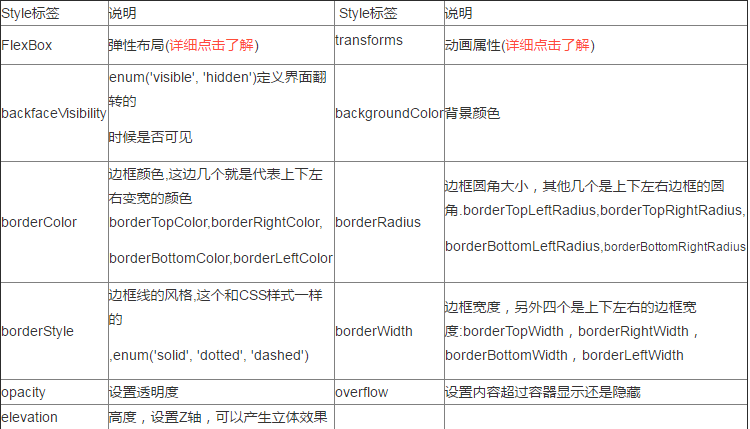
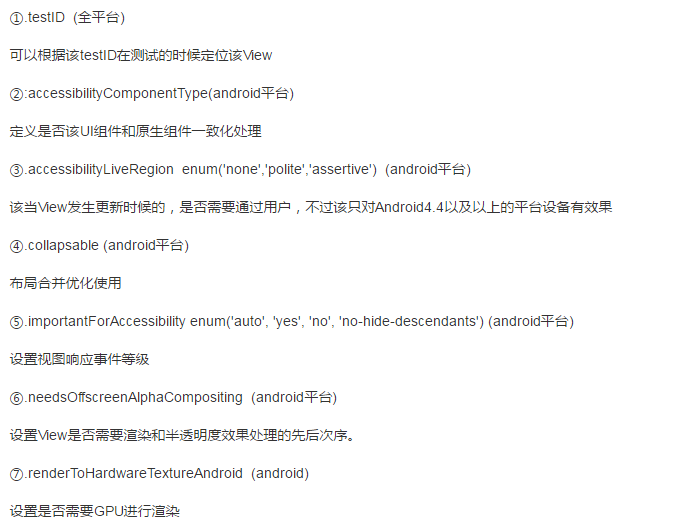
下面是几个特殊的属性,有所有平台通用的,也只在Android平台有效果的属性
二.Text组件介绍
1.该组件为React中的一个基本组件,和Android的TextView组件类似,用来显示基本的文本信息,除了基本的显示布局之外,也可以进行嵌套布局
,设置样式,以及做事件处理.
2.属性
allowFontScalling(bool):控制字体是否根据iOS的设置进行自动缩放-iOS平台,Android平台不适用.
numberOfLines(number):进行设置Text显示文本的行数,如果超出行数,默认其他多余的就不显示了
onLayout(function):当布局位置发生变动的时候自动触发该方法,function的参数如下:
[code lang="" start="" highlight=""]{nativeEvent: {layout: {x, y, width, height}}}[/code]
onPress(function):该方法在文本发生点击的时候调用
3.Style样式
(1)继承View组件的所有Style
(2)color:字体颜色
(3)fontFamily:字体名称
(4)fontStlye:字体风格(normal,italic)
(5)fontWeight:字体粗细('normal','bold','100','200')
(6)fontSize:字体大小
(7)textShadowOffset:设置阴影效果{width:number,height:number}
(8)textShaowRadius:阴影效果圆角
(9)textShadowColr:阴影效果的颜色
(10)letterSpacing:字符间距
(11)lineHeight:行高
(12)textAlign:文本对齐方式('auto','left','right','')
(13)textDecorationLine:横线位置('none','underline','line-through','underline line-through')
(14)textDecorationStyle:线的风格('solid','')
(15)textDecorationColor:线的颜色
(16)writingDirection 文本方向('auto','ltr','rtl')
4.注意点
(1)嵌套特点:和Web上面的设计方案,我们通过嵌套包裹的方案,相同的属性可以用父标签进行包裹,然后内部特殊的文本采用子标签方案
(2)容器布局规则:之前介绍View组件,我们知道该组件是支持FlexBox(弹性布局),但是Text组件直接是文本布局的,也就是说一个Text接着Text,
横向,如果文本已经到末尾了,那就直接换行.
(3)但是如果父控件采用View,View是支持FlexBox布局的,两个Text默认会垂直分布
(4)样式继承规格:
组件可以嵌套,而且样式还支持继承,也就是说父组件定义了相关样式,如果子组件没有重写样式的话,那么该子组件也会继承父组件定义的样式.
RN控件之View Text的更多相关文章
- Android-自定义控件-继承View与ViewGroup的初步理解
继承View需要走的流程是: 1.构造实例化, public ChildView(Context context, @Nullable AttributeSet attrs) 2.测量自身的高和宽on ...
- android RelativeLayout控件或view实现叠加效果
在开发android程序的时候,我们经常会遇到让控件或是view实现叠加的效果,一般这种情况,很多人会使用Framelayout来处理,可是有一个问题Framelayout布局在布局上会有很多限制,不 ...
- RN控件之DrawerLayoutAndroid导航栏
/** * Sample React Native App * https://github.com/facebook/react-native */ 'use strict'; import Rea ...
- RN控件之ProgressBarAndroid进度条
/** * Sample React Native App * https://github.com/facebook/react-native */ 'use strict'; import Rea ...
- 【机房系统知识小结点系列】之遍历窗体中的控件,判断Text是否为空?
做机房系统时,几乎每个窗体中都会用到判断界面中的控件是否为空的情景.我们曾经是这样走来的: 第一版: 好处:对窗体界面中的Text等控件,逐一做判断,当用户输入某一项为空的时候,会议弹出框的形式,告诉 ...
- Android中查看布局文件中的控件(view,id)在哪里被调用(使用)
在阅读别人的代码时通常是很痛苦的,有时很想要看一看布局中的控件在哪里被调用了,为之很苦恼 在这里提供一种方法. 复制要查看的控件ID,到R文件中搜索到该ID, 接下来就好办的了,选中ID按下C ...
- RN控件之TextInput
/** * Sample React Native App * https://github.com/facebook/react-native */ 'use strict'; import Rea ...
- iOS开发小技巧--学会包装控件(有些view的位置由于代码或系统原因,位置或者尺寸不容易修改或者容易受外界影响)
一.百思项目中遇到了两处这样的问题, 第一处 - 是评论界面的headerView,由于直接把自己搞的xib加载了放在了那里,xib中setFrame写了好多-= +=,每次滚动的时候,会频繁调用x ...
- 文字处理控件TX Text Control的使用
这几天一直在研究TX Text Control的使用,由于这方面的资料相对比较少,主要靠下载版本的案例代码进行研究,以及官方的一些博客案例进行学习,使用总结了一些心得,特将其总结出来,供大家分享学习. ...
随机推荐
- 关于Unicode转为str的方法
unicode_a=u'\u810f\u4e71' str_a=unicode_a.encode('unicode-escape').decode('string_escape')
- spring mvc入门教程 转载自【http://elf8848.iteye.com/blog/875830】
目录 一.前言二.spring mvc 核心类与接口三.spring mvc 核心流程图 四.spring mvc DispatcherServlet说明 五.spring mvc 父子上下文的说明 ...
- HDU - 1134 Game of Connections 【DP】
题目链接 http://acm.hdu.edu.cn/showproblem.php?pid=1134 题意 给出一个n 然后有2n个点 给两个点连一条边,最后连N条边,要求所有的边不能够交叉 问最多 ...
- Scala window下安装
第一步:Java 设置 检测方法前文已说明,这里不再描述. 如果还为安装,可以参考我们的Java 开发环境配置. 接下来,我们可以从 Scala 官网地址 http://www.scala-lang. ...
- Linux服务器上的tomcat中部署web项目
首先了解一下下面几个概念,讲得不太准确:1.JVMJVM是class以及jar(实际上就是很多个class压缩在一起)的运行环境,特征就是java和javaw命令,通过这两个命令,你可以执行class ...
- ajax的原理及使用
ajax并非是一门新的技术,而是现有技术的一种新的组合用法,即是结合异步javascript和XML,它是一种创建快速动态网页的技术.其中,异步javascript是相对于同步而言的,同步模式通常称为 ...
- phpmyadmin mysqlnd cannot connect to
mysqlnd cannot connect to MySQL 4.1+ using the old insecure authentication. Please use an administra ...
- 数据分析第二篇:matplotlib 常用的几个绘图方法
Matplotlib matplotlib是python的绘图库,使用它可以很方便的绘制出版质量级别的图形 matplotlib的基本功能 1.基本绘图 1.1 绘制坐标系中连续的线,设置线型/线宽/ ...
- UTF-8 delphi 函数
unit util_utf8; interface uses Windows; type UTF8String = AnsiString; function AnsiT ...
- 《Javascript高级程序设计》阅读记录(一):第二、三章
<Javascript高级程序设计>阅读记录(一) 这个系列,我会把阅读<Javascript高级程序设计>之后,感觉讲的比较深入,而且实际使用价值较大的内容记录下来,并且注释 ...