
solr dataimport
solrconfig.xml
    <requestHandler name="/dataimport" class="org.apache.solr.handler.dataimport.DataImportHandler">

        <lst name="defaults">

          <str name="config">data-config.xml</str>

          <str name="df">text</str>

        </lst>

    </requestHandler>
solrconfig.xml同一个目录下增加 data-config.xml 文件
<dataConfig>

    <dataSource type="JdbcDataSource" name="ds-1"

            driver="com.microsoft.sqlserver.jdbc.SQLServerDriver"

            url="jdbc:sqlserver://localhost;databaseName=My_DB;responseBuffering=adaptive;"

            user="you name"

            password="you password"/>

    <dataSource type="JdbcDataSource" name="ds-2"

            driver="com.mysql.jdbc.Driver"

            url="jdbc:mysql://db2-host/dbname"

            user="db_username"

            password="db_password"/>

    <dataSource type="FileDataSource" name="ds-3" encoding="UTF-8" />

  <document>

    <!--add filed for match sql column to solr column-->

    <entity name="product" dataSource="ds-1"

        query="select top 1 * from Product"

        transformer="RegexTransformer,DateFormatTransformer" >

        <field column="Id" name="id"/>

        <entity name="productCategory" dataSource="ds-1"

            query="select top 1 * from Code_Category_Product

                Where Id=${product.CategoryId}">

            <field column="Id" name="categoryid"/>

            <field column="Description" name="category"/>

        </entity>

        <field column="Name" name="name" />

        <field column="Description" name="description" />

        <field column="UnitPrice" name="unitprice"/>

        <field column="Status" name="status"/>

        <field column="CreatedTime" name="createdtime" dateTimeFormat="M/d/yyyy h:m:s a"/>

        <field column="Name" regex=".*Product1" name="name_py" />

    </entity>

    <!--atch sql column to solr column in the sql query-->

    <entity name="product2" dataSource="ds-1"

        query="select Id as id,

                CategoryId,

                Name as name,

                Description as description,

                UnitPrice as unitprice,

                Status as status,

                CreatedTime as createdTime from Product

                Where Id=10000000002">

        <entity name="productCategory" dataSource="ds-1"

            query="select top 1 * from Code_Category_Product

                Where Id=${product2.CategoryId}">

            <field column="Id" name="categoryid"/>

            <field column="Description" name="category"/>

        </entity>

    </entity>

    <entity name="product3" dataSource="ds-3"

        processor="XPathEntityProcessor"

        stream="true"

        forEach="/products/product | /products/item"

        url="D:\Solr\solr-NewRMS\example\conf\products.xml"

        transformer="RegexTransformer,DateFormatTransformer" >

            <field column="id" xpath="/products/product/id" />

            <field column="name" xpath="/products/product/@name" />

            <field column="name_py" xpath="/products/product/name_py" />

            <field column="createdtime" xpath="/products/product/createdtime" dateTimeFormat="yyyy-MM-dd'T'hh:mm:ss'Z'" />

            <field column="tag" xpath="/products/product/tag" splitBy=","/>

            <field column="description" regex="/products/product/description" />

       </entity>

  </document>

</dataConfig>
data-config.xml同一个目录下增加 products.xml
<products>

    <product name="product1001">

        <id>1001</id>

        <createdtime>2011-11-07T17:05:14</createdtime>

        <description><![CDATA[this is 1001 desc]]></description>

        <tag>tag11,tag22</tag>

    </product>

    <product name="product1002">

        <id>1002</id>

        <name_py>是</name_py>

        <createdtime>2012-11-07T17:05:14</createdtime>

        <description><![CDATA[this is 1002 description]]></description>

        <tag>tag1</tag>

        <tag>tag2</tag>

    </product>

</products>
数据库:Product


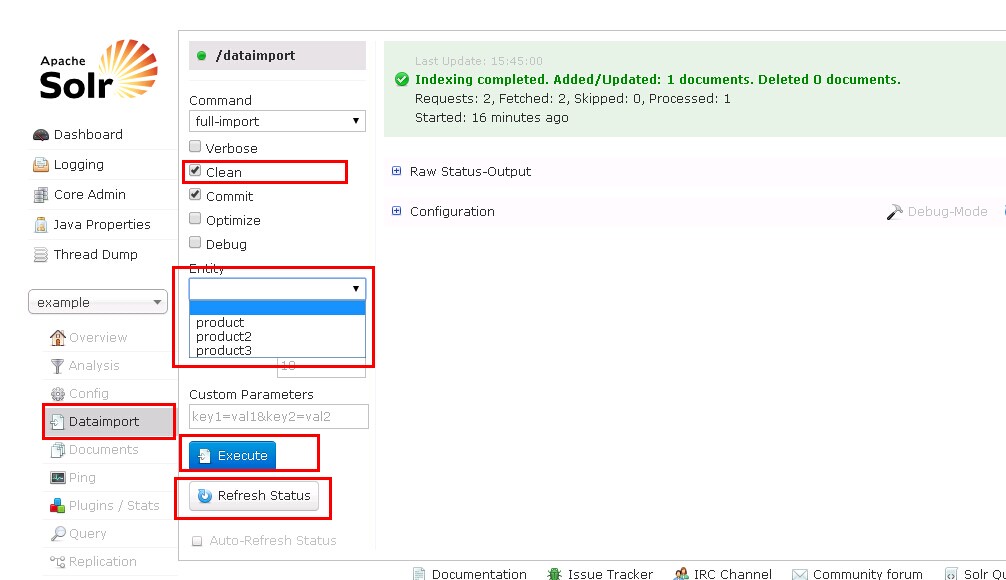
如果不想把之前的数据清除 取消 Clean 选项
在Entity中选择运行项
点击Execute, 一段时间后点击Refresh Status查看运行结果
可以去Query中查看是否已经插入数据
solr dataimport的更多相关文章
- Solr学习笔记之3、Solr dataimport - 从SQLServer导入数据建立索引
Solr学习笔记之3.Solr导入SQLServer数据建立索引 一.下载MSSQLServer的JDBC驱动 下载:Microsoft JDBC Driver 4.0 for SQL Server ...
- 威胁快报|Solr dataimport成挖矿团伙新型利用方式
概述 近日,阿里云安全团队监测到挖矿团伙利用solr dataimport RCE(CVE-2019-0193)作为新的攻击方式对云上主机进行攻击,攻击成功后下载门罗币挖矿程序进行牟利.该团伙使用的恶 ...
- Solr Dataimport配置
参考资料: https://cwiki.apache.org/confluence/display/solr/Uploading+Structured+Data+Store+Data+with+the ...
- solr dataimport中遇到的问题
1.windows的tomcat是没有catalina.out的,可以通过修改start.bat和catalina.bat的方式让日志输出到catalina.out 2.按照网上搜到的资料配置好sol ...
- Linux下安装使用Solr
Linux下安装使用Solr 1.首先下载Solr.mmseg4j分词包.tomcat并解压,这用google.百度都可以搜索得到下载地址. 2.因为要使用到中文分词,所以要设置编码,进入tomcat ...
- solr连接数据库配置
一般要搜索的信息都是被存储在数据库里面的,但是我们不能直接搜数据库,所以只有借助Solr将要搜索的信息在搜索服务器上进行索引,然后在客户端供客户使用. 一.链接数据库 1. SQL配置 拿SQL Se ...
- 将数据库表导入到solr索引
将数据库表导入到solr索引 编辑solrcofnig.xml添加处理器 <requestHandler name="/dataimport" class="org ...
- solr导入mysql数据库
感谢ITeye的博主viskyzz分享的经验,笔者基本参考ta的方法.然而,解决中间出现的问题时也融入了自己的经验. 查看ta的原文请戳: http://tbwuming.iteye.com/blog ...
- SOLR (全文检索)
SOLR (全文检索) http://sinykk.iteye.com/ 1. 什么是SOLR 官方网站 http://wiki.apache.org/solr http://wiki.apach ...
随机推荐
- easyui-dialog对话框练习
<div id="dl1" class="easyui-dialog" title="窗口" style="width:40 ...
- Kubernetes公开应用程序
pod丢失之后,怎样让程序正常工作. service的概念和作用 标签 Pods 是有生命周期的.当一个工作节点死后,运行在该节点上的pods也会丢失.然后,通过创建新的pods来保持应用程序运行,R ...
- POJ1031 Fence
题目来源:http://poj.org/problem?id=1031 题目大意: 有一个光源位于(0,0)处,一个多边形的围墙.围墙是“全黑”的,不透光也不反射光.距光源r处的光强度为I0=k/r, ...
- Decorator模式(装饰器模式)
Decorator模式? 假如现在有一块蛋糕,如果只涂上奶油,其他什么都不加,就是奶油蛋糕.如果加上草莓,就是草莓奶油蛋糕.如果再加上一块黑色巧克力板,上面用白色巧克力写上姓名,然后插上代表年龄的蜡烛 ...
- c# log4Net 详细说明
转载 http://www.cnblogs.com/kissazi2/p/3392605.html
- HIVE获取表的大小和修改日期
### 获取表的大小 hdfs dfs -du /user/hive/warehouse/database_name.db/ > 360_du ### 获取表的修改日期 hdfs dfs -ls ...
- Regionals 2014 >> Asia - Taichung 7003 - A Balance Game on Trees 树形DP + 二维费用背包
https://icpcarchive.ecs.baylor.edu/index.php?option=com_onlinejudge&Itemid=8&page=show_probl ...
- Sorted Subsegments
https://www.hackerrank.com/contests/101hack38/challenges/sorted-subsegments/problem 首先要注意到可以二分答案,比如当 ...
- 存储过程 jdbc
package com.itheima.procedure; import java.sql.CallableStatement; import java.sql.Connection; import ...
- Hive 基本语法操练(一):表操作
Hive 和 Mysql 的表操作语句类似,如果熟悉 Mysql,学习Hive 的表操作就非常容易了,下面对 Hive 的表操作进行深入讲解. **(1)先来创建一个表名为student的内部表** ...