
Using ASIHTTPRequest in an iOS project
1) Add the files
Copy the files you need to your project folder, and add them to your Xcode project. An overview of the ASIHTTPRequest source files appears here.
If you aren't sure which files you need, it's best to copy all the following files:
- ASIHTTPRequestConfig.h
- ASIHTTPRequestDelegate.h
- ASIProgressDelegate.h
- ASICacheDelegate.h
- ASIHTTPRequest.h
- ASIHTTPRequest.m
- ASIDataCompressor.h
- ASIDataCompressor.m
- ASIDataDecompressor.h
- ASIDataDecompressor.m
- ASIFormDataRequest.h
- ASIInputStream.h
- ASIInputStream.m
- ASIFormDataRequest.m
- ASINetworkQueue.h
- ASINetworkQueue.m
- ASIDownloadCache.h
- ASIDownloadCache.m
iPhone projects must also include:
- ASIAuthenticationDialog.h
- ASIAuthenticationDialog.m
- Reachability.h (in the External/Reachability folder)
- Reachability.m (in the External/Reachability folder)
2) Link with CFNetwork, SystemConfiguration, MobileCoreServices, CoreGraphics and zlib
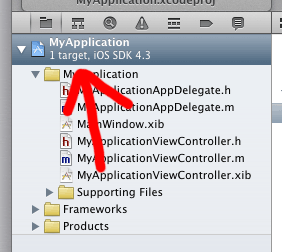
Open the settings for your target by clicking on the blue bar at the very top of the Xcode sidebar:
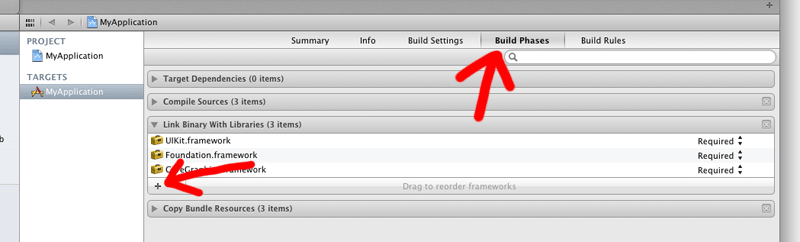
Open the Build Phases tab, expand the box labeled Link Binary With Libraries then click the plus button.
Choose CFNetwork.framework from the list, and click Add:
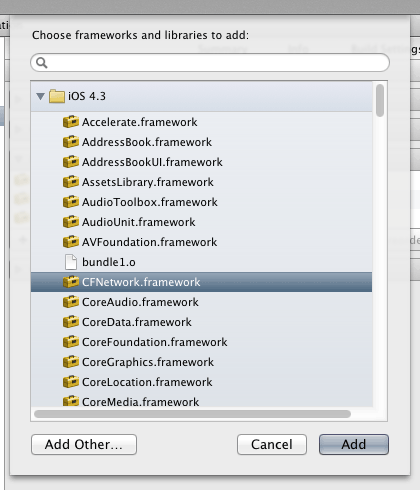
Repeat the last two steps to add the following: SystemConfiguration.framework, MobileCoreServices.framework,CoreGraphics.framework and libz.dylib.
Using ASIHTTPRequest in a Mac OS X project
To use ASIHTTPRequest in a Mac project, you'll need to link against:
- SystemConfiguration.framework + zlib (as above)
- CoreServices.framework
CFNetwork is part of the CoreServices framework on Mac OS X. Unless you are writing a console-based application, your application is probably already setup to link with CoreServices, but if not, simply add CoreServices.framework in the same way as described above.
Building the tests

Most users can skip this part!
The tests that come with ASIHTTPRequest primarily exist for my benefit, so I can check I haven’t broken something when I make changes. You only need to run the tests if you are making changes to ASIHTTPRequest, or want to confirm that something is working as expected.
ASIHTTPRequest uses Gabriel Handford’s wonderful GHUnit framework for running tests.
As of v1.8-50, GHUnit is no longer included as a git submodule. Instead, build scripts automatically download a pre-compiled framework if one does not already exist locally. If you would prefer to build GHUnit yourself, simply grab a copy from GitHub, and drop your built framework in External/GHUnit.
Some of the tests require additional information to run:
- To run the S3 tests, you need to specify your S3 access details in the top of ASIS3RequestTests.m
- To run the proxy tests, you need to specify details of your proxy server, and a PAC file if you want to run the PAC tests. Note that the proxy tests require a proxy server, while all the other tests require that you don't have a proxy server.
Using ASIHTTPRequest in an iOS project的更多相关文章
- 解决 React-Native mac 运行报错 error Failed to build iOS project. We ran "xcodebuild" command but it exited with error code 65. To debug build logs further, consider building your app with Xcode.app, by ope
React-Native 开发的项目,Android 方面没有任何问题,IOS 就是无法跑起来,报错信息如下: mac 10.14.4 xcode 10.2.1 error Failed to bui ...
- iOS - Project 项目
1.项目流程 1.1 分析项目的架构 iOS 常见的几种架构 标签式 Tab Menu 列表式 List Menu 抽屉式 Drawer 瀑布式 Waterfall 跳板式 Springborad 陈 ...
- Step by Step iOS Project In Action - 视图控制器
1. 什么是视图控制器(View Controller) 简单来说,视图控制器用来管理你所有的视图. 他们是你的视图和模型的粘合剂. 如果你做过MVC的Web项目,我想你应该不会对它感到陌生. 2. ...
- ASIHTTPRequest 类库在iOS 7.0中,会有一些报错警告,需要稍作修改
1. if ([inputStream streamStatus] == NSStreamEventErrorOccurred) { 修改成: if ([inputStream streamStatu ...
- iOS通过ASIHTTPRequest提交JSON数据
先验知识——什么是ASIHTTPRequest? 使用iOS SDK中的HTTP网络请求API,相当的复杂,调用很繁琐,ASIHTTPRequest就是一个对CFNetwork API进行了封装,并且 ...
- iOS - ASIHTTPRequest 网络请求
前言 使用 iOS SDK 中的 HTTP 网络请求 API,相当的复杂,调用很繁琐,ASIHTTPRequest 就是一个对 CFNetwork API 进行了封装,并且使用起来非常简单的一套 AP ...
- ASIHTTPREQUEST 文档
http://blog.csdn.net/ysysbaobei/article/details/17026577 Please note that I am no longer working on ...
- 初识IOS,Label控件的应用。
初识IOS,Label控件的应用. // // ViewController.m // Gua.test // // Created by 郭美男 on 16/5/31. // Copyright © ...
- Send Push Notifications to iOS Devices using Xcode 8 and Swift 3, APNs Auth Key
Send Push Notifications to iOS Devices using Xcode 8 and Swift 3 OCT 6, 2016 Push notifications are ...
随机推荐
- HttpRuntime.Cache再学习
摘抄: 可以看到:读缓存,其实是在调用Get方法,而写缓存则是在调用Insert方法的最简单的那个重载版本. 注意了:Add方法也可以将一个对象放入缓存,这个方法有7个参数,而Insert也有一个签名 ...
- KindleEditor insertfile初始化多个
KindEditor.ready(function (K) { var editor = K.editor({ allowFileManager: true }); K('#insertfile'). ...
- OAuth2.0 用户验证授权标准 理解
OAuth2.0是一套标准. 一.问题 这个标准解决了这样的一个问题. 允许用户让第三方应用访问该用户在某一网站上存储的私密的资源(如照片,视频,联系人列表),而无需将用户名和密码提供给第三方应用. ...
- 雅礼集训 Day5 T3 题 解题报告
题 题目背景 由于出题人赶时间所以没办法编故事来作为背景. 题目描述 一开始有\(n\)个苹果,\(m\)个人依次来吃苹果,第\(i\)个人会尝试吃\(u_i\)或\(v_i\)号苹果,具体来说分三种 ...
- 洛谷 P2609 [ZJOI2012]数列 解题报告
P2609 [ZJOI2012]数列 题目描述 小白和小蓝在一起上数学课,下课后老师留了一道作业,求下面这个数列的通项公式: A(0)=0 A(1)=1 A(2i)=A(i) (对于任意 i>0 ...
- python使用openpyxl操作excel
def initExcel(): file_path = "test.xlsx" file = load_workbook(file_path) table = file[&quo ...
- hdu 5072 计数+容斥原理
/* 题意: 给出n个数(n<100000), 每个数都不大于100000,数字不会有重复.现在随意抽出3个,问三个彼此互质 或者 三个彼此不互质的数目有多少. 思路: 这道题反着想,就是三个数 ...
- C/S模式和BS模式是什么?
C/S是Client/Server,即客户端/服务器:B/S是Browser/Server,即浏览器/服务器的意思. C/S (Client/Server)结构,即大家熟知的客户机和服务器结构.它 ...
- Andriod布局
布局[ViewGroup] 像素单位的变化:是用dip,而不是px,主要用于宽高的设置 在Android中支持的描述大小区域的类型有以下几种. px(pixels)——像素:不同的设备显示效果相同 ...
- 配置wpa_supplicant调试wifi linux下命令行连接wifi
调试wpa_supplicant先读一下对应的README.txt文件.根据README.txt修改编译配置. wpa_supplicant需要打开以下开关进行编译CONFIG_DRIVER_NL80 ...