
sench touch 页面跳转
下面是我做的一个简单的登录页面登录成功后跳转页面
首页要在app.js 里面添加
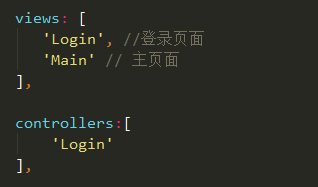
1.视图层 登录页面
 Ext.define('MyApp.view.Login', {

     extend: 'Ext.form.Panel',

     requires:['Ext.Img','Ext.field.Password'],

     alias: 'widget.Login',

     xtype: 'Login',

     config: {

         fullscreen: true,

         cls:'Login',

         items: [

             {

                 margin: 20,

                 html:'<p class="login-title">登录</p>'

             },

             {

                 margin: '20px',

                 style: 'border-bottom:1px solid #f5f5f5;border-radius:0;color:#fff;',

                 xtype: 'textfield',  //文本框

                 name: 'username',

                 id:"username",

                 placeHolder: '账号',

                 required: true,  //必填字段

                 ClearIcon: true  //输入内容后文本框后面会出现一个清空按钮

             },

             {

                 margin: '20px',

                 style: 'border-bottom:1px solid #f5f5f5;border-radius:0;color:#fff;',

                 xtype: 'passwordfield',  //密码文本框

                 name: 'password',

                 id:"password",

                 placeHolder: '密码',

                 required: true,

                 ClearIcon: true

             },

             {

                 margin: '20px',

                 html:'<div class="remPassword"><input id="remPassword" type="checkbox"><label for="remPassword">记住密码</label></div>'

             },

             {

                 xtype: 'button',//添加一个登录按钮,

                 text: '登录',

                 cls:'LoginBtn'

             }

         ]

     }

 });
2.controller login
 Ext.define('MyApp.controller.Login', {

     extend: 'Ext.app.Controller',

     config: {

         refs: {

             'addButton': 'Login button'  //找到按钮

         },

         control: {

             addButton: {

                 tap: 'loginBtn'  //为按钮添加方法

             }

         }

     },

     loginBtn:function(){

         var username = Ext.getCmp('username').getValue();

         var password = Ext.getCmp('password').getValue();

         if (username === "") {

             Ext.Msg.alert("提示", "用户名不许为空!");

             return;

         }

         if (password === "") {

             Ext.Msg.alert("提示", "密码不许为空!");

             return;

         }

         Ext.Msg.alert("提示", username + " 登录成功!");

         Ext.Viewport.setActiveItem(

             'main', {  //main 为要跳转的页面

                 type : 'slide',

                 direction : 'right'

             });

     }

 });
3.登录按钮 登录成功后跳转到的页面 视图层 首页
 Ext.define('MyApp.view.Main', {

     extend: 'Ext.tab.Panel',

     xtype: 'main',

     requires: [

         'Ext.tab.Panel'

     ],

     config: {

         tabBarPosition: 'bottom',

         items: [

             {

                 title: '首页',

                 iconCls: 'home',

                 items:[

                     {

                         html:'哈哈'

                     },

                     {

                         html:'哈哈'

                     },

                     {

                         html:'哈哈'

                     }

                 ]

             },

             {

                 title: '搜索',

                 iconCls: 'search',

                 html:'搜索'

             },

             {

                 title: '商城',

                 iconCls: 'add',

                 html:'分类'

             },

             {

                 title: '我的',

                 iconCls: 'user',

                 html:'我的'

             }

         ]

     }

 });
sench touch 页面跳转的更多相关文章
- [Xcode 实际操作]九、实用进阶-(23)多个Storyboard故事板中的页面跳转
目录:[Swift]Xcode实际操作 本文将演示多个Storyboard故事板中的页面跳转. 使用快捷键[Command]+[N]创建一个新的故事板文件. (在项目文件夹[DemoApp]上点击鼠标 ...
- [Xcode 实际操作]九、实用进阶-(24)使用Segue(页面的跳转连接)进行页面跳转并传递参数
目录:[Swift]Xcode实际操作 本文将演示使用Segue(页面的跳转连接)进行页面跳转并传递参数. 参照结合:[Xcode10 实际操作]九.实用进阶-(23)多个Storyboard故事板中 ...
- JSP页面跳转的几种实现方法
使用href超链接标记 客户端跳转 使用JavaScript 客户端跳转 提交表单 客户端跳转 使用response ...
- web设计页面跳转的方法
一.asp.net c# 打开新页面或页面跳转 1. 最常用的页面跳转(原窗口被替代):Response.Redirect("newpage.aspx"); 2. 利用url地址打 ...
- 前端开发--ppt展示页面跳转逻辑实现
1. 工程地址:https://github.com/digitalClass/web_page 网站发布地址: http://115.28.30.25:8029/ 2. 今天遇到一个小问题, 同组的 ...
- Html中设置访问页面不在后进行其他页面跳转
Html中设置访问页面不在后进行其他页面跳转 <!DOCTYPE html PUBLIC "-//W3C//DTD XHTML 1.0 Transitional//EN" & ...
- JS打开新页面跳转
有时候使用js进行页面跳转,想使用 a 标签中 target="_blank" 形式,跳转打开一个新的页面. 可以使用以下脚本,创建一个 a标签,然后模拟点击操作. 代码如下: ...
- web页面跳转的几种方式
可用客户端触发或服务端触发的方式来实现页面跳转. 客户端触发 方式一:使用Javascript 利用window.location对象的href属性.assign()方法或replace()方法来实现 ...
- Ajax发送POST请求SpringMVC页面跳转失败
问题描述:因为使用的是SpringMVC框架,所以想使用ModelAndView进行页面跳转.思路是发送POST请求,然后controller层中直接返回相应ModelAndView,但是这种方法不可 ...
随机推荐
- 利用 Windows API Code Pack 修改音乐的 ID3 信息
朋友由于抠门 SD 卡买小了,结果音乐太多放不下,又不舍得再买新卡,不得已决定重新转码,把音乐码率压低一点,牺牲点音质来换空间(用某些人的话说,反正不是搞音乐的,听不出差别)… 结果千千静听(百度音乐 ...
- 详解 Java 中的三种代理模式
代理模式 代理(Proxy)是一种设计模式,提供了对目标对象另外的访问方式;即通过代理对象访问目标对象.这样做的好处是:可以在目标对象实现的基础上,增强额外的功能操作,即扩展目标对象的功能. 这里使用 ...
- element-ui MessageBox的bug
通过 use引用messageBox有bug Vue.use(MessageBox) 页面一开始会有一个弹窗,内容空白 Vue.component(MessageBox.name, MessageBo ...
- mysql inner jion多表查询
select vtiger_users.id, vtiger_users.user_name, vtiger_role.rolename FROM vtiger_users inner join vt ...
- 背包的一些idea
题解: 给出n个物品,每次能使用l-r之间的物品,问能不能表示出k,m次询问 k<=100,m,n=1e5 想了线段树分治 发现是k^2(n+m)logn claris告诉我可以直接分治 我们对 ...
- IIS:另一个程序正在使用此文件进程无法访问。
启动网站时,遇到这个错误,一般是端口已经被占用,更换一个空闲端口即可. 通过以下命令可查询 根据最后一列的数字在任务管理器中可查看被哪个程序占用了
- 解决 js setTimeout 传递带参数的函数无效果
最近 js 用到 setTimeout 递归调用 刷新进度 setTimeout ("getProgress(name,type)", 3000) ; 发现getProgres ...
- Linux系统数据共享-NFS服务
转载:http://www.cnblogs.com/mchina/archive/2013/01/03/2840040.html 一.NFS服务简介 NFS 是Network File System的 ...
- java添加水印等比缩放
/** * 图片天加文字水印(默认缩小scale) * 备注: * Positions.BOTTOM_RIGHT 表示水印位置 * * @param filePath 原图路径 * @param ne ...
- 用Eclipse上传项目到github
1.安装EGit插件 点击菜单栏help->Eclipse Marketplace 2.配置Git 这里是配置相关账户信息 3.把项目提交到本地仓库 右键项目->Team->Shar ...