
Centos7离线安装redis
1.1 下载、上传、解压redis4.0.11
下载地址:http://download.redis.io/releases/redis-4.0.11.tar.gz
下载后上传到服务器上,并解压:
备注:这里是上传压缩包到/opt/redis目录下。
[root@CDH-143 redis]# tar -zxvf redis-4.0.11.tar.gz

redis-4.0.11/

redis-4.0.11/.gitignore

......

redis-4.0.11/utils/whatisdoing.sh

[root@CDH-143 redis]# ls

redis-4.0.11 redis-4.0.11.tar.gz

[root@CDH-143 redis]# cd redis-4.0.11/

[root@CDH-143 redis-4.0.11]# ls

00-RELEASENOTES CONTRIBUTING deps Makefile README.md runtest runtest-sentinel src utils

BUGS COPYING INSTALL MANIFESTO redis.conf runtest-cluster sentinel.conf tests
1.2 安装gcc
1)如果执行gcc –version出现以下信息,表示已经安装过gcc,可以跳过该步骤:
[boco@CDH-143 spark_job_monitor]$ gcc --version

gcc (GCC) 4.8.5 20150623 (Red Hat 4.8.5-4)

Copyright (C) 2015 Free Software Foundation, Inc.

This is free software; see the source for copying conditions. There is NO

warranty; not even for MERCHANTABILITY or FITNESS FOR A PARTICULAR PURPOSE.

[root@CDH-143 redis]#
2)否则,如果执行make命令报下面错误,说明系统上没有安装C语言环境,需要安装,在linux系统上的C环境是gcc,因此需要安装gcc。
make[3]: gcc: Command not found

make[3]: *** [net.o] Error 127

make[3]: Leaving directory `/home/work/redis/deps/hiredis'

make[2]: *** [hiredis] Error 2

make[2]: Leaving directory `/home/work/redis/deps'

make[1]: [persist-settings] Error 2 (ignored)

CC adlist.o

/bin/sh: cc: command not found

make[1]: *** [adlist.o] Error 127

make[1]: Leaving directory `/home/work/redis/src'

make: *** [all] Error 2
安装gcc,
方式1:从centos7的系统安装镜像中提取:解压镜像文件,进入"Packages"目录,取出如下图所示rpm包
方式2:访问镜像网站获取:http://mirrors.aliyun.com/centos/7/os/x86_64/Packages/ ,然后将其上传
从里面packages找出来,这些是从网上整理出来的(15个文件不要漏掉!!)
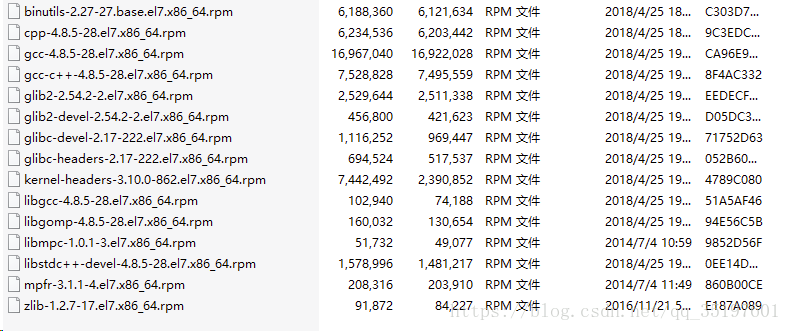
解压gcc.zip,编译安装
[root@CDH-143 soft]# unzip gcc.zip

[root@CDH-143 soft]# cd gcc

[root@CDH-143 soft]# rpm -Uvh *.rpm --nodeps --force
查看gcc版本,出现以下信息,表示安装成功
[boco@CDH-143 spark_job_monitor]$ gcc --version

gcc (GCC) 4.8.5 20150623 (Red Hat 4.8.5-4)

Copyright (C) 2015 Free Software Foundation, Inc.

This is free software; see the source for copying conditions. There is NO

warranty; not even for MERCHANTABILITY or FITNESS FOR A PARTICULAR PURPOSE.

[root@CDH-143 redis]#
1.3 编译安装redis
[root@CDH-143 redis-4.0.11]# make MALLOC=libc

cd src && make all

。。。。。。。。

CC rax.o

LINK redis-server

INSTALL redis-sentinel

CC redis-cli.o

LINK redis-cli

CC redis-benchmark.o

LINK redis-benchmark

INSTALL redis-check-rdb

INSTALL redis-check-aof

Hint: It's a good idea to run 'make test' ;)

make[1]: Leaving directory `/opt/redis/redis-4.0.11/src'

[root@CDH-143 redis-4.0.11]#

[root@CDH-143 redis-4.0.11]# cd src && make install

CC Makefile.dep

Hint: It's a good idea to run 'make test' ;)

INSTALL install

INSTALL install

INSTALL install

INSTALL install

INSTALL install
编译安装成功。
1.4 启动redis
[root@CDH-143 src]# ./redis-server

24496:C 11 Mar 13:49:56.298 # oO0OoO0OoO0Oo Redis is starting oO0OoO0OoO0Oo

24496:C 11 Mar 13:49:56.298 # Redis version=4.0.11, bits=64, commit=00000000, modified=0, pid=24496, just started

24496:C 11 Mar 13:49:56.298 # Warning: no config file specified, using the default config. In order to specify a config file use ./redis-server /path/to/redis.conf
                _._

           _.-``__ ''-._

      _.-``    `.  `_.  ''-._           Redis 4.0.11 (00000000/0) 64 bit

  .-`` .-```.  ```\/    _.,_ ''-._

 (    '      ,       .-`  | `,    )     Running in standalone mode

 |`-._`-...-` __...-.``-._|'` _.-'|     Port: 6379

 |    `-._   `._    /     _.-'    |     PID: 18685

  `-._    `-._  `-./  _.-'    _.-'

 |`-._`-._    `-.__.-'    _.-'_.-'|

 |    `-._`-._        _.-'_.-'    |           http://redis.io

  `-._    `-._`-.__.-'_.-'    _.-'

 |`-._`-._    `-.__.-'    _.-'_.-'|

 |    `-._`-._        _.-'_.-'    |

  `-._    `-._`-.__.-'_.-'    _.-'

      `-._    `-.__.-'    _.-'

          `-._        _.-'

              `-.__.-'
24496:M 11 Mar 13:49:56.302 # Server initialized 24496:M 11 Mar 13:49:56.303 # WARNING overcommit_memory is set to 0! Background save may fail under low memory condition. To fix this issue add 'vm.overcommit_memory = 1' to /etc/sysctl.conf and then reboot or run the command 'sysctl vm.overcommit_memory=1' for this to take effect. 24496:M 11 Mar 13:49:56.303 # WARNING you have Transparent Huge Pages (THP) support enabled in your kernel. This will create latency and memory usage issues with Redis. To fix this issue run the command 'echo never > /sys/kernel/mm/transparent_hugepage/enabled' as root, and add it to your /etc/rc.local in order to retain the setting after a reboot. Redis must be restarted after THP is disabled. 24496:M 11 Mar 13:49:56.303 * Ready to accept connections
启动成功。
以下为设置redis开机自启,并且添加到系统服务
1.4.1 复制redis配置文件
[root@CDH-143 src]# mkdir /etc/redis

[root@CDH-143 src]# cd ..

[root@CDH-143 redis-4.0.11]# ls

00-RELEASENOTES CONTRIBUTING deps Makefile README.md runtest runtest-sentinel src utils

BUGS COPYING INSTALL MANIFESTO redis.conf runtest-cluster sentinel.conf tests

[root@CDH-143 redis-4.0.11]# cp redis.conf /etc/redis/6379.conf
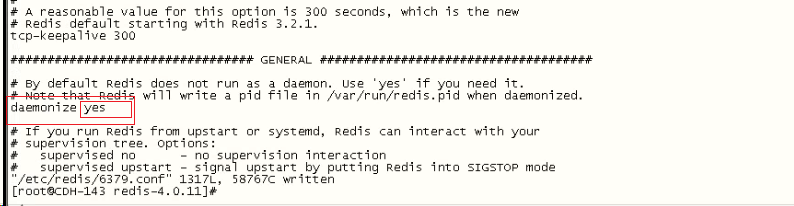
修改redis启动为后台启动:
[root@CDH-143 redis-4.0.11]# vi /etc/redis/6379.conf
1.4.2 将启动文件拷贝到init.d中
[root@CDH-143 redis-4.0.11]# cp utils/redis_init_script /etc/init.d/redisd
1.4.3 修改启动脚本参数
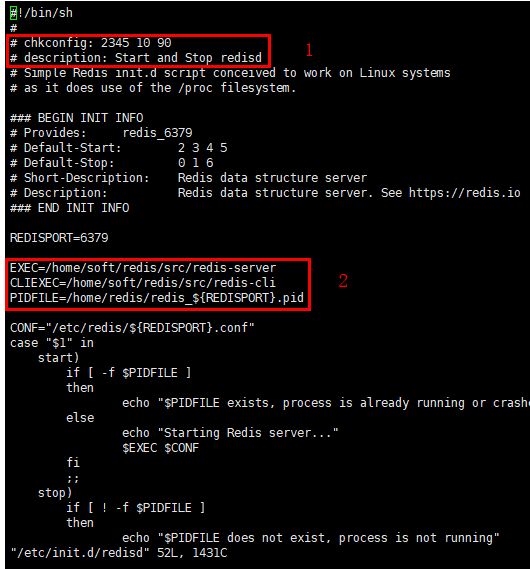
[root@CDH-143 redis-4.0.11]# vi /etc/init.d/redisd
添加以下代码,:wq保存退出
添加
# chkconfig: 2345 10 90

# description: Start and Stop redisd
修改:
EXEC=/opt/redis/redis-4.0.11/src/redis-server

CLIEXEC=/opt/redis/redis-4.0.11/src/redis-cli

PIDFILE=/opt/redis/redis-4.0.11/redis_${REDISPORT}.pid
1.4.4 增加脚本执行权限
[root@CDH-143 redis-4.0.11]# chmod +x /etc/init.d/redisd
1.4.5 增加系统服务
[root@CDH-143 redis-4.0.11]# chkconfig --add redisd

[root@CDH-143 redis-4.0.11]# chkconfig --list redisd

Note: This output shows SysV services only and does not include native

systemd services. SysV configuration data might be overridden by native

systemd configuration.

If you want to list systemd services use 'systemctl list-unit-files'.

To see services enabled on particular target use

'systemctl list-dependencies [target]'.

redisd 0:off 1:off 2:on 3:on 4:on 5:on 6:off

[root@CDH-143 redis-4.0.11]#
1.4.6 启动redis服务测试
[root@CDH-143 redis-4.0.11]# service redisd start

Starting Redis server...

9084:C 11 Mar 15:23:36.469 # oO0OoO0OoO0Oo Redis is starting oO0OoO0OoO0Oo

9084:C 11 Mar 15:23:36.469 # Redis version=4.0.11, bits=64, commit=00000000, modified=0, pid=9084, just started

9084:C 11 Mar 15:23:36.469 # Configuration loaded

[root@CDH-143 redis-4.0.11]#

[root@CDH-143 redis-4.0.11]# ps -aux | grep redis

root 3575 0.0 0.0 38260 2140 ? Ssl 15:09 0:00 /opt/redis/redis-4.0.11/src/redis-server 127.0.0.1:6379

root 8870 0.0 0.0 112660 956 pts/2 S+ 15:22 0:00 grep --color=auto redis
配置完毕,重启服务器,测试是否成功
Centos7离线安装redis的更多相关文章
- 离线安装redis集群
Step0:redis集群组件需求 Step1:离线安装ruby Step2:离线安装rubygems Step3:安装rubygems的 redis api Step4:离线安装tcl 8.6 St ...
- Linux CentOs7 下安装 redis
Linux CentOs7 下安装 redis 请将以下命令放入linux命令行中运行 如果安装过程前没有安装GCC请先安装 命令如下 $ yum install gcc-c++ $ wget ht ...
- CentOS7/RHEL7安装Redis步骤详解
CentOS7/RHEL7安装Redis步骤详解 CentOS7/RHEL7安装Redis还是头一次测试安装了,因为centos7升级之后与centos6有比较大的区别了,下面我们就一起来看看Cent ...
- CentOS7离线安装mysql5.7
下载mysql5.7,系统选择redhat,版本选择RHEL7,下载RPM Bundle后得到一个tar文件.这里得到文件mysql-5.7.25-1.el7.x86_64.rpm-bundle.ta ...
- Centos7下安装redis实战(单机版以及集群)
一.背景 因项目需要,要引入redis做缓存,就在centos7下亲自安装了一遍redis,刚好趁着这个机会就来把redis的概念以及单机版和集群版redis安装步骤记录下来,在此和大家一起分享. 二 ...
- Centos7下安装redis并能使得外网访问
一.安装脚本 #!/bin/bash #FileName: install_redis_centos7.sh #Date: #Author: LiLe #Contact: @qq.com #Versi ...
- CentOS7 离线安装mysql-5.7.16
CentOS7 离线安装mysql-5.7.16 1 . 安装新版mysql前,需将系统自带的mariadb-lib卸载 [root@slave mytmp]# rpm -qa|grep mariad ...
- CentOS7离线安装Nginx(详细安装过程)
CentOS7离线安装Nginx(详细安装过程) 1.安装gcc.g++ 下载好所需的文件后上传至服务器(下载地址:https://download.csdn.net/download/a729360 ...
- CentOS7离线安装MySQL8.0
CentOS7离线安装MySQL8.0 卸载软件 rpm -e --nodeps 要卸载的软件包 root@jacky zookeeper]# rpm -e --nodeps java-1.6.0-o ...
随机推荐
- python---初始sqlite3
***sqllite不需要单独安装,python2.5以上自带的! ***官方中文文档:https://docs.python.org/2/library/sqlite3.html ***SQLite ...
- 初识(试)LoadRunner
一.安装和破解 1.傻瓜式安装.[注意:最好不要默认路径安装,因为64位的win7系统安装LR11时,会默认安装到“Program files (x86)”的目录中,该目录名称有空格,会导致录制“We ...
- 归并排序(Java实现)
package sort; public class MergeSort { static void msort(int []a,int start,int end){ int mid=(start+ ...
- ASP.NET MVC 路由篇二
轉載 http://www.cnblogs.com/yaozhenfa/p/asp_net_mvc_route_2.html 7.解决与物理路径的冲突 当发送一个请求至ASP.NET MVC时,其实会 ...
- Spring Security(15)——权限鉴定结构 RoleVoter
http://www.cnblogs.com/fenglan/p/5913432.html
- 环境变量误删path找回方法与mysql基础命令
环境变量误删path找回方法用户path:%USERPROFILE%\AppData\Local\Microsoft\WindowsAppsWin+R 输入regedit 打开注册表(开始-运行里输入 ...
- 3dsmax不同版本 pyside qt UI 设置max窗口为父窗口的方法
3dsmax不同版本 pyside qt widget 设置 max 窗口为父窗口的方法 前言: 3dsmax 在 2014 extension 之后开始集成 Python 和 PySide,但是在版 ...
- 正则表达式在python中的简单使用
正则表达式独立与编程语言,基本上所有的编程语言都实现了正则表达式的相关操作.在Python中正则表达式的表现为re模块: import re 其操作有三个方法: my_string = "h ...
- bootstrap页面sidebar
function change_active(select_item){ $('.mail-navigation').find('li').each(function(){ $(this).remov ...
- shell编程第二天