
neo1973 audio subsystem
fhttp://wiki.openmoko.org/wiki/Neo_1973_audio_subsystem
using Bluetooth headset with GSM NOTE none of this works with GTA02. Neo mode has disappeared, and none of the state files are GTA02 compatible.

Headset detection via software
- microphone path
- input: from bluetooth via PCM interface to wolfson
- wolfson: DAC
- wolfson routes analog signal to MONO1/MONO2
- arrives at GSM Modem input MICIP/MICIN
- speaker path
- input: GSM Modem attached to wolfson RXN/RXP
- wolfson: ADC
- wolfson: routes digital signal to PCM
- arrives on bluetooth chip via PCM
Internal Codec Route
Neo Mode is GSM Bluetooth Amp Mode is Off
- audio path BT -> GSM
- Vx DAC
- Mono Voice Volume
- Mono Mixer Voice Playback Switch
- Mono Volume
- Mono 2 Mux [Inverted Mono 1]
- audio path GSM -> BT
- RXP/RXN
- Rx Mixer [RXP - RXN]
- ALC Mixer Rx
- Left PGA
- Capture Mixer Mux [PGA]
- Capture Left Mixer [Analogue Mix Left]
- Left ADC
Driver Status
Should be support by ASoC 0.13.3
Example of how to setup PCM->BT link.
http://opensource.wolfsonmicro.com/~gg/bluetooth-pcm/bluetooth_pcm.c
asound.state
http://opensource.wolfsonmicro.com/~gg/neo1973/gsmbluetooth.state
NOTE this will not work with GTA02, as the control numbers have changed Here [1] is a modified version that is GTA02 compatible, But lacks the Neo Mode settings which disappeared on GTA02, and does not seem to work.
The state file above does not work for me. I created one gsm_headset.txt that is working for audio playback on the freerunner. I will be updating that file as I get the mic routing working.
To use this state file there are a number of steps
Turn on bluetooth
Pair the headset ( this only needs to be done once ).
Start the audio subsystem and connect the headset http://wiki.bluez.org/wiki/HOWTO/AudioDevices or use my script BtHeadset.py
If you don't hear static in your headset at this point you may need to reboot.
Start the phone call
alsactl restore 0 -f gsm_headset.txt
I wrote a script to stop the headset too BtHeadsetDetach.py
The above did not work for me; for some reason, the hifi DAC interface must be exercised once before playing. I have hacked BtHeadset.py to make FR-BTAudio. When paired with GSMBLUETOOTH.txt I get 2-way high quality audio.
I did a lot of this debugging using w8753_dump which is a quick and dirty hack, but quite useful on a large text window.
In the center of the Neo1973 audio subsystem is the WM8753 (the "Wolfson Codec"), which implements record (ADCs), playback (DACs), and signal mixing. On the stereo output is the LM4857 amplifier, which drives the stereo speakers, the mono earpiece and the headphones. Sound from and to GSM is received from and sent to the GSM modem via analog connections. There's a digital mono interface for sound from and to the Bluetooth chip.
ALSA Channels
The channel numbers shown here are for the Freerunner, not the 1973.
Note: The ALSA channel numbers changed, probably during this change which is just after the release of 2.6.34:
commit d4b8fdb48cf1596e99f2c5cce58ef37bf94221b2

Author: Lars-Peter Clausen <lars@metafoo.de>

Date:   Sat Oct 17 15:02:22 2009 +0200

    Merge gta01 and gta02 sound soc driver.
See the table below for old & new numbers. At the moment, all of the diagrams reflect the old control numbers. (Most of the diagrams are not SVG so it is difficult to fix this!)
Diagrams
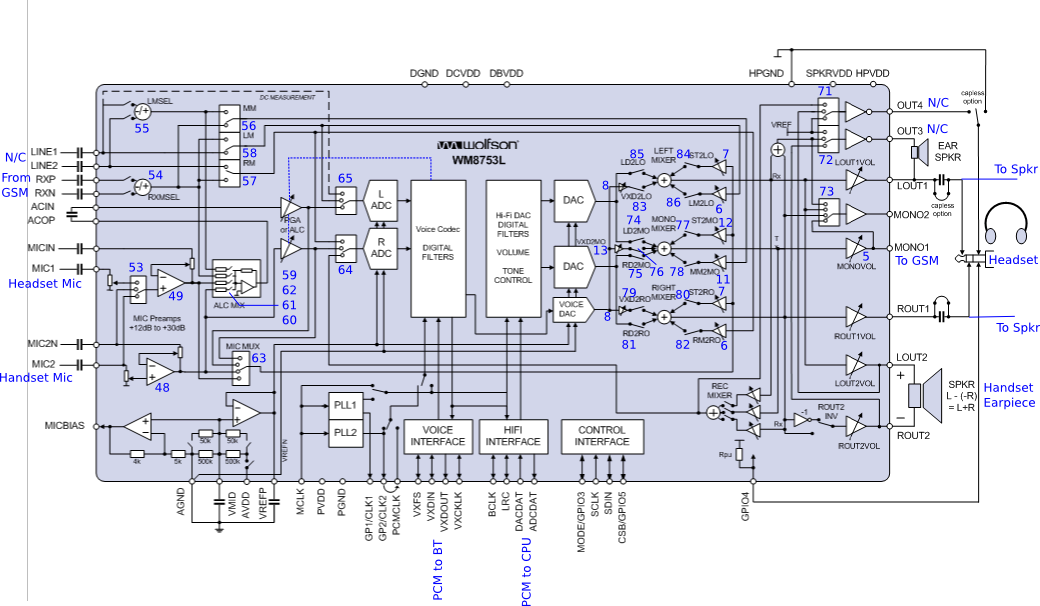 A way more pretty diagram is here
Png version with ALSA control names printed over (these are alsa controls like found in statefiles or amixer commands, alsamixer removes trailing "Playback Volume" and such where it sees fit) Inkscape source: 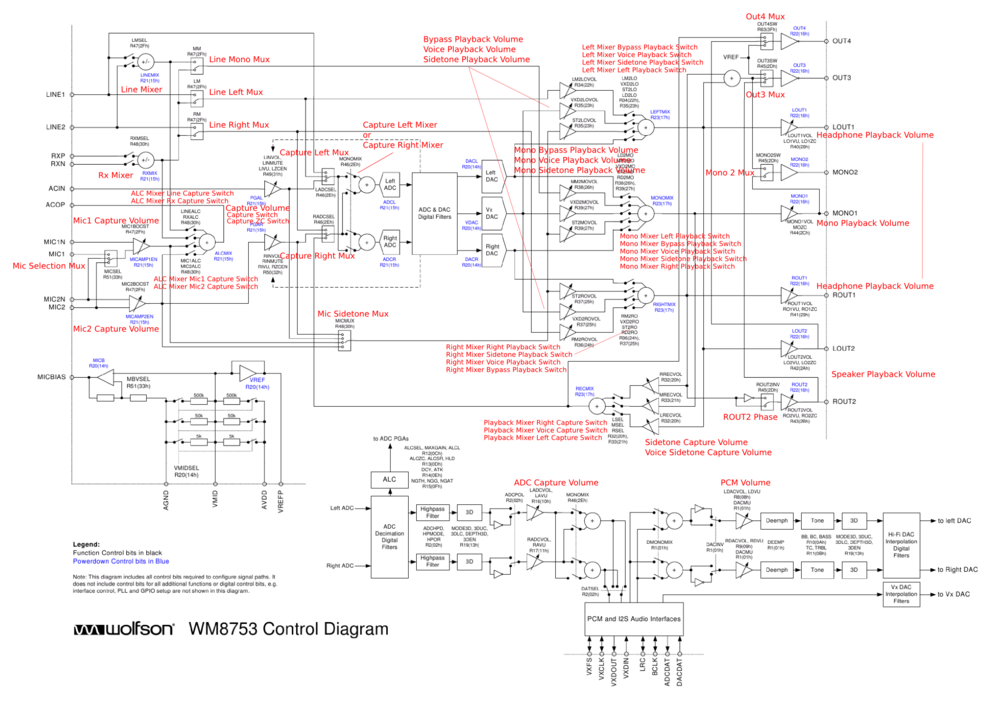

Best of both worlds, Png with the ALSA control names *and* the numid's {in blue}: 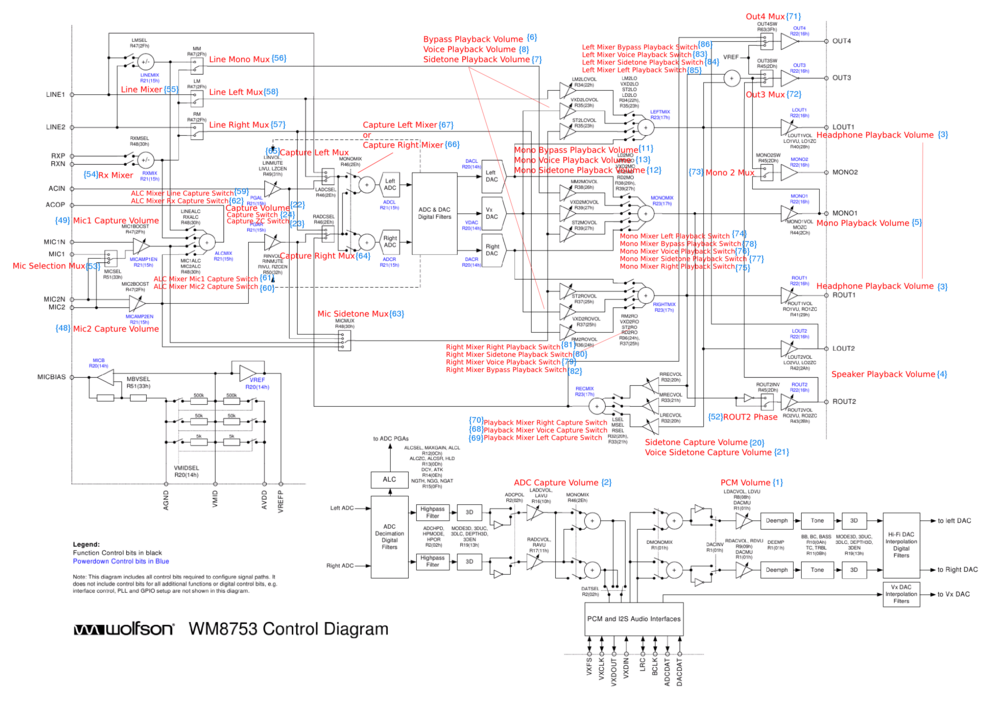
List of controls
[[Names for aliases in new driver. "NEW"=recommended, "new"=suggested. No kernel uses the NEW/new names at least as of 2010-08-03. Update if some great renaming really happens.]]
(columns are sortable)
| Name | Old control number | post-2.6.34 control number | command or recommended/suggested name |
|---|---|---|---|
| PCM Volume | 1 | 1 | |
| ADC Capture Volume | 2 | 2 | |
| Headphone Playback Volume | 3 | 3 | NEW:'Speaker Playback Volume' |
| Speaker Playback Volume | 4 | 4 | NEW:'Earpiece Playback Volume' |
| Mono Playback Volume | 5 | 5 | NEW:'GSM Mic Capture Volume' |
| Bypass Playback Volume | 6 | 6 | new:'GSM Play Playback Volume' |
| Sidetone Playback Volume | 7 | 7 | new:'Mic Sidetone Playback Volume' |
| Voice Playback Volume | 8 | 8 | new:'BT-Mic PB Playback Volume' |
| Headphone Playback ZC Switch | 9 | 9 | NEW:'Speaker Playback ZC Switch' |
| Speaker Playback ZC Switch | 10 | 10 | NEW:'Earpiece Playback ZC Switch' |
| Mono Bypass Playback Volume | 11 | 11 | new:'GSMout2GSMmic feedback! (deprecated)' |
| Mono Sidetone Playback Volume | 12 | 12 | NEW:GSM Mic Mixer Capture Volume' |
| Mono Voice Playback Volume | 13 | 13 | NEW:'GSM BTmic Capture Volume' |
| Mono Playback ZC Switch | 14 | 14 | NEW:'GSM Mic Capture ZC Switch' |
| Bass Boost | 15 | 15 | |
| Bass Filter | 16 | 16 | |
| Bass Volume | 17 | 17 | |
| Treble Volume | 18 | 18 | |
| Treble Cut-off | 19 | 19 | |
| Sidetone Capture Volume | 20 | 20 | |
| Voice Sidetone Capture Volume | 21 | 21 | |
| Capture Volume | 22 | 22 | |
| Capture ZC Switch | 23 | 23 | |
| Capture Switch | 24 | 24 | |
| Capture Filter Select | 25 | 25 | |
| Capture Filter Cut-off | 26 | 26 | |
| Capture Filter Switch | 27 | 27 | |
| ALC Capture Target Volume | 28 | 28 | |
| ALC Capture Max Volume | 29 | 29 | |
| ALC Capture Function | 30 | 30 | |
| ALC Capture ZC Switch | 31 | 31 | |
| ALC Capture Hold Time | 32 | 32 | |
| ALC Capture Decay Time | 33 | 33 | |
| ALC Capture Attack Time | 34 | 34 | |
| ALC Capture NG Threshold | 35 | 35 | |
| ALC Capture NG Type | 36 | 36 | |
| ALC Capture NG Switch | 37 | 37 | |
| 3D Function | 38 | 38 | |
| 3D Upper Cut-off | 39 | 39 | |
| 3D Lower Cut-off | 40 | 40 | |
| 3D Volume | 41 | 41 | |
| 3D Switch | 42 | 42 | |
| Capture 6dB Attenuate | 43 | 43 | |
| Playback 6dB Attenuate | 44 | 44 | |
| De-emphasis | 45 | 45 | |
| Playback Mono Mix | 46 | 46 | |
| Playback Phase | 47 | 47 | |
| Mic2 Capture Volume | 48 | 48 | new:'int.MIC Gain Capture Volume' |
| Mic1 Capture Volume | 49 | 49 | new:'HS-Mic Gain Capture Volume' |
| DAI Mode | 50 | 50 | |
| ADC Data Select | 51 | 51 | |
| ROUT2 Phase | 52 | 52 | |
| Mic Selection Mux | 53 | 60 | |
| Rx Mixer | 54 | 61 | |
| Line Mixer | 55 | 62 | |
| Line Mono Mux | 56 | 63 | |
| Line Right Mux | 57 | 64 | new:'Line/GSM Right Mux' |
| Line Left Mux | 58 | 65 | new:'Line/GSM Left Mux' |
| ALC Mixer Line Capture Switch | 59 | 66 | |
| ALC Mixer Mic2 Capture Switch | 60 | 67 | new:s/Mic2/int.Mic/ |
| ALC Mixer Mic1 Capture Switch | 61 | 68 | new:s/Mic1/HS-Mic/ |
| ALC Mixer Rx Capture Switch | 62 | 69 | new:s/Rx/GSM-PB/ |
| Mic Sidetone Mux | 63 | 70 | new:'Mic Path Mux' |
| Capture Right Mux | 64 | 71 | |
| Capture Left Mux | 65 | 72 | |
| Capture Right Mixer | 66 | 73 | |
| Capture Left Mixer | 67 | 74 | |
| Playback Mixer Voice Capture Switch | 68 | 75 | |
| Playback Mixer Left Capture Switch | 69 | 76 | |
| Playback Mixer Right Capture Switch | 70 | 77 | |
| Out4 Mux | 71 | 78 | |
| Out3 Mux | 72 | 79 | |
| Mono 2 Mux | 73 | 80 | new:'GSM Mic(Mono2) Mux' |
| Mono Mixer Left Playback Switch | 74 | 81 | new:s/Mono/GSM Mic/ |
| Mono Mixer Right Playback Switch | 75 | 82 | new:s/Mono/GSM Mic/ |
| Mono Mixer Voice Playback Switch | 76 | 83 | new:s/Mono/GSM Mic/ |
| Mono Mixer Sidetone Playback Switch | 77 | 84 | new:s/Mono/GSM Mic/ |
| Mono Mixer Bypass Playback Switch | 78 | 85 | new:s/Mono/GSM Mic/ |
| Right Mixer Voice Playback Switch | 79 | 86 | |
| Right Mixer Sidetone Playback Switch | 80 | 87 | |
| Right Mixer Right Playback Switch | 81 | 88 | |
| Right Mixer Bypass Playback Switch | 82 | 89 | |
| Left Mixer Voice Playback Switch | 83 | 90 | |
| Left Mixer Sidetone Playback Switch | 84 | 91 | |
| Left Mixer Left Playback Switch | 85 | 92 | |
| Left Mixer Bypass Playback Switch | 86 | 93 | |
| Stereo Out Switch | 87 | 53 | |
| GSM Line Out Switch | 88 | 54 | |
| GSM Line In Switch | 89 | 55 | |
| Headset Mic Switch | 90 | 56 | |
| Handset Mic Switch | 91 | 57 | new:s/Handset Mic/Int.Mic/ |
| Handset Spk Switch | 92 | 58 | new:'DAPM Earpiece Switch' |
| Amp State Switch | 93 | absent | |
| Amp Spk Switch | 94 | 59 |
*) As LOUT1/ROUT1 drives both speaker/sounder and headset, it is

projected to have two dedicated controls for this.

:numid=3,name='Headphone Playback Volume' will be in effect when

#94 'Amp Spk Switch'=true (speaker mode)

A new control

:numid=95,name='Headphone Playback Volume' will be in effect

when #94 'Amp Spk Switch'=false (headphone mode)

Two new controls

:numid=96,name='Headphone Playback Switch'

:numid=97,name='Speaker Playback Switch'

act as Mute switches:

#96 off->on implies: #97 ->off, #94 ->false

#97 off->on implies: #96 ->off, #94 ->true

RFC:

#93 and #87 are defined as (#96==on) or (#97==on), i.e. if both

are muted, amp is shut down. We need to test if we have to keep

special timings and sequence on enabling/disabling these

controls #87 and #93, e.g. to avoid clicking sounds
Four variants of using available Digital Audio Interfaces and DACs/ADC, these correspond to the "DAI Mode" ALSA control values:
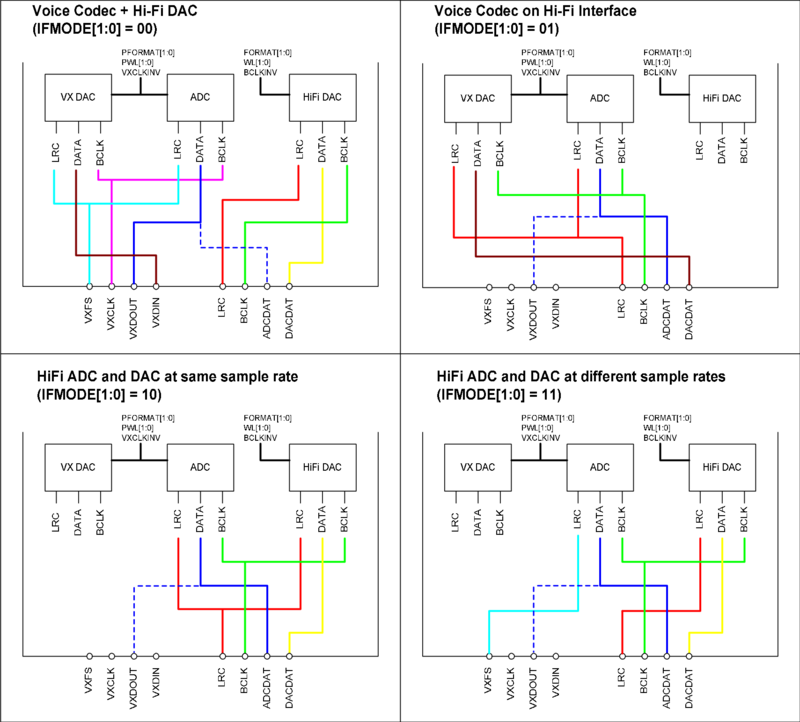
Keep in mind: left interface (VXxxx) is connected to BlueTooth,
right interface (LRC, BCLK, xxxDAT) is connected to SoC (CPU).
So mode "11" at least seems isn't useful at all for the way Neo HW is
built. Mode "10" is suited for (Stereo/mono) output and recording for
digital world, whereas Mode "00" is needed for GSM<->BT operation
(calls via BT-headset) only.
BT-VoIP-calls and BT-stereo-headphones playback are done via
direct USB-connection SoC<->BT in a very usual standard-linux-way,
and therefor need no statefile or any other setup of mixer.
We are still wondering what use Mode "01" might have, other than
analog mixed mono output (which could as well be done at digital side by
feeding L/R with same data)
- --MMlosh
10:15, 5 April 2009 (GMT) Mono signal has separate volume control for
stereo (control #8) and mono (control #13) output. This might be useful
when mixing PCM (VoIP call / music) output into GSM call and playing it
locally (and you can still have different volume levels)
Phase0 Quick Start
In my experience this works but I have to fiddle with the connection a
bit before I get stereo output. The audio also comes out both the
speaker and headphones.
alsactl -f /etc/stereoout.state restore

madplay myfavoritesong.mp3
Another simple test (assuming you have USB Networking configured) is to listen to a radio stream:
wget -O - http://radioparadise.steadyhost.com:8050 | madplay -
If for some reason you're missing stereoout.state, try getting a similar copy (a couple of volume levels are different is all)
wget http://opensource.wolfsonmicro.com/~gg/neo1973/stereoout.state
Voice Calls
using phone-internal microphone and speaker
Actually the diagram below is incorrect (complexity and noise introduced by needless detour for red mic-path, via ACOP ACIN LPGA, should be direct PreAmp MICMUX [control63="Mic 2"] Marked *) below). See http://people.openmoko.org/joerg/ALSA/doc/WM8753_control_diag_gsmhandset_mic_std.png
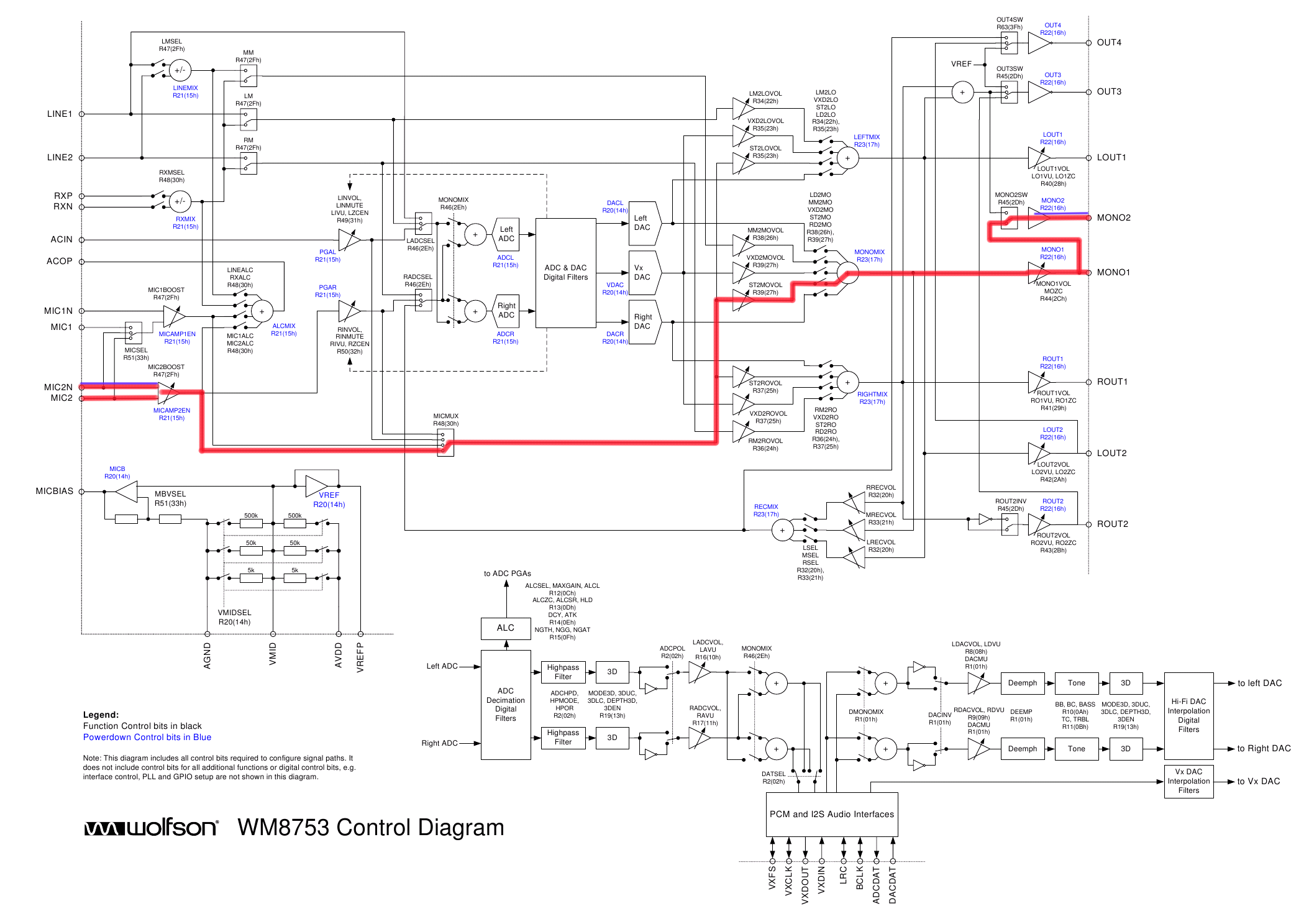
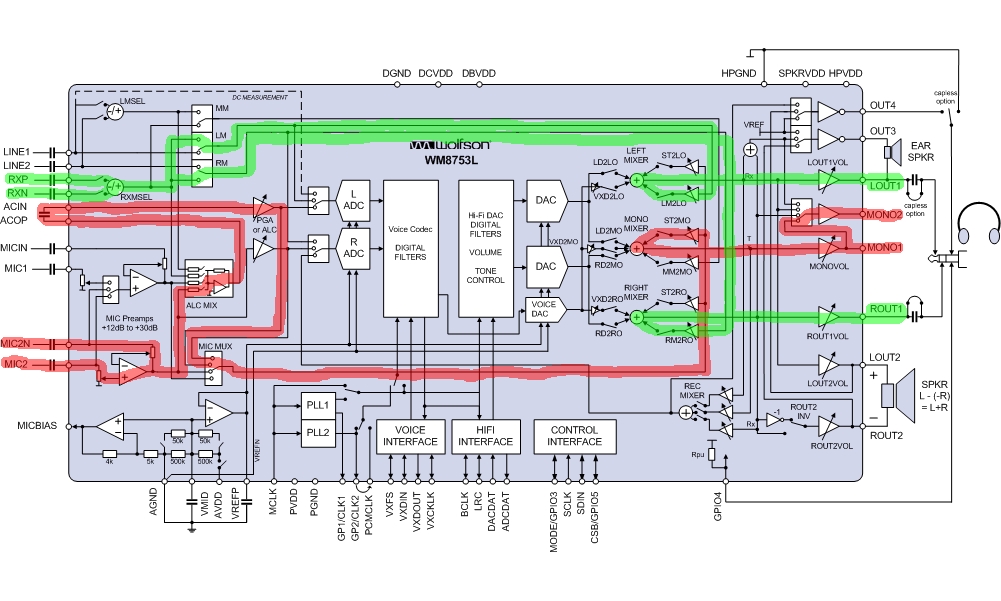
This is the default case.
- microphone path
- input: built in microphone attached to wolfson MIC2/MIC2N
- routed from wolfson MIC2/MIC2N to MONO1/MONO2
- arrives at GSM Modem input MICIP/MICIN
- speaker path
- input: GSM Modem attached to wolfson RXN/RXP
- routed from wolfson RXN/RXP to ROUT1/LOUT1
- arrives on LM4857 RIN/LIN
- routed on LM4856 to EP+/EP-
Internal Codec Route
Neo Mode is GSM Handset Amp Mode is Call Speaker
- audio path Mic -> GSM
- MIC2/MIC2N
- Mic2 Volume
- ALC Micer Mic2 *)
- Left PGA *)
- Mic Sidetone Mux [Left PGA *)"Mic 2"]
- Mono Sidetone Volume
- Mono Mixer Sidetone Playback Switch
- Mono Volume
- Mono 2 Mux [Inverted Mono 1]
- audio path GSM -> Speaker
- RXP/RXN
- Rx Mixer [RXP - RXN]
- Line Left Mux [Rx Mix]/Line Right Mux [Rx Mix]
- Left Mixer Bypass Playback Switch/Right Mixer Bypass Playback Switch
- Headphone Volume
Driver Status
This should be supported by ASoC 0.13rc3 (-moko7 kernel) on.
ASoC 0.13.3 should have same functionality but has renamed the soundcard to neo1973.
asound.state
https://people.openmoko.org/laforge/gta01/gta01b_v2/alsa/gsmhandset.state
For ASoC 0.13.3 http://opensource.wolfsonmicro.com/~gg/neo1973/gsmhandset.state
using analog (4pin 2.5mm) headset
This is also a quite common case, since we ship the headset with the phone
Headset Detection is done via GPIO on S3C2410
- microphone path
- input: headset mic vial HS_MIC attached to wolfson MIC1
- routed from wolfson MIC1 to MONO1/MONO2
- arrives at GSM Modem input MICIP/MICIN
- speaker path
- input: GSM Modem attached to wolfson RXN/RXP
- routed from wolfson RXN/RXP to ROUT1/LOUT1
- arrives on LM4857 RIN/LIN
- routed on LM4856 to LHP/RHP
Internal Codec Route
Neo Mode is GSM Headset Amp Mode is Headphones
- audio path Mic -> GSM
- MIC1
- Mic Selection Mux [Mic 1]
- ALC Mixer Mic1
- Left PGA
- Mic Sidetone Mux [Left PGA]
- Mono Sidetone Volume
- Mono Mixer Sidetone Playback Switch
- Mono Volume
- Mono 2 Mux [Inverted Mono 1]
- Audio path GSM -> Headphones
- RXP/RXN
- Rx Mixer [RXP - RXN]
- Line Left Mux [Rx Mix]/Line Right Mux [Rx Mix]
- Left Mixer Bypass Playback Switch/Right Mixer Bypass Playback Switch
- Headphone Volume
Driver Status
Supported in ASoC 0.13.3
asound.state
http://opensource.wolfsonmicro.com/~gg/neo1973/gsmheadset.state
using Bluetooth headset with GSM
NOTE none of this works with GTA02. Neo mode has disappeared, and none of the state files are GTA02 compatible.

Headset detection via software
- microphone path
- input: from bluetooth via PCM interface to wolfson
- wolfson: DAC
- wolfson routes analog signal to MONO1/MONO2
- arrives at GSM Modem input MICIP/MICIN
- speaker path
- input: GSM Modem attached to wolfson RXN/RXP
- wolfson: ADC
- wolfson: routes digital signal to PCM
- arrives on bluetooth chip via PCM
Internal Codec Route
Neo Mode is GSM Bluetooth Amp Mode is Off
- audio path BT -> GSM
- Vx DAC
- Mono Voice Volume
- Mono Mixer Voice Playback Switch
- Mono Volume
- Mono 2 Mux [Inverted Mono 1]
- audio path GSM -> BT
- RXP/RXN
- Rx Mixer [RXP - RXN]
- ALC Mixer Rx
- Left PGA
- Capture Mixer Mux [PGA]
- Capture Left Mixer [Analogue Mix Left]
- Left ADC
Driver Status
Should be support by ASoC 0.13.3
Example of how to setup PCM->BT link.
http://opensource.wolfsonmicro.com/~gg/bluetooth-pcm/bluetooth_pcm.c
asound.state
http://opensource.wolfsonmicro.com/~gg/neo1973/gsmbluetooth.state
NOTE this will not work with GTA02, as the control numbers have changed Here [1] is a modified version that is GTA02 compatible, But lacks the Neo Mode settings which disappeared on GTA02, and does not seem to work.
The state file above does not work for me. I created one gsm_headset.txt that is working for audio playback on the freerunner. I will be updating that file as I get the mic routing working.
To use this state file there are a number of steps
Turn on bluetooth
Pair the headset ( this only needs to be done once ).
Start the audio subsystem and connect the headset http://wiki.bluez.org/wiki/HOWTO/AudioDevices or use my script BtHeadset.py
If you don't hear static in your headset at this point you may need to reboot.
Start the phone call
alsactl restore 0 -f gsm_headset.txt
I wrote a script to stop the headset too BtHeadsetDetach.py
The above did not work for me; for some reason, the hifi DAC interface must be exercised once before playing. I have hacked BtHeadset.py to make FR-BTAudio. When paired with GSMBLUETOOTH.txt I get 2-way high quality audio.
I did a lot of this debugging using w8753_dump which is a quick and dirty hack, but quite useful on a large text window.
Bluetooth headset with system audio
For example, using a voip app on the phone with a bt voice headset. This would also be a good way to work on the bluetooth driver without requiring a working GSM and placing a lot of calls.
See ticket 583 for a state file that should route system audio *out* to the headset. The codec does not allow for duplex system audio connected to a headset, so audio in is still using the mic.
NOTE the state file specified does not work for GTA02, and even when modified to be GTA02 compatible still does not route system sound to a BT headset. Modified state file for GTA02 is here [2]
Multimedia
sound playback to speakers
This is an important mode since it is also required for ringtone playback
- speaker path
- input: from S3C2410 via IIS interface to wolfson
- wolfson: DAC
- wolfson: route to ROUT1/LOUT1
- LM4857: arrives on RIN/LIN
- LM4857: route to LLS+-/RLS+-
Driver Status
This is working since ASoC 0.13rc2 (-moko6 kernel)
This should also work on ASoC 0.13.3
asound.state
https://people.openmoko.org/laforge/gta01/gta01b_v2/alsa/stereoout.state
For ASoC 0.13.3 http://opensource.wolfsonmicro.com/~gg/neo1973/stereoout.state
sound playback to headphone
- speaker path
- input: from S3C2410 via IIS interface to wolfson
- wolfson: DAC
- wolfson: route to ROUT1/LOUT1
- LM4857: arrives on RIN/LIN
- routed on LM4856 to LHP/RHP
Driver Status
This is working since ASoC 0.13rc2 (-moko6 kernel)
sound playback via A2DP
One way to do this is to use a pulse plugin for bluetooth audio. Pulse would be routed either to the plugin or the default route to the codec. The plugin would watch for headset connect/disconnect events generated by a bluez audio daemon to keep the list of available output devices current.
Driver Status
There is early work on the bluez daemon to handle this. It has been combined with an alsa plugin in the bluez tree but the alsa plugin probably will not be sufficient for neo.
voice recording
This is mainly used to record notes
- microphone path
- can be from built-in mic
- or from headset
- or bluetooth headset
Driver Status
UNKNOWN
http://wiki.openmoko.org/wiki/User:Herp
http://wildsau.enemy.org/~moko/voice-recording.state
Call recording
This is a nice wishlist item. The user should be able to receive the full-duplex audio from the wolfson codec, and record it using the S3C2410 IIS.
recording
It is possible to do PCM recording of a GSM voice call. In fact, it is even possible to record the local microphone (what you speak) and the remote voice (what is spoken on the other end of the call) to separate channels (L and R of the Stereo ADC).
If you want to record a GSM voice call, please adjust your mixer settings as follows
- Capture Left Mux: Line or RXP-RXN
- this routes the analog voice from the GSM modem to the left DAC channel
- Capture Right Mux: PGA
- this routes the microphone input to the right DAC channel
FIXME: test this. There's currently a ASoC kernel driver bug preventing audio capture from working at all.
Driver Status
UNKNOWN
playback
If you want to play PCM audio into a GSM call (i.e. make your remote partner of a voice call hear your PCM audio, e.g. your mp3 or ogg files.
If you are inside a voice call (e.g. FSO/zhone), open amixer or load a state file with alsactl and change the following mixer controls:
- Mono Mixer Left
- this enables audio routing from the Stereo DAC left channel to the Mono Out (GSM Modem)
- Mono Mixer Right Playback Switch
- this enables audio routing from the Stereo DAC right channel to the Mono Out (GSM Modem)
- PCM Level
- adjust the PCM Level up to the desired playback volume
Driver Status
UNKNOWN
Recording and Playback .state
Here is a state file that allows both recording and playback from and to a gsm call.
File: File:Callrec.txt
To record just issue:
arecord -D hw:0,0 -r 8000 -f S16_LE -c 2 record.wav
and to inject sound just issue:
aplay -D hw:0,0 record.wav
If you have any problems you can contact me on IRC, TAsn.
P.S
There's a bug concerning the Right and Left mux, you have to change the
left after you change the right, loading the state file may cause this
issue to show, so just in case, I recommend appending:
amixer sset 'Capture Right Mux' 'Line or RXP-RXN'
amixer sset 'Capture Left Mux' 'Line or RXP-RXN'
to the alsactl -f Callrec.txt restore command.
Recording and maintaining a call .state
For the actual recording:
arecord -D hw:0,0 -r 8000 -f S16_LE -c 2 record.wav
please note that this is the state file I wrote for my Call Recorder, so if you need anything you might miss here, just go and check it's source.
The actual state for gsmhandset (gsmhandset.state):
File:Callrec-gsmhandset.txt
A patch (diff gsmhandset.txt callrec-gsmhandset.txt) to apply on
every state file, including gsmheadset.state and gsmspeakerout.state.
File:Callrec-gsmhandset-patch.txt
Userspace Sound Control Daemon
The userspace sound control deamon might be a separate process or
(more likely) part of some larger general hardware management daemon.
It will provide the following features:
audio playback
In order to provide the desired functionality, the daemon first needs to be capable of doing audio playback.
- supported formats
- mp3 (libmad)
- ogg/vorbis (libtremor)
- mod (mikmod)
- sid (sidplay)
- supported functionality
- start and stop playback
- interrupt previous sound to play new sound
- enqueue new sound at end of previous sound
- smooth fade-in/fade-out
audio event management
- manage a set of events (basically just a name for each event)
- manage a set of audio themes
- each theme contains list of event->audio_file_name mappings
- themes stored/managed via gconf
- manage event sources
- built-in event sources, e.g. touchscreen/button press
- external event sources (e.g. gsmd, dbus, ...)
audio scenario management
- e.g. dialer or even gsmd can request audio subsystem to switch to voicecall mode
- this mainly affects codec/amplifier analog audio routing
- integrated with bluetooth in case of BT headset or A2DP use
- How is this management performed currently?
Important issues/pitfalls
Ringtone while headset playback
If the user is listening to music on the headset, we want to mix the
ring tones only into the headset audio, as we must not interrupt and
play it on the speaker. Reason: headset can't be switched off during
playback via speaker, so to avoid extremely loud headset playback there
must NOT be any speaker playback while headset is inserted.
In expression: loading speakerout.state is deprecated while JACK_INSERT is asserted.
neo1973 audio subsystem的更多相关文章
- Linux and the Device Tree
来之\kernel\Documentation\devicetree\usage-model.txt Linux and the Device Tree ----------------------- ...
- WINDOWS下如何安装GCC(转载http://nirvana.cublog.cn;作者:北斗星君(黄庠魁))
第一章 在视窗操作系统下的GCC 第一节 GCC家族概览 GCC 是一个原本用于 Unix-like 系统下编程的编译器.不过,现在 GCC 也有了许多 Win32 下的移植版本.所以,也许对于许多 ...
- 转:SDL2源代码分析
1:初始化(SDL_Init()) SDL简介 有关SDL的简介在<最简单的视音频播放示例7:SDL2播放RGB/YUV>以及<最简单的视音频播放示例9:SDL2播放PCM>中 ...
- Android系统启动过程-uBoot+Kernel+Android
摘要:本文是参考大量网上资源在结合自己查看源代码总结出来的,让自己同时也让大家加深对Android系统启动过程有一个更加深入的了解!再次强调,本文的大多数功劳应归功于那些原创者们,同时一些必要的参考链 ...
- Android上成功实现了蓝牙的一些Profile
前段时间做蓝牙方面的开发,Google的Android只实现了Handset/Handfree和A2DP/AVRCP等Profile,而其 它常用的Profile如HID/DUN/SPP/OPP/FT ...
- SDL2源代码分析1:初始化(SDL_Init())
===================================================== SDL源代码分析系列文章列表: SDL2源代码分析1:初始化(SDL_Init()) SDL ...
- LOCAL_WHOLE_STATIC_LIBRARIES与LOCAL_STATIC_LIBRARIES的区别
在分析Jelly Bean Audio Subsystem的时候,发现HAL层的库audio_policy.xxx.so与其依赖的静态库libaudiopolicy_legacy.a都有audio_p ...
- MSM8937系统启动流程【转】
本文转载自:https://blog.csdn.net/chenzhen1080/article/details/54945992?utm_source=blogxgwz8 1 Boot Addres ...
- linux音频alsa-uda134x驱动分析之二(时钟)
Audio Clocking音频时钟============== This text describes the audio clocking terms in ASoC and digital au ...
随机推荐
- linux环境下mongodb启动操作
pkill mongod 进入mongo shell :运行 db.shutdownServer() 1.进入mongo的shell : mongo --port 1008 2.进入bin目录下 m ...
- mongoose根据_id更新,且如果数组中没有元素就添加
await model.photo.update({ _id: { $in: photoIdsParam } }, { $addToSet: { customerIds: { code: custCo ...
- Cow Acrobats [POJ3045] [贪心]
Description 农夫的N只牛(1<=n<=50,000)决定练习特技表演. 特技表演如下:站在对方的头顶上,形成一个垂直的高度. 每头牛都有重量(1 <= W_i <= ...
- 华容道 [NOIP 2013]
Describltion 小 B 最近迷上了华容道,可是他总是要花很长的时间才能完成一次.于是,他想到用编程来完成华容道:给定一种局面, 华容道是否根本就无法完成,如果能完成, 最少需要多少时间. 小 ...
- 编程菜鸟的日记-初学尝试编程-C++ Primer Plus 第4章编程练习2
#include <iostream>#include <string>int main(){ using namespace std; string name; string ...
- mybatis查询到count(*)返回值
resultType="int" <select id="num_List_" parameterType=" xxx" result ...
- sklearn LDA降维算法
sklearn LDA降维算法 LDA(Linear Discriminant Analysis)线性判断别分析,可以用于降维和分类.其基本思想是类内散度尽可能小,类间散度尽可能大,是一种经典的监督式 ...
- 在Windows 操作系统中, MySql 如何设置, 允许表名支持大小写
一般在网上会说明 修改my.ini文件的 lower_case_table_names = 0 参照: http://www.linuxidc.com/Linux/2013-04/82719.htm ...
- css 文本超出n行就隐藏并且显示省略号
首先,要知道css的三条属性. overflow:hidden; //超出的文本隐藏 text-overflow:ellipsis; //溢出用省略号显示 white-space:nowrap; // ...
- 本地文件上传GitHub
(1)mkdir 项目名称(2)cd 项目名称(3)git init 把它变成可管理的Git仓库(4)git status 查看状态(5)git add . 点用空格隔开(6)git status ...