
ios中模态弹窗用法及UINavigationController基本用法
- (void)viewDidLoad {

    [super viewDidLoad];

    //点击按钮跳转

    loginViewController *vc=[[loginViewController alloc] init];

    UINavigationController *nav = [[UINavigationController alloc] initWithRootViewController:vc];

    [self presentViewController:nav animated:YES completion:nil];

}
@implementation loginViewController

- (void)viewDidLoad {

    [super viewDidLoad];

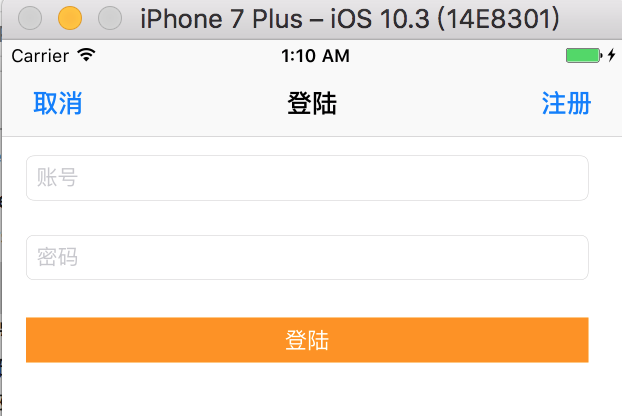
    self.view.backgroundColor = [UIColor whiteColor];

    self.navigationItem.leftBarButtonItem = [[UIBarButtonItem alloc] initWithTitle:@"取消" style:UIBarButtonItemStyleDone target:self action:@selector(cancel)];

    self.navigationItem.rightBarButtonItem = [[UIBarButtonItem alloc] initWithTitle:@"注册" style:UIBarButtonItemStyleDone target:self action:@selector(regist)];

    self.title = @"登陆";

}

//取消

- (void)cancel

{

    [self dismissModalViewControllerAnimated:YES];

}

//注册

-(void)regist

{

}

@end
@implementation MJOneViewController

- (void)viewDidLoad

{

    [super viewDidLoad];

    self.navigationItem.title = @"第1个控制器";

    // 修改下一个界面返回按钮的文字

    self.navigationItem.backBarButtonItem = [[UIBarButtonItem alloc] initWithTitle:@"返回" style:UIBarButtonItemStyleDone target:nil action:nil];

    self.navigationItem.leftBarButtonItem = [[UIBarButtonItem alloc] initWithBarButtonSystemItem:UIBarButtonSystemItemCamera target:nil action:nil];

}

- (IBAction)jumpTwo {

    // 调到第2个控制器

    MJTwoViewController *two = [[MJTwoViewController alloc] init];

    //[self.navigationController presentModalViewController:two animated:YES];

    [self.navigationController pushViewController:two animated:YES];

}

@end
@implementation MJTwoViewController

- (void)viewDidLoad

{

    [super viewDidLoad];

    self.navigationItem.titleView = [UIButton buttonWithType:UIButtonTypeContactAdd];

    self.navigationItem.rightBarButtonItem = [[UIBarButtonItem alloc] initWithBarButtonSystemItem:UIBarButtonSystemItemTrash target:nil action:nil];

    self.navigationItem.leftBarButtonItem=[[UIBarButtonItem alloc] initWithTitle:@"哈哈" style:UIBarButtonItemStyleDone target:self action:nil];

}

- (IBAction)jumpThree {

    MJThreeViewController *three = [[MJThreeViewController alloc] init];

    [self.navigationController pushViewController:three animated:YES];

}

@end
ios中模态弹窗用法及UINavigationController基本用法的更多相关文章
- iOS中block的用法 以及和函数用法的区别
ios中block的用法和函数的用法大致相同 但是block的用法的灵活性更高: 不带参数的block: void ^(MyBlock)() = ^{}; 调用的时候 MyBlock(); 带参数的 ...
- 【IOS】ios中NSUserDefault与android中的SharedPreference用法简单对比
以下内容为原创,欢迎转载,转载请注明 来自天天博客:http://www.cnblogs.com/tiantianbyconan/p/3405308.html 有Android开发经验的朋友对Shar ...
- IOS中的UINavigationController(导航控制器)
UINavigationController UINavigationControlle:导航控制器,是iOS中最常用的多视图控制器之一,它用来管理多个试图控制器 导航控制器可以认为是管理控制器的控制 ...
- 微信中使用popup等弹窗组件时点击输入框input键盘弹起导致IOS中按钮无效处理办法
因为在IOS微信中在弹窗中使用input使键盘弹起,使弹窗的位置上移,当键盘关闭时页面还在上面,弹窗位移量也在上面,只有下拉才能回到原位,这样弹窗也消失了.我的处理办法就是在键盘弹起和消失的时候,让页 ...
- react-native自定义Modal模态框|仿ios、微信弹窗RN版
前序 纵观每个优质项目,无论web端还是native原生应用开发,弹窗都是不可忽视的一环,能很大程度上直接决定用户体验.如:微信.支付宝.ios都有很成熟的一套弹窗UI展示场景. 最近一直沉迷在rea ...
- uni-app自定义Modal弹窗组件|仿ios、微信弹窗效果
介绍 uniapp自定义弹窗组件uniPop,基于uni-app开发的自定义模态弹窗|msg信息框|alert对话框|confirm确认框|toast弱提示框 支持多种动画效果.多弹窗类型ios/an ...
- IOS中调用系统的电话、短信、邮件、浏览功能
iOS开发系列--通讯录.蓝牙.内购.GameCenter.iCloud.Passbook系统服务开发汇总 2015-01-13 09:16 by KenshinCui, 26990 阅读, 35 评 ...
- iOS 中有用的开源库
youtube下载神器:https://github.com/rg3/youtube-dl vim插件:https://github.com/Valloric/YouCompleteMe vim插件配 ...
- ios 中的小技巧 - 总有你想要的 一
UITableView的Group样式下顶部空白处理 在viewWillAppear里面添加如下代码: //分组列表头部空白处理 CGRect frame = myTableView.tableHea ...
随机推荐
- if __name__ == "__main__":
工欲善其事,必先利其器 # 环境:Python3.6 + win10 # 目录结构: D:\test\ # 目录 ├─ t1.py # 文件 └─ t2.py # 文件 让模块如脚本一样运行 在Pyt ...
- 03:open-falcon报警定制
1.1 配置报警 11111111111111111111
- 2018-2019 ICPC, NEERC, Southern Subregional Contest (Online Mirror) Solution
从这里开始 题目列表 瞎扯 Problem A Find a Number Problem B Berkomnadzor Problem C Cloud Computing Problem D Gar ...
- win7 64位下redis的安装
1.下载Redis安装包. 下载地址 https://github.com/MSOpenTech/redis,找到Release,点击前往下载页面,点击Redis-x64-3.2.100.msi下载. ...
- eclipse下的mybatis插件:MyBatipse
MyBatipse:Eclipse 下的 Mybatis插件 MyBatipse是Eclipse的一个插件,提供了内容提示和Mybatis的配置文件验证功能: 特点 XMLEditor 的增强 代码自 ...
- 快速测试方法——JUnit
特点:写一个类,里面可以执行多个方法. 在一个方法上面添加@Test,选中方法名,右键run,即可执行当前方法 import org.junit.Test; //注:测试方法要求:不能有返回值,不能有 ...
- 下载并配置jdk
①下载jdk安装到本机,这里是jdk8下载地址,请根据自己机子的环境进行下载 https://www.oracle.com/technetwork/java/javase/downloads/jdk8 ...
- liunx存储管理之基础知识
存储基础知识 ====================================================================================主要知识点: 基本 ...
- 本地项目初始化git推送到服务器
1. 创建本地项目,在项目根目录执行git init命令 git init 2.在git服务器上创建一个仓库,这里使用GitHub创建一个仓库. 3.执行git remote add origin & ...
- Petrozavodsk Winter Camp, Andrew, 2014, Bipartite Bicolored Graphs
由i个点和j个点组成的二分图个数为 $3^{ij}$,减去不联通的部分得到得到由i,j个点组成的联通二分图个数 $g_{i,j} = 3_{ij} - \sum_{k=1}^i \sum_{l=0}^ ...