
react-native自定义Modal模态框|仿ios、微信弹窗RN版
前序
纵观每个优质项目,无论web端还是native原生应用开发,弹窗都是不可忽视的一环,能很大程度上直接决定用户体验。如:微信、支付宝、ios都有很成熟的一套弹窗UI展示场景。
最近一直沉迷在react-native开发研究中,学习起来发现没有想象的难,不过也采坑了不少。鉴于之前有基于h5和小程序技术开发过自定义弹窗的经验,就想着用react-native技术实现msg信息框|alert提示框|confirm确认框|toast弱提示/loading|仿ios、android弹窗,就有了这个rnPop弹窗组件RN版。
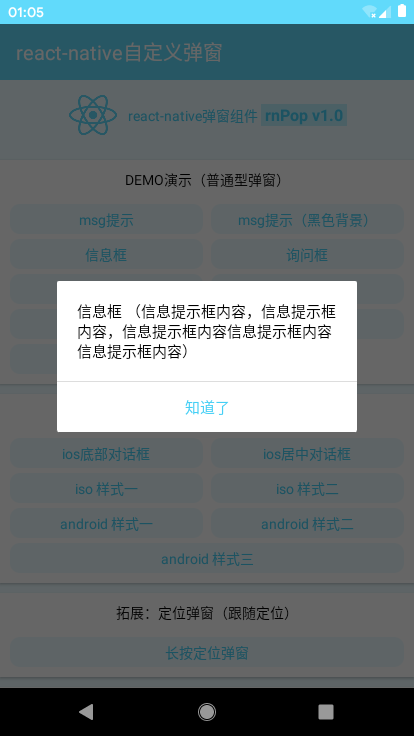
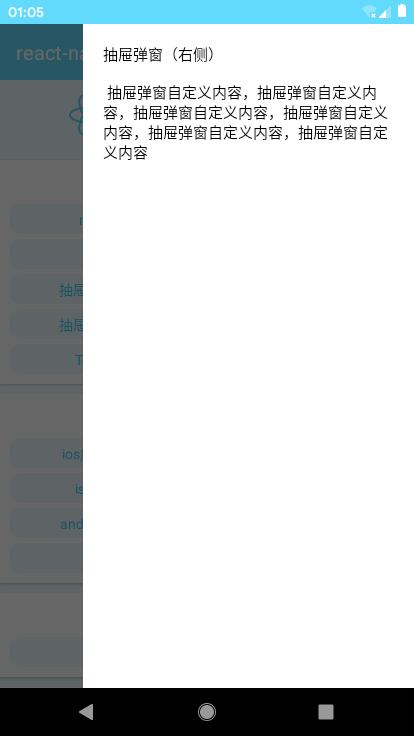
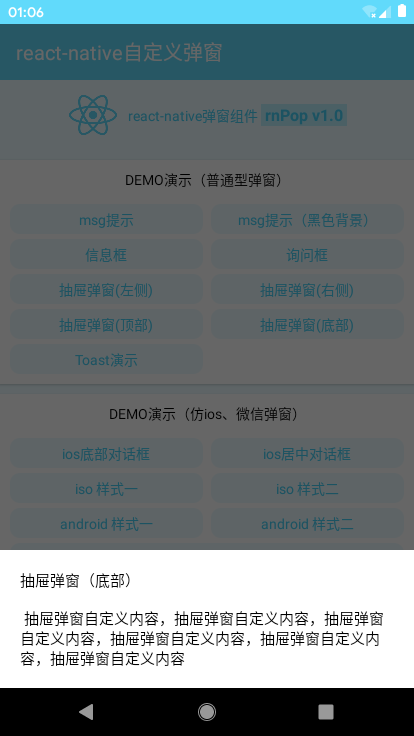
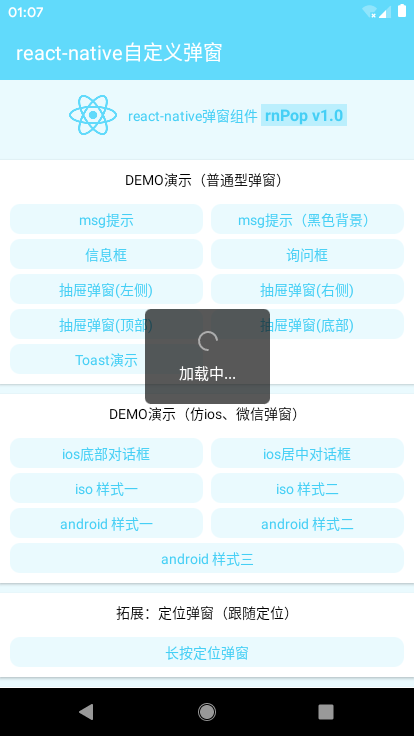
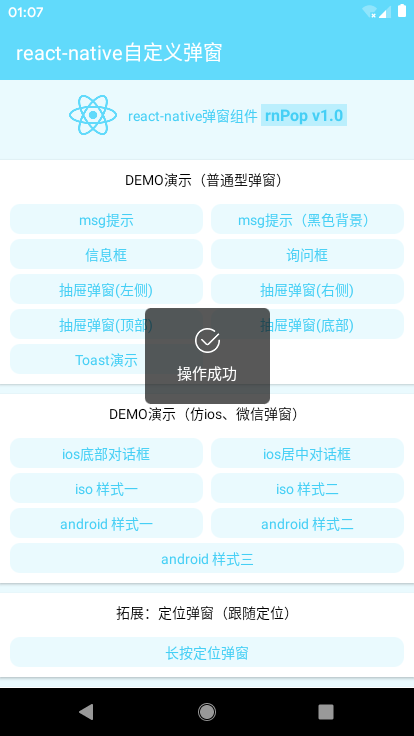
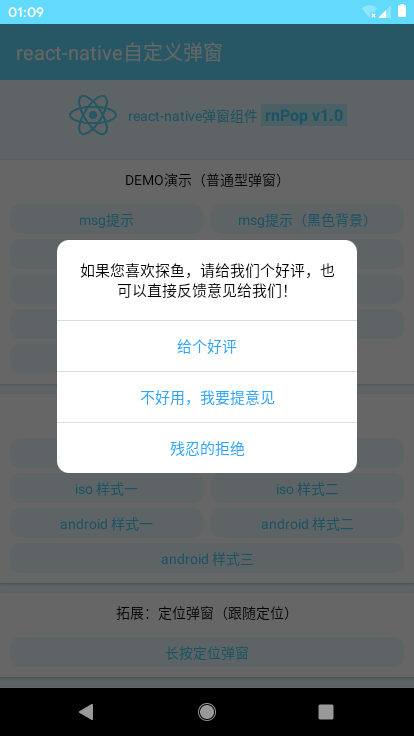
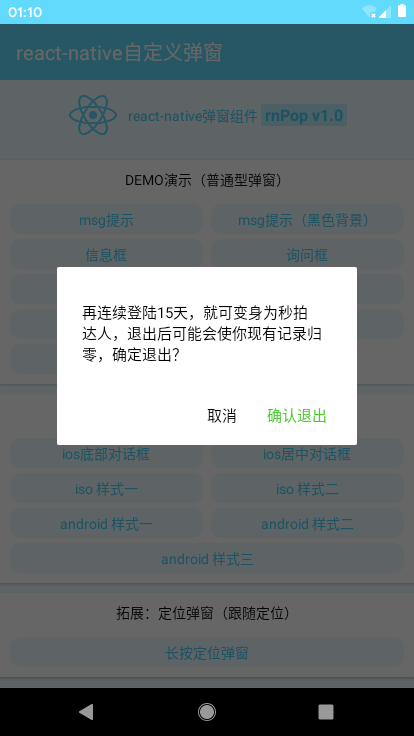
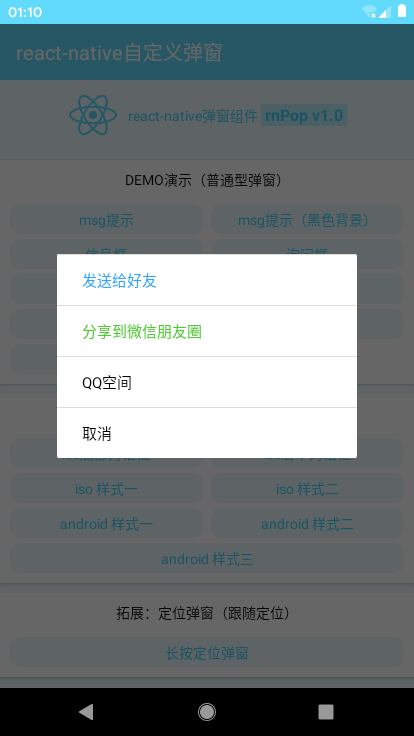
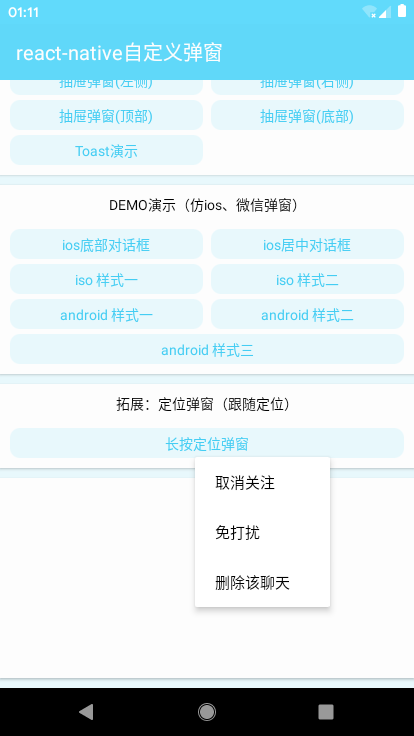
效果图
仿真模拟器上画质有些次,真机实测完美,可忽略这一点
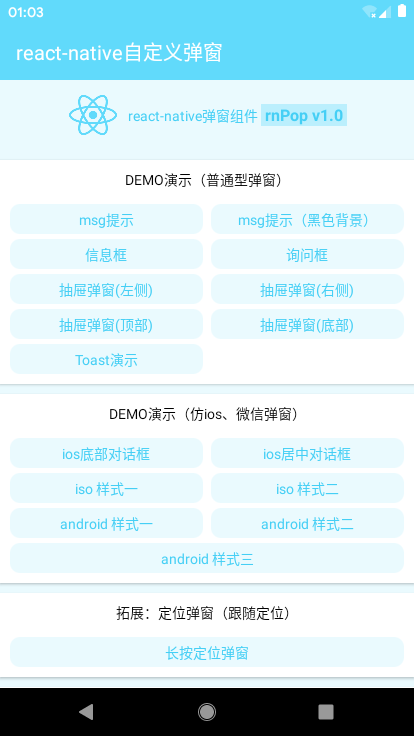
看了上图,是不是觉得调用方式还挺多的,没错,很丰富的应用场景
◆ rnPop弹窗组件目录结构

◆ 引入方式及调用
import RNPop from '../utils/rnPop/rnPop.js'

/**

 * --------- react-native弹窗演示(普通型弹窗) ---------

 */

//msg提示

handlePress01 = ()=> {

    let rnPop = this.refs.rnPop

    rnPop.show({

        anim: 'fadeIn',

        content: 'msg消息提示框(5s后窗口关闭)',

        shade: true,

        shadeClose: false,

        time: 5,

        xtime: true,

    });

}

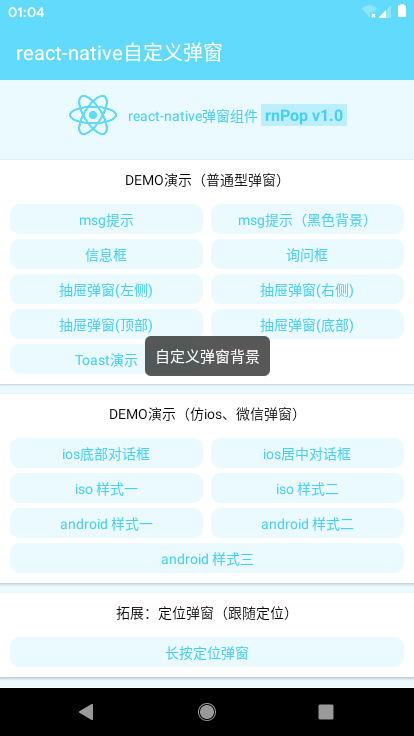
//msg提示(黑色背景)

handlePress02 = ()=> {

    let rnPop = this.refs.rnPop

    rnPop.show({

        content: '自定义弹窗背景',

        shade: false,

        style: {backgroundColor: 'rgba(17,17,17,.7)', borderRadius: 6},

        contentStyle: {color: '#fff', padding: 10},

        time: 2

    });

}
toast弱提示可自定义loading | success | info | error四种图标
//Toast演示

handlePress15 = ()=> {

    let rnPop = this.refs.rnPop

    rnPop.show({

        skin: 'toast',

        content: '操作成功',

        icon: 'success', //success | info | error | loading

        shade: false,

        time: 3

    });

}
//ios居中对话框

handlePress17 = ()=> {

    let rnPop = this.refs.rnPop

    rnPop.show({

        skin: 'footer',

        position: 'center',

        content: '如果您喜欢探鱼,请给我们个好评,也可以直接反馈意见给我们!',

        shadeClose: true,

        btns: [

            {

                text: '给个好评',

                style: {color: '#30a4fc'},

                onPress() {

                    console.log('您点击了给个好评!');

                    //回调函数

                    rnPop.show({

                        anim: 'fadeIn',

                        content: '感谢您的好评,我们会再接再厉!',

                        shade: true,

                        time: 3

                    });

                }

            },

            {

                text: '不好用,我要提意见',

                style: {color: '#30a4fc'},

                onPress() {

                    // ...

                }

            },

            {

                text: '残忍的拒绝',

                style: {color: '#30a4fc'},

                onPress() {

                    rnPop.close();

                }

            }

        ]

    });

}




/**

 * @Title         react-native弹窗插件 rnPop-v1.0 beta (UTF-8)

 * @Author        andy

 * @Create        2019/07/30 10:00:50 GMT+0800 (中国标准时间)

 * @AboutMe    Q:282310962  wx:xy190310

 */

'use strict'

import React, {Component} from 'react'

import {

    StyleSheet, Dimensions, PixelRatio, TouchableHighlight, Modal, View, Text, Image, ActivityIndicator, Alert

} from 'react-native'

const pixel = PixelRatio.get()

const {width, height} = Dimensions.get('window')

export default class RNPop extends Component{

    /**************************

     *    弹窗配置参数

     */

    static defaultProps = {

        isVisible: false,       //弹窗显示

        id: 'rnPop',            //弹窗id标识

        title: '',              //标题

        content: '',            //内容

        style: null,            //自定义弹窗样式 {object}

        contentStyle: null,     //内容样式

        skin: '',               //自定义弹窗风格

        icon: '',               //自定义弹窗图标

        shade: true,            //遮罩层

        shadeClose: true,       //点击遮罩层关闭

        opacity: '',            //遮罩层透明度

        xclose: false,          //自定义关闭按钮

        time: 0,                //弹窗自动关闭秒数

        xtime: false,           //显示关闭秒数

        anim: 'scaleIn',        //弹窗动画

        follow: null,            //跟随定位(适用于在长按位置定位弹窗)

        position: '',           //弹窗位置

        zIndex: 9999,           //层叠等级

        btns: null,             //弹窗按钮(不设置则不显示按钮)[{...options}, {...options}]

    }

    constructor(props){

        super(props)

        this.state = { ...this.props }

        this.timer = null

    }

    render(){

        let opt = this.state

        // 自定义toast图标

        let slotImg = {

            success: require('./skin/success.png'),

            error: require('./skin/error.png'),

            info: require('./skin/info.png'),

        }

        ...

    }

    /**************************

     *    显示弹窗事件(处理传参)

     */

    show = (args) => {

        this.setState({

            ...this.props, ...args, isVisible: true

        })

    }

    /**************************

     *    关闭弹窗事件

     */

    close = () => {

        console.log('关闭')

        this.setState({

            ...this.props

        })

        this.timer && clearTimeout(this.timer)

        delete this.timer

    }

}
◆ react-native自定义弹窗模板
<Modal transparent={true} visible={opt.isVisible} onRequestClose={this.close}>

    <View style={styles.rnpop__ui_panel}>

        {/* 遮罩 */}

        { opt.shade && <View style={styles.rnpop__ui_mask} onTouchEnd={opt.shadeClose ? this.close : null} /> }

        {/* 窗体 */}

        <View style={styles.rnpop__ui_main}>

            <View style={styles.rnpop__ui_child}>

                {/* 标题 */}

                { opt.title ? <View style={[styles.rnpop__ui_tit]}><Text style={[styles.rnpop__ui_titxt]}>{opt.title}</Text></View> : null }

                {/* 内容 */}

                { opt.content ? <View style={[styles.rnpop__ui_cnt]}>

                    ...

                    <Text style={[styles.rnpop__ui_cntxt, opt.contentStyle]}>{opt.content}</Text>

                </View> : null }

                {/* 按钮 */}

                <View style={[styles.rnpop__ui_btnwrap]}>

                ...

                </View>

            </View>

        </View>

    </View>

</Modal>
◆ 附上之前的h5和小程序弹窗
h5手机端弹窗:https://www.cnblogs.com/xiaoyan2017/p/8695783.html
h5网页版弹窗:https://www.cnblogs.com/xiaoyan2017/p/10227798.html
小程序弹窗:https://www.cnblogs.com/xiaoyan2017/p/9976897.html
react-native自定义Modal模态框|仿ios、微信弹窗RN版的更多相关文章
- vue 自定义modal 模态框组件
参数名 类型 说明 visible Boolean 是否显示,默认false title String 标题 update:visible Boolean 更新visible, 使用:visible. ...
- [RN] React Native 自定义 底部 弹出 选择框 实现
React Native 自定义 底部选择框 实现 效果如图所示: 实现方法: 一.组件封装 CustomAlertDialog.js import React, {Component} from ' ...
- React Native 简介:用 JavaScript 搭建 iOS 应用(2)
[编者按]本篇文章的作者是 Joyce Echessa--渥合数位服务创办人,毕业于台湾大学,近年来专注于协助客户进行 App 软体以及网站开发.本篇文章中,作者介绍通过 React Native 框 ...
- React Native 轻松集成分享功能(iOS 篇)
产品一直催我在 RN 项目中添加分享功能,一直没找到合适的库,今天让我看到了一个插件分享给大家. 在集成插件之前,需要在各大开放平台上成功注册应用,并通过审核(支持 3 个可选的主流平台).支持的平台 ...
- [RN] React Native 自定义导航栏随滚动渐变
React Native 自定义导航栏随滚动渐变 实现效果预览: 代码实现: 1.定义导航栏 NavPage.js import React, {Component} from 'react'; im ...
- React Native 简介:用 JavaScript 搭建 iOS 应用 (1)
[编者按]本篇文章的作者是 Joyce Echessa--渥合数位服务创办人,毕业于台湾大学,近年来专注于协助客户进行 App 软体以及网站开发.本篇文章中,作者介绍通过 React Native 框 ...
- React Native 轻松集成统计功能(iOS 篇)
最近产品让我加上数据统计功能,刚好极光官方支持数据统计 支持了 React Native 版本 第一步 安装: 在你的项目路径下执行命令: npm install janalytics-react-n ...
- React Native之code-push的热更新(ios android)
React Native之code-push的热更新(ios android) React Native支持大家用React Native技术开发APP,并打包生成一个APP.在动态更新方面React ...
- React Native之倒计时组件的实现(ios android)
React Native之倒计时组件的实现(ios android) 一,需求分析 1,app需实现类似于淘宝的活动倒计时,并在倒计时结束时,活动也结束. 2,实现订单倒计时,并在倒计时结束时,订单关 ...
随机推荐
- 基于JS的ajax的实现,JSON和JSONP,基于JQuery的ajax的实现
基于JS的ajax的实现,JSON和JSONP,基于JQuery的ajax的实现1.基于JS的ajax的实现 step1: var xmlhttp = XMLHttprequest() #实例化一个对 ...
- OD 快捷方式及窗口说明
OD 快捷方式 其他窗口 L : log 保存日志信息 E :程序的所有模块的信息(加载基址,大小,OEP,路径) M :程序的内存映射视图 T :线程信息 W :窗口信息 H :句柄表 C :CPU ...
- IT兄弟连 HTML5教程 “无意义”的HTML元素div和span
HTML只是赋予内容的手段,大部分HTML标签都有其意义(例如,标签a创建链接,标签h1创建标题等),然而div和span标签似乎没有任何内容上的意义,听起来就像一个泡沫做成的锤子一样无用.但实际上, ...
- ElementUI table 点击编辑按钮进行编辑实现示例
<!DOCTYPE html> <html > <head> <meta charset="UTF-8"> <meta nam ...
- C# -- 多线程向同一文件写入
1. 多线程向同一文件写入Log. public delegate void AsyncLog(string str1, string str2); private void Test() { Con ...
- 当Python遇上AI(一)
Infi-chu: http://www.cnblogs.com/Infi-chu/ 一.什么是学习 如果要给学习下一个定义,那么根据某百科给出的定义是——学习,是指通过阅读.听讲.思考和实践等途径获 ...
- 前端最佳实践——DOM操作
1.浏览器渲染原理 在讲DOM操作的最佳性能实践之前,先介绍下浏览器的基本渲染原理. 分为以下四个步骤: 解析HTML(HTML Parser) 构建DOM树(DOM Tree) 渲染树构建(Rend ...
- C lang:Array_Multidimensional arrays
#include<stdio.h> #include<windows.h> #define YEARS 5 #define MONTHS 12 void color(short ...
- diango运行流程
diango运行流程 Django处理一个请求的流程: 在浏览器的地址栏中输入地址,回车,发了一个GET请求 wsgi模块接收了请求,将请求的相关信息封装成request对象 根据地址找到对应函数 执 ...
- Mac中 pip3 install mysqlclient 报错
主要错误提示如下: ld: library not found for -lssl clang: error: linker command failed with exit code 1 (use ...